Microsoft Security | Microsoft Entra | Microsoft Entra ID
A cloud-based identity and access management service for securing user authentication and resource access

This browser is no longer supported.
Upgrade to Microsoft Edge to take advantage of the latest features, security updates, and technical support.
' cx='32' cy='32' r='32' /%3E%3Ctext x='50%25' y='55%25' dominant-baseline='middle' text-anchor='middle' fill='%23FFF' %3ED%3C/text%3E%3C/svg%3E)
Hi MSFT,
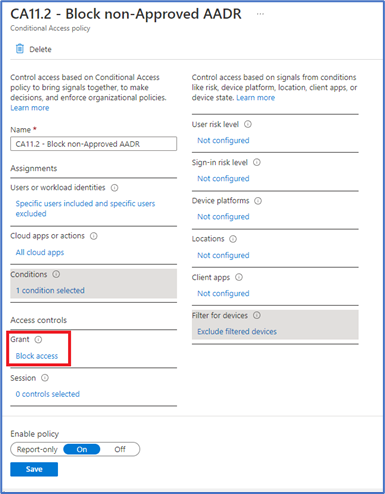
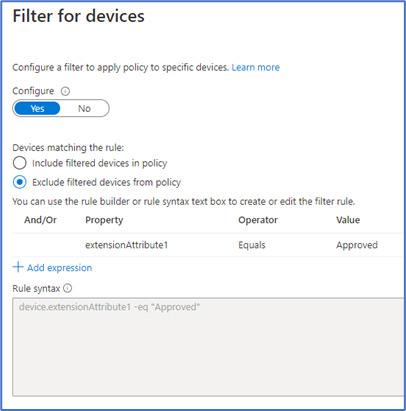
I am trying to get CA policies to BLOCK AAD-Registered devices that DO NOT have extensionAttribute1 set.
However, devices with extensionAttribute1 are also getting blocked as they report "No Match".
Any ideas what is going on here? I have tried 2 different tenants.


Hello @Anonymous
Thank you for reaching out. I am looking into this and would get back to you with an answer.
Thanks @Harpreet Singh Matharoo
I think i might have some more info.
I noticed it DOES work only if i access it with the user account that i registered the device with.
From what i can tell CA must be using the "Owner" field to marry up the deviceID/ObjectID in order to query device attributes.
If you can please confirm/clarify this. Thanks.
' cx='32' cy='32' r='32' /%3E%3Ctext x='50%25' y='55%25' dominant-baseline='middle' text-anchor='middle' fill='%23FFF' %3EA4%3C/text%3E%3C/svg%3E)
Hi,
Did you find a workaround for this?
I have been trying to achieve the same thing with CA and extension attributes, for the exact same reason of requiring authorisation of AAD registered devices.
I made the same mistake of misreading the documentation hence have ended up here. I saw there is a System Label attribute but I read that that is a protected attribute that only Microsoft can write to.
Other than submitting a feature request I'm a bit stumped at the moment!
Hello @Anonymous
Thank you for being patient while I was working on this request. I would like to confirm following points with you:
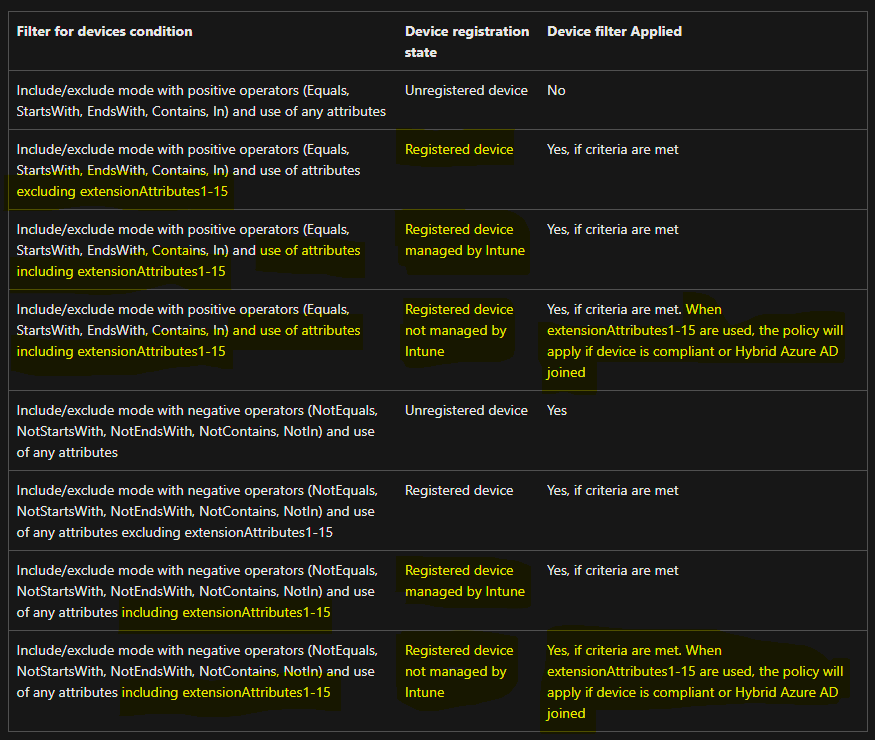
These details can be validated on following document and below is the table from the document which describes the same: Policy behavior with filter for devices
I hope this helps and answers the query you have.
----------
Please "Accept the answer" if the information helped you. This will help us and others in the community as well.
Thanks for the clarification @Harpreet Singh Matharoo
I had seen that table prior, but maybe I had misread it (confusing as it is to read). It's a shame they can't be used for std AADR devices.
A couple of points from me then:
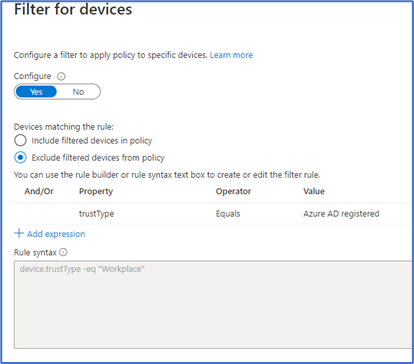
Cheers.
Hello @Anonymous
Please find my responses in below points:
**In regards with Device compliant state values: **
**Should you be able to use the "TrustType" attribute: **
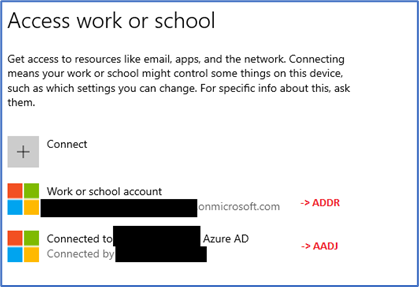
**In regards device is AADR to TenantB and the same device is AADJ to TenantA. Is that supported? **
I hope these answers all your questions.
----------
Please "Accept the answer" if the information helped you. This will help us and others in the community as well.