Azure Data Factory
An Azure service for ingesting, preparing, and transforming data at scale.
This browser is no longer supported.
Upgrade to Microsoft Edge to take advantage of the latest features, security updates, and technical support.
' cx='32' cy='32' r='32' /%3E%3Ctext x='50%25' y='55%25' dominant-baseline='middle' text-anchor='middle' fill='%23FFF' %3END%3C/text%3E%3C/svg%3E)
If the order of columns of my MS SQL Server User-Defined TableType is not exactly like the order of the JSON fields in the result of my rest API call the values are in the worng order. The mapping in the data copy activity looks fine, but the data is inserted in the wrong columns. At least if the datatypes allow it. Otherwise i recieve a database error. It almost looks if the mapping is based on the ordinal position.
Has someone experienced similar behaviour? And if so, wer you able to solve this problem?
I would expect if the mapping is based on name, it should also behave accordingly.
Here is the definition and a screenshot of the mapping:
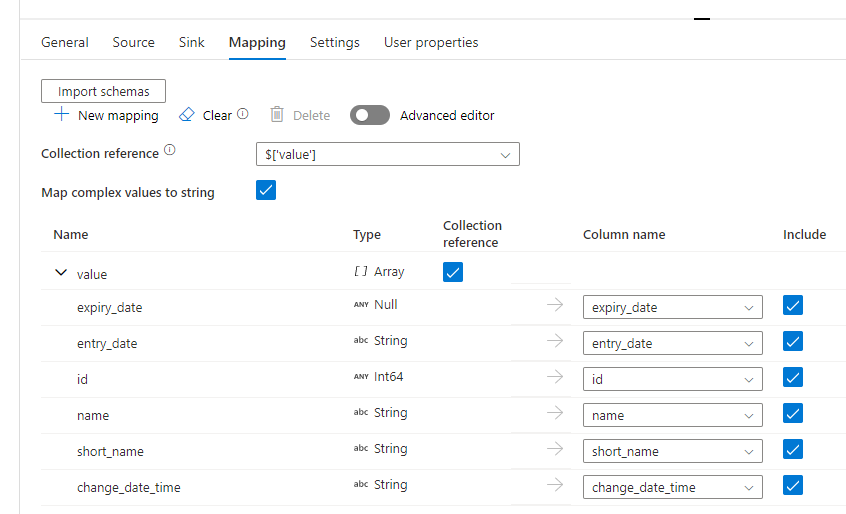
{
"name": "Copy CertificationOrganisation",
"type": "Copy",
"dependsOn": [
{
"activity": "GetBearerToken",
"dependencyConditions": [
"Succeeded"
]
}
],
"policy": {
"timeout": "7.00:00:00",
"retry": 0,
"retryIntervalInSeconds": 30,
"secureOutput": false,
"secureInput": false
},
"userProperties": [],
"typeProperties": {
"source": {
"type": "RestSource",
"httpRequestTimeout": "00:01:40",
"requestInterval": "00.00:00:00.010",
"requestMethod": "GET",
"additionalHeaders": {
"Authorization": {
"value": "@markus.bohland@hotmail.de ('Bearer ', activity('GetBearerToken').output.access_token)",
"type": "Expression"
}
}
},
"sink": {
"type": "SqlServerSink",
"sqlWriterStoredProcedureName": "[dbo].[axspADFSinkFLC_CertificationOrganisation]",
"sqlWriterTableType": "FLC_CertificationOrganisation",
"storedProcedureTableTypeParameterName": "CertificationOrganisationType"
},
"enableStaging": false,
"translator": {
"type": "TabularTranslator",
"mappings": [
{
"source": {
"path": "['expiry_date']"
},
"sink": {
"name": "expiry_date",
"type": "DateTime"
}
},
{
"source": {
"path": "['entry_date']"
},
"sink": {
"name": "entry_date",
"type": "DateTime"
}
},
{
"source": {
"path": "['id']"
},
"sink": {
"name": "id",
"type": "Int32"
}
},
{
"source": {
"path": "['name']"
},
"sink": {
"name": "name",
"type": "String"
}
},
{
"source": {
"path": "['short_name']"
},
"sink": {
"name": "short_name",
"type": "String"
}
},
{
"source": {
"path": "['change_date_time']"
},
"sink": {
"name": "change_date_time",
"type": "DateTime"
}
}
],
"collectionReference": "$['value']",
"mapComplexValuesToString": true
}
},
"inputs": [
{
"referenceName": "FloricodeCertificationOrganisationREST",
"type": "DatasetReference"
}
],
"outputs": [
{
"referenceName": "SQLCertificationOrganisation",
"type": "DatasetReference"
}
]
}

Hi @Niels Dekkers ,
Just checking in to see if you got a chance to see previous response. If the suggested response helped you, please click Accept Answer and kindly upvote the same.
Hi @Niels Dekkers ,
Welcome to Microsoft Q&A platform and thanks for posting your question.
As I understand your query, you are trying to copy the data from REST API to MySQL database using copy activity. But the order of the columns in MySQL database is different than the source . Please let me know if my understanding is incorrect.
I tried to reproduce the same scenario with some dummy data and it worked for me . Note: As target database, I used Az SQL server (Not MySQL).
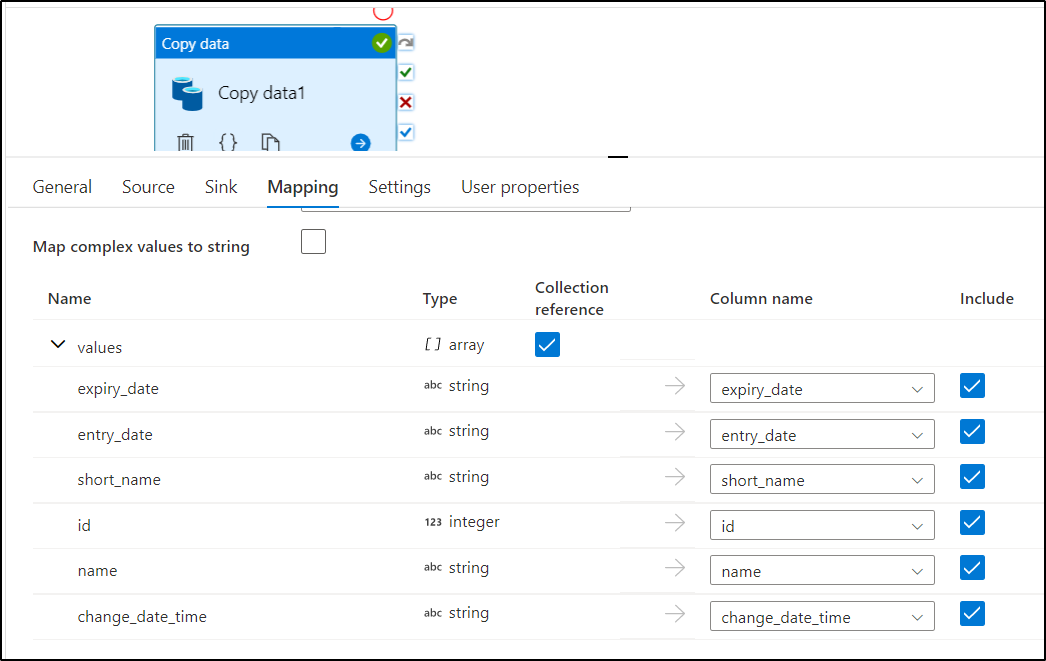

My suggestion would be to drop the target table and use Auto create option in the sink settings of copy activity to generate the target table schema . Once that is done after the first run, you can consider importing the schema in mapping tab and map each columns correctly.
Kindly let us know if it helps.
Hope this will help. Please let us know if any further queries.
------------------------------
 or upvote
  button whenever the information provided helps you.
Hi @AnnuKumari-MSFT ,
Thanks for your answer!
In my case it is also an MS SQL table. It also worked for me. But when the order in the JSON changed i've noticed the mapping looks to work on the ordinal positions and not on the field names.
Currently if i define my type with the first statement it fills the table correct. Second swaps the columns name and short_name. So it look like positions are used instead of a mapping on names. Dropping table is not possible for me because of existing data.
CREATE TYPE [dbo].[FLC_CertificationOrganisation] AS TABLE(
[expiry_date] [date] NULL,
[entry_date] [date] NULL,
[id] [int] NULL,
[name] nvarchar NULL,
[short_name] nvarchar NULL,
[change_date_time] datetime2 NULL
)
CREATE TYPE [dbo].[FLC_CertificationOrganisation] AS TABLE(
[expiry_date] [date] NULL,
[entry_date] [date] NULL,
[id] [int] NULL,
[short_name] nvarchar NULL,
[name] nvarchar NULL,
[change_date_time] datetime2 NULL
)
Regards, Niels
Hi @Niels Dekkers ,
I tried to reorder the source Json and tried to copy the data too. It seems to work fine for me as long as we have the correct mapping . Please make sure you are importing the schema for the source dataset and try to rerun the pipeline. Attaching the video below for your reference.
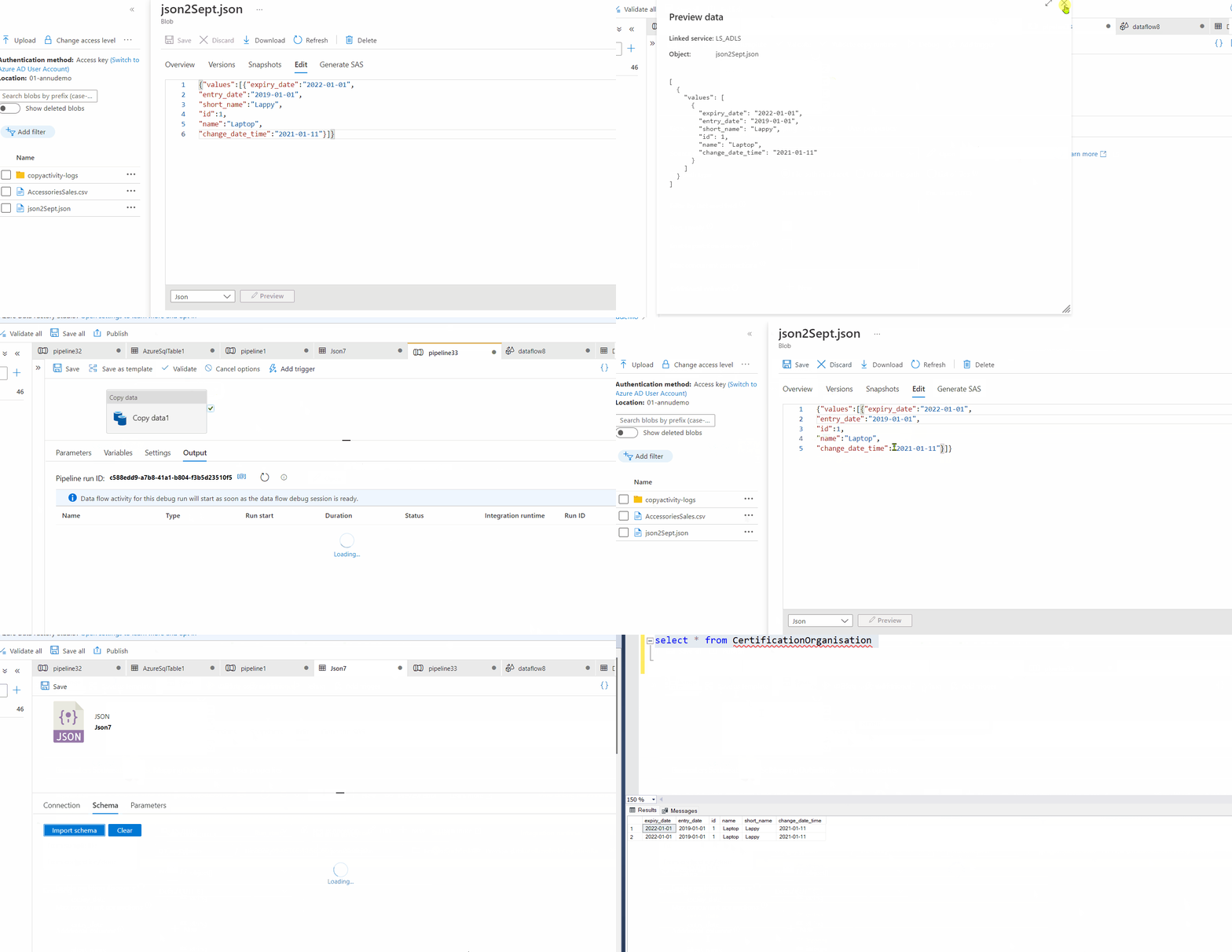
------------
Hope it helps. Please do consider clicking Accept Answer and Up-Vote for the same as accepted answers help community as well. If you have any further query do let us know.
Good morning @AnnuKumari-MSFT ,
So mapping on the fieldnames is not entirely what it seems to be. Or at least what I expected it to be. I will change our architecture for no and include an extra (auto create) staging table.
Thanks for your efforts and testing in assisting us. Much appreciated!
Regards, Niels
Great to hear it helped. Thanks for the updates @Niels Dekkers