Note
Access to this page requires authorization. You can try signing in or changing directories.
Access to this page requires authorization. You can try changing directories.
Important
AKS preview features are available on a self-service, opt-in basis. Previews are provided "as is" and "as available," and they're excluded from the service-level agreements and limited warranty. AKS previews are partially covered by customer support on a best-effort basis. As such, these features aren't meant for production use. For more information, see the following support articles:
Azure Kubernetes Application Network (Application Network) provides a fully managed, ambient service mesh for Azure Kubernetes Service (AKS). Use it to secure service-to-service communication within a cluster or across multiple member clusters without adding sidecars to your applications. Azure manages the control plane and data plane.
In an ambient mesh, workloads participate without sidecar proxies. A member cluster is an AKS cluster that you join to an Application Network. Enrolling a workload adds it to the mesh.
For the complete product documentation, see Azure Kubernetes Application Network.
When to use Application Network
Consider Application Network when you need:
- Mutual TLS (mTLS) and managed workload certificates for enrolled services.
- Optional layer 7 proxies for routing and service-level authorization.
- Service discovery and communication across participating AKS member clusters.
Compare with the Istio add-on
Choose based on how you want to run the service mesh:
| Attribute | Application Network (preview) | Istio add-on |
|---|---|---|
| Mesh model | Ambient, without application sidecars | Sidecar-based |
| Control plane location | Hosted outside your AKS clusters | Runs in your AKS cluster |
| Ambient mode | Supported | Not supported |
| Multi-cluster support | Supported across member clusters | Not supported |
| Choose it when | You want to avoid application sidecars or connect services across member clusters. | You want an in-cluster Istio deployment. |
A cluster with the Istio add-on enabled can't join Application Network. To switch, plan for disruption: uninstalling the add-on removes its control plane, custom resources, and gateway configurations. Then follow the Application Network onboarding guide and enroll your workloads. This isn't an in-place migration.
How it fits with AKS
Create an Application Network resource, join your AKS clusters as members, and enroll the workloads that should participate. Joining a cluster doesn't automatically enroll every workload or export every service.
The following diagram shows the management plane, the managed control plane outside your AKS clusters, and the data plane within member clusters:
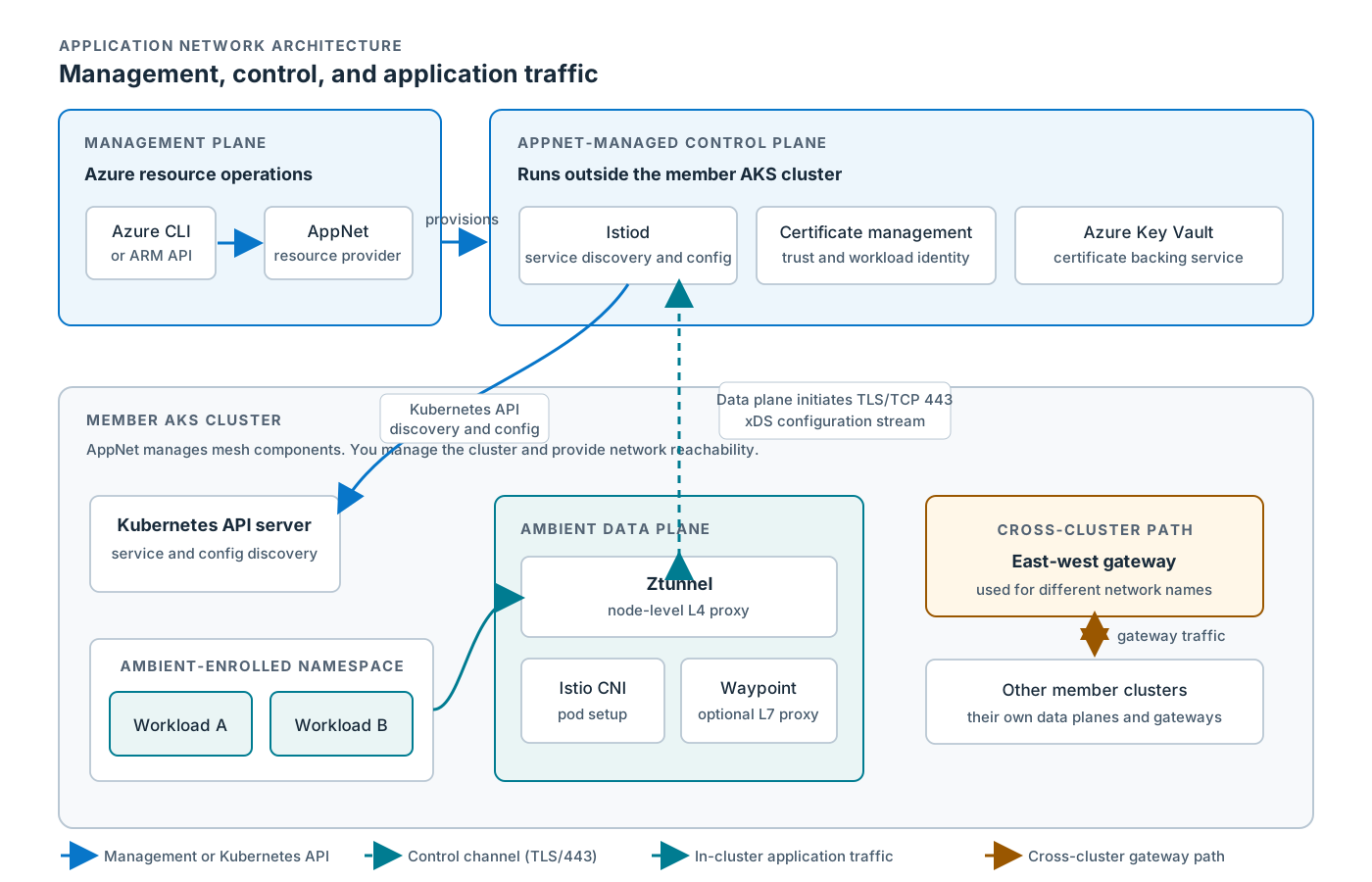
The diagram shows three layers:
- Management plane: Creates Application Network resources and manages cluster membership.
- Control plane: Distributes mesh configuration and manages workload certificates.
- Data plane: Node-level proxies secure enrolled workload traffic; optional waypoints apply layer 7 policies.
Application Network doesn't upgrade your AKS cluster, Kubernetes version, or node images, and it doesn't create the underlying connectivity between clusters. For details, see the Application Network architecture.