Note
Access to this page requires authorization. You can try signing in or changing directories.
Access to this page requires authorization. You can try changing directories.
This article describes how to use Azure API Center to register plugins as part of your API inventory. Plugins are reusable capabilities that AI agents can discover and consume to extend their functionality.
In API Center, you register a plugin by bundling together one or more skills and/or MCP servers that are already registered in your API inventory. By registering a plugin, you create a higher-level abstraction that simplifies the discovery and use of related skills and MCP servers by developers and AI systems.
Prerequisites
- An API center. If you don't have an API center yet, see the quickstart to Create an API center.
- One or more registered skills or registered MCP servers that you want to bundle into a plugin.
Register a plugin in your API center
To register a plugin in your API center:
Sign in to the Azure portal and go to your API center.
In the sidebar menu, under Inventory, select Assets.
Select + Register an asset > Plugin.
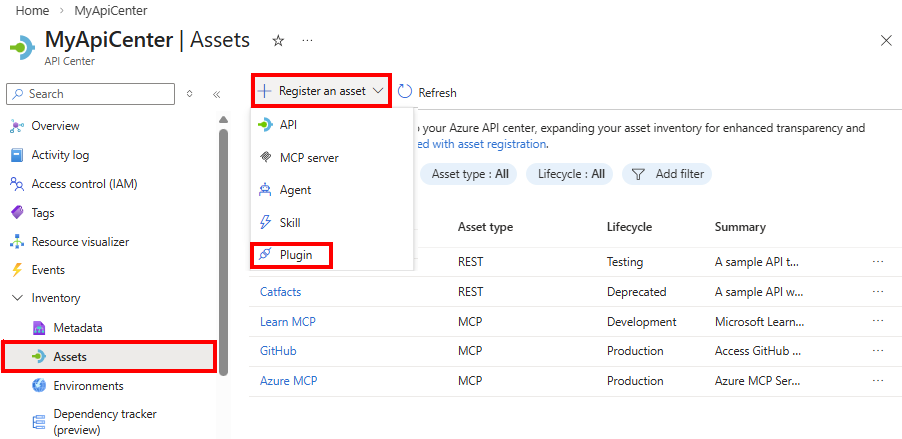
In the Register a plugin form, enter the information described in the following table:
Field Description Title Enter a descriptive name for the plugin. Identifier API Center automatically generates an identifier based on the title. You can edit this identifier if needed. Summary Optionally enter a brief summary of what the plugin does. Description Optionally enter a more detailed description of the plugin's capabilities, use cases, and behavior. Version Optionally enter the version of the plugin. Skills To add skills to the plugin, select + Add skill and choose from the list of registered skills in your API inventory. MCP servers To add MCP servers to the plugin, select + Add MCP server and choose from the list of registered MCP servers in your API inventory. Select Create to register the plugin in your API center.
After registration, the plugin appears in your inventory on the Inventory > Assets page.
Discover plugins in the API Center portal
Set up your API Center portal so that developers and other stakeholders in your organization can discover plugins in your API inventory. From the API Center portal, users can:
- Browse and filter plugins in the inventory.
- View detailed information about each plugin.
Assess AI assets
API Center can assess the quality of AI assets such as skills and agents registered in your API center. API Center comes with default assessment criteria out of the box, assessing assets across predefined dimensions. Enterprise platform administrators can further extend these defaults by defining custom assessment criteria tailored to their organization's specific standards, compliance requirements, and governance policies.
To enable automated assessments of AI assets in your inventory:
In the Azure portal, go to your API center.
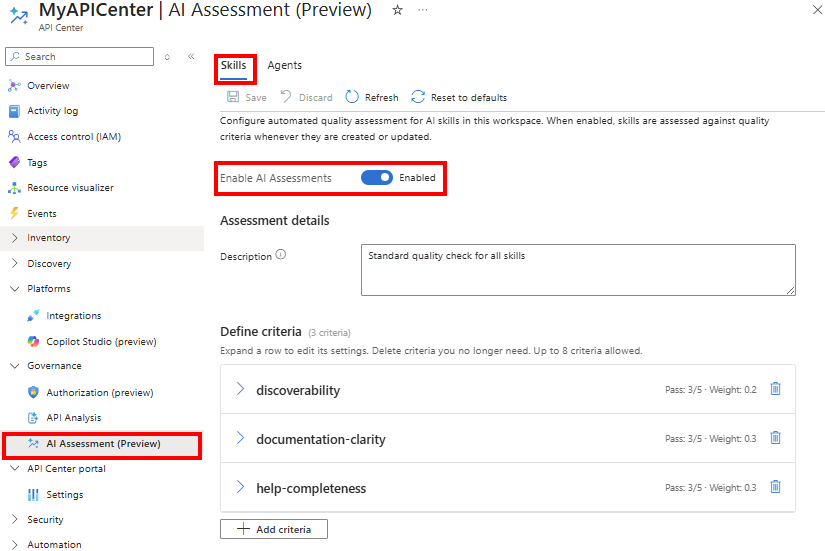
In the sidebar menu. go to Governance > AI Assessment.
Select the Skills tab to configure assessments for skills, or select the Agents tab to configure assessments for agents.
In Assessment status, select Enabled.
Enter a Description for the assessment.
In Assessment criteria, do one of the following:
- Accept the Default criteria provided by API Center. Optionally remove default criteria that aren't relevant for your organization.
The following screenshot shows default criteria for skills:
- Add one or more custom criteria.
- Select + Add criteria.
- Enter a Name and optional Assessment instruction for the criterion.
- Enter Minimum score and Maximum score values for the score (for example, 1 and 5).
- Enter a Pass threshold value (for example, 3) that indicates the minimum acceptable score for the criterion.
- Enter a Weight value that indicates the contribution of the criterion to the total assessment (for example, a weight of 0.3 multiples the score by 0.3, contributing 30% to the total assessment).
- Repeat the preceding steps to add more criteria as needed.
Select Save.
You can then view assessment results in the API Center portal. For example, view assessment results for each skill on the skill details page.
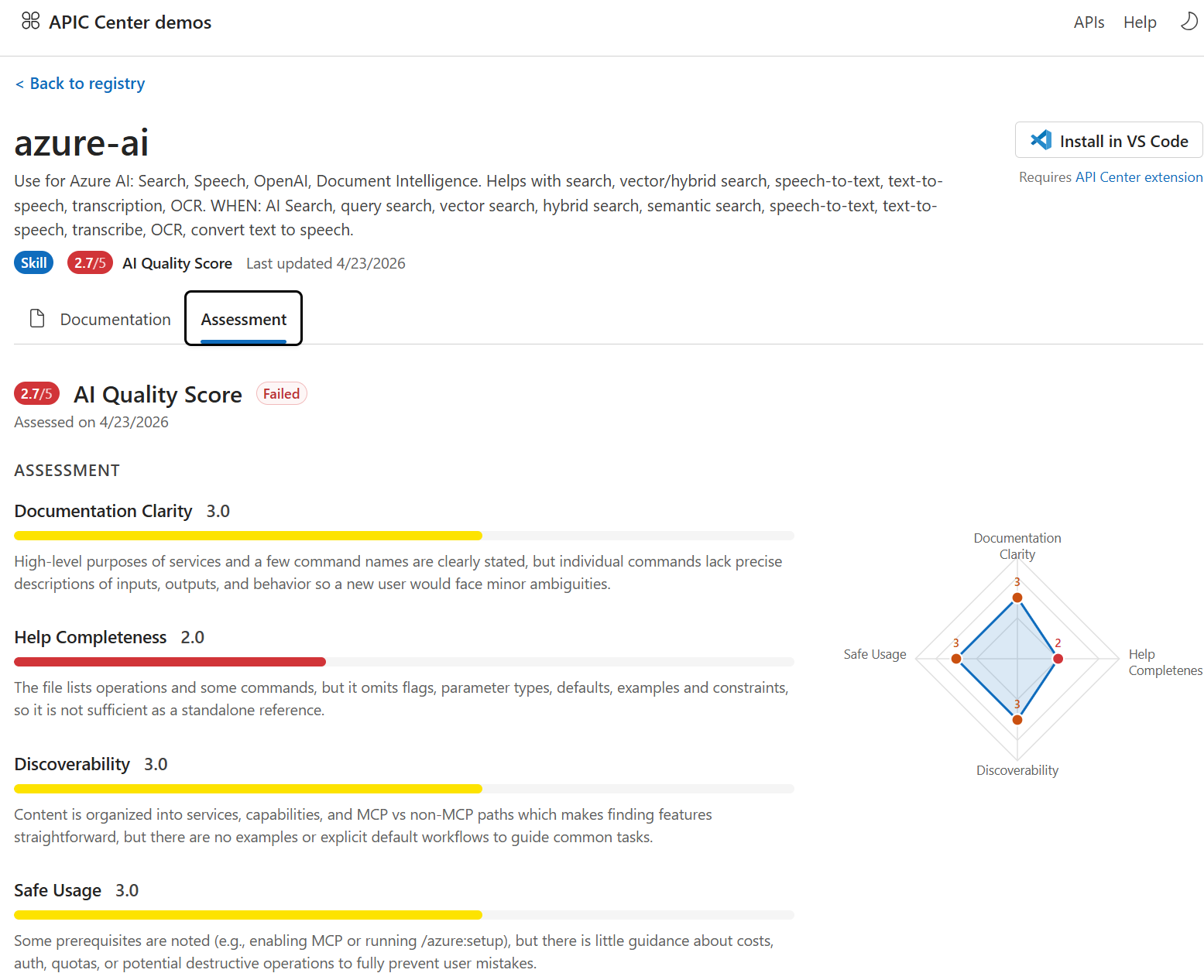
Configure plugin discovery and use through the marketplace endpoint
The API Center plugin marketplace endpoint exposes the catalog of registered plugins by using the API Center data API, allowing discovery and use by developers. Developers can add the marketplace to their GitHub Copilot CLI or Claude Code development environment to browse and install plugins from your API center.