Note
Access to this page requires authorization. You can try signing in or changing directories.
Access to this page requires authorization. You can try changing directories.
Microsoft Agent 365 integrates with Azure API Management to provide centralized governance and runtime enforcement for Model Context Protocol (MCP) servers and tools. Together, they enable organizations to:
- Discover Azure API Management gateways and their MCP servers.
- Maintain a centralized MCP server inventory.
- Block or unblock MCP servers.
- Control access to individual tools on supported tiers.
- Collect runtime signals for auditing, observability, and incident response.
Existing agents can continue using their configured gateway endpoints.
Prerequisites
To connect Microsoft Agent 365 to Azure API Management, you need:
- A Microsoft Agent 365 tenant.
- A supported Azure API Management instance.
- Use the AI Gateway tier in Azure API Management (preview) because it offers the most advanced integration with Microsoft Agent 365.
- One or more MCP servers registered with Azure API Management.
- To enable tool-level controls from Microsoft Agent 365, ensure each MCP server has a static list of allowed tools configured.
- Authorization to provide tenant-level consent (tenant-level administrator).
How it works
The integration separates governance from runtime enforcement:
- Microsoft Agent 365 defines governance intent, inventory, and access decisions.
- Azure API Management enforces policies inline for traffic to MCP servers and tools.
- Use runtime signals for monitoring, auditing, and investigation.
Microsoft Agent 365 discovers Azure resources of type Microsoft.ApiManagement in the tenant. It then retrieves the MCP servers and tools exposed by those resources, along with available metadata such as endpoints, access scopes, and associated service identities.
Grant access to Microsoft Agent 365
Microsoft Agent 365 needs consent to discover and perform governance operations on Azure subscriptions. A customer administrator grants the A365 MCP Gateway Policy Operator Azure role at the tenant level with a one-time consent.
The grant gives the Microsoft Agent 365 service identity the ability to:
- Read Azure API Management resources.
- Read API-scoped policies.
- Write API-scoped policies.
- Discover supported resources in existing and future tenant subscriptions.
To grant consent:
Go to the Microsoft Administration Center portal.
Ensure you have tenant administration permission level.
Under Agents, select Settings.
Select Gateways.
Enable Azure API Management service and AI Gateway. By consenting, you let this organization read the tools published through the AI gateway.
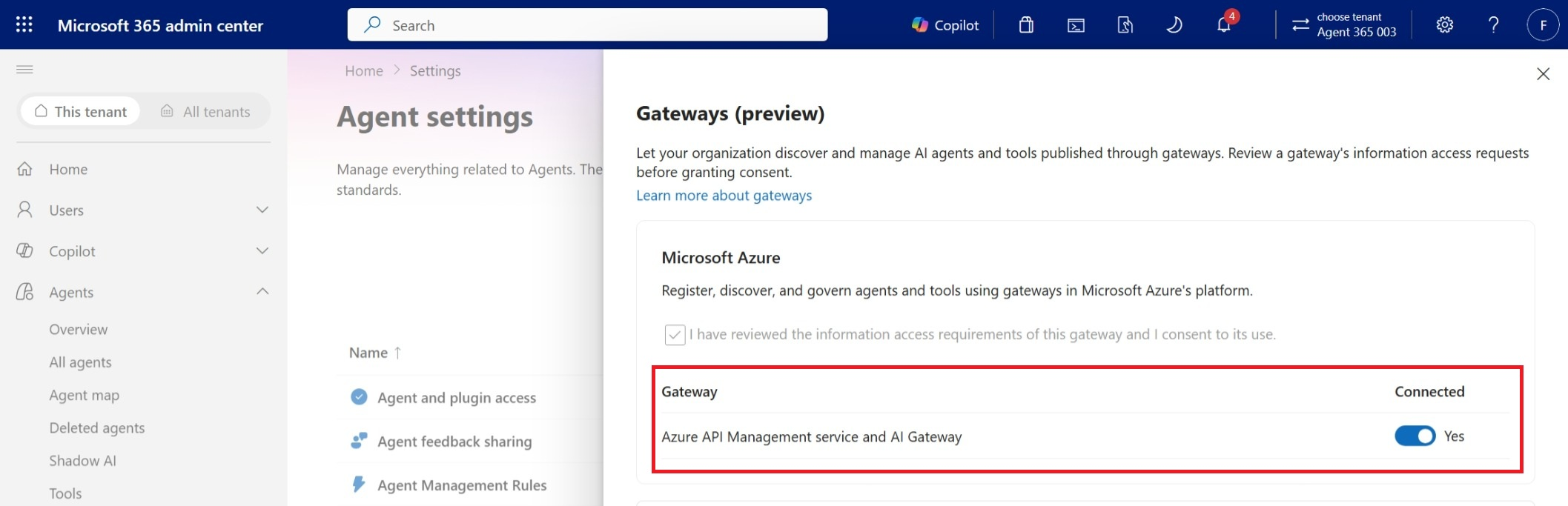
After you grant consent, governance operations run under Microsoft Agent 365's app-only identity. Individual Microsoft Agent 365 administrators don't need separate Azure permissions to perform actions over AI assets in the gateway.
Discover gateways and MCP servers
After you enable the integration, Microsoft Agent 365:
- Discovers supported Azure API Management resources in the tenant.
- Adds discovered servers to the centralized inventory and displays available metadata.
- Makes supported governance actions available to administrators.
To see MCP servers in gateways:
Go to Microsoft Administration Center portal.
Under Agents, select Tools.
Search for an MCP server or identify the ones where publisher is AI Gateway.
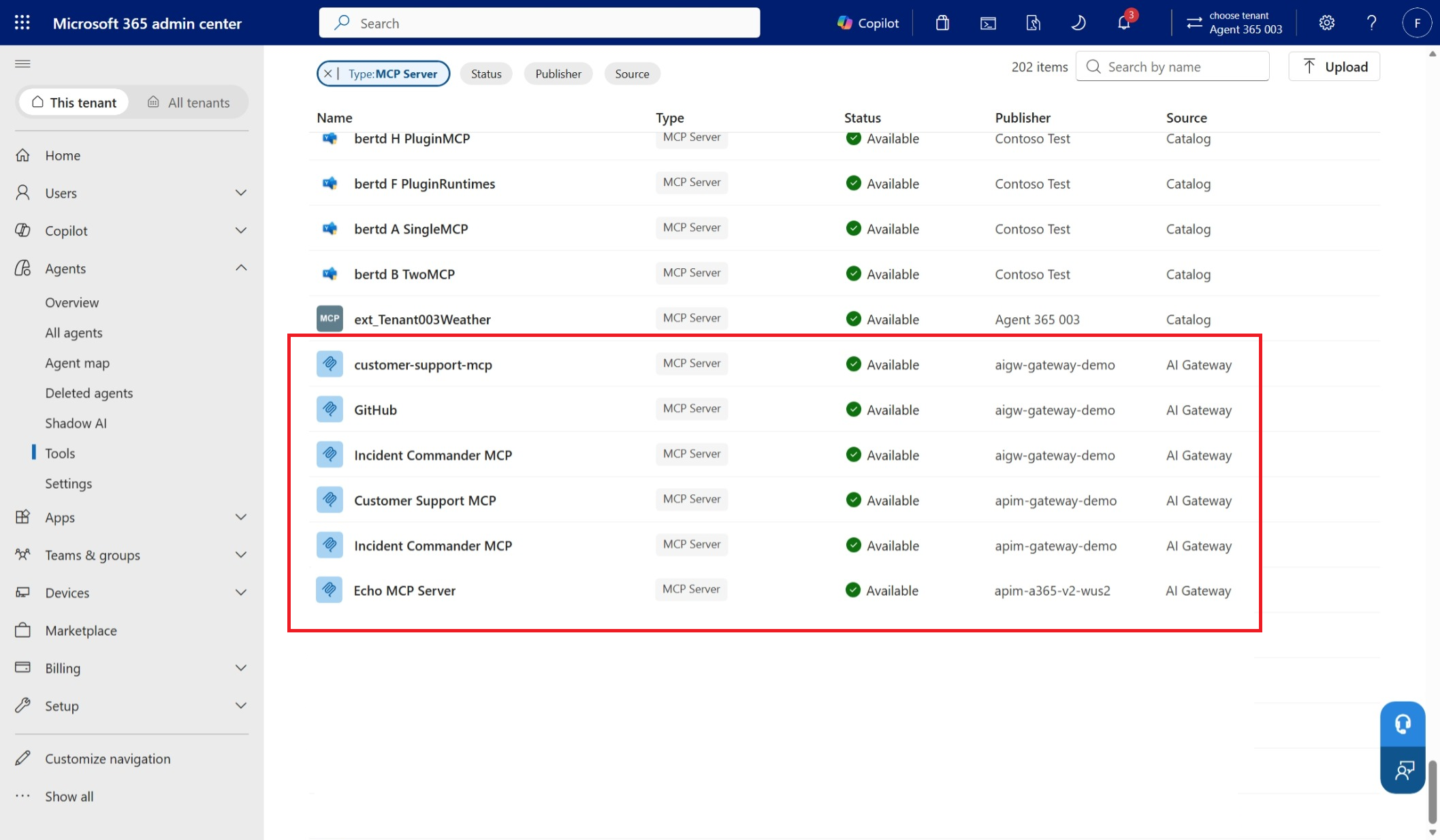
Select the MCP server to see its metadata.
Control access to individual tools
Administrators can control which tools are available through an MCP server. Tool-level control lets an organization block selected tools without disabling the entire server.
Note
This capability is only available for MCP Servers registered in the AI Gateway tier in Azure API Management service.
To block a tool:
Go to Microsoft Administration Center portal.
Under Agents select Tools.
Select the MCP Server you want to control.
Select the tab Tools.
Disable the tools you want to block. The following example blocks
delete_file.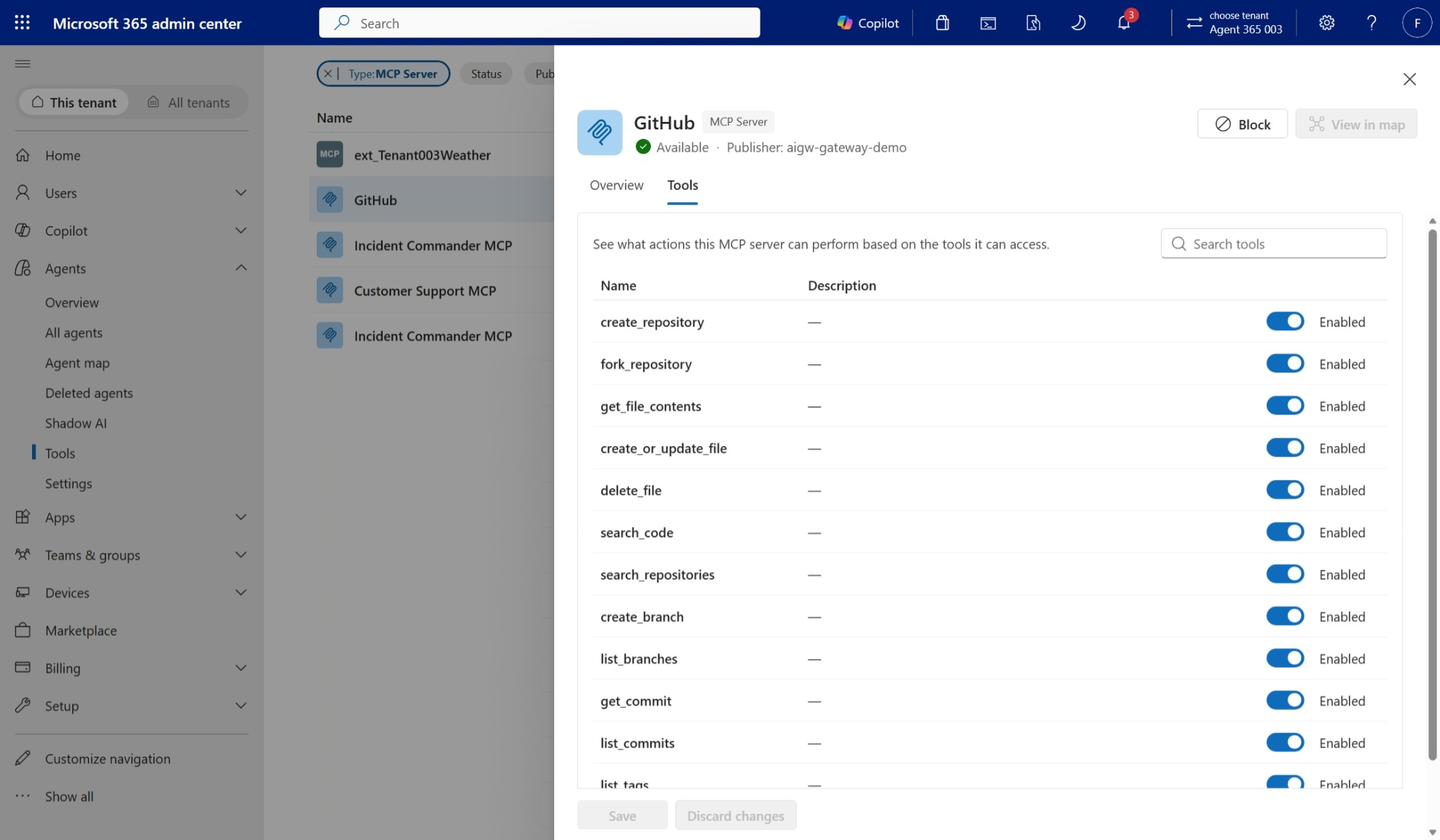
Once a tool is blocked, Microsoft Agent 365 uses Azure API Management control-plane operations to insert a managed policy to prevent execution. A blocked tool call results in a 200 response but agents receive a JSON-RPC response with
isError=Trueand a description of the error. This behavior makes agents aware of the policy and restrain them from retrying.HTTP/1.1 200 OK Content-Type: application/json x-correlation-id: 9f2c1b6e-... { "jsonrpc": "2.0", "id": 42, "result": { "content": [ { "type": "text", "text": "Tool 'delete_file' is blocked by the gateway. Do not retry this tool." } ], "isError": true, "_meta": { "com.microsoft.azure.ai.gateway/denial": { "code": "ToolNotAvailable", "correlationId": "9f2c1b6e-..." } } } }When the MCP Server doesn't have an static list of allowed tools configured in the AI Gateway tier in Azure API Management, Microsoft Agent 365 can't retrieve the list of tools available. In those cases, use the AI Gateway portal to block the tool.
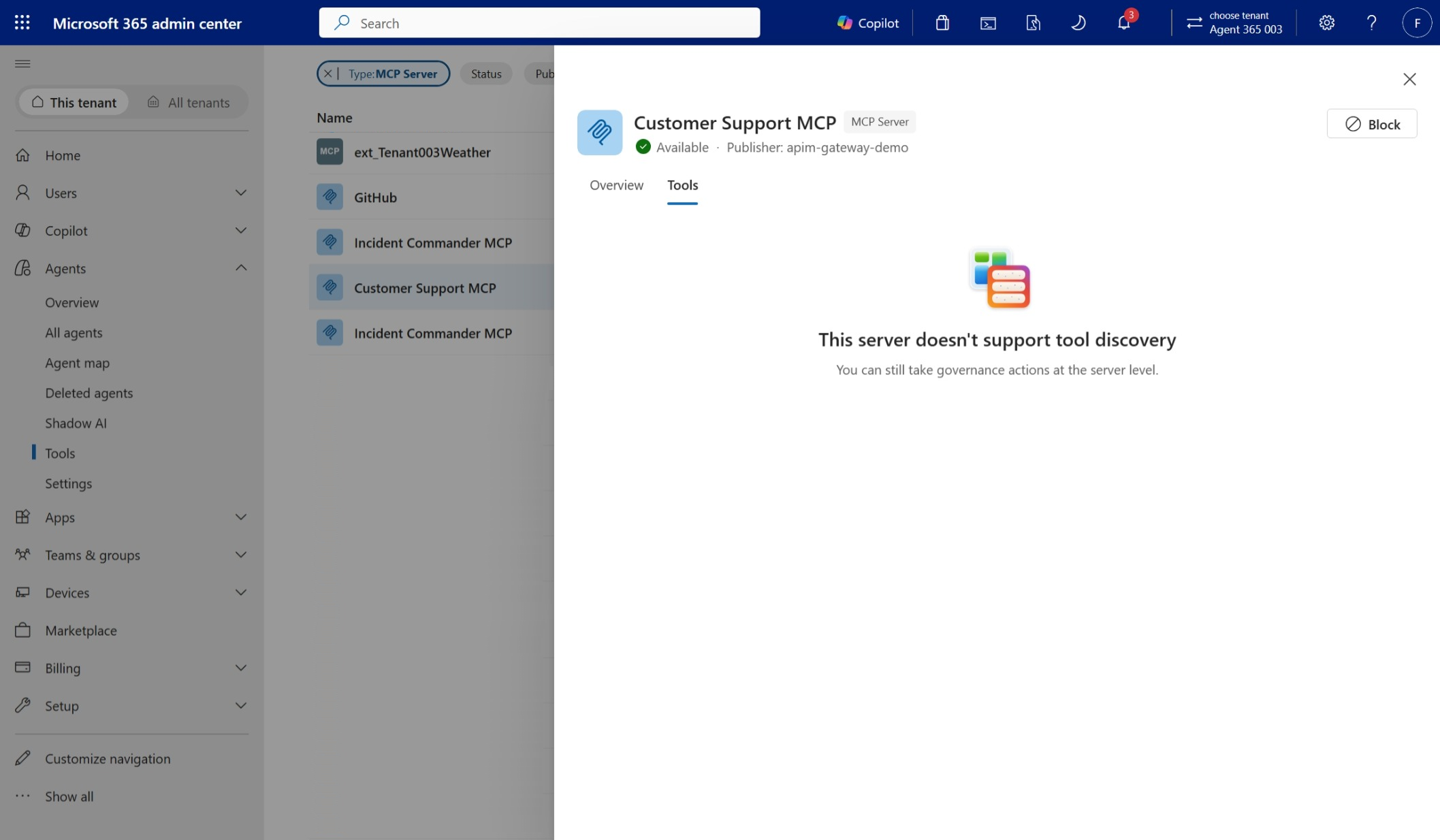
Block or unblock an MCP server
When an administrator blocks an MCP server, Microsoft Agent 365 uses Azure API Management control-plane operations to insert a managed return-response policy at the beginning of the API's inbound policy.
To block a server:
Go to Microsoft Administration Center portal.
Under Agents, select Tools.
Select the MCP server you want to control.
Select the Block option.
The gateway returns HTTP status
403for requests to that MCP server. Unblocking the server removes the managed policy.HTTP/1.1 403 Forbidden Content-Type: application/json x-correlation-id: 9f2c1b6e-... { "error": { "code": "AccessBlockedByGateway", "message": "Access to server 'github-mcp' is blocked.", "target": "github-mcp", "correlationId": "9f2c1b6e-..." } }
Tool threat protection for Microsoft Agent 365
Microsoft Agent 365 integrates with Microsoft Defender and Microsoft Purview to provide advanced threat protection for tools.
Azure administrators can configure policies in the gateway to ensure MCP servers registered in the AI Gateway tier in Azure API Management are protected before tools are invoked and before their results get into the agent.
To learn more about how this capability works, see Protect tool calls with Defender and Purview in AI Gateway tier (preview).
Supported capabilities
Availability varies by tier offering.
| Capability | Microsoft Agent 365 with API Management v2 tiers | Microsoft Agent 365 with AI Gateway tier |
|---|---|---|
| Centralized MCP server inventory | ✔️ | ✔️ |
| Block or unblock MCP servers | ✔️ | ✔️ |
| Tool-level blocking | ✔️ | |
| Tool activity observability | ✔️ | |
| Tool threat protection | ✔️ |
Preview limitations
Consider the following limitations when using the integration with Microsoft Agent 365:
- Azure API Management v1 tiers aren't supported.
- Azure API Management v2 tiers don't support tool-level access control or Tool threat protection policies.
- Tool-level governance for MCP servers with dynamic allowed tools isn't available.
Note
Microsoft Agent 365 doesn't automatically route agents through a customer-hosted gateway. An agent developer must configure the agent to use the gateway's MCP endpoint. To prevent direct access, restrict MCP server connectivity so the gateway is the only permitted caller or use private networking or network-level access controls when supported.