Note
Access to this page requires authorization. You can try signing in or changing directories.
Access to this page requires authorization. You can try changing directories.
APPLIES TO: AI Gateway tier (preview)
Important
AI Gateway tier is currently in public preview. During public preview, AI Gateway tier is available in the following regions:
- United States - East US 2
- Europe - Sweden Central
Use AI Gateway tier (preview) to put common controls in front of AI models, Microsoft Foundry resources, Azure OpenAI deployments, and MCP servers. Platform teams can apply governance, security, and monitoring settings in one place while application teams keep using the assets they need. To connect the gateway to private backends and clients, see Configure private networking.
AI Gateway tier is in preview. Use it for pilots and production-like validation. Features, regions, limits, telemetry fields, and setup flows can change before general availability. The preview supports quick provisioning, but reliability is best effort. Monitor errors and keep a rollback path for critical applications.
Prerequisites
- An AI Gateway tier instance.
- Permission to manage the AI Gateway tier instance.
- Access to the provider model or backend you plan to govern.
- For managed identity backend authentication, permission to assign the required role on the backend resource.
- Access to a telemetry destination, such as Application Insights or another OpenTelemetry (OTLP)-compatible endpoint.
Governance policies
Governance policies protect AI traffic before requests reach backend models or tools. In preview, you configure policies as visual cards in the portal; in the control plane API, each policy is a structured JSON object. You select a policy type, choose which models or tools it applies to, fill in validated fields, and select Create. You don't need to write XML, paste policy fragments, or use policy expressions. Because policies are structured objects, you can audit or enforce them across a fleet of gateways with Azure Policy.
You apply each policy to the models or tools you select. To set a baseline control such as content safety, select all applicable assets. Apply narrower policies when one model or tool has different risk, capacity, or network requirements.
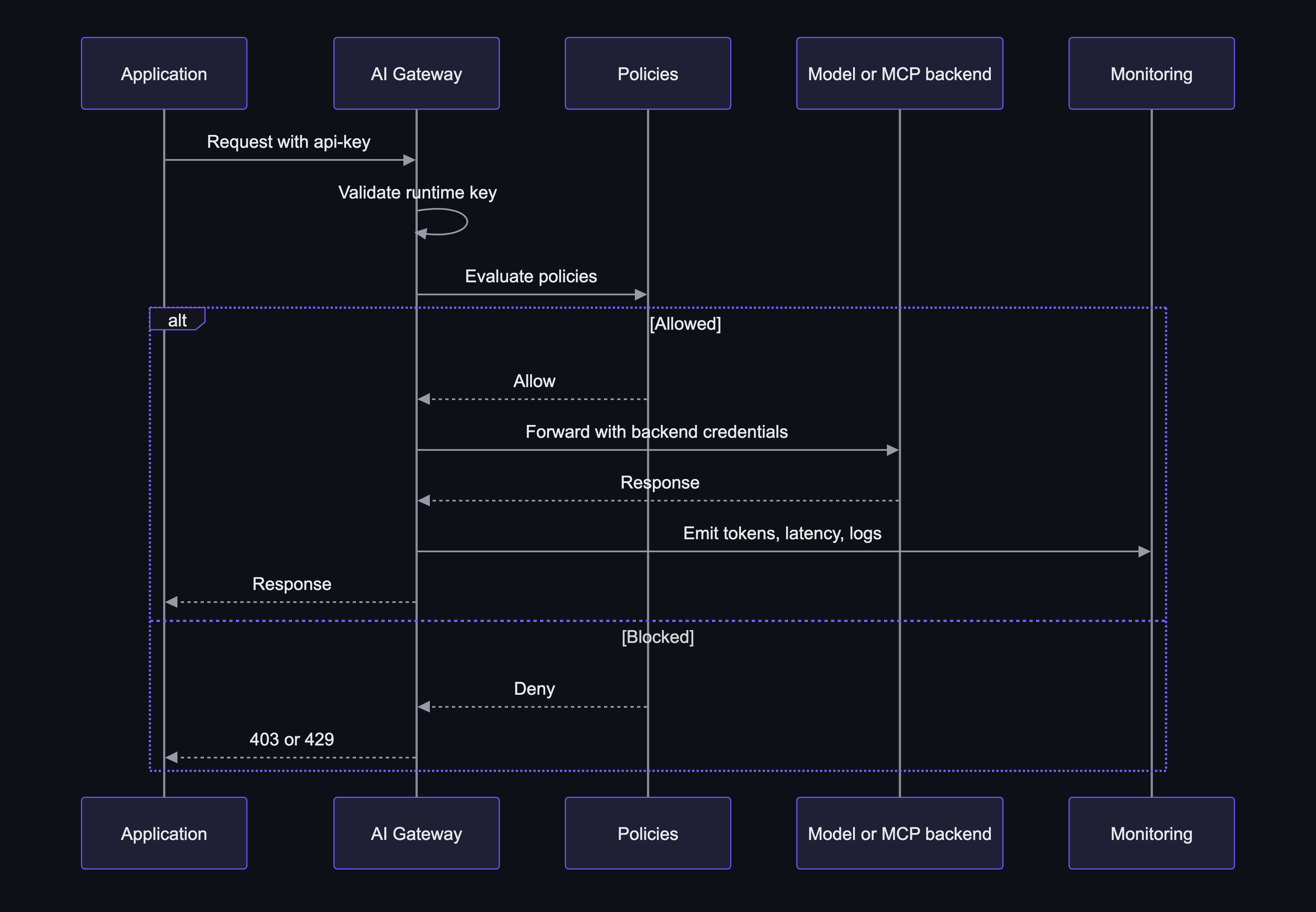
When more than one policy applies to a request, the gateway evaluates all of them before it forwards the request to the backend. If any policy blocks the request, the gateway stops and returns an error without calling the backend:
| Policy | Status on block |
|---|---|
| Content safety | 400 |
| IP filter | 403 |
| Token rate limit | 429 (with Retry-After) |
| Request rate limit | 429 (with Retry-After) |
When both a token limit and a request limit apply, a request must satisfy both.
Not every policy applies to every asset type. Content safety, IP filter, and request rate limits apply to both models and MCP tools. Token rate limits apply to models.
The following diagram shows where governance policies apply in the request flow.
To configure a policy:
- In the AI Gateway tier portal, select Policies, and then select Add policy.
- On Type, choose the policy (guardrail) you want to add - content safety, IP filter, token rate limit, or request rate limit.
- On Assets, select the models or tools the policy applies to. For a gateway-wide baseline, select all applicable assets.
- On Configure, fill in the validated fields, and then select Create.
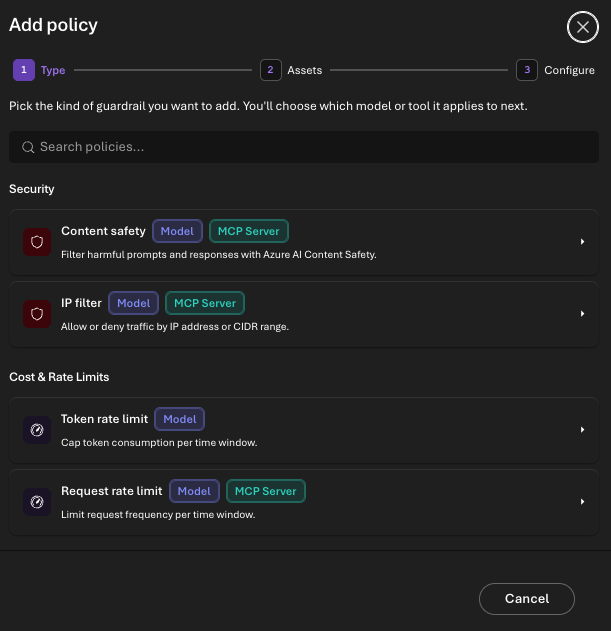
Start with these policy types:
- Content safety: Inspect incoming prompts and tool inputs with Azure AI Content Safety before they reach the backend. Set per-category severity thresholds (hate, sexual, violence, self-harm), and choose 4 or 8 severity levels for finer control. Turn on Prompt Shields to detect jailbreak and prompt-injection attempts, and add blocklists to reject specific keywords or phrases (for example, competitor names or banned terms). Choose whether to block, log, or both; a blocked call returns an error to the client. Content safety requires an Azure AI Content Safety resource, which you select as the policy backend on the Configure step. To calibrate without rejecting legitimate traffic, start in log-only mode, tune the thresholds against real traffic, and then switch to blocking. Applies to models and MCP tools.
- IP filter: Restrict runtime calls to approved client network ranges by IPv4 or IPv6 CIDR (allow or deny lists). Apply it globally for private applications, or to a specific model or tool that needs a tighter boundary. Combine it with runtime access keys for defense in depth: the key authenticates the caller and the IP range enforces a network boundary. Applies to models and MCP tools.
- Token rate limits: Cap token throughput (prompt plus completion) per minute, hour, or day. On the Configure step, set the token allowance and choose the dimension the limit counts against — caller identity or caller IP address. The gateway returns
remaining-tokensandconsumed-tokensresponse headers (andremaining-quota-tokensfor hourly or longer periods) so client applications can self-throttle before they're blocked. Use token limits to protect model capacity and smooth bursts. Applies to models. - Request rate limits: Limit call volume over a configurable window (for example, 30 seconds, 1 minute, 2 minutes, or 5 minutes), counted per caller identity or caller IP address. Use them for tools that call SaaS APIs or internal systems with strict quotas. Applies to models and MCP tools.
Layer policies for a baseline and targeted overrides
Get the most out of governance by combining a broad baseline with narrower overrides:
- Set a gateway-wide baseline. Apply content safety and an IP filter to all applicable assets so every model and tool inherits the same protection.
- Add targeted overrides. Apply a token rate limit to high-cost or capacity-constrained models, and a tighter request rate limit to a specific tool that calls a rate-limited downstream API.
- Stack cost controls. Apply both a token limit and a request limit to the same model when you need to protect model capacity and downstream systems; a request must satisfy both.
- Scope by identity. Issue a separate runtime access key per application, then count rate limits by caller identity so each application gets its own budget and you can attribute usage.
Governance policies are operational controls. Token limits help reduce spikes and provide usage signals. For financial reporting, use provider billing or Azure Cost Management.
Security and identity
Use the security capabilities in AI gateway tier to control access and secure resources.
Runtime access keys
Runtime access keys let client applications call assets exposed by AI Gateway tier without receiving backend credentials. Client applications authenticate to the gateway with runtime access keys. A client sends a runtime access key to the gateway in the api-key header. The gateway validates the key, applies governance policies, and authenticates to the backend by using the configured API key, OAuth configuration for tools, or managed identity. Use runtime access keys for agent applications, evaluation harnesses, developer tools, and automation that call MCP servers, OpenAPI-generated MCP tools, model resources, or other gateway assets.
The gateway generates a runtime access key, assigns it to an owner, and rotates or revokes it as needed. In preview, every key is gateway-scoped: it grants access to all published models and tools in the gateway, and per-asset scoping isn't available yet. Create separate keys per application and environment so you can rotate and audit them independently.
To create a runtime access key:
- In the AI Gateway tier portal, select Keys.
- Select Create API key.
- Enter a stable name and identify the owner.
- Select Create.
- Copy the value for use in your application. You can view the key again later on the Keys page.
Client applications include the runtime access key in the api-key header. Don't paste runtime access keys into source code, build logs, notebooks, or shared chat. Store them in your deployment platform's secret store or another approved secret manager. Use one key per application and environment. Rotate keys regularly and whenever ownership changes. If a key might be exposed, rotate or revoke it immediately and review gateway logs.
Use managed identity for backend authentication
Configure managed identity so AI Gateway tier can authenticate to supported model and MCP server backends without storing API keys. Using managed identity to access models and MCP servers is available in public preview. Prefer managed identity where supported because it reduces backend key management. It removes key rotation from gateway configuration and lets you manage access with Azure RBAC. AI Gateway tier supports system-assigned and user-assigned managed identities. Manage them on the Managed identities page in the AI Gateway tier portal.
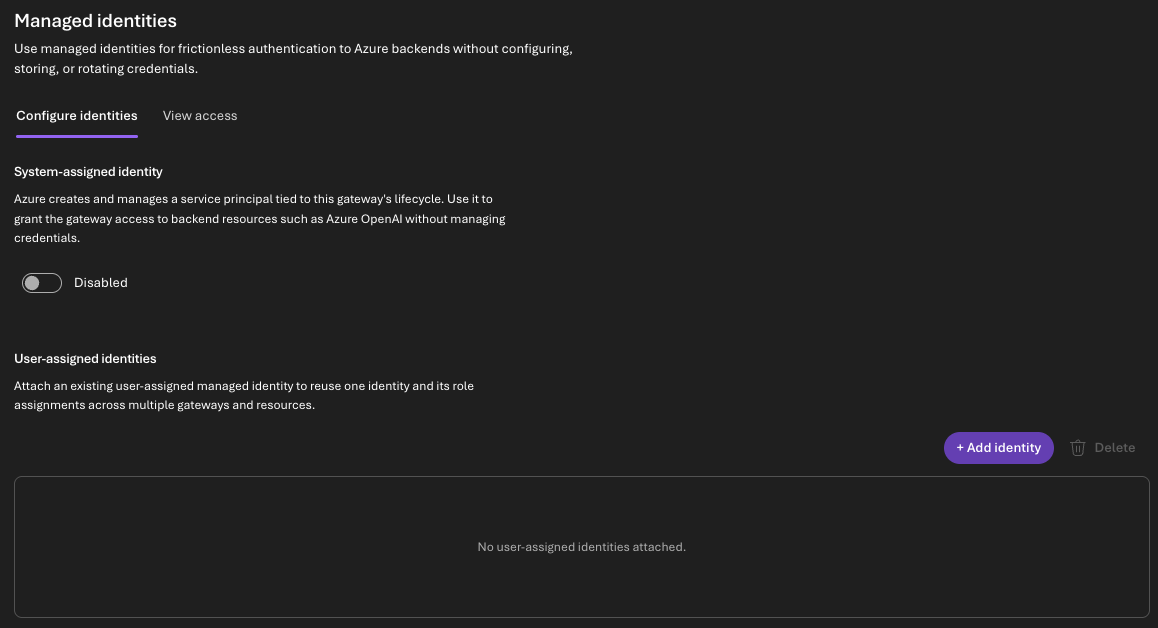
Choose system-assigned or user-assigned identities based on your needs. A system-assigned identity is tied to the gateway's lifecycle and is simple when a single gateway needs backend access. User-assigned identities give you tighter control: you can share one identity across gateways, or attach separate identities for different backends instead of using a single identity for every backend. Use an API key when a provider doesn't support managed identity.
Before you configure backend authentication, make sure you have these items:
- An AI Gateway tier instance.
- A Microsoft Foundry or Azure OpenAI resource that hosts the model deployment.
- Permission to update gateway identity settings.
- Permission to assign Azure RBAC roles on the backend resource.
- Azure CLI 2.57.0 or later.
To enable a system-assigned identity, open the Managed identities page in the AI Gateway tier portal. On Configure identities, turn on the System-assigned identity, and then copy its Object (principal) ID.
To enable a user-assigned identity, create the identity in the same tenant as the gateway and backend resource. On the Managed identities page, select User-assigned > Add identity, and choose it. Copy the managed identity's Client ID and Object (principal) ID. The gateway uses the client ID to request a token. Azure RBAC uses the principal ID.
Grant the gateway identity access to each backend resource at the narrowest practical scope. In most cases, use the individual Foundry or Azure OpenAI resource.
| Principal | Role | Scope |
|---|---|---|
| Gateway system-assigned identity | Foundry User (role ID 53ca6127-db72-4b80-b1b0-d745d6d5456d) |
Foundry or Azure OpenAI resource |
| Gateway user-assigned identity | Foundry User (role ID 53ca6127-db72-4b80-b1b0-d745d6d5456d) |
Foundry or Azure OpenAI resource |
Note
When you import a model with managed identity and have sufficient permissions, the import wizard assigns this role for you. Use the following steps when you prefer to assign the role manually or through automation.
Use the following Azure CLI snippet. Replace the placeholders with your values. Reference the role by its ID rather than its name.
Gather these values:
GATEWAY_PRINCIPAL_ID: the Object (principal) ID of the gateway's managed identity.BACKEND_RESOURCE_ID: the full Azure resource ID of the Microsoft Foundry or Azure OpenAI resource, in the format/subscriptions/....
GATEWAY_PRINCIPAL_ID="<gateway-managed-identity-principal-id>"
BACKEND_RESOURCE_ID="/subscriptions/<subscription-id>/resourceGroups/<resource-group>/providers/Microsoft.CognitiveServices/accounts/<foundry-or-aoai-resource-name>"

az role assignment create \
  --assignee-object-id "$GATEWAY_PRINCIPAL_ID" \
  --assignee-principal-type ServicePrincipal \
  --role "53ca6127-db72-4b80-b1b0-d745d6d5456d" \
  --scope "$BACKEND_RESOURCE_ID"
Role assignments can take several minutes to propagate. Confirm the assignment:
az role assignment list \
  --assignee-object-id "$GATEWAY_PRINCIPAL_ID" \
  --scope "$BACKEND_RESOURCE_ID" \
  --output table
When you import a model, choose managed identity as the backend authentication method. In the Add models wizard, select Import from Foundry, and choose the subscription, resource, and model deployment. On Provider details, select Managed identity, and then choose the system-assigned identity or a user-assigned identity attached to the gateway. Clients that call the gateway don't need backend keys.
If calls fail with 401 errors, confirm the import uses managed identity and the backend accepts Entra ID authentication. If calls fail with 403 errors, confirm the identity's principal ID has the Foundry User role at the backend resource scope, and wait for role assignment propagation.
Monitoring
AI Gateway tier emits an OpenTelemetry token usage metric for model traffic. You choose where it goes: send the metric to Azure Application Insights or to another OpenTelemetry (OTLP)-compatible destination, such as Datadog, Splunk, or Grafana Cloud. When you use Application Insights, the portal provides a built-in token consumption dashboard.
MCP tool traffic monitoring (request volume, latency, and errors) is available in the portal's monitoring views when you connect Application Insights. OpenTelemetry (OTLP) export currently covers the model token usage metric only, not MCP tool traffic.
Note
Token usage is the only metric exported over OpenTelemetry (OTLP) in public preview. Additional exported logs, traces, and metrics are coming soon.
The token usage metric is a custom OpenTelemetry metric that carries a subset of the OpenTelemetry Generative AI and cloud semantic-convention attributes — for example, the model name. Not every backend reports token counts; some providers omit them in streaming or passthrough responses. Treat missing token data as unavailable, not as zero.
The token usage metric includes attributes such as:
| Attribute | Description |
|---|---|
gen_ai.request.model |
The model name from the request's model field. |
gen_ai.response.model |
The model that produced the response. |
gen_ai.operation.name |
The operation, such as chat or responses. |
gen_ai.token.type |
The token type, such as prompt_tokens or completion_tokens_details.reasoning_tokens. |
Configure a telemetry destination in the gateway's monitoring settings. For Application Insights, select the resource in your subscription. For a generic OpenTelemetry (OTLP) endpoint, provide the collector URL and any required access token or headers. Use Datadog, Splunk, Grafana Cloud, or a generic OTLP collector when those platforms are your standard operational platforms. Protect destination credentials as secrets, and monitor telemetry export failures.
When you send the token usage metric to Application Insights, the portal provides a built-in token consumption dashboard. You query the token metric with PromQL, whether it lands in Application Insights or another OTLP metric destination. For example, this PromQL query sums token usage by model:
sum by (gen_ai_request_model) (gen_ai_client_token_usage)
Because the metric carries the semantic-convention attributes, you can segment consumption without extra configuration. For example, group by gen_ai_operation_name to compare chat and responses traffic, or by gen_ai_token_type to separate prompt and completion tokens:
sum by (gen_ai_request_model, gen_ai_token_type) (gen_ai_client_token_usage)
Use model and token usage for consumption estimates, then reconcile with provider billing or Azure Cost Management exports for financial reporting.
Send an x-correlation-id header for application-level investigations. Don't put personal data, secrets, prompts, or regulated identifiers in correlation headers.
Start with alerts you can act on, such as token usage spikes, backend authentication failures, and telemetry export failures. Route every alert to an owner who can investigate the gateway, backend, policy, or destination configuration.