Note
Access to this page requires authorization. You can try signing in or changing directories.
Access to this page requires authorization. You can try changing directories.
APPLIES TO: AI Gateway tier (preview)
Important
AI Gateway tier is currently in public preview. During public preview, AI Gateway tier is available in the following regions:
- United States - East US 2
- Europe - Sweden Central
Use private networking when gateway traffic shouldn't use the public internet. Private networking has two directions:
- Inbound Private Link and private endpoint: Lets clients in your virtual network, peered networks, or connected on-premises networks reach the gateway by using a private IP address.
- Outbound virtual network integration: Lets the gateway call private backends, model endpoints, APIs, and MCP servers that are reachable only from your virtual network.
Inbound and outbound networking solve different problems. Creating a private endpoint for clients to call the gateway doesn't automatically let the gateway reach private backends. Configure outbound virtual network integration separately when the gateway must reach resources in your network.
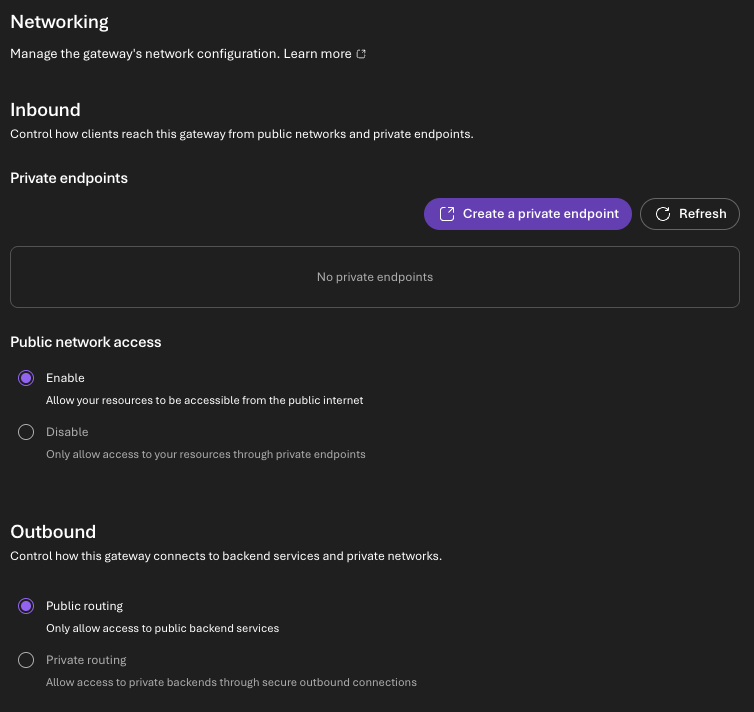
You configure both directions from the gateway's Networking page, which has an Inbound section (private endpoints and public network access) and an Outbound section (public or private routing).
Prerequisites
Before you configure private networking, prepare these items:
- An AI Gateway tier resource in a supported preview region.
- A virtual network with non-overlapping address space, in the same region as the gateway. Outbound integration requires the virtual network to be in the same region; a virtual network in a different region generates a prerequisite warning.
- Separate subnets for inbound private endpoints and for outbound integration (the outbound subnet can't be shared with the private endpoints):
- Private endpoint subnet (in the client virtual network) to host the gateway's private endpoint.
- Outbound integration subnet that is dedicated to this gateway (no other resources), sized at least /27 (a /24 is recommended to leave room for scale), and delegated to
Microsoft.Web/serverFarms.
- A network security group (NSG) on the outbound integration subnet that allows outbound HTTPS (TCP 443) to the
StorageandAzureKeyVaultservice tags. The gateway uses these dependencies during virtual network integration. - Permissions to create private endpoints and private DNS resources (see Permissions).
- Backend resources (model endpoints, APIs, MCP servers) reachable from the integration subnet, with their ports, protocols, and hostnames confirmed.
Note
The portal runs the outbound subnet checks (region, dedicated subnet, size, delegation, and NSG rules) as advisory warnings only. They don't block saving, and Azure Resource Manager remains the authority on whether a configuration succeeds. Address any warnings before you rely on private routing in production.
Permissions
Assign these permissions before you configure private networking:
| Task | Required permission (or built-in role) |
|---|---|
| View and change the gateway's networking configuration | Write access to the gateway resource (a role that can configure the gateway, such as Contributor on the gateway) |
| Approve, reject, or remove private endpoint connections | Write and delete access to the gateway's private endpoint connections |
| Create the private endpoint | Microsoft.Network/privateEndpoints/write in the target resource group, plus approval rights on the gateway |
| Integrate the outbound subnet | Microsoft.Network/virtualNetworks/subnets/join/action on the subnet, and read access to the virtual networks and subnets (for example, Network Contributor) |
| Create and link private DNS zones | Microsoft.Network/privateDnsZones/write and Microsoft.Network/privateDnsZones/virtualNetworkLinks/write |
Important
When you select Save on the Networking page, Azure validates the required roles and permissions as it applies the change. If you (or the platform identity that integrates the subnet) lack a required role or permission, the update fails and the page shows the error so you can grant the missing access and try again. Assign the roles in this table before you save.
Inbound Private Link
Inbound Private Link lets clients reach the gateway over a private IP address and, optionally, blocks public access entirely.
To set up inbound Private Link:
- On the gateway's Networking page, in the Inbound section under Private endpoints, select Create a private endpoint. This opens the Azure portal Create a private endpoint experience, pre-targeted at your gateway. Select the Gateway target sub-resource.
- Choose the client virtual network and the subnet that will host the private endpoint.
- Enable private DNS integration (or plan to configure DNS manually) so clients resolve the gateway hostname to the private endpoint. Link the gateway's private DNS zone to the virtual networks where clients run.
- Return to the gateway's Networking page and select Refresh in the Private endpoints list. Newly created connections appear with a Pending status.
- Use the row's action menu to Approve the connection (you can also Reject or Delete connections here). After approval, the status becomes Approved.
- From a test client inside the virtual network, verify that the gateway hostname resolves to the private endpoint's private IP address and that requests succeed.
- After private connectivity is confirmed, set Public network access to Disable so the gateway is reachable only through private endpoints. Leave it Enable if clients still need public access. Select Save to apply the change.
DNS is a common source of issues. Clients must resolve the gateway hostname to the private endpoint IP address. Link the required private DNS zones to the right virtual networks, or configure custom DNS forwarding.
Outbound virtual network integration
Outbound virtual network integration ("private routing") lets the gateway call private backends through a delegated subnet.
To set up outbound virtual network integration:
- Identify every backend the gateway must call, and confirm the ports, protocols, and hostnames.
- On the gateway's Networking page, in the Outbound section, select Private routing ("Allow access to private backends through secure outbound connections"). Selecting Public routing keeps the gateway on public backends only.
- Select the Virtual network and Subnet to integrate with. The subnet must meet the prerequisites (same region, dedicated, sized at least /27, delegated to
Microsoft.Web/serverFarms, and NSG-allowed outbound 443 to Storage and Key Vault). The portal shows advisory warnings for any unmet checks. - Select Save. Applying outbound integration is a long-running operation that can take a few minutes. As it applies, Azure validates the required roles and permissions (see Permissions); if a required role is missing, the update fails and the page shows the error so you can grant access and retry. The networking configuration is locked while the update is in progress, but you can keep using the portal and navigate away from the page; a notification confirms when the change completes.
- Allow traffic from the integration subnet to your backend resources, and configure DNS so private backend hostnames resolve to private IP addresses.
- Test by invoking a route, model, tool, or MCP server operation that targets a private backend.
DNS is a common source of issues. The gateway must resolve backend hostnames to private IP addresses. Link the required private DNS zones to the right virtual networks, or configure custom DNS forwarding.