Note
Access to this page requires authorization. You can try signing in or changing directories.
Access to this page requires authorization. You can try changing directories.
Azure Application Gateway Advanced Rules evaluates incoming requests against configurable conditions based on HTTP request attributes and routes traffic to specific backend pools based on the results.
Important
Advanced rule is currently in preview. See the Supplemental Terms of Use for Microsoft Azure Previews for legal terms that apply to Azure features that are in beta, preview, or otherwise not yet released into general availability.
This feature isn't supported for Multisite listeners and Layer 4 TCP/TLS proxy
Use cases
Advanced Rules Engine use cases include:
- Multi-tenant applications: Route requests to different backend pools based on specific headers.
- A/B testing and canary deployments: Direct traffic to different application versions based on specific headers.
- API versioning: Route API requests to different backend services based on version headers.
- Feature flags: Enable or disable features by routing to different backends based on header values.
- Partner integrations: Route requests from different partners to dedicated backend pools.
- Mobile vs. desktop traffic: Separate mobile and desktop traffic based on User-Agent or custom headers.
Architecture overview
The Advanced Rules feature adds a new routing type to Application Gateway that provides flexible, condition-based routing decisions. It evaluates its nested rules in priority order, with lower numbers taking precedence. Rules can match request conditions, such as exact HTTP header values or Query String header values based on a regular expression, and send matching requests to a backend address pool or redirect them. If no rule matches, Application Gateway uses the configured default backend pool or redirection.
An Advanced Routing rule consists of four main components:
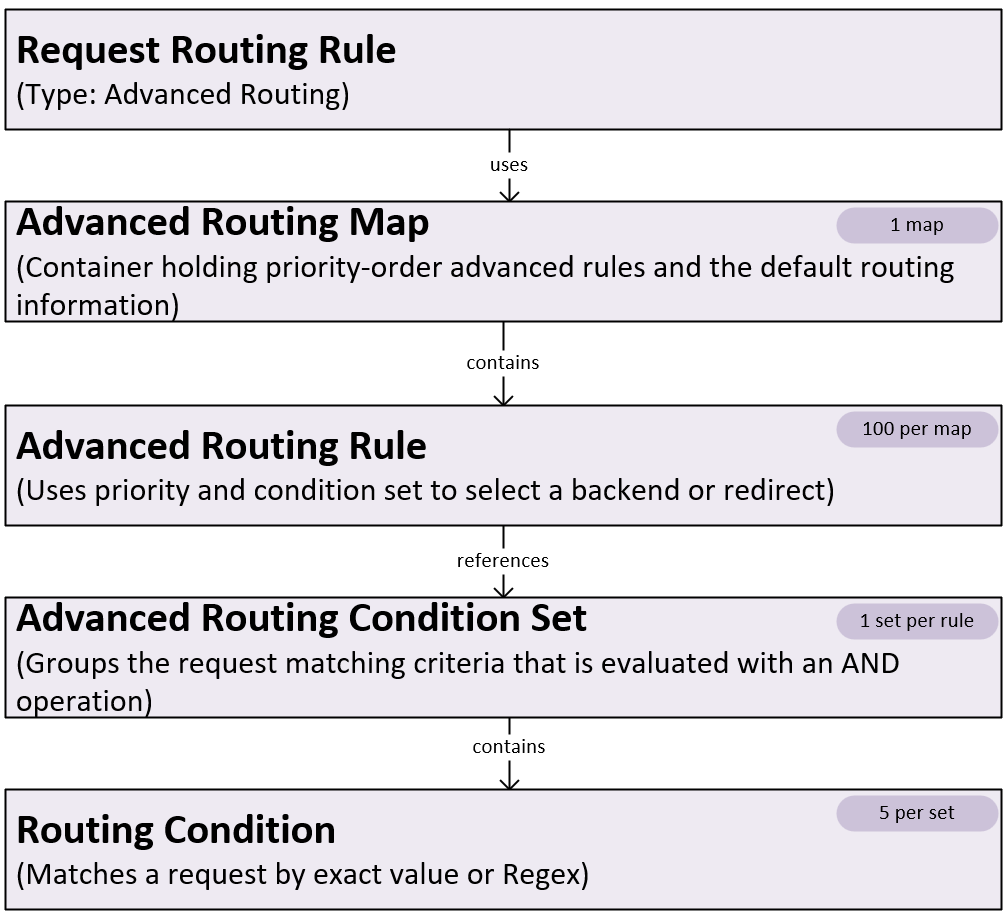
Advanced routing map
An Advanced routing map is a container for advanced routing rules and default routing configuration.
| Key property | Description |
|---|---|
| Advanced routing rules | Collection of rules evaluated for routing decisions |
| Default backend pool | Backend pool used when no rules match |
| Default backend HTTP settings | Backend HTTP settings used with the default backend pool |
| Default rewrite rule set (optional) | Rewrite rules applied to requests routed to the default backend |
Advanced routing rule
An Advanced routing rule defines a routing decision based on condition evaluation. Application Gateway evaluates advanced routing rules in ascending priority order. The first matching rule determines the routing destination.
| Key properties | Description |
|---|---|
| Priority | Integer value that determines evaluation order (lower values are evaluated first). The Advanced rule priority is different from the primary Routing rule priority. |
| Condition set | Reference to the set of conditions that must match for this rule to apply. All conditions within a set must match for the condition set to be considered matched (logical AND operation). |
| Backend pool | Target backend pool for matching requests |
| Backend HTTP settings | HTTP settings used when routing to the backend pool |
| Rewrite rule set (optional) | Rewrite rules applied to matching requests |
| Redirect configuration (optional) | Redirect target for matching requests instead of routing to a backend pool |
If no advanced routing rules match, Application Gateway forwards traffic to the default backend pool.
Advanced routing condition set
A Routing Condition Set is a collection of conditions that the system evaluates together.
| Key properties | Description |
|---|---|
| Routing conditions | Array of condition objects to evaluate |
Routing condition
A Routing condition specifies a single condition to evaluate against the incoming request. During the public preview, the service supports only header-based conditions.
| Key properties | Description |
|---|---|
| Condition type | Type of condition |
| Condition values | Array of exact values to match (logical OR operation) |
Note
- A condition set can include different condition types. All conditions in the set must match (logical AND) for the rule to apply.
- Pattern matching supports RE2-compatible regex only.
Supported condition types
Header
It evaluates HTTP request headers. You can match headers by using either exact or pattern matching approaches.
Example of exact value matching. This condition matches if the X-Custom-Header header contains any of the specified values.
{
  "conditionType": "Header",
  "propertyName": "X-Custom-Header",
  "propertyValues": ["value1", "value2", "value3"]
}
Example of pattern matching (regular expression). This condition matches if the X-Custom-Header header value matches the given regular expression pattern.
{
  "conditionType": "Header",
  "propertyName": "X-Custom-Header",
  "propertyValueMatcher":
  {
    "pattern": "^(customer-[0-9]+|partner-[a-z]+)$"
  }
}
- Supports special characters
! # $ % & ' * + - . ^ | ~ `
QueryString
It evaluates the value of a named query string parameter. Use propertyName to specify the parameter.
Example of exact value matching. This condition matches if the campaign parameter value is spring or summer.
{
  "conditionType": "QueryString",
  "propertyName": "campaign",
  "propertyValues": ["spring", "summer"]
}
Example of pattern matching (regular expression). This condition matches if the campaign parameter value matches the regular expression.
{
  "conditionType": "QueryString",
  "propertyName": "campaign",
  "propertyValueMatcher": {
    "pattern": "^(spring|summer)$"
  }
}
- An empty PropertyValue is allowed only for QueryString.
ClientIP
It evaluates the client IP address.
Example of ClientIP condition. This condition matches if the client IP address matches either listed value.
{
  "conditionType": "ClientIP",
  "propertyValues": ["203.0.113.10/32", "203.0.113.11/32"]
}
- This condition accepts a single IPv4 or IPv6 address, or multiple addresses, in CIDR (Classless Inter-Domain Routing) format only.
Method
It evaluates the HTTP request method. This condition supports exact value(s) matching.
Example of Method condition. This condition matches if the request method is GET or POST.
{
  "conditionType": "Method",
  "propertyValues": ["GET", "POST"]
}
- The allowed values are GET, HEAD, POST, PUT, DELETE, CONNECT, OPTIONS, and PATCH
- Only exact match is supported. Match values are case-sensitive and must be specified using uppercase characters.
Path
It evaluates the request URL path.
Example of exact value matching. This condition matches if the request path equals either listed path.
{
  "conditionType": "Path",
  "propertyValues": ["/api/orders", "/api/customers"]
}
Example of pattern matching (regular expression). This condition matches if the request path matches the regular expression.
{
  "conditionType": "Path",
  "propertyValueMatcher": {
    "pattern": "^/api/orders(/.*)?$"
  }
}
- URL normalization (decoding) happens before path matching is evaluated. For example, incoming URL:
/foo%2Fbar, path condition configured:/foo/bar. Here the comparison is done against the decoded path (/foo/bar), not the raw encoded string.
Note
The Path condition in Advanced Routing Rules is different from legacy Path-Based PathBasedRouting Routing rule. PathBasedRouting relies on URL path maps and path rules, whereas the Path condition is evaluated within an Advanced Routing Rule's condition set. Use Advanced Routing Rules for path-based routing because they can combine path matching with other conditions, so you can create more flexible routing configurations.
Request flows with Advanced Rules
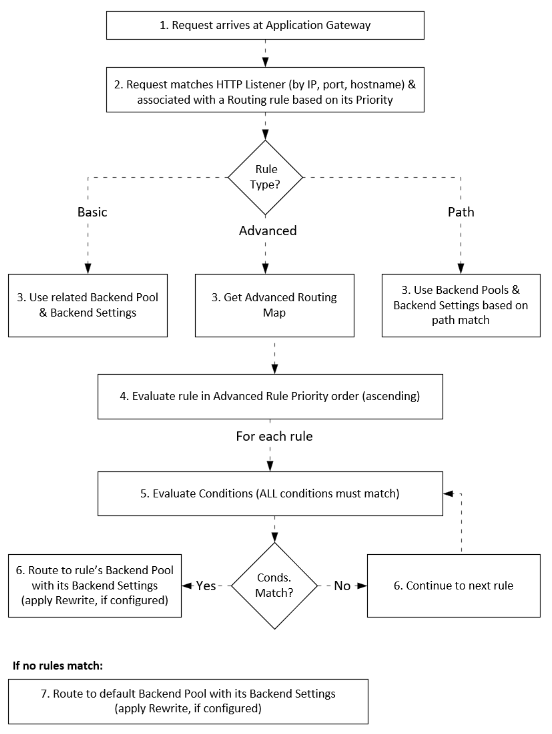
The Advanced Rules Engine extends Application Gateway's routing capabilities beyond traditional path-based and basic routing. When a request arrives at the Application Gateway:
- The request is matched to an HTTP listener.
- The routing rule associated with the listener is evaluated.
- If the rule is an Advanced rule type, its Advanced Routing Map is fetched.
- The rules within the map are evaluated in priority order.
- All conditions of a rule are evaluated against the request attributes (AND operation).
- If all conditions match, evaluation stops. The request is routed to the rule's specified backend pool by using the configured backend HTTP settings. If the rule specifies a redirect configuration, the request is redirected instead.
- If any condition doesn't match, evaluation continues with the next rule in priority order.
- If no rules match, the request is routed to the default backend pool by using the default backend HTTP settings.
Property limits
| Property | Limit |
|---|---|
| Advanced Routing Maps | 100 (per gateway) |
| Advanced Routing Rules per Map | 100 |
| Advanced Routing Condition Sets | 10,000 (per gateway) |
| Advanced Routing Conditions Per Condition Set | 5 |
| Advanced Routing Condition Property Values Count | 5 |
| Advanced Routing Condition Property Value | 128 characters |
| Advanced Routing Property Value Regular expression | 128 characters |
Each application gateway can contain up to 100 advanced routing maps. Each map contains up to 100 advanced routing rules and one default routing configuration. Each advanced routing rule references one condition set and one routing target. A condition set contains up to five conditions, and each condition contains up to five property values.
Integration with other features
Listeners
You can associate an Advanced Routing rule with only a Basic frontend listener. Multisite listeners aren't currently supported.
Rewrite rule sets
You can associate Advanced Routing Rules with Rewrite Rule Sets to modify requests or responses:
- Each advanced rule can have its own rewrite rule set.
- The system applies rewrite rules after it makes the routing decision but before it sends a request to the backend.
Redirect configurations
Instead of routing to a backend pool, an advanced rule can use a redirect configuration.
Web Application Firewall (WAF)
Advanced Rules Engine integrates with Web Application Firewall (WAF).
- WAF policies are evaluated before the routing decision is made. Requests that WAF blocks never reach the routing engine.
- Advanced Routing Rules support WAF policy association at the gateway or listener level only. They don't support per-rule WAF policy association.