Note
Access to this page requires authorization. You can try signing in or changing directories.
Access to this page requires authorization. You can try changing directories.
Microsoft Fabric
Power BI
This example workload describes a SQL-first modern data warehouse (MDW) medallion architecture. A modern data warehouse uses SQL-based data stores to organize structured data for analytics and reporting. This architecture implements the bronze, silver, and gold layers in Fabric Data Warehouse and uses Fabric Data Factory to orchestrate data ingestion and transformation.
Fabric Data Warehouse stores relational data in Delta format in OneLake and supports T-SQL development through tables, views, transactions, and stored procedures. Power BI, SQL clients, and other applications consume curated data from the gold layer.
Important
The recommended Fabric medallion patterns use a lakehouse for every layer or use lakehouses for the bronze and silver layers and a warehouse for the gold layer. This architecture uses warehouses for all three layers because the data remains structured and is transformed by using SQL throughout the process. Lakehouses are better suited for Spark-based processing, data science workloads, and large volumes of unstructured or semistructured data. For a lakehouse-first implementation that supports Spark and unstructured data, see Greenfield lakehouse on Microsoft Fabric.
Architecture
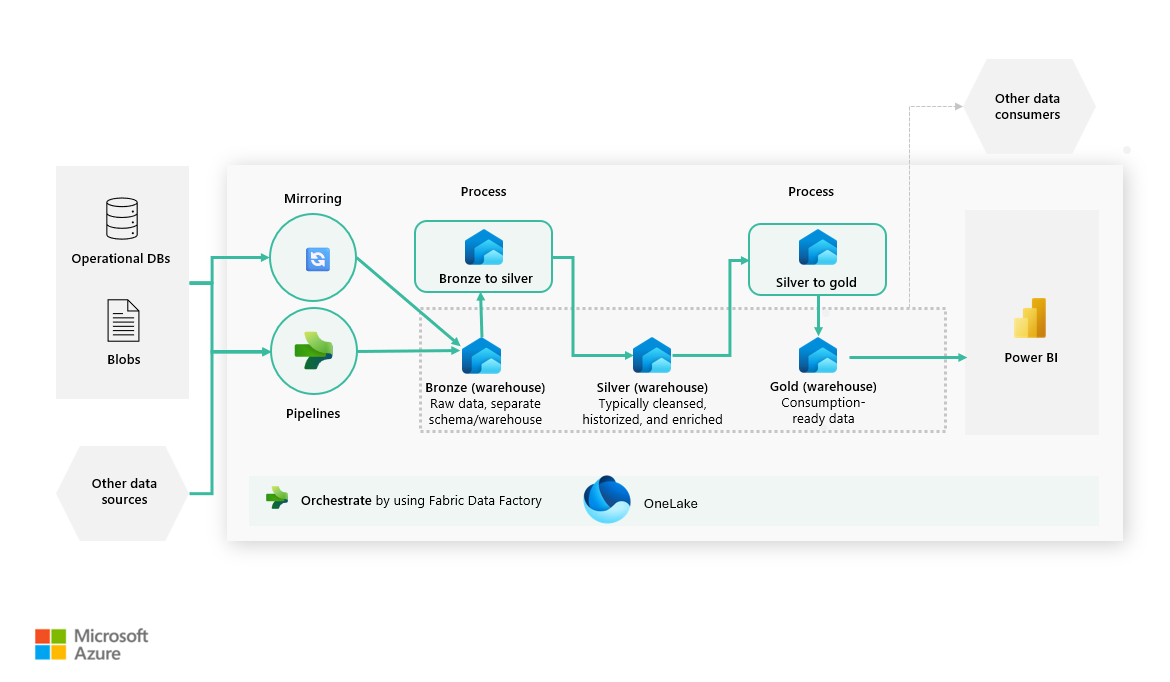
Download a PowerPoint file of this architecture.
In the diagram, Mirroring handles operational database replication, and Fabric Data Factory pipelines ingest non-mirrored sources into the bronze path.
Data flow
The following data flow corresponds to the previous diagram:
Operational databases, SaaS applications, files, and other source systems produce data.
Ingestion brings source data into Fabric through two paths. For supported operational databases, Mirroring in Fabric continuously replicates data into a mirrored database item in OneLake. A warehouse
CTASorINSERT ... SELECTstep then persists that data in the bronze warehouse. For files, SaaS applications, and other non-mirrored sources, use Fabric Data Factory pipelines or warehouse T-SQL, such asCOPY INTO, to load bronze tables.The bronze layer stores raw, minimally processed data in warehouse tables. Ingestion metadata, such as load timestamps and source identifiers, supports auditing and reprocessing.
The first transformation stage (
Bronze to silver) validates and transforms bronze data into the silver layer.The silver layer contains cleansed, deduplicated, and conformed data. Where historical analysis is required, silver tables retain source changes with effective dates and current-row indicators.
Stored procedures or dbt jobs typically implement the
Bronze to silverstage by using SQL patterns such asCREATE TABLE AS SELECT(CTAS),INSERT ... SELECT, andMERGE.The gold layer provides consumption-ready star schemas, data marts, and preaggregated tables.
The second transformation stage (
Silver to gold) transforms silver data into business entities, dimensions, facts, and aggregates in the gold layer.Power BI consumes gold data through semantic models. Other consumers, such as SQL clients, notebooks, and applications, can query the warehouse SQL endpoint.
Components
- Fabric Data Warehouse provides the T-SQL compute and relational tables for the bronze, silver, and gold layers.
- OneLake stores warehouse data in Delta format and stores data replicated by Fabric mirroring.
- Mirroring in Fabric continuously replicates supported operational databases into OneLake.
- Fabric Data Factory ingests data and orchestrates stored procedures, pipelines, and other transformation activities.
- Power BI provides semantic models, reports, and dashboards over curated gold data.
Design guidance
The following guidance describes how to implement the bronze, silver, and gold layers and organize the supporting workspaces. Adapt these recommendations to your workload's data sources and governance requirements and your team's skills.
Bronze layer: Raw data ingestion
The bronze layer ingests raw data and captures all source data in its original form without applying any business logic. It serves as the system of record, enabling full traceability and reprocessing. Tables in this layer closely mirror source schemas and intentionally avoid filtering, deduplication, or enrichment. Optional metadata columns, such as ingestion timestamps or source file names, often support auditing.
For supported operational databases, use Mirroring in Fabric to continuously replicate source tables into OneLake. For file, SaaS, or unsupported sources, use Fabric Data Factory pipelines, COPY INTO for bulk ingestion, or OPENROWSET with CTAS or INSERT ... SELECT to persist external file data in the bronze warehouse.
At this stage, ingestion keeps reshaping minimal so the bronze layer remains the replayable system of record. Where needed for non-mirrored sources, a bronze-load stored procedure (or equivalent dbt model) can standardize incoming records and add load metadata.
Best practices for the bronze layer emphasize preserving all raw data, including invalid records, using batch ingestion to avoid small-file problems, aligning schemas closely with source systems, and automating ingestion workflows by using Fabric pipelines to ensure consistency and reliability at scale.
Silver layer: Data cleansing and conformance
The silver layer focuses on data cleansing and conformance by refining bronze data through the application of data quality rules, standardization, deduplication, and integration across multiple sources. It ultimately produces a single source of truth for cleansed and reliable data.
You typically implement transformations at this stage by using T-SQL, using patterns such as CREATE TABLE AS SELECT (CTAS), INSERT … SELECT, and MERGE statements to support both batch and incremental processing. While Fabric Data Warehouse doesn't support materialized views, you can use materialized lake views, implemented by using Spark, to generate Delta tables. The SQL analytics endpoint exposes these Delta tables as tables that the warehouse can read.
Best practices for the silver layer include designing transformations to be idempotent, enforcing data quality rules consistently, and using MERGE for incremental updates. When the workload requires historization, retain row versions with effective start and end dates and a current-row indicator. Gold dimensions can use this history to implement type 1 or type 2 slowly changing dimension (SCD) behavior.
Gold layer: Curated data for analytics
The gold layer delivers curated, business-ready data that's optimized for analytics, reporting, and consumption by BI tools such as Power BI. This layer is designed around analytical modeling patterns, commonly using star schemas with fact and dimension tables, domain-specific data marts, and pre-aggregated summary tables to support performant querying and intuitive analysis.
You typically derive gold tables exclusively from silver data and expose them to end users and reporting tools.
Use stable surrogate keys for dimensions so facts don't depend on mutable source-system keys. Fabric Data Warehouse supports BIGINT IDENTITY columns for surrogate-key generation. Identity values are unique but aren't guaranteed to be sequential or ordered, and gaps can occur. If those limitations aren't appropriate for the workload, generate and persist surrogate keys in transformation logic and maintain a durable mapping to each natural key. Don't regenerate surrogate keys during a full refresh.
Best practices for the gold layer include modeling data to align closely with analytical and business use cases, preaggregating data where possible to improve performance, applying security controls such as row-level security (RLS), column-level security (CLS), and data masking, and thoroughly documenting data lineage and transformations.
Workspace strategy
A workspace strategy defines how bronze, silver, and gold layers are logically and physically separated to balance governance, security, and operational simplicity. You can implement layers by using separate workspaces per layer, which we recommend when strong security boundaries, clear ownership, or strict separation of responsibilities are required. For example, you should isolate raw data ingestion from curated business data.
Alternatively, you can implement layers within a single workspace by using separate warehouses for bronze, silver, and gold data. This approach can reduce management overhead and simplify cross-layer development and testing while preserving warehouse-level separation between medallion layers.
The choice between these approaches typically depends on factors such as organizational scale, security requirements, team structure, and governance maturity. Many enterprises adopt a hybrid model as their Fabric implementation evolves. We recommend using separate workspaces when isolation, governance, and ownership boundaries are required.
Implementation guidance
Fabric Data Warehouse provides transactional consistency and reliable data processing across the bronze, silver, and gold layers. Use batch-oriented writes to minimize small-file problems and improve storage and query efficiency. Use MERGE statements to handle late-arriving or changed data in incremental processing scenarios.
Keep transactions short-lived to reduce contention and optimize concurrency, especially in high-ingestion environments. Actively monitor performance and operational health by using Fabric query insights and dynamic management views (DMVs). The architectural separation of read and write workloads in Fabric further enables ingestion and transformation jobs to run concurrently without blocking analytical queries, ensuring predictable performance for downstream analytics and reporting.
Use T-SQL stored procedures and Fabric Data Factory pipelines for native SQL transformation and orchestration. Teams that prefer modular SQL models and tests can use the Microsoft-maintained dbt adapter for Fabric Data Warehouse. Run uniqueness, referential-integrity, and accepted-value tests as deployment or pipeline gates before publishing data to downstream layers.
Alternatives
This architecture includes multiple components that you can substitute with other Azure services or approaches, depending on your workload's functional and nonfunctional requirements. Consider the following alternatives and their trade-offs.
For scenarios that emphasize large-scale data engineering, advanced analytics, machine learning, or unstructured data, a lakehouse-first architecture on Microsoft Fabric can be a better fit. In this approach, a Fabric lakehouse serves as the primary data store in OneLake, and transformations are primarily implemented by using Spark-based tools such as notebooks or Dataflow Gen2. This pattern provides the distributed computation, notebooks, and machine learning tooling that aren't the focus of this SQL-first warehouse architecture.
For organizations with a strong focus on data science, AI, or complex distributed processing, Azure Databricks is another alternative. Azure Databricks is typically selected when workloads require deep integration with open-source machine learning frameworks, fine-grained control over Spark execution, or multicloud portability.
For near real-time or event-driven analytics, Fabric Real-Time Intelligence, Azure Event Hubs, or Azure Stream Analytics might be more suitable than a batch-oriented medallion design centered on Fabric Data Warehouse.
Scenario details
Fabric Data Warehouse is a strong fit for this medallion architecture when the primary goal is to deliver governed, analytics-ready data at scale by using familiar SQL patterns.
Scenario 1: Relational semantics and SQL performance for curated, analytics-ready datasets
Fabric Data Warehouse is well suited because it provides relational tables and views, ACID transactions, and T-SQL operations on top of Delta data. This feature set supports workloads where data is already cleansed and conformed and must be queried consistently through SQL.
Example: An airline builds curated gold datasets for flight operations and revenue analytics. Analysts rely on stable SQL query performance to evaluate on-time performance trends, route profitability, and crew utilization. Using warehouse tables and views ensures transactional consistency and reliable query behavior, which is harder to guarantee with ad hoc file-based access.
Scenario 2: Centralized governance with a SQL-first experience
Fabric Data Warehouse enables centralized governance through workspace permissions, object-level security, and built-in lineage, while exposing data through a SQL interface that's familiar to analytics engineering teams. This approach reduces operational friction, simplifies access control, and accelerates adoption across teams without introducing new access paradigms.
Example: A global enterprise enforces strict separation of duties: platform teams manage ingestion and transformations, and analytics teams consume only curated data. By exposing only gold layer tables through a warehouse and governing access centrally, the organization avoids uncontrolled access to raw or intermediate data while maintaining a familiar SQL-based workflow.
Scenario 3: BI-optimized consumption for reporting and dashboards
The warehouse is optimized for high concurrency, read-heavy workloads, making it a strong choice when large numbers of business users consume dashboards and reports built on consistent semantic models. This optimization is especially important where performance, stability, and predictable query behavior are required during peak usage.
Example: Finance and operations teams access Power BI dashboards during business hours to monitor KPIs such as revenue, operational efficiency, and SLA compliance. Fabric Data Warehouse isolates SELECT and non-SELECT workloads into separate compute pools, reducing direct contention between dashboard queries and warehouse ingestion.
Scenario 4: Dimensional modeling support for a reusable gold layer
Fabric Data Warehouse aligns naturally with dimensional modeling patterns, including fact and dimension tables, which you commonly use in the gold layer to expose business-friendly, reusable datasets. These models simplify analytics, reduce logic duplication, and promote consistent metric definitions across teams.
Example: A retail organization creates shared dimension tables for customers, products, and stores, along with fact tables for sales and inventory. These gold datasets are reused across multiple Power BI reports and business units, ensuring that KPIs such as net sales or inventory turnover are defined once and applied consistently.
Considerations
These considerations implement the pillars of the Azure Well-Architected Framework, which is a set of guiding tenets that you can use to improve the quality of a workload.
Reliability
Reliability helps ensure that your application can meet the commitments that you make to your customers. For more information, see the design review checklist for Reliability.
Review Reliability in Microsoft Fabric for the documented resiliency model, including zone-down behavior and regional considerations. Validate recovery expectations against this guidance for your region and workload requirements.
For cross-region disaster recovery scenarios, design and document a recovery strategy that aligns with organizational requirements and the shared responsibility model.
- Fabric Data Warehouse supports
PRIMARY KEY,FOREIGN KEY, andUNIQUEtable constraints only asNOT ENFORCED. The warehouse doesn't validate uniqueness or referential integrity. Ingestion and transformation logic must detect duplicate or orphaned records and prevent them from reaching downstream layers.
Security
Security provides assurances against deliberate attacks and the misuse of your valuable data and systems. For more information, see the design review checklist for Security.
Microsoft Fabric provides capabilities to manage, control, and audit security settings based on organizational requirements. Consider the following security practices:
Use Microsoft Entra ID single sign-on (SSO) to authenticate users and provide consistent identity management across devices and locations.
Apply workspace-based permissions to control who can create, modify, or consume Fabric artifacts.
Use Fabric inbound and outbound network security controls when accessing data or services inside or outside your network. These controls include Conditional Access, private links, trusted workspace access, and managed private endpoints.
Use Fabric audit logs to track user activity, configuration changes, and data access across the platform.
For more information, see Security in Fabric.
Cost Optimization
Cost Optimization focuses on ways to reduce unnecessary expenses and improve operational efficiencies. For more information, see the design review checklist for Cost Optimization.
Microsoft Fabric provides capacity reservations for a defined number of capacity units (CUs). One-year reservations can help reduce costs for predictable, steady-state workloads.
To maximize Fabric capacity utilization, consider the following practices:
Start with trial capacities or pay-as-you-go F SKUs to understand workload behavior. Run a scoped proof of concept with representative ingestion, transformation, and reporting workloads. Monitor CU consumption and extrapolate results to estimate production needs. You can scale Fabric capacities as demand increases.
Analyze historical usage to identify peak and off-peak periods. Schedule non-critical or background workloads during lower-demand windows to reduce sustained CU pressure.
Reduce unnecessary compute consumption by optimizing SQL queries, Data Analysis Expressions (DAX), and background jobs.
Fabric supports bursting and smoothing to absorb short-term spikes in compute demand and spread background workload consumption over time. These features help size capacities for average usage rather than peak demand. For more information, see Evaluate and optimize your Fabric capacity.
Coordinate long-running transformations and refresh operations to avoid overlapping high-compute workloads on the same capacity. For more information, see Workload management in Fabric Data Warehouse.
Keep the following pricing considerations in mind:
OneLake storage volume, retention period, and data access patterns directly affect total cost. Estimate expected data growth per medallion layer and align retention with business and compliance requirements.
Microsoft Fabric pricing is based on an assigned F capacity, measured in CUs. Power BI per-user licenses are separate and don't provision Fabric capacity.
Use the preconfigured estimate in the Azure pricing calculator to get a starting cost for this architecture. Adjust the values to match your expected workload.
Operational Excellence
Operational Excellence covers the operational processes that deploy, monitor, and maintain a workload in production. For more information, see the design review checklist for Operational Excellence.
Microsoft Fabric provides built-in operational visibility across data engineering, warehousing, and analytics workloads. Use the Fabric Capacity Metrics app to monitor capacity consumption, identify resource-intensive artifacts, and understand how interactive and background workloads contribute to overall utilization. These insights help teams make informed operational decisions about scaling, scheduling, and optimization.
Set up proactive alerts so capacity administrators can identify high utilization or throttling conditions early and respond before user impact occurs.
Performance Efficiency
Performance Efficiency refers to a workload's ability to scale and meet user demand efficiently. For more information, see the design review checklist for Performance Efficiency.
Microsoft Fabric includes several mechanisms to help manage performance and capacity utilization:
Bursting and smoothing allow short-term spikes in compute demand to complete faster while spreading usage over time. Interactive operations typically smooth over minutes, and background operations smooth over longer windows.
Throttling is applied when a capacity experiences sustained compute usage that's above the limits of its assigned SKU. Throttling delays or rejects new operations to protect platform stability.
The Fabric Capacity Metrics app provides detailed visibility into capacity consumption and distinguishes between interactive operations (such as report queries) and background operations (such as ingestion or model refresh). This distinction enables targeted performance optimizations for different workload types.
Contributors
Microsoft maintains this article. The following contributors wrote this article.
- Prabhjot Kaur | Senior Cloud Solution Architect
To see nonpublic LinkedIn profiles, sign in to LinkedIn.
Next steps
- What is Fabric Data Warehouse?
- Warehouse connectivity
- What is Copilot in the Data Warehouse?
- CI/CD in Fabric Data Warehouse
- Data Warehouse architecture