Note
Access to this page requires authorization. You can try signing in or changing directories.
Access to this page requires authorization. You can try changing directories.
Azure Automation
Azure Key Vault
Azure Storage Accounts
This article outlines an infrastructure and workflow process designed to help teams provide digital evidence that demonstrates a valid chain of custody in response to legal requests. This article describes how to maintain a valid chain of custody throughout the stages of evidence acquisition, preservation, and access.
Note
This article is based on the theoretical and practical knowledge of the authors. Before you use it for legal purposes, validate its applicability with your legal department.
Architecture
The architecture design follows the Azure landing zone principles in the Cloud Adoption Framework for Azure.
This scenario uses a hub-and-spoke network topology, which is shown in the following diagram.
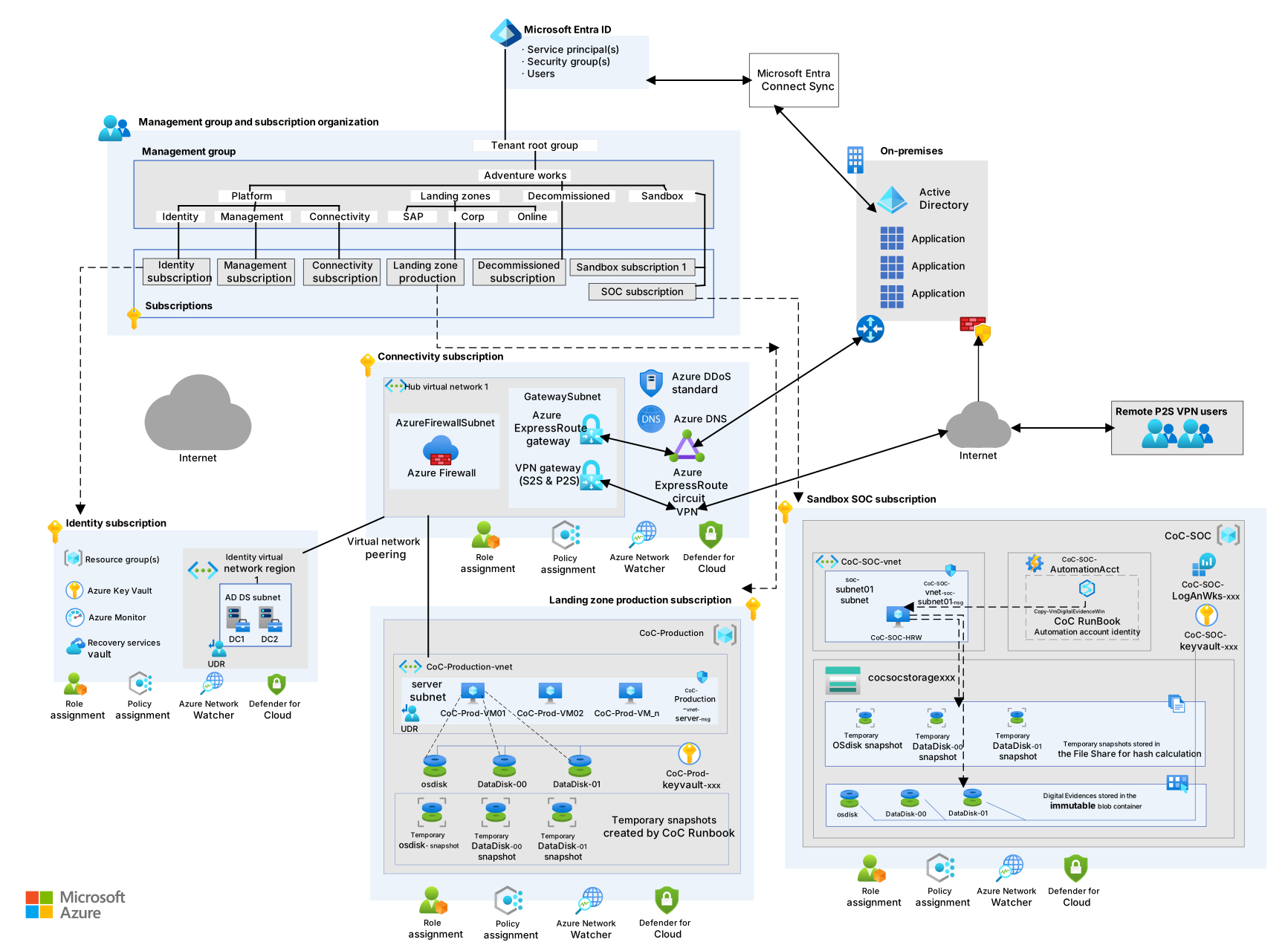
Download a Visio file of this architecture.
Workflow
In the architecture, the production virtual machines (VMs) are part of a spoke Azure virtual network. The VM disks are encrypted via encryption at host by using platform-managed keys. For more information, see Overview of managed disk encryption options.
Note
This architecture assumes encryption at host via platform-managed keys.
If encryption at host doesn't meet your requirements, you can use an OS-level encryption solution, such as BitLocker on Windows or dm-crypt on Linux. These encryption implementations are specific to each environment and aren't described in this article. Evaluate your requirements to determine the appropriate approach.
The security operations center (SOC) team uses a discrete Azure SOC subscription. The team has exclusive access to that subscription, which contains the resources that must be kept protected, inviolable, and monitored. The Azure Storage account in the SOC subscription hosts copies of disk snapshots in immutable blob storage. A dedicated key vault stores copies of the hash values of the snapshots.
In response to a request to capture the digital evidence of a VM, a member of the SOC team signs in to the Azure SOC subscription and uses an Azure hybrid runbook worker VM from Azure Automation to run the Copy-VmDigitalEvidence runbook. The Automation hybrid runbook worker provides control of all mechanisms included in the capture.
The Copy-VmDigitalEvidence runbook implements the following macro steps:
Use the system-assigned managed identity for an Automation account to sign in to Azure. This identity grants access to the target VM's resources and the other Azure services needed for the solution.
Generate disk snapshots of the VM's operating system (OS) and data disks.
Transfer the snapshots to both the SOC subscription's immutable blob storage and a temporary file share.
Compute the hash values of the snapshots by using the copy that's stored in the file share.
Store the obtained hash values in the SOC key vault.
Remove all the copies of the snapshots, except for the copy in immutable blob storage.
Components
Azure Automation is a cloud-based service that automates operational tasks by using runbooks and scripts. In this architecture, it orchestrates the evidence capture process by running the
Copy-VmDigitalEvidencerunbook to snapshot and transfer VM disks securely. This process helps ensure evidence integrity.Azure Storage is a scalable cloud storage solution for various data types, including object, file, disk, queue, and table storage. In this architecture, it stores VM disk snapshots in immutable blob containers to preserve digital evidence in a tamper-proof format.
Azure Blob Storage is a cloud-based solution that provides object storage optimized for unstructured data. In this architecture, it holds the immutable snapshots of VM disks to ensure the integrity and nonrepudiation of digital evidence.
Azure Files is a fully managed cloud file storage service that provides shared file systems that can be accessed via the industry-standard Server Message Block (SMB) protocol, the Network File System (NFS) protocol, and the Azure Files REST API. You can concurrently mount shares through cloud or on-premises deployments of Windows, Linux, and macOS. You can also cache file shares on Windows Server by using Azure File Sync for quick access near the data usage location. In this architecture, Azure Files temporarily stores disk snapshots to compute hash values before transferring them to immutable storage.
Key Vault is a secure cloud service for managing secrets, encryption keys, and certificates. In this architecture, it stores hash values of disk snapshots to verify the integrity of digital evidence.
Microsoft Entra ID is a cloud-based identity service that helps you control access to Azure and other cloud apps. In this architecture, it ensures that only authorized SOC personnel can access and manage sensitive evidence-handling operations.
Azure Monitor is a monitoring service that provides observability through metrics, logs, and alerts. It supports operations at scale by helping you maximize the performance and availability of your resources, while proactively identifying potential problems. In this architecture, it archives activity logs to support auditing, compliance, and monitoring of the evidence chain of custody.
Automation
The SOC team uses an Automation account to create and maintain the Copy-VmDigitalEvidence runbook. The team also uses Automation to create the hybrid runbook workers that implement the runbook.
Hybrid runbook worker
The hybrid runbook worker VM is integrated into the Automation account. The SOC team uses this VM exclusively to run the Copy-VmDigitalEvidence runbook.
You must place the hybrid runbook worker VM in a subnet that can access the Storage account. Configure access to the Storage account by adding the hybrid runbook worker VM subnet to the Storage account's firewall allow list rules.
Grant access to this VM only to the SOC team members for maintenance activities.
To isolate the virtual network that the VM uses, avoid connecting the virtual network to the hub.
The hybrid runbook worker uses the Automation system-assigned managed identity to access the target VM's resources and the other Azure services that the solution requires.
The minimum Azure role-based access control (Azure RBAC) permissions required for a system-assigned managed identity are divided into two categories:
- Access permissions to the SOC Azure architecture that contains the solution core components
- Access permissions to the target architecture that contains the target VM resources
Access to the SOC Azure architecture includes the following roles:
- Storage Account Contributor on the SOC immutable Storage account
- Key Vault Secrets Officer on the SOC key vault for hash-value management
Access to the target architecture includes the Contributor role on the target VM's resource group, which provides snapshot rights on VM disks.
Storage account
The Storage account in the SOC subscription hosts the disk snapshots in a container that's configured with a legal hold policy as Azure immutable blob storage. Immutable blob storage stores business-critical data objects in a write once, read many (WORM) state. The WORM state makes the data nonerasable and uneditable for a user-specified interval.
Make sure that you enable the secure transfer and storage firewall properties. The firewall grants access only from the SOC virtual network.
The storage account also hosts an Azure file share as a temporary repository that's used to calculate the snapshot's hash value.
Key Vault
The SOC subscription has its own instance of Key Vault, which stores the hash values of disk snapshots that the hybrid runbook worker computes during capture operations.
Ensure that the firewall is enabled on the key vault. It must grant access exclusively from the SOC virtual network.
Log Analytics
A Log Analytics workspace stores activity logs used to audit all relevant events on the SOC subscription. Log Analytics is a feature of Monitor.
Scenario details
Digital forensics is a science that addresses the recovery and investigation of digital data to support criminal investigations or civil proceedings. Computer forensics is a branch of digital forensics that captures and analyzes data from computers, VMs, and digital storage media.
Companies must guarantee that the digital evidence they provide in response to legal requests demonstrates a valid chain of custody throughout the stages of evidence acquisition, preservation, and access.
Potential use cases
A company's SOC team can implement this technical solution to support a valid chain of custody for digital evidence.
Investigators can attach disk copies that are obtained by using this technique on a computer that's dedicated to forensic analysis. They can attach the disk copies without powering on or accessing the original source VM.
Chain of custody regulatory compliance
If it's necessary to submit the proposed solution to a regulatory compliance validation process, consider the materials in the considerations section during the chain of custody solution validation process.
Note
You should include your legal department in the validation process.
Considerations
These considerations implement the pillars of the Azure Well-Architected Framework, which is a set of guiding tenets that you can use to improve the quality of a workload. For more information, see Well-Architected Framework.
The principles that validate this solution as a chain of custody are described in this section. To help ensure a valid chain of custody, digital evidence storage must demonstrate adequate access control, data protection and integrity, monitoring and alerting, and logging and auditing.
Security
Security provides assurances against deliberate attacks and the misuse of your valuable data and systems. For more information, see Design review checklist for Security.
Compliance with security standards and regulations
When you validate a chain of custody solution, one of the requirements to evaluate is the compliance with security standards and regulations.
All the components included in the architecture are Azure standard services built on a foundation that supports trust, security, and compliance.
Azure has a wide range of compliance certifications, including certifications tailored to countries or regions, and for key industries like healthcare, government, finance, and education.
For more information about updated audit reports that detail standards compliance for the services used in this solution, see Service Trust Portal.
Cohasset's Azure Storage compliance assessment provides details about the following requirements:
Securities and Exchange Commission (SEC) in 17 CFR § 240.17a-4(f), which regulates exchange members, brokers, or dealers.
Financial Industry Regulatory Authority (FINRA) Rule 4511(c), which defers to the format and media requirements of SEC Rule 17a-4(f).
Commodity Futures Trading Commission (CFTC) in regulation 17 CFR § 1.31(c)-(d), which regulates commodity futures trading.
It's Cohasset's opinion that Azure Storage, with the immutable storage feature of Blob Storage and policy lock option, retains time-based blobs (or records) in a nonerasable and nonrewriteable format and meets relevant storage requirements of SEC Rule 17a-4(f), FINRA Rule 4511(c), and the principles-based requirements of CFTC Rule 1.31(c)-(d).
Least privilege
When the roles of the SOC team are assigned, only two individuals in the team, known as SOC team custodians, should have rights to modify the Azure RBAC configuration of the subscription and its data. Grant other individuals only bare minimum access rights to data subsets that they need to perform their work.
Least access
Only the virtual network in the SOC subscription has access to the SOC Storage account and key vault that archives the evidence. Authorized SOC team members can grant investigators temporary access to evidence in the SOC storage.
OS disk requirements
The production VMs that are subject to forensic capture must use persistent managed OS disks. Don't use ephemeral OS disks on VMs where digital evidence collection is required. Ephemeral OS disks are stored only on the local VM host and don't support disk snapshots. Because the snapshot-based evidence capture workflow depends on the ability to create and transfer point-in-time snapshots of OS and data disks, ephemeral OS disks are incompatible with this chain of custody process.
Evidence acquisition
Azure audit logs can document the evidence acquisition by recording the action of taking a VM disk snapshot. The logs include details such as who takes the snapshots and when they're taken.
Evidence integrity
Use Automation to move evidence to its final archive destination, without human intervention. This approach helps guarantee that evidence artifacts remain unaltered.
When you apply a legal hold policy to the destination storage, the evidence is immediately frozen as soon as it's written. A legal hold demonstrates that the chain of custody is fully maintained within Azure. It also indicates that there's no opportunity to tamper with the evidence from the time the disk images are on a live VM to when they're stored as evidence in the storage account.
Lastly, you can use the provided solution as an integrity mechanism to compute the hash values of the disk images. The supported hash algorithms are MD5, SHA256, SKEIN, and KECCAK (or SHA3).
Evidence production
Investigators need access to evidence so that they can perform analyses. This access must be tracked and explicitly authorized.
Provide investigators with a shared access signatures (SAS) uniform resource identifier (URI) storage key for accessing evidence. A SAS URI can generate relevant log information when it's created. You can obtain a copy of the evidence each time the SAS is used.
For example, if a legal team needs to transfer a preserved virtual hard drive, one of the two SOC team custodians generates a read-only SAS URI key that expires after eight hours. The SAS restricts access to the investigators within a specified time frame.
The SOC team must explicitly place the IP addresses of investigators that require access on an allow list in the Storage firewall.
Regional store
For compliance, some standards or regulations require evidence and the supporting infrastructure to be maintained in the same Azure region.
All the solution components, including the Storage account that archives evidence, are hosted in the same Azure region as the systems being investigated.
Cost Optimization
Cost Optimization focuses on ways to reduce unnecessary expenses and improve operational efficiencies. For more information, see Design review checklist for Cost Optimization.
This architecture has a mix of fixed-cost and variable-cost components. The fixed-cost components run continuously and regardless of investigation frequency. The variable-cost components scale with the volume and size of forensic captures.
Fixed-cost components
The following components incur ongoing costs whether or not you perform evidence captures:
Hybrid runbook worker VM: This VM runs continuously in the SOC subscription so that it's available for on-demand evidence capture. The VM size is the primary cost lever. Evidence capture isn't compute intensive except for hash computation, so use a small general-purpose VM, such as a Standard_D2s_v5. To reduce the cost of this VM, consider Azure reservations or savings plans for a one-year or three-year contract.
Azure Automation account: The Automation account that hosts the
Copy-VmDigitalEvidencerunbook and the hybrid worker configuration has a small baseline cost.Key Vault: The SOC key vault stores hash values as secrets. The cost per secret operation is nominal, and the overall Key Vault cost is minimal for this workload.
Variable-cost components
The following components scale with the number of investigations and the size of captured evidence:
Azure Storage (immutable blob storage): Storage is the primary variable cost in this architecture. Each forensic capture generates full disk snapshots of the target VM's OS and data disks, which can range from tens to hundreds of GB per VM. Storage costs are cumulative because you can't delete snapshots that have a legal hold policy applied. The size of a snapshot increases with each investigation and with the number and the size of disks in each VM. To manage storage costs, evaluate the access tier for retained snapshots. Snapshots that you rarely access after initial hash verification can benefit from the Cool or Cold tier, which offers lower storage rates in exchange for higher access costs.
Azure Files: The temporary file share that computes hash values incurs a cost only for the duration that the snapshot data is present. The runbook removes this data after hash computation, so the cost is transient and proportional to snapshot size.
Log Analytics workspace: Log Analytics ingestion costs increase with the number of operations that you perform in the SOC subscription. More frequent evidence captures and more active monitoring generate more log data. Configure data retention policies to match your compliance requirements and avoid unnecessary data retention.
Cost estimation
To estimate the cost of this architecture for your workload, use the Azure pricing calculator. Configure the following components based on your expected investigation volume and VM disk sizes:
- One general-purpose VM, for example Standard_D2s_v5, for the hybrid runbook worker
- Azure Blob Storage with the appropriate access tier and estimated total snapshot volume
- Azure Files with the Standard tier for transient usage
- Key Vault with the Standard tier
- Azure Automation job runs based on expected capture frequency
- Log Analytics with estimated ingestion volume
Operational Excellence
Operational Excellence covers the operations processes that deploy an application and keep it running in production. For more information, see Design review checklist for Operational Excellence.
Monitoring and alerting
Azure provides services to all customers for monitoring and alerting about anomalies related to their subscriptions and resources. These services include:
Note
The configuration of these services isn't described in this article.
Deploy this scenario
Follow the chain of custody lab deployment instructions to build and deploy this scenario in a laboratory environment.
The laboratory environment represents a simplified version of the architecture described in this article. You deploy two resource groups within the same subscription. The first resource group simulates the production environment, housing digital evidence, while the second resource group holds the SOC environment.
Select Deploy to Azure to deploy only the SOC resource group in a production environment.

Note
If you deploy the solution in a production environment, make sure that the system-assigned managed identity of the Automation account has Contributor permissions in the production resource group of the target VM. The Contributor role creates snapshots.
Extended configuration
You can deploy a hybrid runbook worker on-premises or in different cloud environments.
In this scenario, you must customize the Copy‑VmDigitalEvidence runbook to enable the capture of evidence in different target environments and archive them in storage.
Note
The Copy-VmDigitalEvidence runbook provided in the Deploy this scenario section was developed and tested only in Azure. To extend the solution to other platforms, you must customize the runbook to work with those platforms. If you enable the key vault firewall, allow the hybrid runbook worker VM's public IP address.
Contributors
Microsoft maintains this article. The following contributors wrote this article.
Principal authors:
- Fabio Masciotra | Principal Consultant
- Simone Savi | Senior Consultant
To see nonpublic LinkedIn profiles, sign in to LinkedIn.
Next steps
For more information about Azure data-protection features, see:
- Storage encryption for data at rest
- Overview of managed disk encryption options
- Store business-critical blob data with immutable storage in a WORM state
For more information about Azure logging and auditing features, see:
- Azure security logging and auditing
- Storage analytics logging
- Send Azure resource logs to Log Analytics workspaces, Event Hubs, or Storage
For more information about Microsoft Azure compliance, see: