Note
Access to this page requires authorization. You can try signing in or changing directories.
Access to this page requires authorization. You can try changing directories.
Foundry Models provides access to foundation models and agentic AI capabilities for building AI-powered applications. This guide describes key Foundry Models features that support multitenant applications, including many types of software as a service (SaaS) solutions. The article helps you plan an appropriate multitenant deployment approach based on isolation, scale, and operational constraints.
Isolation approaches
To design a multitenant system that uses Foundry Models, you must first determine the level of isolation your tenants require. Isolation decisions directly affect security posture, operational complexity, quota utilization, and cost efficiency. In Microsoft Foundry-based architectures, configure isolation by using Azure subscription and resource group boundaries, and by structuring Foundry resources, projects, and model deployments.
Note
Most documentation refers to these patterns as isolation models, but to avoid confusion with AI models, this article uses the equivalent term isolation approaches instead.
Many use cases treat AI models as stateless components, and you can use Foundry Models without a persistence layer. Persistence introduces added complexities for multitenant solutions, such as segregating each tenant's data. If you use Foundry Models in a stateless way, you can avoid some of these complexities. However, other components of your solution, like Foundry Agent Service, might introduce state that you need to manage.
For Foundry Models, design your isolation approach based on the following factors:
The number of tenants you plan to support. If the number of tenants is small, dedicated deployments can be easy to manage. A large number of tenants increases the operational complexity of dedicated deployment solutions.
Tenants' compliance or regulatory requirements. Strict compliance requirements might demand strong isolation. Select a deployment type whose global, data zone, or geography-based processing boundary meets each tenant's requirements. Use separate model deployments if tenants require different processing boundaries.
A dedicated subscription or Foundry resource alone doesn't constrain where inference processing occurs. For all deployment types, data at rest remains in the designated Azure geography.
Tenants' requirements for specific models, model versions, or model lifecycles. To simplify your operational processes, try to limit the number of models in use at one time. However, you might need to deploy more models if tenants must use specific model versions or tenant-specific fine-tuned models.
Variance between tenants. If tenant workload scale or throughput requirements vary significantly, you might need to group tenants into sets that have similar characteristics.
These considerations are especially important for SaaS platforms that serve hundreds or thousands of customers from shared infrastructure.
Note
When you design your architecture, take quotas and limits for Foundry Models and Azure OpenAI in Foundry Models into account.
Compare isolation approaches
The following table summarizes isolation characteristics of common Foundry Models deployment approaches for multitenant SaaS systems.
Note
This comparison focuses on tenant isolation at the Foundry resource, project, and model deployment levels. If you use other Foundry components, like Foundry Agent Service, the considerations might vary.
| Consideration | Dedicated Foundry resource per tenant (separate subscriptions) | Dedicated Foundry resource per tenant (shared subscription) | Shared Foundry resource with dedicated project and deployment per tenant | Shared Foundry resource with shared deployment | Tenant-provided Foundry resource |
|---|---|---|---|---|---|
| Data isolation | High | High | Medium | Low to medium | High |
| Performance isolation | High | Medium to high, depending on subscription quota usage | Medium, depending on per-tenant throttling and deployment design | Low to medium, depending on token-per-minute usage per tenant | High |
| Deployment complexity | Medium to high, increasing with number of tenants | Medium | Medium | Low | Not applicable, customer-managed |
| Operational complexity | Low per tenant, high at scale | Medium | Medium | Low | Low for provider, medium to high for tenant |
| Example scenario | Regulated enterprise tenants that require separate subscription and quota boundaries | Enterprise SaaS that requires tenant-specific network and role-based access control (RBAC) boundaries | SaaS with tenant-specific model versions, guardrails, or throughput allocations | Business-to-consumer (B2C) SaaS where all customers use the same model deployment | Tenants that host fine-tuned models in their Azure environments |
The following sections describe these approaches in more detail.
Dedicated Foundry resource per tenant (separate subscriptions)
In this isolation approach, the service provider assigns each tenant a dedicated Azure subscription in the service provider's Microsoft Entra tenant. Each subscription contains a single Microsoft Foundry resource for that tenant, along with tenant-specific projects and model deployments.
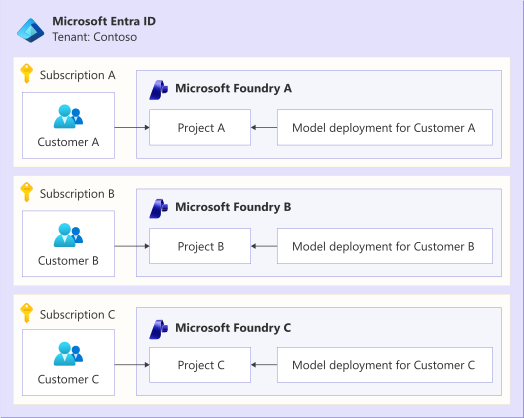
The diagram shows the Microsoft Entra ID tenant for Contoso and has three horizontal rows for Subscriptions A, B, and C. Each row has a customer on the left and a Microsoft Foundry resource on the right. Each Foundry resource contains a project and a model deployment. An arrow points from each customer to the project in its Foundry resource, and another arrow points from each model deployment to the project in its Foundry resource. Subscription A contains Customer A and Microsoft Foundry A with Project A and Model deployment for Customer A. Subscription B contains Customer B and Microsoft Foundry B with Project B and Model deployment for Customer B. Subscription C contains Customer C and Microsoft Foundry C with Project C and Model deployment for Customer C.
This approach provides the strongest isolation because administrative boundaries, quotas, and monitoring are fully separated between tenants. It minimizes the risk of cross-tenant interference and simplifies compliance for customers that require strict separation. Because many Azure quotas apply at the Azure subscription scope, this approach ensures that each tenant draws from its own quotas.
However, the operational overhead for this approach increases significantly as the number of tenants grows. Each tenant requires independent subscription provisioning, Foundry resource provisioning, quota management, monitoring, and lifecycle management. Deployment can be complex, especially if you use continuous integration and continuous delivery (CI/CD) pipelines instead of dynamic deployment through a custom control plane. This approach is difficult to operate efficiently at SaaS scale.
Separate subscriptions are most appropriate for strictly regulated tenants that require isolated resources. Because of the operational complexity, this approach works best with a small number of large tenants that explicitly require dedicated infrastructure and are willing to accept higher onboarding and operational costs to achieve stronger isolation.
Dedicated Foundry resource per tenant (shared subscription)
In this approach, multiple tenants share a single Azure subscription, and each tenant gets a dedicated Microsoft Foundry resource within that subscription.
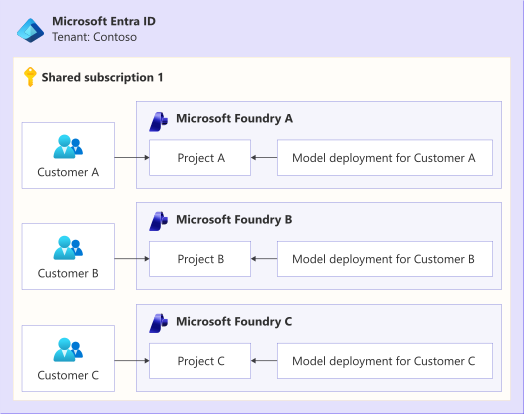
The diagram shows the Microsoft Entra ID tenant for Contoso and contains a box for Shared subscription 1. Inside the box are three horizontal rows, each with a customer on the left and a Microsoft Foundry resource on the right. Each Foundry resource contains a project and a model deployment. An arrow points from each customer to the project in its corresponding Foundry resource, and another arrow points from each model deployment to the project in its Foundry resource. Customer A and Model deployment for Customer A point to Project A in Foundry resource A. Customer B and Model deployment for Customer B point to Project B in Foundry resource B. Customer C and Model deployment for Customer C point to Project C in Foundry resource C.
This approach reduces the number of Azure subscriptions while maintaining strong logical isolation at the Foundry resource level, and enables both authorization-level and network-level isolation for each Foundry resource.
This isolation approach significantly reduces the number of subscriptions that you must manage, but depending on how you enforce Foundry capacity, tenants might still compete for shared subscription-level quotas. Cost allocation and governance are also complex, because you must attribute usage across multiple Foundry resources within the same subscription.
Foundry resource limits apply per Azure subscription and region. If you might exceed those limits, consider deploying across multiple subscriptions or regions by using bin packing.
This approach is commonly used for SaaS platforms that require strong logical separation but don't require full subscription isolation for each tenant.
Shared Foundry resource with a dedicated project and deployment per tenant
In this isolation approach, many tenants share a single Foundry resource. You assign each tenant a dedicated Foundry project and a dedicated model deployment within the shared resource. Projects scope configuration, tools, and connections, while deployments enable per-tenant control over model versions, policies, and throughput.
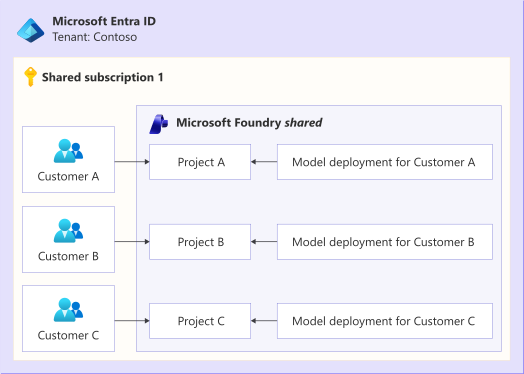
The diagram shows the Microsoft Entra ID tenant for Contoso and contains a box for Shared subscription 1. Inside the box are three customer boxes on the left, and one Microsoft Foundry shared resource box on the right. The Foundry resource contains three projects and corresponding Model deployments. An arrow points from each customer to its corresponding project box in the Foundry resource, and another arrow points from each model deployment to its corresponding project in the Foundry resource. Customer A and Model deployment for Customer A point to Project A in the Foundry resource. Customer B and Model deployment for Customer B point to Project B in the Foundry resource. Customer C and Model deployment for Customer C point to Project C in the Foundry resource.
This approach significantly reduces resource deployment overhead and enables centralized management while preserving strong logical separation. However, all tenants ultimately share the same Foundry resource and underlying capacity.
If you use this approach, you must design tenant-aware routing, throttling, and monitoring. Any isolation guarantees are your responsibility, and they rely heavily on correct configuration and strict enforcement in your application layer. You can't provide network-level isolation by using this approach.
Project and model-deployment limits apply per Foundry resource. Review the current Foundry Models quotas and limits when you calculate tenant density, and distribute tenants across additional Foundry resources or subscriptions before they approach a limit.
This approach provides a good balance for medium-scale SaaS deployments if you rigorously use automation, governance, noisy neighbor mitigations, and tenant isolation approaches. For larger-scale deployments, consider deploying across multiple Foundry resources or Azure subscriptions by using bin packing.
Shared Foundry resource with a shared deployment
In the most centralized approach, all tenants share a single Foundry resource and a single model deployment.
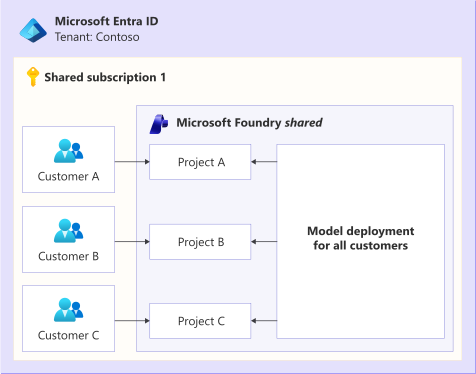
The diagram shows the Microsoft Entra ID tenant for Contoso and contains a box for Shared subscription 1. Inside the box are three stacked customer boxes on the left, and one Microsoft Foundry shared resource box on the right. The Foundry resource contains three stacked projects on the left and one model deployment for all customers on the right. An arrow points from each customer to its corresponding project box in the Foundry resource, and an arrow points from the shared model deployment to each project in the Foundry resource. Customer A points to Project A in the Foundry resource. Customer B points to Project B in the Foundry resource. Customer C points to Project C in the Foundry resource.
This approach minimizes infrastructure complexity and cost, but provides the weakest isolation guarantees.
All tenant requests route through the same deployment endpoint, and the application layer must entirely enforce any isolation. Isolation requirements can include tenant-aware authorization, request scoping, data separation, and rate limiting. Because all tenants share the same inference pipeline, this approach might be unsuitable for workloads that involve sensitive data or strict compliance requirements.
Model deployments belong to the Foundry resource, not to individual projects, and projects can reuse deployments from that resource. Tenants can have dedicated Foundry projects, as shown in the preceding diagram, or can use a single shared project if they don't need to deploy tenant-specific project assets into Foundry.
This approach suits business-to-business (B2B) and business-to-consumer (B2C) SaaS applications where tenants share the same model deployment, deployment configuration, and compliance requirements, and the application enforces tenant isolation. It also suits internal tools, proof-of-concept solutions, and applications whose users share an organizational trust boundary. Use a more isolated approach when tenants require separate model versions, guardrails, throughput, network boundaries, data residency, or compliance controls.
Tenant-provided Foundry resource
In this approach, each tenant provides its own Foundry resource and Azure environment. The tenant provisions and manages the resource directly. The service provider can also deploy the resource after being granted access to the tenant's subscription.
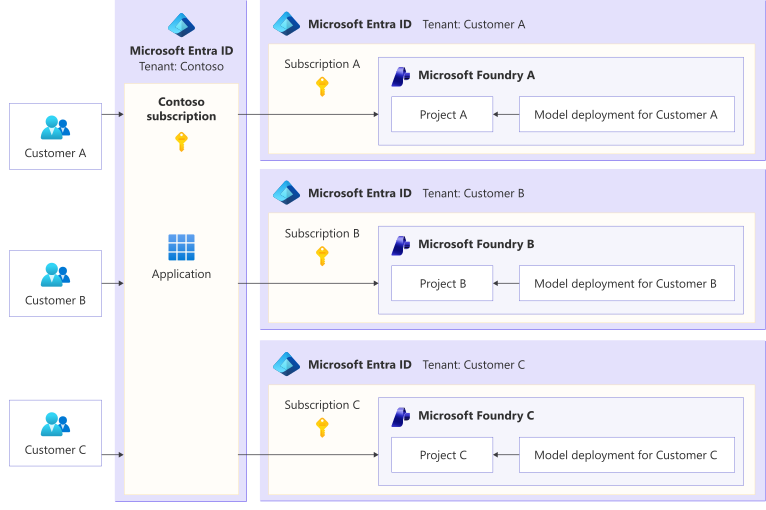
The diagram shows Customer A, Customer B, and Customer C on the left, all connecting to a Microsoft Entra ID box for the Contoso service provider tenant. The box contains a Contoso subscription and a shared application. Three horizontal arrows point from the application box to three separate Microsoft Entra ID environments, each containing a Microsoft Foundry resource. Each Microsoft Foundry resource contains a project and a model deployment pointing to that project. The top Customer A tenant contains Subscription A and Microsoft Foundry A with Project A and a model deployment for Customer A. The middle Customer B tenant contains Subscription B and Microsoft Foundry B with Project B and a model deployment for Customer B. The bottom Customer C tenant contains Subscription C and Microsoft Foundry C with Project C and a model deployment for Customer C.
Consider this approach when any of the following situations apply:
- Tenants require specific model access, quota allocations, guardrail configurations, or provisioned throughput that must remain under their control.
- Tenants need to use fine-tuned models that are hosted in their own environments.
- Tenants require data to remain within their environment while still allowing the provider's application to invoke the tenant's Foundry model deployments or other Foundry components.
This approach provides strong data and performance isolation, because each tenant uses its own Foundry resource and quota allocation. However, it also creates a shared operating arrangement between the provider and the tenant. To avoid ownership gaps, both parties should clearly define responsibilities for provisioning, monitoring, support, security, and cost management.
The service provider must also design its application to access the Foundry resource in the tenant's environment. One option is to publish a multitenant Microsoft Entra application. Another option is for the tenant to create a service principal that the provider can use.
The latter approach increases the provider's credential management burden. If you use tenant-specific credentials, be sure to securely implement credential storage, rotation, and revocation.
Validate tenant isolation
Regardless of the isolation approach you select, validate your isolation boundary with tests that don't depend on model behavior. For example, verify the following scenarios by using a combination of model evaluations and deterministic tests.
- Your application or data layer should reject a request that's authenticated as tenant A but references a response, conversation, or session from tenant B.
- Similar prompts from tenant A or tenant B should never return cached responses from the other tenant.
- Requests passed to a tool or another agent should derive the tenant identifier from the authenticated identity, not from model output or request content.
If a cross-tenant test passes only because the model refused to answer, treat it as a failure, because the other tenant's data already reached the model. Because model behavior is nondeterministic, run these tests repeatedly and include them in your release process.
Features of Foundry Models that support multitenancy
It's important to plan for tenant isolation when you use specific Foundry Models features.
Responses API
The Azure OpenAI Responses API within Foundry Models unifies several separate concerns behind a single interface. These concerns include conversation history, tool invocation, file search, structured outputs, and long-running background tasks. The Responses API supports both stored and stateless operations. The API retains stored response data for a defined period, and you can also delete the data explicitly.
Each call returns a response identifier, and you chain turns by passing that response identifier to the next request, or by attaching responses to a stateful conversation object that the service manages on your behalf. Because state resides on the service rather than in your application, you get continuity across turns, but you also inherit the multitenancy obligations that come with shared stateful storage.
When you use the Responses API in a multitenant solution, the application is responsible for tenant isolation. The service doesn't partition stored state by tenant on your behalf, so you must scope and validate every reference to stored responses and conversations. For tenants that operate at high scale, or that have strict isolation or data residency requirements, move conversation state to an external data store that you control rather than relying on service-managed state.
Copying state to your own store doesn't prevent the service from retaining its copy, so disable state storage on these requests and pass the conversation history from your store on each turn. Background mode requires stateful storage, so you can't use it with this approach. For stateful multitenant workloads that need stronger isolation controls, evaluate the Foundry Agent Service.
If you use Responses API in Foundry Models within a multitenant solution, apply the following best practices:
Store responses and conversation IDs with tenant-scoped keys in your own database, and rigorously validate that a request from tenant A can never reference an ID created for tenant B.
Ensure that function calls from your application include the tenant ID. Validate the tenant ID server-side. Don't trust the model to propagate it.
Code Interpreter runs on Microsoft-managed infrastructure, so where isolation matters, use dedicated Code Interpreter containers per tenant.
Remote Model Context Protocol (MCP) calls connect to the configured remote MCP server, so where isolation matters, use dedicated remote MCP tool configurations per tenant.
Scope retrieval tools to a single tenant per vector store, or apply a verified tenant filter on every shared-store query.
Important
Always use deterministic code to manipulate, validate, enforce, and distribute tenant identifiers and other authentication and authorization parameters. Never rely on models to perform these operations.
Foundry Agent Service
Foundry Agent Service is a sibling to Foundry Models for building stateful, agentic workloads. It adds a persistence layer for agents, conversations, and responses, and it supports capabilities like routines and long-running autonomous workflows. These stateful, long-running characteristics add multitenancy complexity beyond stateless model inference.
For hosted agents, Agent Service isolates conversations, sessions, and stored data by the caller's Microsoft Entra identity. If your application authenticates its own users, a trusted middle tier can pass a stable, server-derived, tenant-scoped user identifier. The service associates sessions with this delegated identity, but your application is wholly responsible for managing user separation.
Keep session identifiers scoped to the correct tenant and user, and enforce tenant-aware authorization for tools, data stores, and agent actions. For more information, see Isolate hosted agent sessions per user.
Hosted agents have limited customer-managed key (CMK) coverage for encryption keys. Before you use hosted agents for tenants that require customer-controlled encryption keys, review the current CMK coverage for Microsoft Foundry.
AI gateway in Azure API Management
An AI gateway is an intermediary between your application and your Foundry Models endpoints. In a multitenant solution, it can centralize cross-cutting concerns such as authentication, rate limiting, routing, caching, and observability. Each tenant's traffic is governed consistently before it reaches a model deployment. The gateway is a natural place to enforce per-tenant limits, attribute usage and cost to each tenant, and prevent any tenant from consuming capacity that other tenants need.
Azure API Management provides AI gateway capabilities through its inbound and outbound policy system, including large language model (LLM)-aware policies, token metering, semantic caching, and back-end routing. You use these policies to turn a shared Foundry Models endpoint into a tenant-aware, metered, and governed API surface.
When you design a multitenant API Management deployment with Foundry Models, the most important consideration is identifying the tenant. Use the tenant identifier consistently across your policies to scope every limit, metric, and cache entry to a single tenant. Derive the tenant identifier from a trusted source, such as:
- A validated JSON Web Token (JWT) claim.
- The API Management subscription ID, if each subscription maps to a single tenant. Don't use the subscription key value itself, because it's a secret credential that changes when you rotate keys.
Don't accept a tenant identifier that the client supplies directly.
Apply the tenant identifier in the following policies:
Token limit: Use the tenant identifier as the
counter-keyin thellm-token-limitpolicy to enforce per-tenant tokens-per-minute caps and token quotas. The policy can precalculate prompt tokens at the gateway and reject requests that exceed a tenant's limit before they reach the back end. This approach mitigates the noisy neighbor problem.Token counters don't aggregate across the whole instance. Each gateway, region, or workspace tracks usage independently. If you need a consistent per-tenant request or bandwidth limit across regions in one API Management instance, use the
quotaorquota-by-keypolicy. For globally consistent token limits, enforce the limit at a single upstream gateway that receives all traffic, or route each tenant to a designated single gateway or region.Token metrics: Add the tenant identifier as a custom dimension in the
llm-emit-token-metricpolicy, but ensure that your tenant population fits within the custom metric limits. The policy silently discards dimension values and time series that exceed the limit.Use token metrics for approximate cost showback only when you have a small number of tenants to track. For larger tenant populations, aggregate LLM API logs by API Management subscription ID when subscriptions map to tenants. Otherwise, send token usage and the validated tenant identifier to another durable metering pipeline.
Semantic cache: Use the tenant identifier as a
vary-byvalue in thellm-semantic-cache-lookuppolicy, so that a cached response generated for one tenant isn't served to another tenant. Use additionalvary-byvalues for relevant model, prompt, tool, and safety-policy versions, and set the cache lifetime based on how quickly the underlying information changes. Because semantic caching matches by similarity, it can return responses that are incorrect, outdated, or unsafe for the current request. Don't use it for highly personalized, regulated, safety-critical, or time-sensitive interactions, or for interactions that depend on tool or transaction side effects.Caution
Failing to partition the cache appropriately is a common mistake in multitenant AI gateway design.
Back-end routing: Use the tenant identifier in routing policies to select back-end pools that use priority- or weight-based load balancing and circuit breakers for each back end. For example, route premium tenants to provisioned deployments that use provisioned throughput units (PTUs), route other tenants to pay-as-you-go deployments, and route tenants with data-processing location requirements to geography-based or data zone-specific deployments.
Content safety: Use the
llm-content-safetypolicy to enforce tenant-appropriate harm thresholds and block lists. Enable theshield-promptattribute to check user inputs for prompt attacks, and validate model outputs by using theenforce-on-completionsattribute or an outbound policy.Auditing: If your tenants permit it, log prompts and completions to Azure Monitor and include the tenant identifier so that you can produce per-tenant audit feeds. Prompts and completions contain sensitive data, so prefer token and request metadata for routine per-tenant audit feeds.
The gateway governs traffic at the perimeter. It doesn't isolate tenant data inside your Foundry resources. Per-tenant deployments, projects, indexes, and prompt construction remain part of your isolation boundary, as described in the preceding isolation approaches. For more information, see AI gateway capabilities in Azure API Management and Baseline Microsoft Foundry chat reference architecture.
Contributors
Microsoft maintains this article. The following contributors wrote this article.
Principal authors:
- Rodanthi Alexiou | Partner Solution Architect
- Kiko de Angel Gimeno | Senior Partner Solution Architect
- John Downs | Principal Software Engineer, Azure Patterns & Practices
- Jing Liu | Partner Technology Strategist
- Ellie Nosrat | Principal Partner Solution Architect
Other contributors:
- Daphne Choong | Senior Partner Solution Architect, Enterprise Partner Solutions
- Mamoru Kuroda | Partner Solution Architect
- Kodai Sakabe | Partner Solution Architect, Enterprise Partner Solutions
- Daniel Scott-Raynsford | Partner Solution Architect, Data & AI
To see nonpublic LinkedIn profiles, sign in to LinkedIn.