Note
Access to this page requires authorization. You can try signing in or changing directories.
Access to this page requires authorization. You can try changing directories.
Microsoft Defender for Office 365
Microsoft Defender for Cloud Apps
Microsoft Defender for Identity
Microsoft 365
Microsoft Endpoint Manager
Solution ideas
This article describes a solution idea. Your cloud architect can use this guidance to help visualize the major components for a typical implementation of this architecture. Use this article as a starting point to design a well-architected solution that aligns with your workload's specific requirements.
This article is the third in a four-part series that demonstrates how you can layer Microsoft security solutions to protect an enterprise environment against modern threats like ransomware.
Map threats to your IT environment, the first article in the series, describes how to map ransomware attack paths across a hybrid environment by using the MITRE ATT&CK framework. It also helps you identify how attackers typically gain initial access, escalate privileges, move laterally, and affect critical assets.
Build the first layer of defense by using Azure security services, the second article in the series, focuses on the first layer of defense, before attackers breach your environment. It describes how foundational Azure security services and Zero Trust principles reduce the attack surface and prevent many attacks from the start.
This article builds on these foundational security approaches and introduces the second layer of defense. This layer applies detection and response mechanisms that you implement by using Microsoft Defender XDR.
Even in well-architected environments, some attacks bypass preventive controls. The purpose of a second layer of defense is to detect malicious activity early, correlate signals across domains, and enable rapid containment and response before an attack can escalate into a ransomware incident.
Defender XDR provides a unified detection and response layer that correlates security signals across identities, endpoints, email, cloud applications, and infrastructure to detect and contain advanced threats that bypass preventive controls.
Architecture
This architecture shows a hybrid enterprise environment composed of on-premises infrastructure, Microsoft 365 services, Azure workloads, and user endpoints. Defender XDR sits logically above these layers and collects telemetry from Microsoft Defender for Endpoint, Microsoft Defender for Identity, Microsoft Defender for Office 365, Microsoft Defender for Cloud Apps, and Microsoft Defender Vulnerability Management. It correlates signals into unified incidents so that you can automate investigation and response actions. Integration with Microsoft Sentinel provides centralized security information and event management (SIEM) and security orchestration, automation, and response (SOAR) capabilities for extended analytics and orchestration.
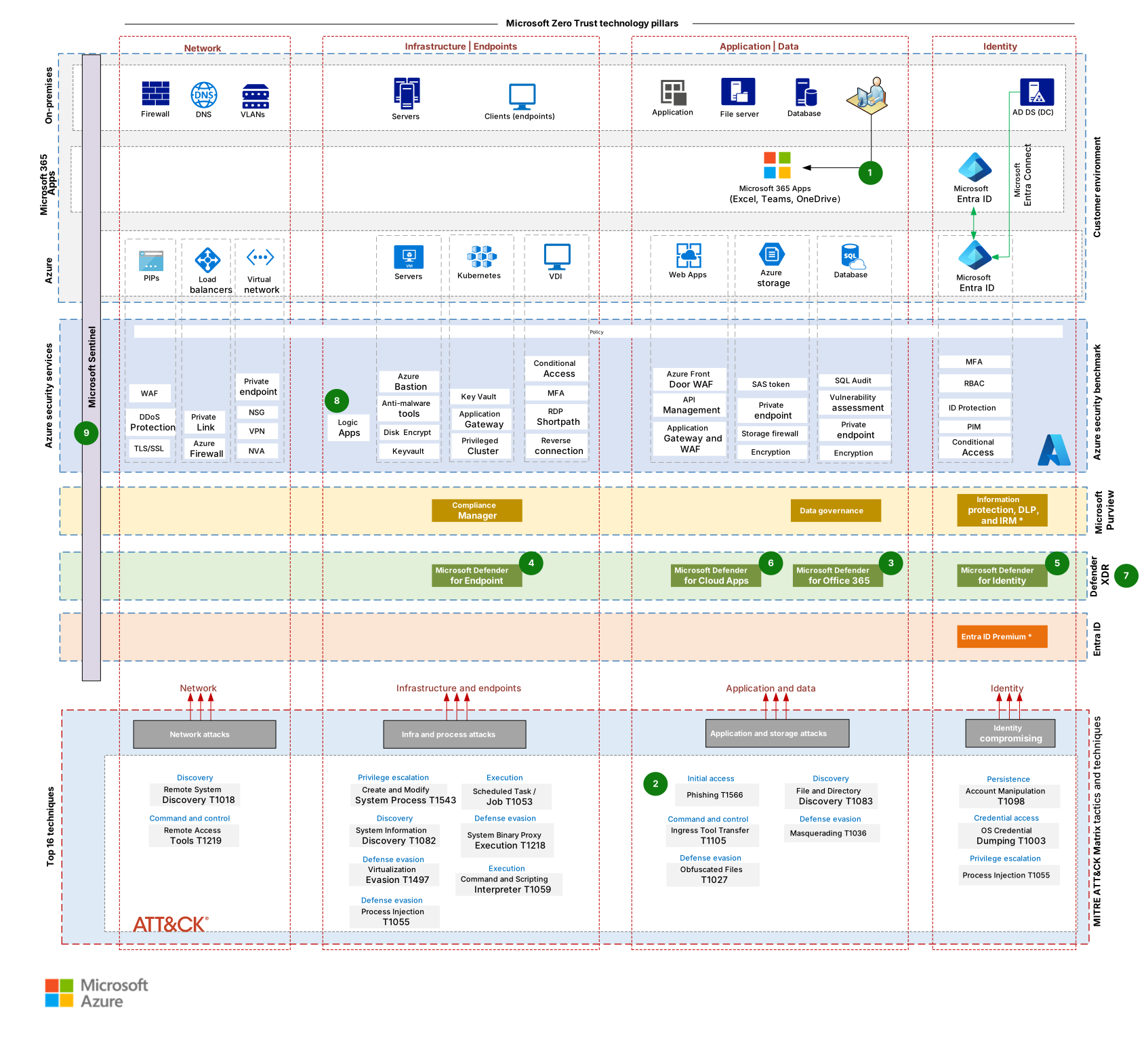
This image incorporates concepts and terminology from the MITRE ATT&CK® Framework developed by The MITRE Corporation. ATT&CK® is a registered trademark of The MITRE Corporation.
Download a Visio file of this architecture.
Workflow
The following workflow corresponds to the previous diagram:
A user interacts with email, applications, or endpoints protected by baseline preventive controls defined in the first layer of defense.
A phishing attempt or malicious payload bypasses preventive controls and reaches a user mailbox or endpoint.
Defender for Office 365 analyzes email content and detects suspicious links or attachments.
Defender for Endpoint monitors endpoint behavior and identifies malicious process execution or lateral movement activity.
Defender for Identity analyzes authentication traffic and detects abnormal Active Directory behavior, such as credential theft or privilege escalation.
Defender for Cloud Apps detects anomalous software as a service (SaaS) activity or risky OAuth application usage.
Defender XDR correlates all signals into a single incident that represents the whole attack chain.
Automated investigation and response actions are triggered to contain the threat. These actions include device isolation, account inactivation, or malicious indicator blocks.
Security teams investigate and remediate the incident by using unified Defender XDR workflows, or they forward the data to Microsoft Sentinel for advanced analytics and orchestration.
Components
Defender XDR is a unified extended detection and response platform that correlates signals across multiple security domains. In this architecture, it provides centralized visibility, incident correlation, and automated responses across the environment.
Defender for Endpoint is an endpoint security platform that provides endpoint detection and response, attack surface reduction, and vulnerability insights. In this architecture, it detects malicious behavior on user devices and servers and enforces containment actions during active attacks.
Defender for Identity is a service that monitors on-premises Active Directory signals to detect identity-based attacks. In this architecture, it identifies lateral movement, credential theft, and privilege escalation attempts that ransomware campaigns typically use.
Defender for Office 365 is a service that helps protect email and collaboration workloads from phishing and malware. In this architecture, it detects and investigates malicious email-based initial-access vectors.
Defender for Cloud Apps is a service that provides visibility and control over SaaS applications. In this architecture, it detects compromised cloud identities, anomalous application behavior, and data exfiltration attempts.
Defender Vulnerability Management is a service that continuously assesses endpoint vulnerabilities and misconfigurations. In this architecture, it helps reduce exploitable attack surface before and after it's compromised.
Microsoft Sentinel is a cloud-native SIEM and SOAR solution. In this architecture, it optionally aggregates Defender XDR incidents for long-term retention, advanced hunting, and orchestration.
Scenario details
This scenario focuses on detecting and responding to ransomware attacks that bypass preventive security controls.
Map threats to your IT environment describes how to map ransomware threats across a hybrid enterprise environment by using the MITRE ATT&CK framework. Build the first layer of defense by using Azure security services addresses how foundational Azure security services and Zero Trust principles reduce the likelihood of those attacks succeeding.
This article assumes that some attacks succeed. It focuses on the following tasks to minimize their impact:
- Early detection of attacker behavior
- Signal correlation across multiple security domains
- Reduction of attacker dwell time
- Threat containment before widespread encryption or data exfiltration occurs
Defender XDR identifies behavioral patterns, not only known malware signatures. This design makes it effective against modern ransomware operators who rely on living-off-the-land techniques and legitimate tools.
Potential use cases
This architecture applies to multiple industries and scenarios, including the following examples:
Finance: Detect credential theft and lateral movement in regulated environments
Healthcare: Protect sensitive identities and data from ransomware disruption
Manufacturing: Prevent operational impact from compromised endpoints
Government: Detect identity-based attacks and nation-state techniques
Retail and e-commerce: Identify phishing-driven account compromise
Education: Monitor high-volume identity and endpoint activity
Other considerations
Microsoft Purview plays a critical role in an organization's overall data protection and governance strategy. Microsoft Purview provides capabilities like data discovery and classification, sensitivity labeling, data loss prevention (DLP), insider risk management, and auditing across Microsoft 365, Azure, and multicloud environments. These capabilities are essential for protecting sensitive information and meeting regulatory and compliance requirements, especially in ransomware scenarios that involve data exfiltration and extortion.
The architecture diagram in this article includes Microsoft Purview because it's important in a comprehensive security posture. However, data governance and compliance aren't in scope for this article series.
Microsoft Entra ID Premium and Microsoft Entra Conditional Access are also foundational to identity protection in cloud-centric environments. Use Microsoft Entra ID Premium for advanced identity security capabilities like risk-based conditional access, identity protection, privileged identity management (PIM), and continuous access evaluation for cloud and SaaS applications. These controls focus on cloud identities and access enforcement.
In contrast, Defender for Identity focuses on detecting identity-based threats in on-premises Active Directory, including credential theft, lateral movement, and domain dominance techniques. Both Microsoft Entra ID Premium and Defender for Identity appear in the architecture diagram to show end-to-end identity coverage across hybrid environments. However, detailed identity governance and access policy design aren't in scope for this article series, which concentrates on ransomware threat mapping and layered defense architecture.
Contributors
Microsoft maintains this article. The following contributors wrote this article.
Principal author:
- Rudnei Oliveira | Senior Customer Engineer
Other contributors:
- Gary Moore | Programmer/Writer
- Andrew Nathan | Senior Customer Engineering Manager
To see nonpublic LinkedIn profiles, sign in to LinkedIn.
Next steps
- Configure automated investigation and response capabilities in Microsoft Defender XDR
- Integrate Defender XDR with Microsoft Sentinel for advanced SIEM and SOAR capabilities