Note
Access to this page requires authorization. You can try signing in or changing directories.
Access to this page requires authorization. You can try changing directories.
This set of articles explains how to authenticate, send real-time messages to clients connected to Azure Web PubSub by using Azure Web PubSub bindings in Azure Functions.
| Action | Type |
|---|---|
| Handle client events from Web PubSub | Trigger binding |
| Handle client events from Web PubSub with HTTP trigger, or return client access URL and token | Input binding |
| Invoke service APIs | Output binding |
Install extension
The extension NuGet package you install depends on the C# mode you're using in your function app:
Functions execute in an isolated C# worker process. To learn more, see Guide for running C# Azure Functions in an isolated worker process.
Add the extension to your project by installing this NuGet package.
Install bundle
To be able to use this binding extension in your app, make sure that the host.json file in the root of your project contains this extensionBundle reference:
{
    "version": "2.0",
    "extensionBundle": {
        "id": "Microsoft.Azure.Functions.ExtensionBundle",
        "version": "[4.0.0, 5.0.0)"
    }
}
In this example, the version value of [4.0.0, 5.0.0) instructs the Functions host to use a bundle version that is at least 4.0.0 but less than 5.0.0, which includes all potential versions of 4.x. This notation effectively maintains your app on the latest available minor version of the v4.x extension bundle.
When possible, you should use the latest extension bundle major version and allow the runtime to automatically maintain the latest minor version. You can view the contents of the latest bundle on the extension bundles release page. For more information, see Azure Functions extension bundles.
Note
The Web PubSub extensions for Java is not supported yet.
Key concepts
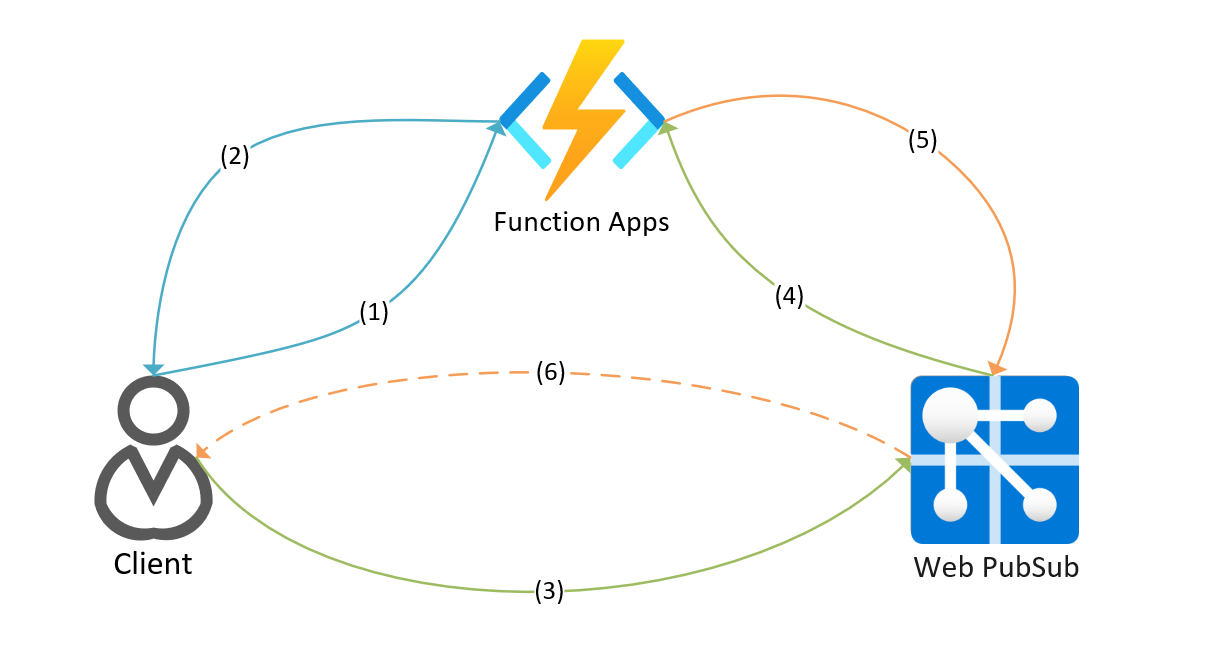
(1)-(2) WebPubSubConnection input binding with HttpTrigger to generate client connection.
(3)-(4) WebPubSubTrigger trigger binding or WebPubSubContext input binding with HttpTrigger to handle service request.
(5)-(6) WebPubSub output binding to request service do something.
Connection string settings
By default, an application setting named WebPubSubConnectionString is used to store your Web PubSub connection string. When you choose to use a different setting name for your connection, you must explicitly set that as the key name in your binding definitions. During local development, you must also add this setting to the Values collection in the the local.settings.json file.
Important
A connection string includes the authorization information required for your application to access Azure Web PubSub service. The access key inside the connection string is similar to a root password for your service. For optimal security, your function app should use managed identities when connecting to the Web PubSub service instead of using a connection string. For more information, see Authorize a managed identity request by using Microsoft Entra ID.
For details on how to configure and use Web PubSub and Azure Functions together, refer to Tutorial: Create a serverless notification app with Azure Functions and Azure Web PubSub service.
Note
When running in the isolated worker model, the Azure Web PubSub binding doesn't currently support Microsoft Entra ID authentication using managed identities. In the isolated model, you must continue to use a connection string, which includes a shared secret key.