Note
Access to this page requires authorization. You can try signing in or changing directories.
Access to this page requires authorization. You can try changing directories.
Web PubSub chat is a managed chat capability built on Azure Web PubSub that you can use to add real-time chat to your applications with minimal setup and server-side code.
It provides purpose-built client and server APIs for chat scenarios. Instead of designing custom events and message payloads, you work with chat-native concepts such as rooms, messages, and members.
Web PubSub chat sits on top of Web PubSub’s core real-time messaging infrastructure, so you can focus on building chat experiences instead of wiring protocols, message persistence, and fan-out logic yourself.
Web PubSub chat supports:
- One-to-one and group chat
- Managed message delivery and ordering
- Chat room-based message history
- Highly scalable real-time messaging backed by the Azure Web PubSub service
Even though Web PubSub chat is a distinct offering, it inherits Web PubSub’s foundational capabilities, including:
- Automatic scaling
- Geo-replication
- Enterprise-grade security and compliance
Why Web PubSub chat?
Chat has become a core interaction model for modern applications. For example, banks offer in-app chat to their customers to provide quick support during a customer's full lifecycle with them.
However, building a production-ready chat system typically requires stitching together multiple concerns:
- Real-time transport
- Message fan-out and ordering
- Connection lifecycle management
- Message persistence
- Client SDKs across platforms
Managing these pieces directly increases complexity and slows time-to-value.
What chat gives you instead
Web PubSub chat provides a chat-specific abstraction on top of Web PubSub that handles these concerns for you.
| Capability | Standard hub | Chat hub |
|---|---|---|
| Real-time messaging | ✔️ | ✔️ |
| Rooms | Custom | Built-in |
| Message persistence | Custom | Built-in |
| Member management | Custom | Built-in |
| Chat-specific APIs | ❌ | ✔️ |
| Client SDK ergonomics | Low-level | Chat-focused |
With chat hub, you work with rooms, messages, and members, instead of events and connections.
Choose the right level of abstraction
Use standard hub if you need:
- Full control over protocol design
- Non-chat real-time workloads (telemetry, signaling, live dashboards)
- Highly custom event models
Use chat hub if you want to:
- Build chat experiences quickly
- Reduce service orchestration and boilerplate
- Focus on user experience instead of infrastructure
- Scale chat workloads using Azure-native services
Both options are built on the same Web PubSub service, so you can choose the level of abstraction that best fits your application.
How it works
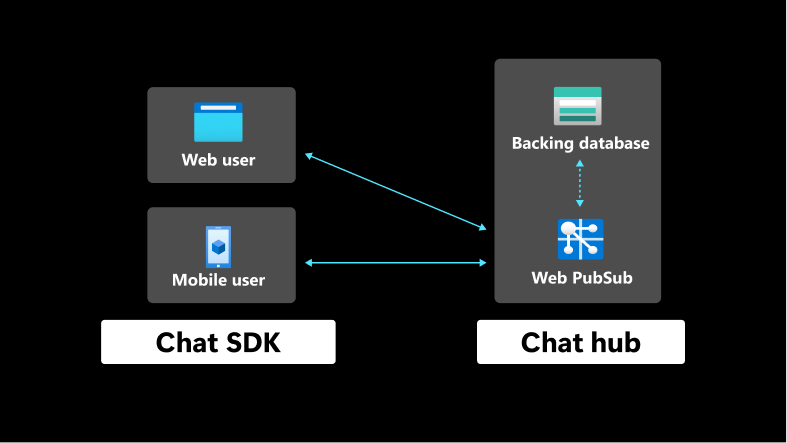
Instead of publishing raw events or managing connections directly, your application interacts with chat-native primitives:
- Rooms
- Messages
- Members
- Users
The chat SDK and service handle:
- Real-time message delivery
- Fan-out to connected users (including when a user is connected from multiple devices or browser tabs)
- Room membership
- Message persistence and retrieval
Key concepts
Rooms
A room represents a chat space. It can include one or more members and maintains its own message history.
To create rooms and manage members, see Create and manage rooms.
Messages
Send messages to a room and deliver them in real time to connected members. Web PubSub chat manages message ordering and message persistence so your application doesn't have to. Members can load past messages as history, even after they reconnect or join the room later.
To send messages and read history, see Send and read messages.
Users
A user represents an application identity that can send and receive messages.
Members
A member represents a user added to a room. Membership controls which users can receive and send messages within that room.
Reliability
Web PubSub chat runs on Web PubSub's reliable WebSocket connection. If the connection drops, the client reconnects and recovers automatically, without losing messages.
Roles and permissions
Web PubSub chat allows you to control who can do what through roles and permissions. A permission is a single action, and a role is a named set of permissions.
For the full permission lists, the built-in roles, and how to assign or customize them, see Configure roles and permissions.