Note
Access to this page requires authorization. You can try signing in or changing directories.
Access to this page requires authorization. You can try changing directories.
This quickstart shows the fastest way to see Web PubSub chat working. You generate a client access URL in the Azure portal, then use the client SDK to connect, create a room, and send a message without server code.
Prerequisites
- An Azure Web PubSub resource with storage configured and Chat enabled. If you haven't done this yet, see Configure storage and enable chat.
- Node.js version 20 or later.
Get a client access token from the portal
A client connects to a chat hub with a client access URL that carries its user identity. For a quick test, generate one in the portal.
- In the Azure portal, open your Web PubSub resource.
- In the left menu, select the Keys blade, then Client URL Generator.
- Set Hub to the name of the Chat Hub you added, for example
chat. - Set User ID to any name, for example
alice. Chat uses this as your user identity. - Copy the Client Access URL.
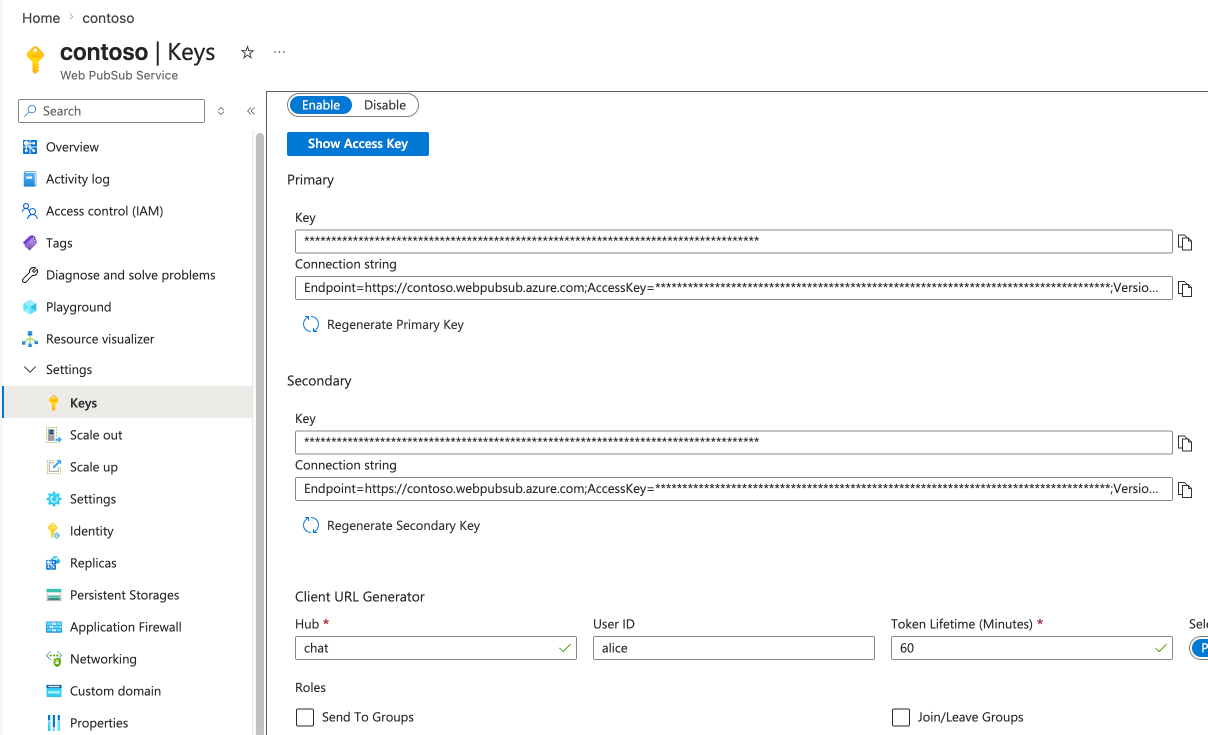
Install the client SDK
Create a project and install the client SDK.
mkdir chat-quickstart
cd chat-quickstart
npm init -y
npm install @azure/web-pubsub-chat-client
Connect, create a room, and send a message
Save the following code as index.mjs. Replace <client-access-url> with the URL you copied from
the portal.
import { ChatClient } from "@azure/web-pubsub-chat-client";

// Paste the client access URL you generated in the portal.
const clientAccessUrl = "<client-access-url>";

async function main() {
  // Connect to chat hub.
  const client = await ChatClient.start(clientAccessUrl);
  console.log(`Connected as ${client.userId}`);

  // Print messages as they arrive.
  client.on("message", (event) => {
    const message = event.message;
    console.log(`${message.createdBy}: ${message.content.text}`);
  });

  // Create a room. You're added to it automatically.
  const room = await client.createRoom("My first room", []);
  console.log(`Created room ${room.roomId}`);

  // Send a message to the room.
  await client.sendToRoom(room.roomId, "Hello, Chat!");

  // Read the room's history back from your storage.
  console.log("History:");
  for await (const message of client.listRoomMessages(room.roomId)) {
    console.log(`  ${message.createdBy}: ${message.content.text}`);
  }

  // Disconnect.
  await client.stop();
}

main().catch(console.error);
Run it:
node index.mjs
You see output similar to:
Connected as alice
Created room <room-id>
alice: Hello, Chat!
History:
  alice: Hello, Chat!
Note
In this quickstart you used a portal token. For production, issue tokens from your own server. See Authenticate and connect clients.