Note
Access to this page requires authorization. You can try signing in or changing directories.
Access to this page requires authorization. You can try changing directories.
Azure Container Apps express provides the fastest way to deploy containerized web applications to Azure. With opinionated defaults and a minimal configuration surface, express is a developer-first and agent-first platform designed to get your web apps running in the cloud as fast as possible.
By using express, you can create a container app directly without waiting for environment provisioning first. The rapid provisioning and scale-from-zero features make express an ideal host for AI-powered applications and agent backends.
Note
Some Azure portal windows for Express environments aren't functional.
Key capabilities
The express deployment model removes infrastructure decisions so you can focus on building your application.
| Capability | Details |
|---|---|
| High-speed launch | Deploy in minutes with no infrastructure tuning required. Scaling behavior is built in from the start. |
| Simple, powerful apps | Run HTTP-first workloads including APIs, SaaS frontends, AI gateways, and event-driven web backends. |
| Automatic elasticity | Scale from zero to hyperscale automatically. The platform is designed for unpredictable traffic patterns, and scaling is handled for you. |
| Scale from zero | Your app scales down to zero when idle and back up on demand, so you only pay for what you use. |
| High-speed startup | Optimized cold start ensures your app is ready to serve traffic quickly. |
| Opinionated defaults | Sensible defaults are applied automatically so you don't have to configure infrastructure settings. |
| Minimal configuration surface | Fewer decisions to make means faster time to production. |
| Developer velocity | Spend less time on infrastructure and more time writing code. |
Common scenarios
The express deployment model works best for HTTP web workloads where speed of deployment and simplicity matter most.
SaaS applications: Launch SaaS products without worrying about scaling infrastructure.
AI app frontends: Deploy AI-powered interfaces and gateways that scale with demand.
Developer tools: Ship internal and external dev tools with zero-config deployment.
Web dashboards: Build internal analytics, monitoring, and admin panels with instant availability.
Startups and new projects: Go from idea to production in minutes. Prototype fast, and scale as you grow.
Rapid prototyping: Build and validate ideas quickly, then keep running in production without replatforming.
How express works
The express deployment model simplifies the deployment experience by removing the need to manage a Container Apps environment. You deploy your app and the platform provisions the underlying resources for you.
Less environment details to manage: When using the portal, the platform creates a light-weight environment for your app. If working from the CLI, you still create an environment yourself.
Consumption-based compute: Express apps run on consumption CPU with pay-as-you-go pricing. Your apps scale to zero when idle, so you only pay for the compute your app uses.
Opinionated defaults: The platform handles configuration decisions like scaling rules, networking, and resource allocation with production-ready defaults.
Request-driven duration: Compute runs when your app receives requests and scales down when traffic stops.
Optimized cold start: The platform automatically optimizes cold-start behavior, so your app is ready to serve traffic quickly after scaling from zero.
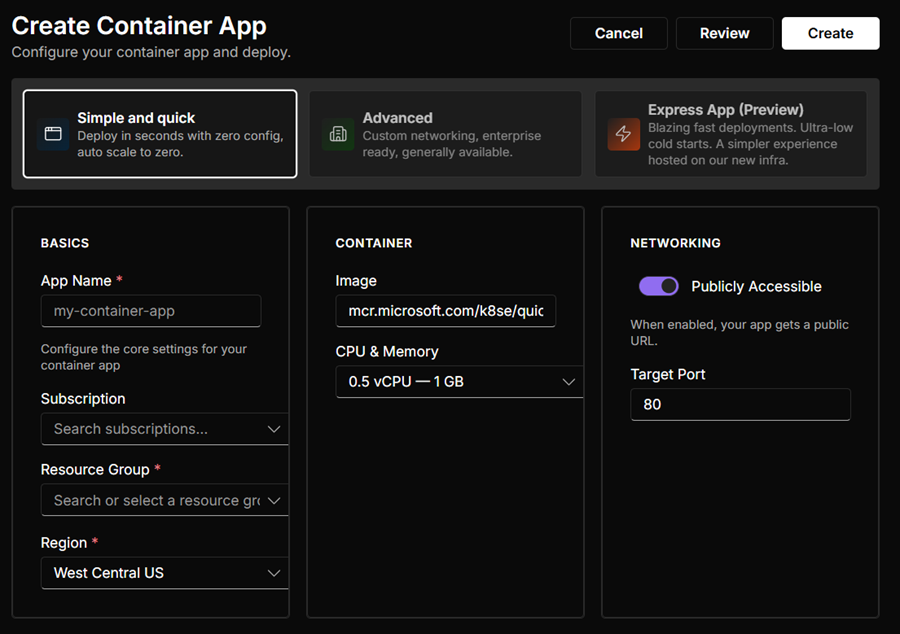
Specialized management UI: Express apps are managed through a UI experience separate from the Azure portal. When you create or manage an express app, the platform directs you to this streamlined interface instead of the standard Azure portal experience.
When to use express
Use the following table to determine if express is the right fit for your workload.
| Scenario | Use express | Alternative |
|---|---|---|
| Web apps and REST APIs | ✅ Yes | |
| SaaS frontends and AI gateways | ✅ Yes | |
| Rapid prototyping and startups | ✅ Yes | |
| Web dashboards and admin panels | ✅ Yes | |
| GPU workloads | ❌ No | Use serverless GPUs with dedicated workload profiles |
| TCP services | ❌ No | Use Workload Profile Container Apps environments |
| Jobs and batch processing | ❌ No | Use Container Apps jobs |
| Microservices with service discovery | ❌ No | Use Workload Profile Container Apps environments |
Considerations
Keep these important points in mind when using express:
Ingress protocols: Express supports HTTP ingress. It doesn't support HTTP/2, TCP, insecure HTTP, additional ingress ports, or target port auto-detection (
targetPort: 0).Consumption CPU compute: Express apps run on consumption-based CPU compute. GPU workloads require Consumption GPU Workload Profiles.
Opinionated configuration: The express model uses opinionated defaults with a minimal configuration surface. If you need fine-grained control over compute, networking, or cold-start behavior, use standard Container Apps with a workload profiles environment.
Focused networking: Express supports internal or external ingress, IP restrictions, CORS, virtual network egress, and environment private endpoints. For virtual network egress, connect the Express environment to a virtual network subnet. Custom domains, client certificates, session affinity, and built-in service discovery aren't supported.
Feature availability: Express offers a focused set of Container Apps capabilities. User-assigned managed identities, HTTP, CPU, and memory scale rules,
EmptyDirvolume mounts, and custom ephemeral storage are available with the limitations described in the following table. Dapr, jobs, workload profiles, and system-assigned managed identities aren't supported.
Supported features
Express provides a streamlined set of Azure Container Apps capabilities. Each feature falls into one of two availability states:
- ✅ Supported: Works directly in Express.
- ❌ Not supported: Not available in Express.
Available capabilities
| Feature | Availability |
|---|---|
| Scale to zero | ✅ Supported |
| Container image deployment | ✅ Supported: Public images and private images authenticated with username and password secrets |
| Multiple replicas | ✅ Supported |
| Environment variables | ✅ Supported: Literal values and references to manual secrets |
| HTTP ingress | ✅ Supported: Target port auto-detection isn't supported |
| Default ingress domain | ✅ Supported: Microsoft-managed azurecontainerapps.io domain |
| Express management experience | ✅ Supported: Streamlined experience for creating and managing Express apps |
| Log streaming | ✅ Supported: Live, per-container log streams |
| Regional availability | ✅ Supported in the regions listed below |
| Start and stop apps | ✅ Supported |
| Consumption-based billing | ✅ Supported: Usage-based billing |
| Rolling updates | ✅ Supported: Updates replace the active revision automatically. Traffic splitting isn't supported. |
| IP restrictions | ✅ Supported: Allow or deny traffic by CIDR range |
| Console access | ✅ Supported: Browser-based, per-container console |
| Internal and external ingress | ✅ Supported |
| Single-revision deployment | ✅ Supported: Built in |
| App-to-app communication | ✅ Supported: Apps communicate by using their public app URLs. Internal service discovery isn't supported. |
| Secrets | ✅ Supported: Add secrets directly to the app. Key Vault references aren't available. |
| Metrics (Azure Monitor) | ✅ Supported in the app overview and environment dashboard |
| Logs (Log Analytics) | ✅ Supported: Send logs to Log Analytics by enabling it for the Express environment. |
| Autoscaling | ✅ Supported: Apps can scale on HTTP traffic, CPU, or memory. Custom KEDA scalers aren't supported. |
| User-assigned managed identity for app runtime | ✅ Supported: Apps can use user-assigned managed identities. System-assigned managed identities aren't supported. |
| User-assigned managed identity for image pulls | ✅ Supported: Apps can use a user-assigned identity to pull images from supported Azure Container Registry servers. System-assigned managed identities aren't supported. |
| Virtual network integration | ✅ Supported: Apps can send outbound traffic through the virtual network configured for their Express environment. |
| Volume mounts | ✅ Supported: Each container can mount up to 10 EmptyDir volumes. Other volume types and subPath aren't supported. |
| Ephemeral storage | ✅ Supported: Combined container and EmptyDir storage must not exceed 40 GiB per replica. |
| Express environment quotas | ✅ Supported: Regional and global Express environment limits apply |
| Health probes | ✅ Supported: Apps can use HTTP and TCP health probes. Exec-based probes aren't supported. |
| CORS | ✅ Supported: Exposed response headers aren't supported. |
| Private endpoints | ✅ Supported: Express environments can use a private endpoint when public network access is disabled. |
Not supported
Express doesn't support the following capabilities:
- Sidecar containers
- Init containers
- Insecure HTTP ingress
- TCP ingress
- Debug console
- Key Vault secret references
- Easy Auth
- Custom domains with managed certificates
- Custom domains with customer-provided certificates
- Environment custom domain suffix with a customer-provided certificate
- Environment custom domain suffix with a managed certificate
- Client certificates
- Azure Monitor logging
- Session affinity
- Azure Files storage
- GPU
- Additional ingress ports
- Dapr
- Deployment labels
- Language stack configuration
- Multiple revisions and traffic splitting
- Resiliency
- Source-to-cloud deployment
- Aspire
- Maintenance windows
- OpenTelemetry
- Premium ingress
- Workload profiles
- Peer-to-peer traffic encryption
- Container Apps jobs
- Zone redundancy
Region availability
Express is available in the following Azure regions:
- Australia East
- Austria East
- Brazil South
- Canada Central
- Canada East
- Central India
- Central US
- Chile Central
- East Asia
- East US
- East US 2
- East US 2 EUAP
- France Central
- Germany West Central
- Indonesia Central
- Italy North
- Japan East
- Japan West
- Jio India Central
- Korea Central
- Malaysia West
- Mexico Central
- New Zealand North
- North Central US
- North Europe
- Norway East
- Poland Central
- South Africa North
- South Central US
- South India
- Southeast Asia
- Spain Central
- Sweden Central
- Switzerland North
- Switzerland West
- UAE North
- UK South
- UK West
- West Central US
- West Europe
- West US
- West US 2
- West US 3