Note
Access to this page requires authorization. You can try signing in or changing directories.
Access to this page requires authorization. You can try changing directories.
In this quickstart, you create a serverless sandbox in Azure Container Instances with the three sandbox APIs:
- The AI agents group API (Azure Resource Manager REST), to create an AI agents group and connect to it.
- The sandbox management API (REST), to create a sandbox in the group.
- The sandbox gateway API (gRPC), to run a command, copy a file, and view logs in the sandbox.
Then you delete the resources.
Prerequisites
An Azure subscription. If you don't have an Azure subscription, create a free account before you begin.
The Azure CLI, version 2.60 or later, signed in with
az login, or another tool to send authenticated REST requests to Azure Resource Manager.The
Microsoft.ContainerInstanceresource provider registered in your subscription.az provider register --namespace Microsoft.ContainerInstance --waitThe Contributor, Azure Deployment Stack Owner, and Storage Blob Data Contributor roles assigned to the Compute Sandbox Groups service principal on your subscription, so that the service can provision the managed resource group and snapshot storage account in your subscription. To assign the roles, you need permission to create role assignments on the subscription, such as the Owner or User Access Administrator role:
subscriptionId=$(az account show --query id --output tsv)
spObjectId=$(az ad sp show --id 1eeacc2b-ec4a-4b1e-977a-2b5fef2131c6 --query id --output tsv 2>/dev/null || \
  az ad sp create --id 1eeacc2b-ec4a-4b1e-977a-2b5fef2131c6 --query id --output tsv)

for role in "Contributor" "Azure Deployment Stack Owner" "Storage Blob Data Contributor"; do
  az role assignment create --assignee-object-id $spObjectId --assignee-principal-type ServicePrincipal \
    --role "$role" --scope /subscriptions/$subscriptionId
done
Role assignments can take up to 15 minutes to take effect.
Quota provisioned for serverless sandboxes in Azure Container Instances on your subscription:
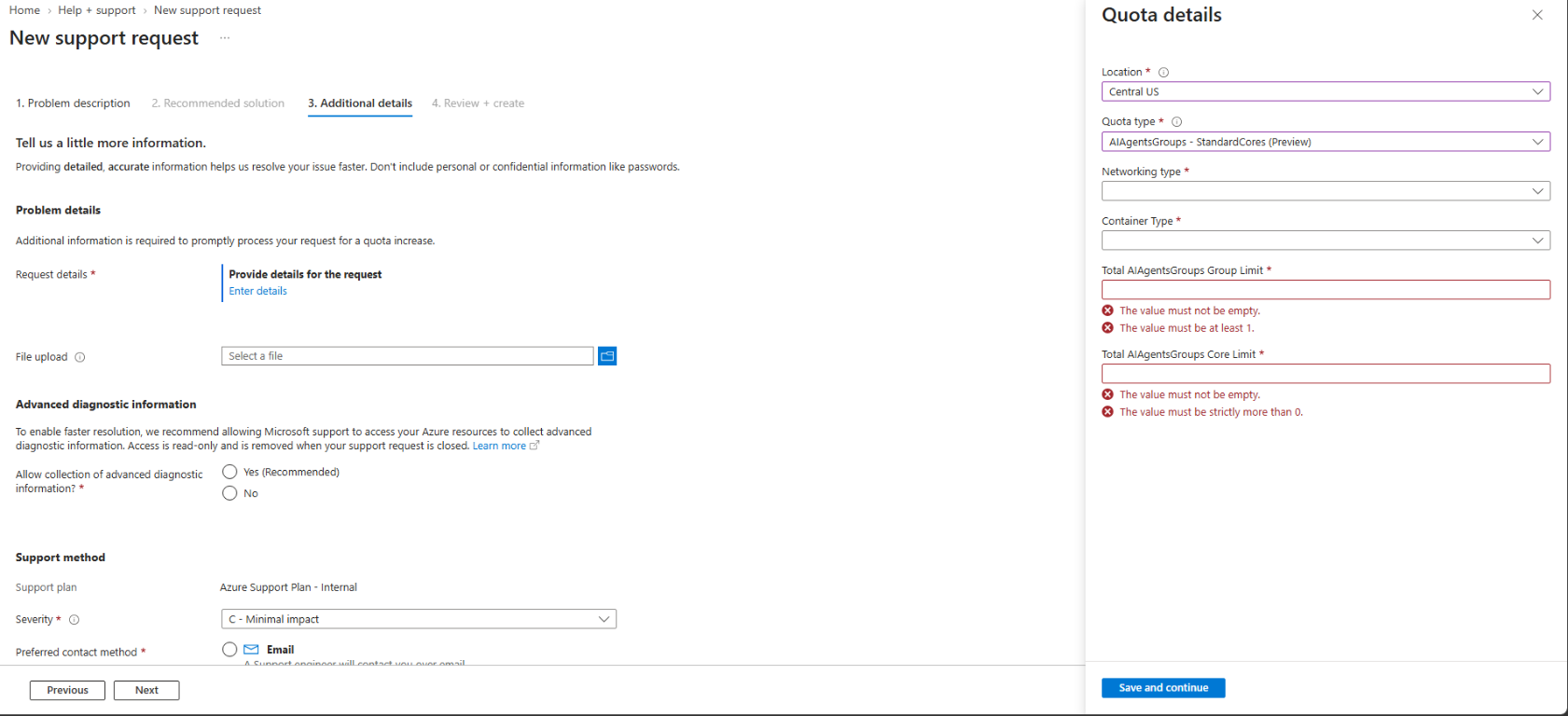
Open New support request in the Azure portal (with Issue type set to Service and subscription limits (quotas) and Quota type set to Container Instances), select your subscription, and go to the Additional details tab.
Select Enter details to open the Quota details pane, choose your Location, select AIAgentsGroups - StandardCores (Preview) for Quota type, and fill in Networking type, Container Type, Total AIAgentsGroups Group Limit, and Total AIAgentsGroups Core Limit:
Submit the support request. After your quota request is approved, re-register the
Microsoft.ContainerInstanceresource provider (az provider register --namespace Microsoft.ContainerInstance --wait) so that your subscription picks up the newly enabled capabilities.
To connect to a running sandbox after you create an AI agents group and a sandbox (see Quickstart: Create your first serverless sandbox), a gRPC client generated from the sandbox gateway protobuf file,
sandboxgateway.proto. A gRPC client is required because the sandbox gateway exposes a gRPC service (aci.sandboxgateway.SandboxGatewayService) for in-sandbox operations such as waiting for readiness, running commands, transferring files, and reading logs. To use the cross-platform sample C# CLI in this documentation (supported on Linux, macOS, and Windows), install the .NET 8 SDK and build the CLI.Note
A gRPC client isn't required if you schedule and manage serverless sandboxes through Azure Kubernetes Service (AKS).
Send the requests
The examples in this quickstart show the method, URL, headers, and body of each HTTP request. You can send them with any HTTP client. For example, in a Bash shell:
For the AI agents group API, use
az rest, which authenticates to Azure Resource Manager with your Azure CLI sign-in. For example, this command sends the request that creates the AI agents group:subscriptionId=$(az account show --query id --output tsv) groupUrl="https://management.azure.com/subscriptions/$subscriptionId/resourceGroups/myResourceGroup/providers/Microsoft.ContainerInstance/AIAgentsGroups/myAgentsGroup" apiVersion="api-version=2026-08-01-preview" az rest --method put --url "$groupUrl?$apiVersion" --body '{ "location": "centralus", "properties": {} }'For the sandbox management API, save the
endpointandaccessTokenthat theconnectaction returns, and usecurl. For example, these commands connect to the group and send the request that creates a sandbox:{ read -r endpoint; read -r accessToken; } < <(az rest --method post --url "$groupUrl/connect?$apiVersion" --query "[endpoint, accessToken]" --output tsv) curl -X PUT "$endpoint/sandboxes/sandbox1?$apiVersion" \ -H "Authorization: Bearer $accessToken" -H "Content-Type: application/json" \ -d '{ "location": "centralus", "properties": { "image": "mcr.microsoft.com/azurelinux/base/core:3.0", "resources": { "cpu": 1, "memory": 2 } } }'
Create an AI agents group
An AI agents group is an Azure Resource Manager resource of type Microsoft.ContainerInstance/AIAgentsGroups. It holds your sandboxes and the settings that they share. When you create an AI agents group, the service also creates a managed resource group in your subscription containing a storage account used to save and restore snapshots.
Create a resource group:
az group create --name myResourceGroup --location centralusCreate the AI agents group:
PUT https://management.azure.com/subscriptions/{subscriptionId}/resourceGroups/myResourceGroup/providers/Microsoft.ContainerInstance/AIAgentsGroups/myAgentsGroup?api-version=2026-08-01-preview

{
  "location": "centralus",
  "properties": {}
}
Creation of an AI agents group is a long-running operation. Check the group until
properties.provisioningStateisSucceeded:GET https://management.azure.com/subscriptions/{subscriptionId}/resourceGroups/myResourceGroup/providers/Microsoft.ContainerInstance/AIAgentsGroups/myAgentsGroup?api-version=2026-08-01-preview
Connect to the AI agents group
To manage sandboxes in the AI agents group, call the connect action of the group:
POST https://management.azure.com/subscriptions/{subscriptionId}/resourceGroups/myResourceGroup/providers/Microsoft.ContainerInstance/AIAgentsGroups/myAgentsGroup/connect?api-version=2026-08-01-preview
The response includes the group's sandbox management endpoint and a short-lived accessToken:
{
  "endpoint": "https://<group-endpoint-host>/subscriptions/{subscriptionId}/resourcegroups/myResourceGroup/providers/Microsoft.ContainerInstance/<group-path>",
  "accessToken": "<access-token>",
  "notAfter": "2026-11-04T10:30:00Z"
}
The endpoint value already includes the resource path for the group. Use the returned {endpoint} URL directly as the base URL for sandbox management requests (for example, {endpoint}/sandboxes/sandbox1), and pass {accessToken} in the Authorization: Bearer {accessToken} header. When the access token expires at the notAfter time, call connect again.
Create a sandbox
Create a sandbox in the AI agents group:
PUT {endpoint}/sandboxes/sandbox1?api-version=2026-08-01-preview
Authorization: Bearer {accessToken}
Content-Type: application/json

{
  "location": "centralus",
  "properties": {
    "image": "mcr.microsoft.com/azurelinux/base/core:3.0",
    "guestOs": "linux",
    "architecture": "amd64",
    "resources": {
      "cpu": 1,
      "memory": 2
    }
  }
}
Sandbox creation is asynchronous. Get the sandbox until
properties.provisioningStateisSucceeded, which typically takes a few seconds:GET {endpoint}/sandboxes/sandbox1?api-version=2026-08-01-preview Authorization: Bearer {accessToken}The response includes
properties.connectionString, which contains the gatewayaddressand bearertokenfor the sandbox:{ "id": "/subscriptions/{subscriptionId}/resourcegroups/myResourceGroup/providers/Microsoft.ContainerInstance/<group-path>/sandboxes/sandbox1", "name": "<group-name>/sandbox1", "type": "Microsoft.ContainerInstance/sandboxes", "location": "centralus", "tags": {}, "properties": { "resources": { "cpu": 1.0, "memory": 2.0, "disk": 0.0 }, "guestOs": "linux", "architecture": "amd64", "provisioningState": "Succeeded", "targetState": "Active", "connectionString": "address=<gateway-host>;token=<gateway-token>;token_type=bearer", "attachToAgentFabric": false } }Treat the connection string as a secret. Anyone with the token can run commands in the sandbox until the token expires.
List the sandboxes in the group:
GET {endpoint}/sandboxes?api-version=2026-08-01-preview
Authorization: Bearer {accessToken}
Connect to the sandbox gateway
After you create the sandbox, use a gRPC client to connect to the sandbox gateway (aci.sandboxgateway.SandboxGatewayService) and run operations inside the sandbox. Generate a gRPC client from sandboxgateway.proto and connect by using the values in properties.connectionString:
- Connect to the gateway endpoint: Open a TLS gRPC connection to
https://<gateway-host>:443using theaddressfromproperties.connectionString. - Authenticate and route requests with the token: Pass
authorization: Bearer <gateway-token>in the gRPC request headers (metadata). The gateway uses this token both to authorize the request and to identify the target sandbox.
To build the sample C# CLI tool (SandboxGatewayCli) used in the following steps, install the .NET 8 SDK and follow Build a C# CLI from sandboxgateway.proto.
Call aci.sandboxgateway.SandboxGatewayService/WaitForReady to wait until the guest inside the sandbox is running.
By using the sample C# CLI:
dotnet run -- -cs "address=<gateway-host>;token=<gateway-token>;token_type=bearer" wait
gRPC request payload:
{
  "timeoutSeconds": 120
}
Response:
{
  "ready": true,
  "currentState": "running"
}
Run a command in the sandbox
Call aci.sandboxgateway.SandboxGatewayService/ExecSandbox to run a command in the sandbox. command is the executable to run, and args are its arguments.
Use the sample C# CLI:
dotnet run -- -cs "address=<gateway-host>;token=<gateway-token>;token_type=bearer" exec /bin/sh -c "cat /etc/os-release; nproc"
gRPC request payload:
{
  "command": "/bin/sh",
  "args": ["-c", "cat /etc/os-release; nproc"],
  "timeoutSeconds": 60
}
The response includes stdout with the operating system of the image (Azure Linux 3.0) and the CPU count of the sandbox (1), stderr, and exitCode.
Copy a file into and out of the sandbox
Write a file to the sandbox with
aci.sandboxgateway.SandboxGatewayService/WriteFile(contentis raw bytes, or Base64-encoded in JSON).By using the sample C# CLI:
dotnet run -- -cs "address=<gateway-host>;token=<gateway-token>;token_type=bearer" write-file /tmp/hello.txt $'hello from my computer\n'gRPC request payload:
{
  "path": "/tmp/hello.txt",
  "content": "aGVsbG8gZnJvbSBteSBjb21wdXRlcgo="
}
Append a line to the file inside the sandbox with
aci.sandboxgateway.SandboxGatewayService/ExecSandbox.By using the sample C# CLI:
dotnet run -- -cs "address=<gateway-host>;token=<gateway-token>;token_type=bearer" exec /bin/sh -c "echo 'hello from the sandbox' >> /tmp/hello.txt"gRPC request payload:
{
  "command": "/bin/sh",
  "args": ["-c", "echo 'hello from the sandbox' >> /tmp/hello.txt"]
}
Read the file with
aci.sandboxgateway.SandboxGatewayService/ReadFile.By using the sample C# CLI:
dotnet run -- -cs "address=<gateway-host>;token=<gateway-token>;token_type=bearer" read-file /tmp/hello.txtgRPC request payload:
{
  "path": "/tmp/hello.txt"
}
The streamed response returns the file bytes in
contentand"eof": true:hello from my computer hello from the sandbox
View sandbox logs
Fetch the sandbox logs with aci.sandboxgateway.SandboxGatewayService/GetLogs.
By using the sample C# CLI:
dotnet run -- -cs "address=<gateway-host>;token=<gateway-token>;token_type=bearer" logs 20
gRPC request payload:
{
  "tail": 20,
  "timestamps": true
}
For all the gateway methods, see Sandbox gateway API.
Clean up resources
Delete the sandbox:
DELETE {endpoint}/sandboxes/sandbox1?api-version=2026-08-01-preview
Authorization: Bearer {accessToken}
If you don't plan to do the tutorials, delete the AI agents group and the resource group. Deletion of an AI agents group is a long-running operation and deletes all sandboxes in the group.
DELETE https://management.azure.com/subscriptions/{subscriptionId}/resourceGroups/myResourceGroup/providers/Microsoft.ContainerInstance/AIAgentsGroups/myAgentsGroup?api-version=2026-08-01-previewaz group delete --name myResourceGroup
The tutorials use the AI agents group from this quickstart. To do them, keep the AI agents group.