Note
Access to this page requires authorization. You can try signing in or changing directories.
Access to this page requires authorization. You can try changing directories.
An enclave is a second Hyper-V isolated micro VM that a parent serverless sandbox in Azure Container Instances starts and manages from inside the guest. The parent sandbox communicates with the host's aci.hostbridge.peersandbox.v1.PeerSandboxService gRPC service over vsock (AF_VSOCK, host CID 2, port 5090) by using the sandboxctl CLI (or any gRPC client generated from peersandbox.proto). An enclave has its own kernel, CPU, and memory allocation, has no IP address and no outbound internet access, and is reachable only from its parent sandbox over vsock.
Use an enclave to isolate the most sensitive part of an agent's work, such as code that handles secrets or evaluates untrusted inputs, from the rest of the agent.
In this tutorial, you create a parent sandbox with a reserved CPU and memory budget for enclaves (properties.peerSandboxProfile), set up the sandboxctl CLI inside the parent sandbox, start a networkless enclave micro VM, verify that the enclave runs in a separate micro VM with no network access, forward a port over vsock to a service in the enclave, and verify that enclaves exceeding the remaining budget are rejected.
In this tutorial, you learn how to:
- Create a parent sandbox with an enclave budget (
peerSandboxProfile) - Build or install
sandboxctlfrompeersandbox.protoin the parent sandbox - Start an enclave micro VM from inside the parent and check the remaining budget
- Verify that the enclave runs in a separate micro VM and has no internet access
- Forward a port from the parent sandbox to a vsock service in the enclave
- Verify that an enclave request exceeding the remaining budget is rejected
Prerequisites
An Azure subscription. If you don't have an Azure subscription, create a free account before you begin.
The Azure CLI, version 2.60 or later, signed in with
az login, or another tool to send authenticated REST requests to Azure Resource Manager.The
Microsoft.ContainerInstanceresource provider registered in your subscription.az provider register --namespace Microsoft.ContainerInstance --waitThe Contributor, Azure Deployment Stack Owner, and Storage Blob Data Contributor roles assigned to the Compute Sandbox Groups service principal on your subscription, so that the service can provision the managed resource group and snapshot storage account in your subscription. To assign the roles, you need permission to create role assignments on the subscription, such as the Owner or User Access Administrator role:
subscriptionId=$(az account show --query id --output tsv)
spObjectId=$(az ad sp show --id 1eeacc2b-ec4a-4b1e-977a-2b5fef2131c6 --query id --output tsv 2>/dev/null || \
  az ad sp create --id 1eeacc2b-ec4a-4b1e-977a-2b5fef2131c6 --query id --output tsv)

for role in "Contributor" "Azure Deployment Stack Owner" "Storage Blob Data Contributor"; do
  az role assignment create --assignee-object-id $spObjectId --assignee-principal-type ServicePrincipal \
    --role "$role" --scope /subscriptions/$subscriptionId
done
Role assignments can take up to 15 minutes to take effect.
Quota provisioned for serverless sandboxes in Azure Container Instances on your subscription:
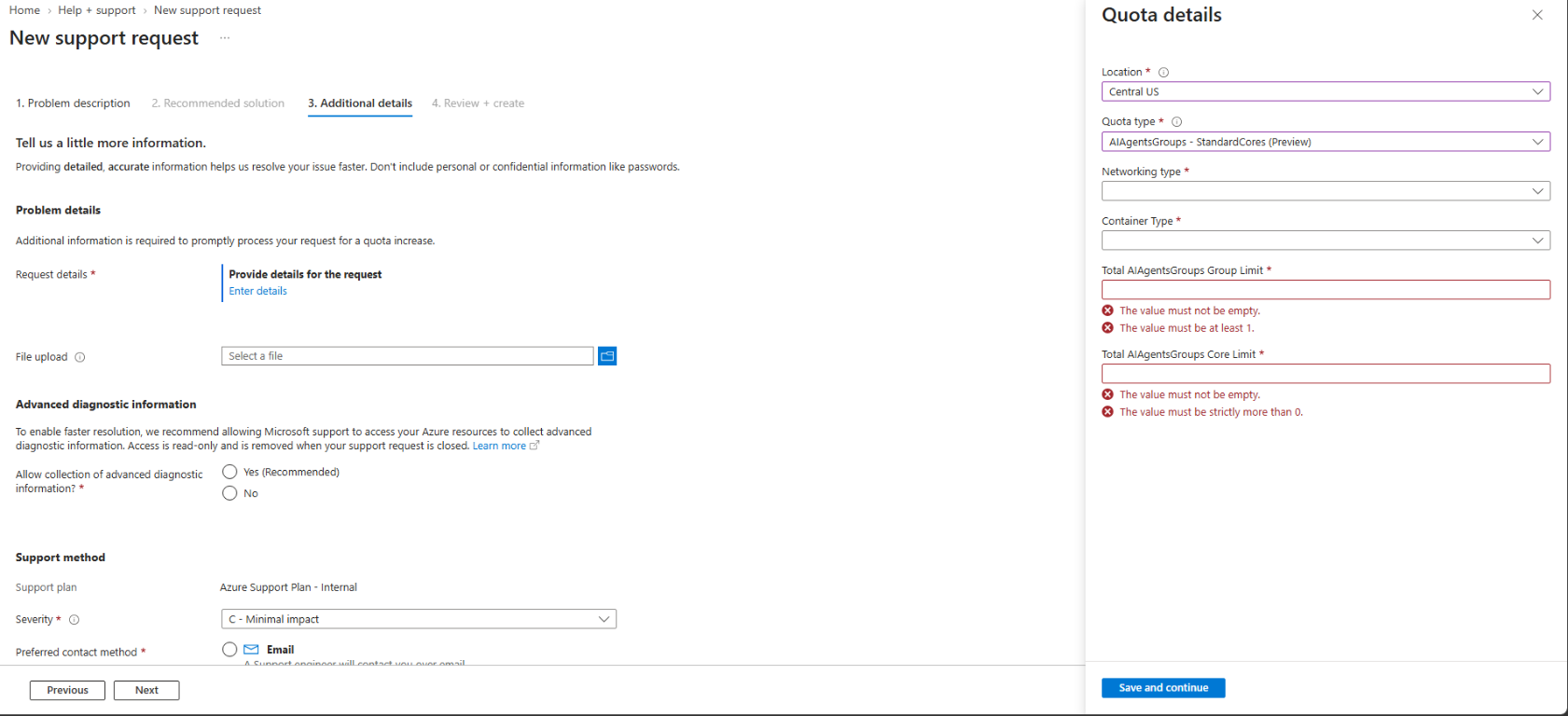
Open New support request in the Azure portal (with Issue type set to Service and subscription limits (quotas) and Quota type set to Container Instances), select your subscription, and go to the Additional details tab.
Select Enter details to open the Quota details pane, choose your Location, select AIAgentsGroups - StandardCores (Preview) for Quota type, and fill in Networking type, Container Type, Total AIAgentsGroups Group Limit, and Total AIAgentsGroups Core Limit:
Submit the support request. After your quota request is approved, re-register the
Microsoft.ContainerInstanceresource provider (az provider register --namespace Microsoft.ContainerInstance --wait) so that your subscription picks up the newly enabled capabilities.
To connect to a running sandbox after you create an AI agents group and a sandbox (see Quickstart: Create your first serverless sandbox), a gRPC client generated from the sandbox gateway protobuf file,
sandboxgateway.proto. A gRPC client is required because the sandbox gateway exposes a gRPC service (aci.sandboxgateway.SandboxGatewayService) for in-sandbox operations such as waiting for readiness, running commands, transferring files, and reading logs. To use the cross-platform sample C# CLI in this documentation (supported on Linux, macOS, and Windows), install the .NET 8 SDK and build the CLI.Note
A gRPC client isn't required if you schedule and manage serverless sandboxes through Azure Kubernetes Service (AKS).
- An AI agents group, and the
{endpoint}and{accessToken}from theconnectaction. To create one, complete Quickstart: Create your first serverless sandbox.
Create a parent sandbox with an enclave budget
To allow a sandbox to start enclaves, set properties.peerSandboxProfile when you create the parent sandbox. You must provide both cpu (1–64 whole cores) and memoryInGB (1–256 whole GB). These values reserve the total CPU and memory budget shared across all enclaves of that parent sandbox.
The enclave budget is immutable after creation. You can't combine peerSandboxProfile with confidentialComputeProperties or with min and max resource bounds, and you can't save a snapshot of a sandbox that has an enclave budget.
Create a parent sandbox named parent1 with 1 CPU core and 1 GiB of memory for the parent, and an enclave budget of 2 CPU cores and 4 GB of memory:
PUT {endpoint}/sandboxes/parent1?api-version=2026-08-01-preview
Authorization: Bearer {accessToken}
Content-Type: application/json

{
  "location": "centralus",
  "properties": {
    "image": "mcr.microsoft.com/mirror/docker/library/python:3.9-slim-bookworm",
    "guestOs": "linux",
    "architecture": "amd64",
    "resources": {
      "cpu": 1,
      "memory": 1
    },
    "peerSandboxProfile": {
      "cpu": 2,
      "memoryInGB": 4
    }
  }
}
Wait until properties.provisioningState is Succeeded. Then copy properties.connectionString from the response, and wait until the guest is ready (WaitForReady). By using the sample C# CLI:
dotnet run -- -cs "<parent1-connection-string>" wait
Set up sandboxctl in the parent sandbox
Inside the parent sandbox, the in-guest sandboxctl tool communicates with aci.hostbridge.peersandbox.v1.PeerSandboxService on the host over vsock (CID 2, port 5090) to manage enclaves (peer create, peer list, peer get, peer start, peer stop, peer delete, and peer exec) and vsock port forwards (forward create, forward list, and forward delete).
To use sandboxctl in parent1, you can either include /usr/local/bin/sandboxctl and socat in your parent sandbox image, or build sandboxctl, upload it to Azure Blob Storage, and download it into parent1:
Build the self-contained
linux-x64sandboxctlbinary by following Build sandboxctl from peersandbox.proto. You can run the build on Linux, macOS, or Windows; the published binary is created atbin/Release/net8.0/linux-x64/publish/sandboxctl.Upload the published
sandboxctlbinary to an Azure Blob Storage container and generate a short-lived read-only SAS URL ($sandboxctlSasUrl).storageAccount="aisandboxstore$RANDOM" storageContainer="tools" az storage account create --resource-group myResourceGroup --name $storageAccount --location centralus --sku Standard_LRS az storage container create --account-name $storageAccount --name $storageContainer --auth-mode key az storage blob upload --account-name $storageAccount --container-name $storageContainer \ --name sandboxctl --file bin/Release/net8.0/linux-x64/publish/sandboxctl --overwrite --auth-mode key expiry=$(date -u -d "+1 hour" '+%Y-%m-%dT%H:%MZ' 2>/dev/null || date -u -v+1H '+%Y-%m-%dT%H:%MZ') sandboxctlSasUrl=$(az storage blob generate-sas --account-name $storageAccount --container-name $storageContainer \ --name sandboxctl --permissions r --expiry $expiry --https-only --full-uri --auth-mode key --output tsv) echo $sandboxctlSasUrlInside
parent1, installsocatand downloadsandboxctlto/usr/local/bin/sandboxctl(replace<sandboxctl-blob-sas-url>with the$sandboxctlSasUrloutput from the previous step, or useDownloadFromBlobstore):dotnet run -- -cs "<parent1-connection-string>" exec /bin/sh -c ' export DEBIAN_FRONTEND=noninteractive apt-get update -qq && apt-get install -y -qq --no-install-recommends curl socat ca-certificates curl -fsSL -o /usr/local/bin/sandboxctl "<sandboxctl-blob-sas-url>" chmod +x /usr/local/bin/sandboxctl'
Start an enclave from inside the parent and check the budget
Start an enclave named
p1from insideparent1(ExecSandbox) with 1 CPU core and 2 GB of memory (--cpu 0and--memory-gb 0, the defaults, allocate all remaining budget).sandboxctl peer createwaits until the enclave reaches therunningstate. Use the sample C# CLI:dotnet run -- -cs "<parent1-connection-string>" exec /usr/local/bin/sandboxctl peer create p1 --image mcr.microsoft.com/mirror/docker/library/python:3.9-slim-bookworm --cpu 1 --memory-gb 2 --timeout 300Name: p1 State: running Image: mcr.microsoft.com/mirror/docker/library/python:3.9-slim-bookworm Cores: 1 Memory (GB): 2 VM id: <vm-guid>List the enclaves and the remaining enclave budget in
parent1:dotnet run -- -cs "<parent1-connection-string>" exec /usr/local/bin/sandboxctl peer listNAME STATE IMAGE CORES MEMORY(GB) DISK(GB) VM ID p1 running mcr.microsoft.com/mirror/docker/library/python:3.9-slim-bookworm 1 2 10 <vm-guid> Budget: cores 1/2, memory 2/4 GB
Verify micro VM isolation and no network access
Compare the kernel
boot_id, CPU count, and memory ofparent1andp1:dotnet run -- -cs "<parent1-connection-string>" exec /bin/sh -c ' probe="echo boot_id=\$(cut -c1-8 /proc/sys/kernel/random/boot_id) cpus=\$(nproc) memory_mb=\$(( \$(sed -n \"s/^MemTotal: *\\([0-9]*\\).*/\\1/p\" /proc/meminfo) / 1024 ))" echo "parent: $(sh -c "$probe")" echo "enclave: $(/usr/local/bin/sandboxctl peer exec p1 -- sh -c "$probe")"'The parent and the enclave report different
boot_idvalues and separate memory totals, which confirms thatp1runs in its own micro VM with its own Linux kernel.parent: boot_id=4a91c8e2 cpus=1 memory_mb=972 enclave: boot_id=9f03b21d cpus=1 memory_mb=1984Verify that
p1has no outbound internet access:dotnet run -- -cs "<parent1-connection-string>" exec /usr/local/bin/sandboxctl peer exec p1 -- /usr/local/bin/python3 -c ' import urllib.request try: urllib.request.urlopen("http://www.bing.com", timeout=5) print("RESULT=REACHABLE") except Exception as e: print("RESULT=BLOCKED (%s)" % getattr(e, "reason", e))'Because the enclave has no external network interface, outbound requests fail immediately.
RESULT=BLOCKED ([Errno -3] Temporary failure in name resolution)
Forward a port from the parent to a service in the enclave
Because an enclave has no network interface, the parent sandbox and the enclave communicate only through vsock port forwards (sandboxctl forward create).
In
p1, start a background Python service that listens on vsock port8080(socket.AF_VSOCK) and replies with"hello from the enclave micro VM\n":dotnet run -- -cs "<parent1-connection-string>" exec /usr/local/bin/sandboxctl peer exec p1 -- /bin/sh -c ' cat << "EOF" > /tmp/svc.py import socket s = socket.socket(socket.AF_VSOCK, socket.SOCK_STREAM) s.bind((socket.VMADDR_CID_ANY, 8080)) s.listen(5) open("/tmp/svc.ready", "w").close() while True: c, _ = s.accept() try: c.recv(1024) c.sendall(b"hello from the enclave micro VM\n") finally: c.close() EOF setsid /usr/local/bin/python3 /tmp/svc.py >/tmp/svc.log 2>&1 < /dev/null &'In
parent1, open a port forward to port8080inp1and send a request through the host vsock relay (CID 2) on the returnedlistenPort:dotnet run -- -cs "<parent1-connection-string>" exec /bin/sh -c ' /usr/local/bin/sandboxctl --output json forward create --peer p1 --target-port 8080 > /tmp/fwd.json port=$(sed -n "s/.*\"listenPort\": *\([0-9]*\).*/\1/p" /tmp/fwd.json | head -1) echo "forward: parent -> host vsock port $port -> enclave p1 port 8080" reply=$( (printf "ping\n"; sleep 1) | socat -t 1 - VSOCK-CONNECT:2:$port ) echo "reply: $reply"'forward: parent -> host vsock port 40000 -> enclave p1 port 8080 reply: hello from the enclave micro VM
Verify enclave budget enforcement
parent1 has one CPU core and 2 GB of memory remaining in its enclave budget (Budget: cores 1/2, memory 2/4 GB). Try to create a second enclave (p2) that requests two CPU cores and 4 GB of memory:
dotnet run -- -cs "<parent1-connection-string>" exec /usr/local/bin/sandboxctl peer create p2 --image mcr.microsoft.com/mirror/docker/library/python:3.9-slim-bookworm --cpu 2 --memory-gb 4 --timeout 60
The host rejects the request because it exceeds the remaining enclave budget.
error: ResourceExhausted: peer budget exceeded
Clean up resources
Delete the parent sandbox. When you delete the parent sandbox, you automatically delete all of its enclaves and port forwards:
DELETE {endpoint}/sandboxes/parent1?api-version=2026-08-01-preview
Authorization: Bearer {accessToken}
If you don't plan to do the other tutorials, delete the AI agents group and the resource group.
Build sandboxctl from peersandbox.proto
You can generate a gRPC client in any language from peersandbox.proto and connect to aci.hostbridge.peersandbox.v1.PeerSandboxService over an unencrypted HTTP/2 (h2c) connection on Linux vsock (AF_VSOCK = 40, host CID = 2, port 5090).
To build the self-contained sandboxctl Linux binary in C# with the .NET 8 SDK:
Create a new project folder (
SandboxCtl), save thepeersandbox.protodefinition aspeersandbox.proto, and createSandboxCtl.csproj.<Project Sdk="Microsoft.NET.Sdk"> <PropertyGroup> <OutputType>Exe</OutputType> <TargetFramework>net8.0</TargetFramework> <ImplicitUsings>enable</ImplicitUsings> <Nullable>enable</Nullable> <AssemblyName>sandboxctl</AssemblyName> <InvariantGlobalization>true</InvariantGlobalization> </PropertyGroup> <ItemGroup> <PackageReference Include="Google.Protobuf" Version="3.28.3" /> <PackageReference Include="Grpc.Net.Client" Version="2.66.0" /> <PackageReference Include="Grpc.Tools" Version="2.67.0" PrivateAssets="All" /> </ItemGroup> <ItemGroup> <Protobuf Include="peersandbox.proto" GrpcServices="Client" /> </ItemGroup> </Project>Replace
Program.cswith the following implementation, which connects to the host overAF_VSOCK(CID 2, port5090) and implementspeer(create,list,get,start,stop,delete,exec) andforward(create,list,delete).using System.Runtime.InteropServices; using ACI.HostBridge.Api.PeerSandbox.V1; using Google.Protobuf; using Grpc.Core; using Grpc.Net.Client; AppContext.SetSwitch("System.Net.Http.SocketsHttpHandler.Http2UnencryptedSupport", true); bool jsonOutput = false; uint vsockPort = 5090; var rest = new List<string>(); for (int i = 0; i < args.Length; i++) { if (args[i] == "--output" && i + 1 < args.Length) { jsonOutput = args[++i] == "json"; } else if (args[i] == "--port" && i + 1 < args.Length) { vsockPort = uint.Parse(args[++i]); } else { rest.Add(args[i]); } } if (rest.Count < 2) { Console.Error.WriteLine("Usage: sandboxctl [--output text|json] <peer|forward> <subcommand> [options]"); return 1; } var handler = new SocketsHttpHandler { ConnectCallback = (_, ct) => VsockStream.ConnectAsync(vsockPort, ct), EnableMultipleHttp2Connections = true, }; using var channel = GrpcChannel.ForAddress("http://localhost", new GrpcChannelOptions { HttpHandler = handler }); var client = new PeerSandboxService.PeerSandboxServiceClient(channel); try { if (rest[0] == "peer") { switch (rest[1]) { case "create": string name = rest[2], image = ""; int cpu = 0, memGb = 0, timeout = 300; bool noWait = false; for (int i = 3; i < rest.Count; i++) { if (rest[i] == "--image") image = rest[++i]; else if (rest[i] == "--cpu") cpu = int.Parse(rest[++i]); else if (rest[i] == "--memory-gb") memGb = int.Parse(rest[++i]); else if (rest[i] == "--timeout") timeout = int.Parse(rest[++i]); else if (rest[i] == "--no-wait") noWait = true; } var peer = (await client.CreatePeerAsync(new CreatePeerRequest { Name = name, Image = image, Cores = cpu, MemoryInGb = memGb })).Peer; DateTime deadline = DateTime.UtcNow.AddSeconds(timeout); while (!noWait && peer.State != "running" && peer.State != "failed") { if (DateTime.UtcNow >= deadline) { Console.Error.WriteLine($"error: timed out waiting for peer {name}"); return 1; } await Task.Delay(1000); peer = (await client.GetPeerAsync(new GetPeerRequest { Name = name }, deadline: deadline)).Peer; } PrintPeer(peer, jsonOutput); return peer.State == "failed" ? 1 : 0; case "list": var listResp = await client.ListPeersAsync(new ListPeersRequest()); if (jsonOutput) { Console.WriteLine(JsonFormatter.Default.Format(listResp)); return 0; } if (listResp.Peers.Count == 0) Console.WriteLine("No peers."); else { Console.WriteLine("NAME\tSTATE\tIMAGE\tCORES\tMEMORY(GB)\tDISK(GB)\tVM ID"); foreach (var p in listResp.Peers) Console.WriteLine($"{p.Name}\t{p.State}\t{p.Image}\t{p.Cores}\t{p.MemoryInGb}\t{p.DiskInGb}\t{p.VmId}"); } if (listResp.Budget is { } b) Console.WriteLine($"Budget: cores {b.UsedCores}/{b.Cores}, memory {b.UsedMemoryInGb}/{b.MemoryInGb} GB"); return 0; case "get": PrintPeer((await client.GetPeerAsync(new GetPeerRequest { Name = rest[2] })).Peer, jsonOutput); return 0; case "start": PrintPeer((await client.StartPeerAsync(new StartPeerRequest { Name = rest[2] })).Peer, jsonOutput); return 0; case "stop": PrintPeer((await client.StopPeerAsync(new StopPeerRequest { Name = rest[2] })).Peer, jsonOutput); return 0; case "delete": await client.DeletePeerAsync(new DeletePeerRequest { Name = rest[2] }); Console.WriteLine($"Deleted {rest[2]}."); return 0; case "exec": string execPeer = rest[2]; int sep = rest.IndexOf("--", 3); var cmdTokens = sep >= 0 ? rest.Skip(sep + 1).ToArray() : rest.Skip(3).ToArray(); var execReq = new ExecPeerRequest { Name = execPeer, Command = cmdTokens[0] }; execReq.Args.AddRange(cmdTokens.Skip(1)); var execResp = await client.ExecPeerAsync(execReq); Console.Out.Write(execResp.Stdout); Console.Error.Write(execResp.Stderr); return execResp.TimedOut ? 124 : execResp.ExitCode; } } else if (rest[0] == "forward") { switch (rest[1]) { case "create": string targetPeer = ""; bool toParent = false; uint targetPort = 0, listenPort = 0; for (int i = 2; i < rest.Count; i++) { if (rest[i] == "--peer") targetPeer = rest[++i]; else if (rest[i] == "--parent") toParent = true; else if (rest[i] == "--target-port") targetPort = uint.Parse(rest[++i]); else if (rest[i] == "--listen-port") listenPort = uint.Parse(rest[++i]); } var fwdResp = await client.CreateForwardAsync(new CreateForwardRequest { Peer = targetPeer, ToParent = toParent, TargetPort = targetPort, ListenPort = listenPort, }); if (jsonOutput) { Console.WriteLine(JsonFormatter.Default.Format(fwdResp)); return 0; } Console.WriteLine($"Forward id: {fwdResp.Forward.Id}\nListen port: {fwdResp.Forward.ListenPort}\nTarget: peer {fwdResp.Forward.Peer}, port {fwdResp.Forward.TargetPort}"); return 0; case "list": var fwds = await client.ListForwardsAsync(new ListForwardsRequest()); if (jsonOutput) { Console.WriteLine(JsonFormatter.Default.Format(fwds)); return 0; } foreach (var f in fwds.Forwards) Console.WriteLine($"{f.Id}\t{f.ListenPort}\t{f.Peer}\t{f.TargetPort}"); return 0; case "delete": await client.DeleteForwardAsync(new DeleteForwardRequest { Id = rest[2] }); Console.WriteLine($"Deleted {rest[2]}."); return 0; } } } catch (RpcException ex) { Console.Error.WriteLine($"error: {ex.StatusCode}: {ex.Status.Detail}"); return 1; } return 1; static void PrintPeer(PeerInfo p, bool json) { if (json) { Console.WriteLine(JsonFormatter.Default.Format(new GetPeerResponse { Peer = p })); return; } Console.WriteLine($"Name: {p.Name}\nState: {p.State}\nImage: {p.Image}\nCores: {p.Cores}\nMemory (GB): {p.MemoryInGb}\nVM id: {p.VmId}"); } internal sealed class VsockStream : Stream { private const int AF_VSOCK = 40, SOCK_STREAM = 1, EINTR = 4; private const uint VMADDR_CID_HOST = 2; private int _fd; private VsockStream(int fd) => _fd = fd; public static ValueTask<Stream> ConnectAsync(uint port, CancellationToken ct) => new(Task.Run<Stream>(() => { int fd = socket(AF_VSOCK, SOCK_STREAM, 0); if (fd < 0) throw new IOException($"vsock socket() failed (errno {Marshal.GetLastPInvokeError()})."); var addr = new SockAddrVm { svm_family = AF_VSOCK, svm_port = port, svm_cid = VMADDR_CID_HOST, svm_zero = new byte[4] }; int size = Marshal.SizeOf<SockAddrVm>(); nint ptr = Marshal.AllocHGlobal(size); try { Marshal.StructureToPtr(addr, ptr, false); if (connect(fd, ptr, (uint)size) < 0) { int e = Marshal.GetLastPInvokeError(); close(fd); throw new IOException($"vsock connect failed (errno {e})."); } } finally { Marshal.FreeHGlobal(ptr); } return new VsockStream(fd); }, ct)); public override bool CanRead => _fd >= 0; public override bool CanWrite => _fd >= 0; public override bool CanSeek => false; public override long Length => throw new NotSupportedException(); public override long Position { get => throw new NotSupportedException(); set => throw new NotSupportedException(); } public override void Flush() { } public override long Seek(long o, SeekOrigin s) => throw new NotSupportedException(); public override void SetLength(long v) => throw new NotSupportedException(); public override int Read(byte[] b, int o, int c) => ReadAsync(b, o, c, CancellationToken.None).GetAwaiter().GetResult(); public override void Write(byte[] b, int o, int c) => WriteAsync(b, o, c, CancellationToken.None).GetAwaiter().GetResult(); public override Task<int> ReadAsync(byte[] buffer, int offset, int count, CancellationToken ct) => Task.Run(() => { byte[] target = offset == 0 ? buffer : new byte[count]; while (true) { int r = recv(_fd, target, count, 0); if (r > 0) { if (offset != 0) Array.Copy(target, 0, buffer, offset, r); return r; } if (r == 0 || Marshal.GetLastPInvokeError() != EINTR) return 0; } }, ct); public override Task WriteAsync(byte[] buffer, int offset, int count, CancellationToken ct) => Task.Run(() => { int sentTotal = 0; while (sentTotal < count) { byte[] chunk = new byte[count - sentTotal]; Array.Copy(buffer, offset + sentTotal, chunk, 0, chunk.Length); int s = send(_fd, chunk, chunk.Length, 0); if (s > 0) { sentTotal += s; continue; } if (Marshal.GetLastPInvokeError() != EINTR) throw new IOException("vsock send failed."); } }, ct); protected override void Dispose(bool disposing) { int fd = Interlocked.Exchange(ref _fd, -1); if (fd >= 0) close(fd); base.Dispose(disposing); } [StructLayout(LayoutKind.Sequential)] private struct SockAddrVm { public ushort svm_family, svm_reserved1; public uint svm_port, svm_cid; [MarshalAs(UnmanagedType.ByValArray, SizeConst = 4)] public byte[] svm_zero; } [DllImport("libc", SetLastError = true)] private static extern int socket(int domain, int type, int protocol); [DllImport("libc", SetLastError = true)] private static extern int connect(int sockfd, nint addr, uint addrlen); [DllImport("libc", SetLastError = true)] private static extern int recv(int sockfd, byte[] buf, int len, int flags); [DllImport("libc", SetLastError = true)] private static extern int send(int sockfd, byte[] buf, int len, int flags); [DllImport("libc", SetLastError = true)] private static extern int close(int fd); }Publish
sandboxctlas a self-contained single-file Linux executable (no .NET runtime required inside the parent sandbox):dotnet publish -c Release -r linux-x64 --self-contained true -p:PublishSingleFile=true -p:EnableCompressionInSingleFile=trueThe published binary is created at
bin/Release/net8.0/linux-x64/publish/sandboxctl.
Enclave protobuf definition (peersandbox.proto)
Save the following protobuf definition as peersandbox.proto:
syntax = "proto3";

option csharp_namespace = "ACI.HostBridge.Api.PeerSandbox.V1";

package aci.hostbridge.peersandbox.v1;

// Enclave (peer sandbox) management and parent<->enclave port forwarding, served by the host
// on vsock port 5090 (CID 2). The caller is identified by its VM ID.
service PeerSandboxService {
  rpc CreatePeer(CreatePeerRequest) returns (CreatePeerResponse);
  rpc GetPeer(GetPeerRequest) returns (GetPeerResponse);
  rpc ListPeers(ListPeersRequest) returns (ListPeersResponse);
  rpc StartPeer(StartPeerRequest) returns (StartPeerResponse);
  rpc StopPeer(StopPeerRequest) returns (StopPeerResponse);
  rpc DeletePeer(DeletePeerRequest) returns (DeletePeerResponse);

  // Runs one command in the enclave. Output is returned when it exits.
  rpc ExecPeer(ExecPeerRequest) returns (ExecPeerResponse);
  // Interactive TTY shell in the enclave. The first message must be `start`.
  rpc ShellPeer(stream ShellPeerRequest) returns (stream ShellPeerResponse);

  rpc CreateForward(CreateForwardRequest) returns (CreateForwardResponse);
  rpc ListForwards(ListForwardsRequest) returns (ListForwardsResponse);
  rpc DeleteForward(DeleteForwardRequest) returns (DeleteForwardResponse);
}

message PeerInfo {
  string name = 1;
  // Current state, for example "creating", "running", "stopped", "failed", "deleting".
  string state = 2;
  string target_state = 3;
  string image = 4;
  int32 cores = 5;
  int32 memory_in_gb = 6;
  int32 disk_in_gb = 7;
  // Hyper-V VM id of the running enclave. Empty when it is not running.
  string vm_id = 8;
  string failure_message = 9;
}

message PeerBudget {
  int32 cores = 1;
  int32 memory_in_gb = 2;
  int32 used_cores = 3;
  int32 used_memory_in_gb = 4;
}

message CreatePeerRequest {
  // Short name, [a-z0-9]([a-z0-9-]*[a-z0-9])?, at most 32 characters.
  string name = 1;
  // Image reference pulled by the host, for example "myregistry.azurecr.io/app:1".
  string image = 2;
  // 0 means all remaining CPU in the parent budget.
  int32 cores = 3;
  // 0 means all remaining memory in the parent budget.
  int32 memory_in_gb = 4;
  // The enclave always gets the parent's disk size.
  reserved 5;
  reserved "disk_in_gb";
}

message CreatePeerResponse {
  PeerInfo peer = 1;
}

message GetPeerRequest {
  string name = 1;
}

message GetPeerResponse {
  PeerInfo peer = 1;
}

message ListPeersRequest {
}

message ListPeersResponse {
  repeated PeerInfo peers = 1;
  PeerBudget budget = 2;
}

message StartPeerRequest {
  string name = 1;
}

message StartPeerResponse {
  PeerInfo peer = 1;
}

message StopPeerRequest {
  string name = 1;
}

message StopPeerResponse {
  PeerInfo peer = 1;
}

message DeletePeerRequest {
  string name = 1;
}

message DeletePeerResponse {
}

message ExecPeerRequest {
  string name = 1;
  string command = 2;
  repeated string args = 3;
  string working_directory = 4;
  map<string, string> environment = 5;
  // 0 means the host default. The host clamps it to its maximum.
  int32 timeout_seconds = 6;
}

message ExecPeerResponse {
  int32 exit_code = 1;
  string stdout = 2;
  string stderr = 3;
  bool timed_out = 4;
}

message ShellPeerRequest {
  oneof request {
    ShellStart start = 1;
    // Raw terminal input. Keep each chunk at most 16 KiB.
    bytes input = 2;
    ShellWindowSize window_size = 3;
    // Signal name, for example "SIGINT".
    string signal = 4;
  }
}

message ShellStart {
  string name = 1;
  // Empty means "/bin/sh".
  string shell = 2;
  map<string, string> environment = 3;
  string working_directory = 4;
  int32 rows = 5;
  int32 cols = 6;
}

message ShellWindowSize {
  int32 rows = 1;
  int32 cols = 2;
}

message ShellPeerResponse {
  oneof response {
    ShellOutput output = 1;
    ShellExited exited = 2;
    string error = 3;
  }
}

message ShellOutput {
  enum Stream {
    STDOUT = 0;
    STDERR = 1;
  }
  Stream stream = 1;
  bytes data = 2;
}

message ShellExited {
  int32 exit_code = 1;
}

message ForwardInfo {
  string id = 1;
  string source_vm_id = 2;
  string target_vm_id = 3;
  // hvsock/vsock port the source (the caller) connects to on the host (CID 2).
  uint32 listen_port = 4;
  // Port the relay connects to in the target VM.
  uint32 target_port = 5;
  // Target enclave name, or empty when the target is the caller's parent.
  string peer = 6;
}

message CreateForwardRequest {
  // Parent callers: the target enclave name. Must be empty for enclave callers.
  string peer = 1;
  // Enclave callers: true to forward to the parent. Must be false for parent callers.
  bool to_parent = 2;
  uint32 target_port = 3;
  // 0 means the relay picks a free port.
  uint32 listen_port = 4;
}

message CreateForwardResponse {
  ForwardInfo forward = 1;
}

message ListForwardsRequest {
}

message ListForwardsResponse {
  // Only forwards whose source is the caller.
  repeated ForwardInfo forwards = 1;
}

message DeleteForwardRequest {
  string id = 1;
}

message DeleteForwardResponse {
}