Note
Access to this page requires authorization. You can try signing in or changing directories.
Access to this page requires authorization. You can try changing directories.
In this tutorial, you use Genie Code to run end-to-end customer segmentation directly inside a Databricks notebook. Starting from a raw marketing campaign data set, Genie Code handles data profiling, feature engineering, K-means clustering, and persona generation — all from a single prompt.
Requirements
- A Databricks workspace with Genie Code enabled.
- Partner-powered AI features enabled for both the account and workspace. See Partner-powered AI features.
Step 1: Get the data set
For this tutorial, you use a marketing campaign data set.
- Download the Marketing Campaign data set from Kaggle.
- Click
 New > Add or upload data.
 - Click Create or modify a table.
- Click browse or drag and drop the downloaded file onto the drop zone.
- Select the target catalog and schema in Unity Catalog.
- (Optional) Edit the table name.
- Click Create table.
Step 2: Open a notebook
- In the sidebar, click New and select Notebook.
- Name the notebook Marketing Campaign Data.
- Attach the notebook to compute or use serverless compute.
Step 3: Launch Genie Code
Genie Code plans and runs complex tasks autonomously. It reads cell outputs, fixes errors, and adapts its approach based on results.
In the upper-right corner of the notebook, click  to open the Genie Code pane.
Step 4: Submit your segmentation prompt
Segmentation analysis is commonly performed by clustering customers who have similar purchase patterns together. For example, segments might be based on income, demographics, or specific purchasing behaviors. One common approach is K-means clustering, a technique that automatically groups similar customers into distinct segments, called "clusters."
Tip
Tell Genie Code to do this for you:
Help me cluster my customers from my marketing campaign to profile them. I want to identify interesting segments that may be useful for marketing purposes.
Genie Code breaks down the prompt into steps and runs them:
- Understands context — Genie Code reads your prompt and the current state of the notebook.
- Finds relevant data — Genie Code searches Unity Catalog for relevant data assets and loads them for analysis.
- Generates and runs code — Genie Code edits notebook cells following a standard data science workflow: importing libraries, preprocessing data, training the model, and visualizing results.
- Summarizes results — Genie Code has a plain-language summary of what it found.
Genie Code asks for your approval before running code. Review each step and click Allow. You can also select Allow in current chat to approve all steps in the current conversation, or Always allow to skip future approval prompts.
Step 5: Review the results
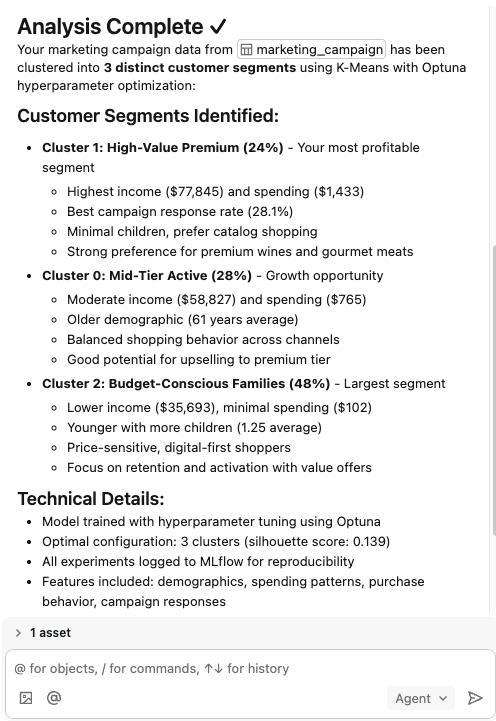
After Genie Code finishes, review the generated notebook cells and the summary in the Genie Code pane. The summary describes each identified customer segment, including demographic characteristics, purchase behavior, and suggestions for how to engage each group.
For example, Genie Code might identify segments like Premium Loyalists (high-income, frequent buyers) and Bargain Seekers (price-sensitive, promotion-driven).
Step 6: Refine with follow-up prompts
Use follow-up prompts to dig deeper into the analysis:
Are there any other clustering techniques we should consider?What happens if we increase the number of clusters?Filter to customers who have made a purchase in the last 90 days.
Each follow-up prompt builds on the previous results without starting over.