Note
Access to this page requires authorization. You can try signing in or changing directories.
Access to this page requires authorization. You can try changing directories.
Lakeflow Connect provides governed, high-performance ingestion of data from external sources, including on-premises databases. You define the source connection one time in Unity Catalog, and data engineers build fully managed ingestion pipelines on top of it.
Unlike Lakehouse Federation, Lakeflow Connect runs transformation compute in Azure Databricks and reads changes incrementally, which minimizes the load on the source system. It reads change data and lands it in a defined schema and table.
You can ingest on-premises data with an Lakeflow Connect integrated change data capture (CDC) pipeline, a serverless pipeline that connects to your on-premises database over a private network path.
Integrated CDC pipelines
An integrated CDC pipeline, also called direct CDC, runs snapshot, CDC, and replication in one scheduled serverless pipeline, without a separate ingestion gateway. Integrated CDC pipelines support SQL Server and Oracle.
When to use an integrated CDC pipeline
Use an integrated CDC pipeline in the following cases:
- You want managed CDC and incremental loads without owning the pipeline logic.
- You use serverless compute and want a single reusable path into your network, instead of a private endpoint and proxy VMs for each resource.
How it works
A private network gateway provides the serverless path into your VNet and to transitively connected networks, such as your on-premises network. The integrated CDC pipeline runs on serverless compute and reaches your on-premises database through the gateway.
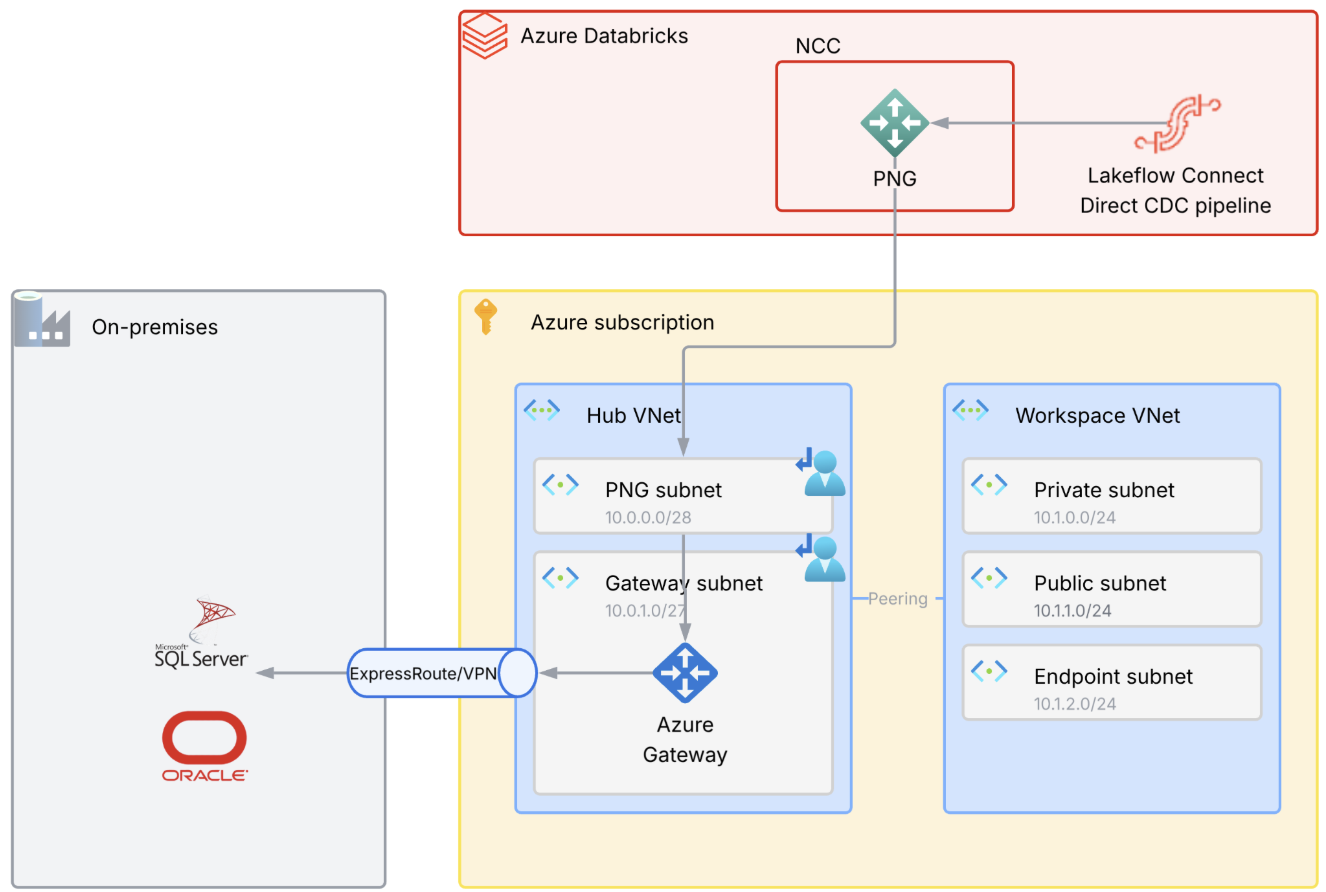
To create an integrated CDC pipeline, see the following:
Considerations
Review the following before you use an integrated CDC pipeline:
- Integrated CDC pipelines support only SQL Server and Oracle.
- You might not be able to create a connection to an on-premises database in the UI. Create the connection using SQL instead.