Note
Access to this page requires authorization. You can try signing in or changing directories.
Access to this page requires authorization. You can try changing directories.
Important
This feature is in Public Preview. Account admins can manage access to this feature from the account console Previews page. See Manage account-level previews.
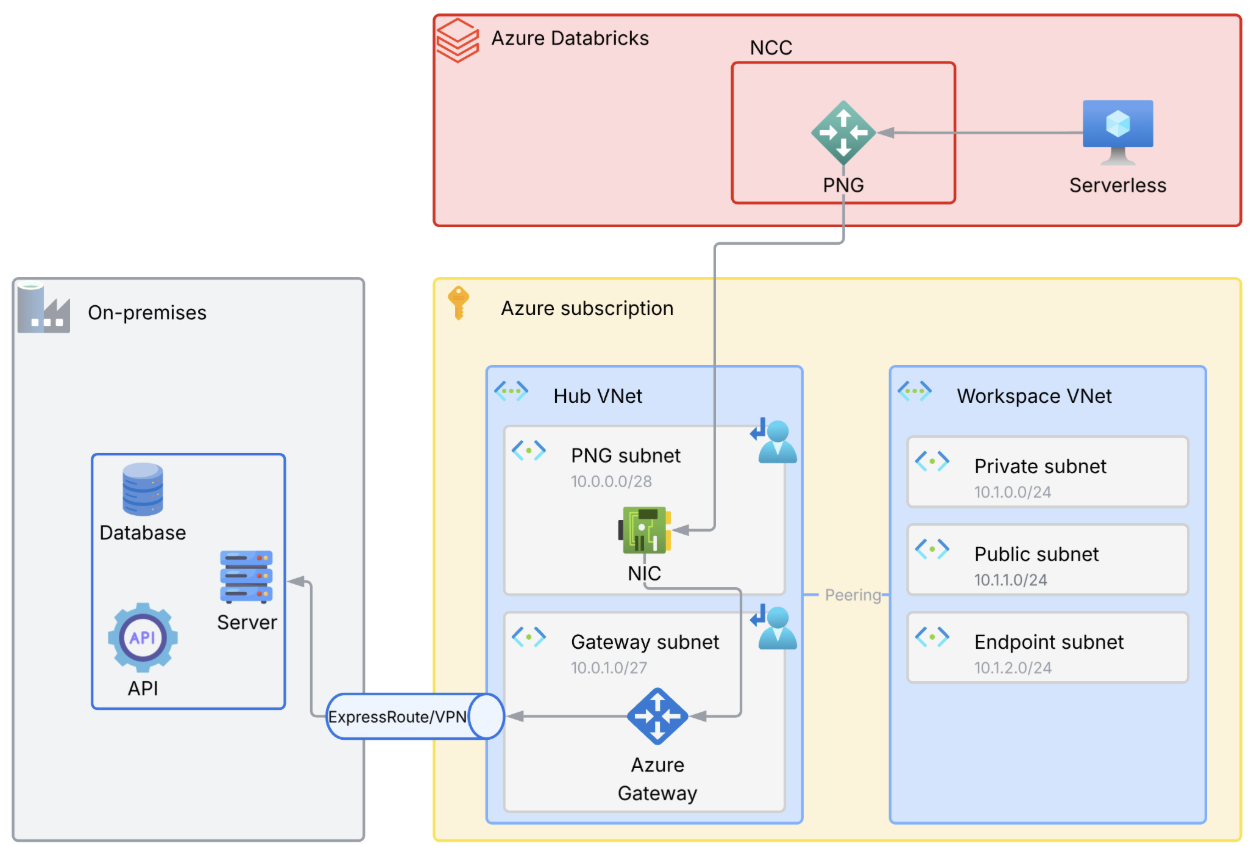
A private network gateway is the recommended way to connect serverless compute to on-premises resources. It provides a single managed gateway into your VNet, so serverless workloads can reach resources in that VNet and in transitively connected networks. For example, if you use a hub-and-spoke network with on-premises connectivity through the hub, serverless compute can reach those on-premises resources through the gateway.
A private network gateway combines the security of Private Link with the flexibility of customer-managed hub-and-spoke networking. Azure Databricks places a managed network interface in your VNet, so serverless compute reaches target resources as if the traffic originated from that network.
For a full description of private network gateways, including traffic modes and routing priority, see Private network gateway.
What problem it solves
Without a private network gateway, you configure an individual private endpoint for every target resource. This approach:
- Is cumbersome to set up and maintain.
- Runs into scaling limits as the number of target resources grows.
- Requires coordination between application teams and infrastructure teams for each new resource.
A private network gateway replaces per-resource private endpoints with one gateway that reaches every resource your VNet can reach.
When to use a private network gateway
Use a private network gateway to connect serverless compute to:
- Resources in your VNet that don't support Private Link.
- On-premises resources that are reachable over a dedicated connection or a site-to-site VPN.
- Internet resources through a centralized firewall, such as Palo Alto.
- Software as a service (SaaS) providers through your own proxy or NAT gateway in your VNet.
Set up a private network gateway
To set up a private network gateway:
- Verify that your account is on the Premium plan tier.
- Create a new subnet (
/28) in your VNet and delegate it toMicrosoft.Databricks/workspaces. - Create a network connectivity configuration (NCC), or reuse an existing one.
- Create a private network gateway in the NCC, and attach the NCC to your workspaces.
For detailed steps, see Configure a private network gateway.
Considerations
Review the following before you use a private network gateway:
- A private network gateway supports serverless Azure Databricks Runtime products and AI services.
- A private network gateway does not route traffic to services that serverless compute reaches through private endpoints or service endpoints, such as Azure storage accounts.
- You can create a private network gateway using the account console, the Networking REST API, or Terraform.
- Billing for private network gateway begins on or after December 1, 2026. See Billing for private network gateway.
Design your private network gateways
To minimize cost and overhead, plan how many private network gateways you create and how you group them. The following limits apply:
- An account can have up to 10 NCCs per region.
- An NCC can have up to two private network gateways.
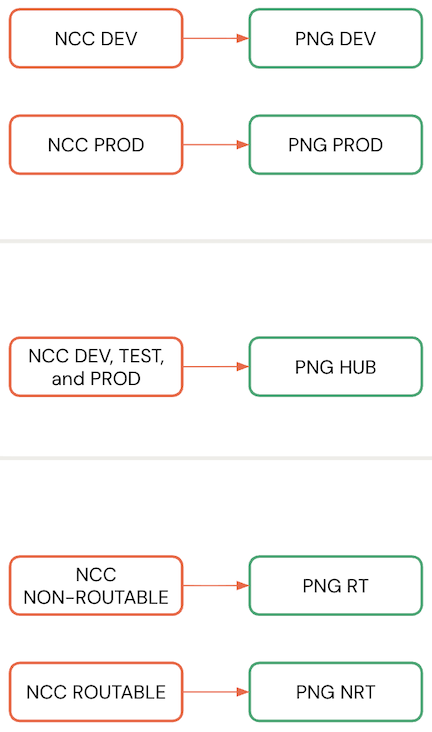
Common strategies for organizing NCCs and gateways include:
- One NCC per environment: For example, separate NCCs and gateways for development and production workspaces.
- One NCC per business unit: Each business unit has its own NCC and gateway.
- One NCC per environment and business unit: Combine both strategies for the most isolation.
You can also use the following patterns:
- Shared hub: Development, test, and production NCCs all connect through gateways into a shared hub network.
- Routable and non-routable networks: Use separate NCCs and gateways for workloads that connect to routable networks and workloads that connect to non-routable networks.
Network topologies
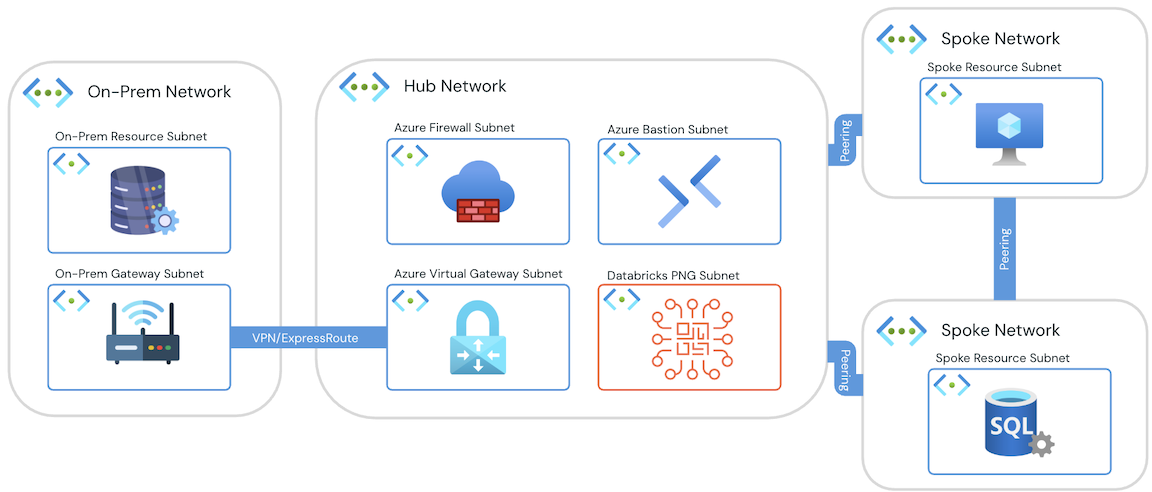
A private network gateway works with hub-and-spoke network topologies. In a typical topology:
- A hub network contains shared infrastructure, such as an Azure Firewall subnet, an Azure virtual network gateway subnet, and an Azure Bastion subnet.
- The hub network connects to your on-premises network over a VPN or ExpressRoute.
- One or more spoke networks peer with the hub network. Each spoke contains its own resource subnets and a subnet for the private network gateway.
Because the spoke peers with the hub, serverless compute reaches resources in the spoke, the hub, and the on-premises network through the gateway in the spoke.
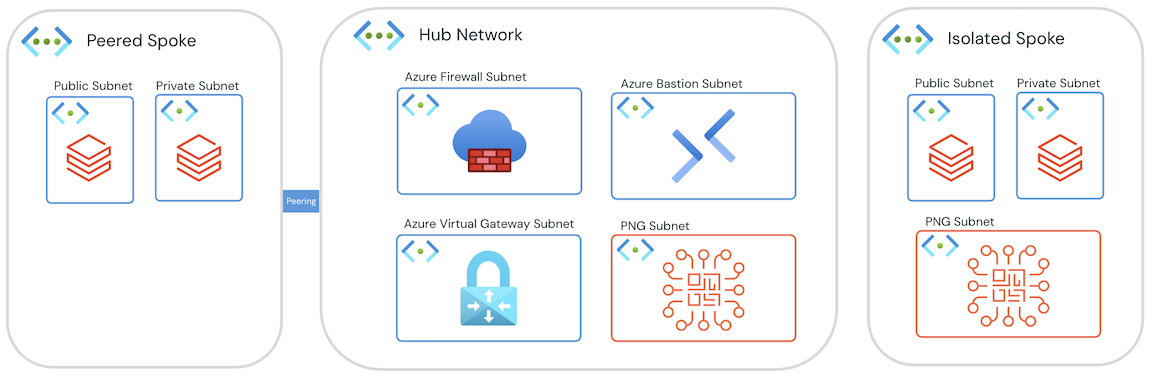
You can also combine spokes with different levels of connectivity:
- Peered spoke: A spoke that peers with the hub. A gateway in this spoke can reach the hub and the networks connected to it.
- Isolated spoke: A spoke that does not peer with the hub. A gateway in this spoke can reach only the resources in that spoke.
Ingest on-premises data with Lakeflow Connect
You can use a private network gateway with Lakeflow Connect integrated change data capture (CDC) pipelines to ingest data from on-premises databases. See Ingest on-premises data using Lakeflow Connect.