Note
Access to this page requires authorization. You can try signing in or changing directories.
Access to this page requires authorization. You can try changing directories.
Use Cloud Security Explorer to identify vulnerabilities in registry images and running containers.
For an introduction to Cloud Security Explorer, see Build queries with Cloud Security Explorer.
Create a query to identify vulnerabilities in registry images
Use this query to find container images stored in registries that have known vulnerabilities.
Sign in to the Azure portal.
Go to Microsoft Defender for Cloud > Cloud Security Explorer.
In Query builder, select Select resource types.
Select Container Images.
Select Done.
Select +.
Select Select condition.
In Vulnerabilities, select All vulnerabilities.
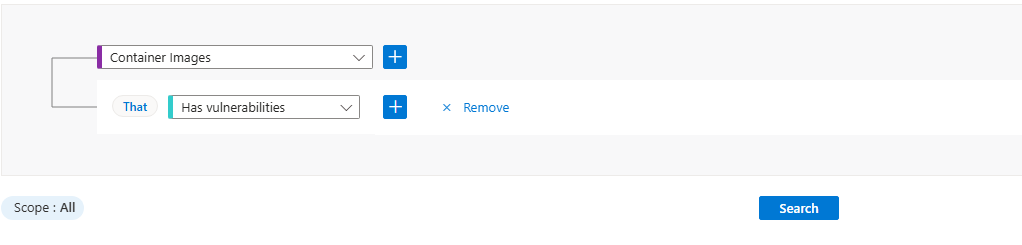
Select Search.
Select View details > for a container image.
In the Result details pane, review vulnerability information such as affected packages and severity.
Select Open the vulnerability page to review the vulnerability details.
Create a query to identify vulnerabilities in running containers
Use this query to find container images that are currently used by workloads running in Kubernetes clusters and have known vulnerabilities.
Sign in to the Azure portal.
Go to Microsoft Defender for Cloud > Cloud Security Explorer.
In Query builder, select Select resource types.
In Containers, select Containers.
Select Done.
Select +.
Select Select condition.
In Application, select Created by.
Select Select resource types.
Select Container Images.
Select +.
Select Select condition.
In Vulnerabilities, select Has vulnerabilities.
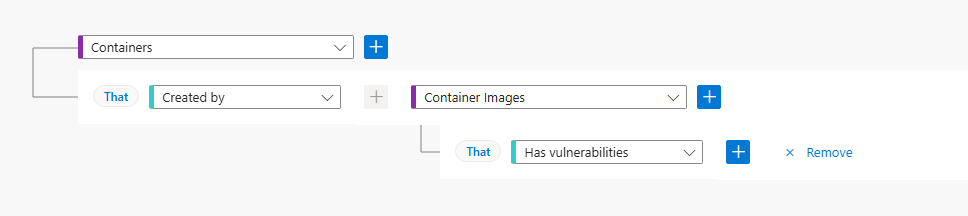
Select Search.
Select View details > for a container.
In the Result details pane, review vulnerability information such as affected images, severity, and related resources.
Select Open the vulnerability page to review the vulnerability details.
