Note
Access to this page requires authorization. You can try signing in or changing directories.
Access to this page requires authorization. You can try changing directories.
Display names create a friendly name to use for resources that developers can view and use in the developer portal. You can add a display name to projects and pools after creating resources. Display names are helpful in several scenarios, for example:
Project and resource naming: If your current resource names are confusing dev box users, you can create a separate display name to provide more context for developers.
Project reorganization: Rename your projects and pools as developers move to new teams.
Resource degradation: Mark your projects and pools to communicate legacy resources to developers.
Edit display names for projects
The display name for your projects and pools automatically defaults to the resource name specified during project creation. The resource name and display name are initially the same.
To edit the display name for a project, go to the Properties panel, modify the Display name value, and select Apply:

You can view your changes to the display name in the Azure portal next to the resource name. You should create unique display names for projects. When you create a dev box in the developer portal, if there are duplicate display names for a project, the resource name appears in the project list next to the display name to differentiate projects.
After you change the display name, it can take a few minutes for the update to be visible throughout the Azure portal.
Edit display names for pools
To edit the display name for a pool, select More actions (...) for the pool, and then select Edit:

You see a similar Display name value for pools as you did for projects. Enter a Display name and save your changes:

You can view your changes to the display name in the Azure portal next to the resource name. Pools with duplicate names don't show the resource name in the developer portal. You should create unique pool names to avoid confusion.
Important
Resources created before the release of the display names feature don't have a display name. However, you can still add a display name to these resources.
View resource names in the developer portal
Developers see the display names for projects on the dev box tiles in the developer portal:

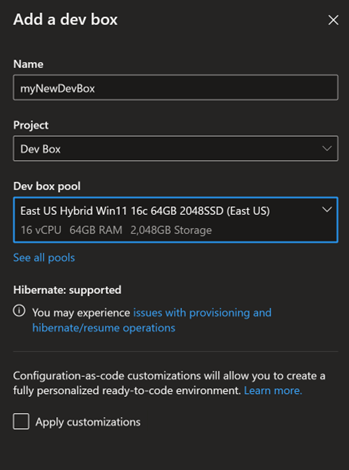
Developers also see the display names for projects and pools during dev box creation:
To view information about the pool resource for a dev box in the developer portal, select More actions (...) > Support for the dev box. You see both the resource name and display name for the associated pool:

Note
Changes to display names in the Azure portal can take a few minutes to propagate through the system.