Note
Access to this page requires authorization. You can try signing in or changing directories.
Access to this page requires authorization. You can try changing directories.
You must convert service connections that use workload identity federation with the Azure DevOps issuer to use the Microsoft Entra issuer. The Azure DevOps issuer uses the https://vstoken.dev.azure.com prefix, while the Microsoft Entra issuer uses the https://login.microsoftonline.com/ prefix.
This conversion isn't limited to Azure Resource Manager service connections. It applies to any workload identity federation service connection that uses the Azure DevOps issuer, including Azure Resource Manager (ARM) service connections, Docker service connections, and service connections created by extensions.
Service connections that already use the Microsoft Entra issuer aren't affected.
Important
The Azure DevOps issuer for workload identity federation (WIF) service connections will be retired on July 1, 2027.
This deprecation applies only to eligible service connections in Azure public cloud that use single-tenant Microsoft Entra applications or managed identities. Service connections that target non-public clouds, such as Azure Government, Azure operated by 21Vianet, or Azure Stack, and service connections that use multitenant applications are out of scope for this deprecation. The Azure DevOps issuer continues to be supported for those scenarios.
Why conversion is required
Workload identity federation lets Azure Pipelines authenticate without storing long-lived secrets. Earlier workload identity federation service connections used the Azure DevOps issuer. Microsoft is now standardizing on the Microsoft Entra issuer for workload identity federation across services, and newer service connections use the Microsoft Entra issuer by default.
To avoid authentication failures after the Azure DevOps issuer is retired, convert affected service connections to use the Microsoft Entra issuer.
What service connections are affected
A service connection is affected if it uses workload identity federation with the Azure DevOps issuer. The conversion requirement is based on the issuer that the service connection uses, not on the service connection type.
Affected service connections can include Azure Resource Manager service connections, Docker service connections, and service connections created by extensions when those connections use workload identity federation with the Azure DevOps issuer.
Before you begin
Before you convert a service connection, make sure that you have permission to manage the service connection in Azure DevOps.
If you can edit the service connection in Azure DevOps but don't have permission to update the identity in Azure or Microsoft Entra, you can still start the conversion. Azure DevOps provides the issuer and subject identifier values that you can hand off to an Azure administrator or identity owner to complete the federated credential setup.
| Area | Permission needed |
|---|---|
| Azure DevOps | Service connection administrator or endpoint administrator permission on the service connection. |
| User-assigned managed identity | Permission to update the managed identity and add federated credentials. The minimum role might be Managed Identity Federated Credential Contributor, Managed Identity Contributor, or another role that allows creating federated credentials. |
| App registration | Owner access to the app registration or another Microsoft Entra role that allows managing federated credentials. |
| Target Azure resource | Permission to assign the identity the required role, such as Contributor, on the subscription, resource group, or resource. |
Automatically convert an affected service connection
Use the conversion experience in Azure DevOps when it's available. This automatically updates the service connection so that it uses the Microsoft Entra issuer.
Affected service connections appear at the top of the service connection list with a warning that they require action. Convert the existing service connection instead of recreating it. Reusing the existing service connection avoids unnecessary updates to pipelines that already reference it.
To convert a service connection:
In Azure DevOps, go to Project settings > Service connections.
Find the service connection that's flagged with the Azure DevOps issuer warning.
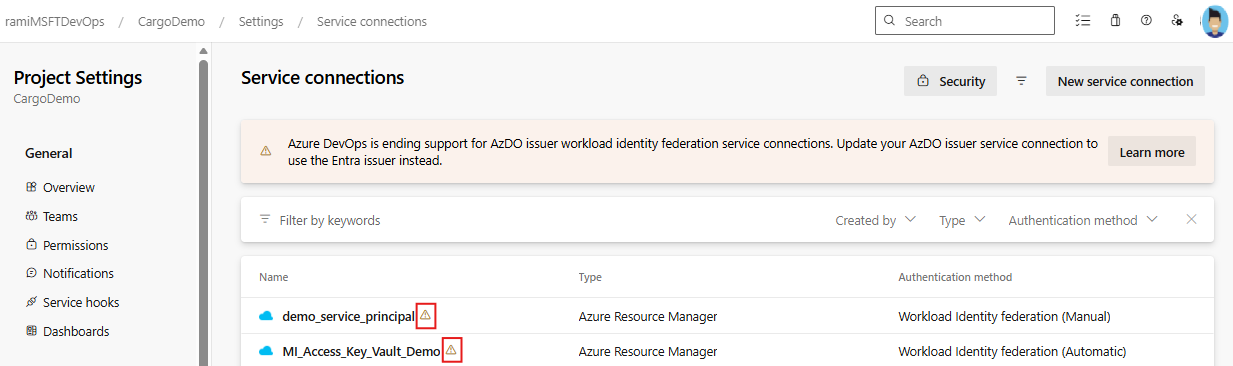
Open the service connection, and then select Update.
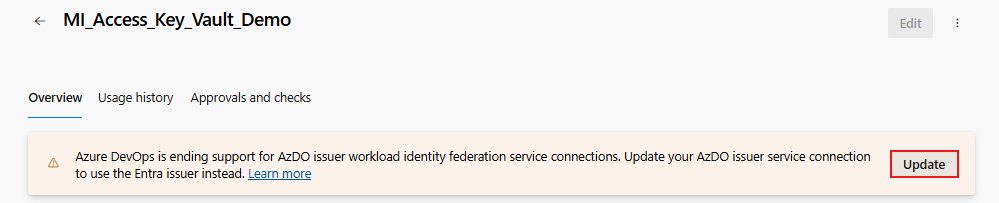
Select Update again to confirm your choice and update the service connection to use the Entra issuer.
A pane shows that the update is in progress. The update can take a few minutes. When the update finishes, a dialog box confirms that the conversion succeeded. Your service connection now uses the Microsoft Entra issuer.
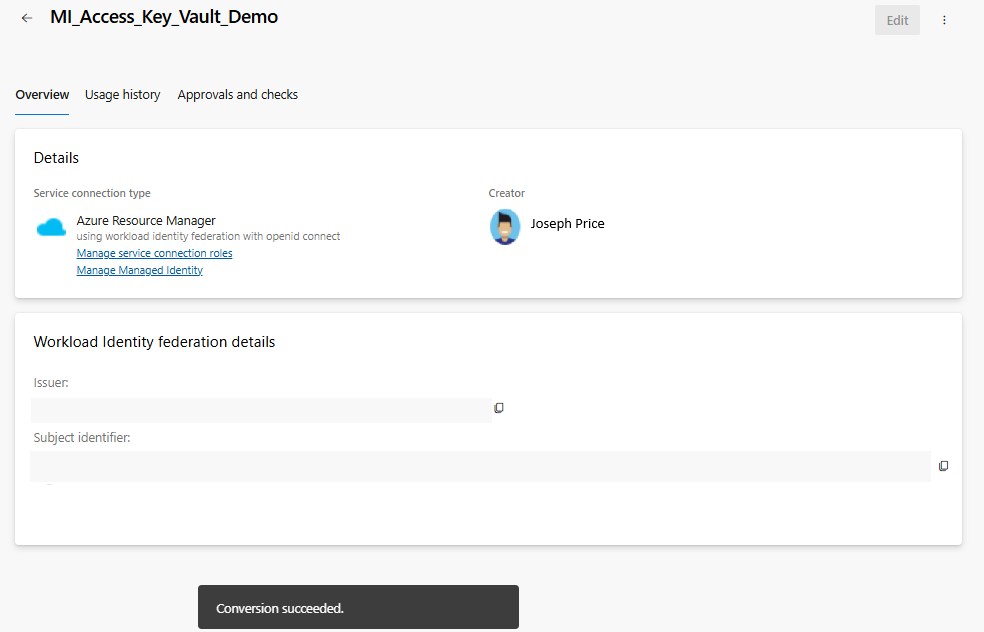
Manually convert an affected service connection
If automatic conversion fails, you can manually add the federated credential to the app registration or managed identity that the service connection uses.
Manual fallback might be required when:
- You don't have permission to update the identity in Microsoft Entra.
- Another team owns the identity.
- Automatic conversion can't create or update the federated credential.
To create the federated credential and complete the service connection conversion, follow these steps:
In Azure DevOps, if automatic conversion fails, Azure DevOps provides instructions for completing the conversion manually. In those instructions, find and copy the Issuer and Subject identifier values.
Open the link provided in Azure DevOps to go to Azure, and then go to the Federated credentials blade of your app registration or managed identity.
Select Add credential, and then select Other.
Enter the Issuer and Subject identifier values that you copied from Azure DevOps.
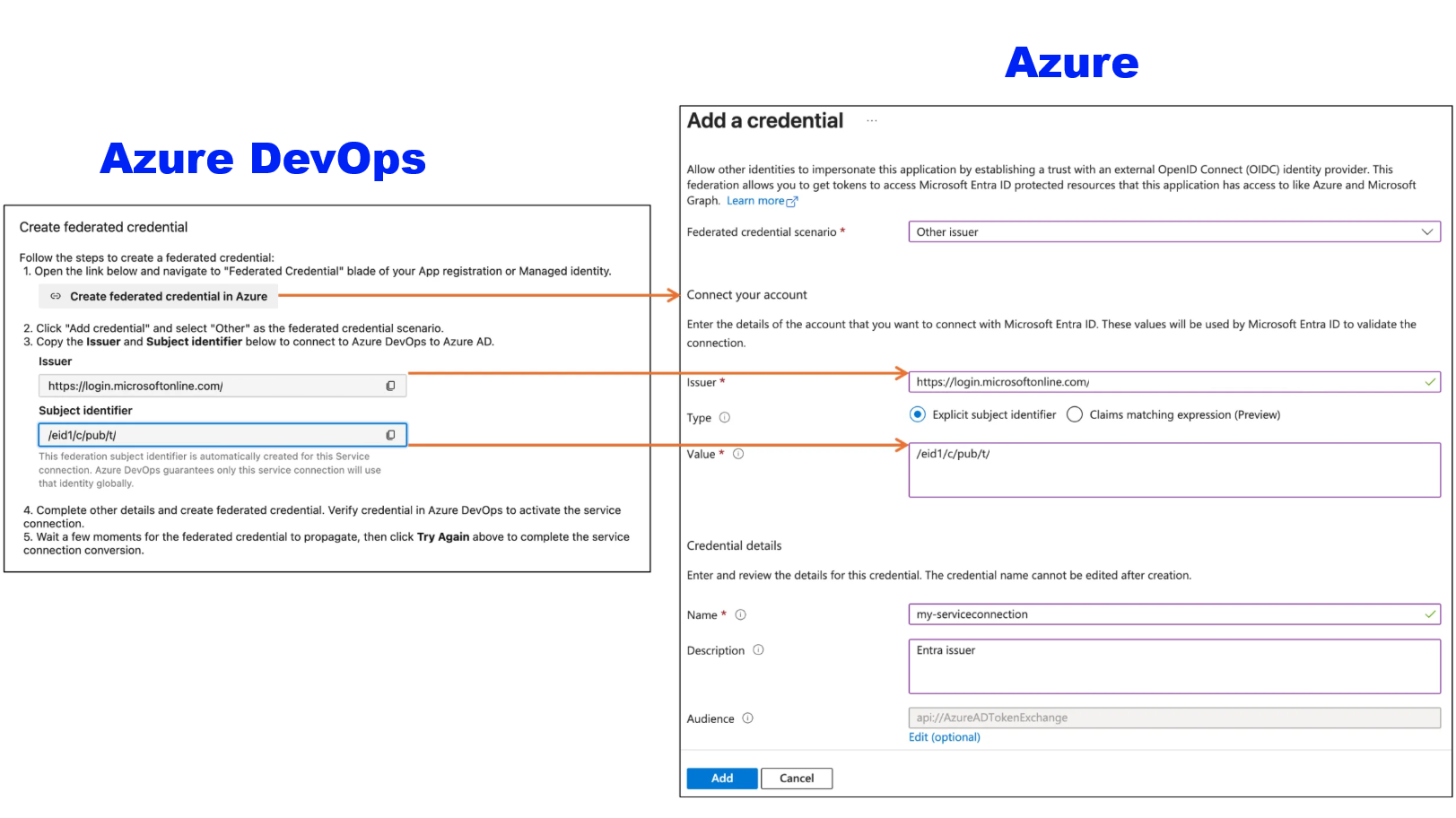
Complete the remaining fields, and then create the federated credential.
Return to Azure DevOps and verify the credential to activate the service connection.
Wait a few moments for the federated credential to propagate, and then select Try again in Azure DevOps to complete the service connection conversion.
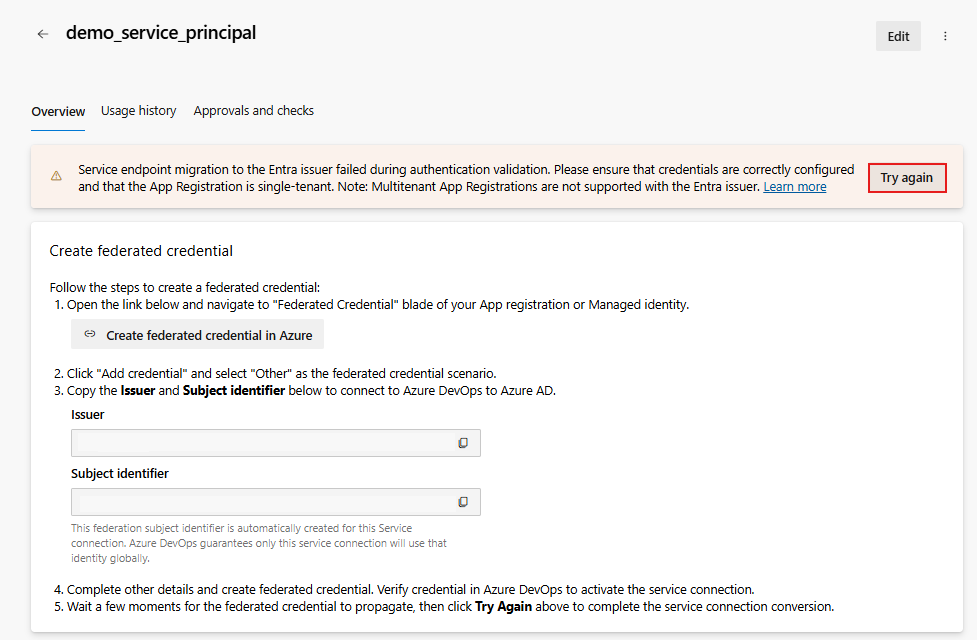
Limitations
Some scenarios aren't part of this deprecation or its initial conversion experience.
- Service connections that target non-public clouds are out of scope.
- Service connections that use multitenant applications are out of scope.
Troubleshoot workload identity federation scenarios
The following issues can occur when you convert or use your service connections:
- Pipeline shows a deprecated Azure DevOps issuer warning
- Automatic conversion fails
- You can edit the service connection but can't add the federated credential
- Federated credential values don't match
- You don't know who owns the app registration or managed identity
- The service connection uses a multitenant app
Pipeline shows a deprecated Azure DevOps issuer warning
A pipeline warning means the pipeline is using a workload identity federation service connection that still uses the deprecated Azure DevOps issuer.
To resolve the warning:
- Open the service connection linked from the warning.
- Convert the service connection to use the Microsoft Entra issuer.
- If automatic conversion doesn't complete, follow the manual conversion steps in Set a Resource Manager workload identity service connection.
- Run the pipeline again after the service connection is converted.
Automatic conversion fails
Azure DevOps first attempts to convert the service connection automatically. The conversion can fail if Azure DevOps can't update the associated app registration or managed identity.
To resolve the issue:
- Confirm that you have service connection administrator or endpoint administrator permission in Azure DevOps.
- Confirm that you or the identity owner can add federated credentials to the associated app registration or managed identity.
- Copy the Issuer, Subject identifier, and Audience values shown in Azure DevOps.
- Add the federated credential to the associated identity in Azure or Microsoft Entra.
- Return to the Azure DevOps service connection and complete setup.
You can edit the service connection but can't add the federated credential
Azure DevOps service connection permissions don't grant permission to update identities in Azure or Microsoft Entra. The app registration or managed identity might be owned by a different user or team.
To resolve the issue, ask an Azure administrator, app registration owner, or managed identity owner to add the federated credential. Provide the generated Issuer, Subject identifier, and Audience values from the Azure DevOps service connection.
Federated credential values don't match
A workload identity service connection depends on matching federated credential values. If the issuer, subject identifier, or audience in Azure or Microsoft Entra doesn't match the values generated by Azure DevOps, authentication can fail.
To resolve the issue:
- Open the service connection in Azure DevOps.
- Copy the generated Issuer, Subject identifier, and Audience values.
- Open the associated app registration or managed identity in Azure or Microsoft Entra.
- Compare the federated credential values.
- Update or recreate the federated credential so the values match.
You don't know who owns the app registration or managed identity
Some organizations separate Azure DevOps administration from Azure or Microsoft Entra identity administration. If the current service connection administrator doesn't own the identity, the administrator might not be able to complete conversion.
To resolve the issue:
- For app registrations, check the app registration owners in Microsoft Entra.
- For managed identities, check who has role assignments over the managed identity or its resource group.
- If you can't identify the owner, contact the tenant administrator or subscription administrator.
The service connection uses a multitenant app
Multitenant app scenarios are out of scope for this deprecation. Service connections that use multitenant applications don't need to migrate as part of this deprecation, and the Azure DevOps issuer continues to be supported for those scenarios.
Troubleshoot conversion issues
During conversion, you might see Microsoft Entra authentication errors. These errors usually indicate an issue with the issuer, subject, audience, or federated credential configuration.
The following table lists common Microsoft Entra ID error codes and possible issues related to workload identity service connections:
| Message | Possible issue |
|---|---|
| AADSTS700016: Application with identifier '****' wasn't found | The identity that is used for the service connection no longer exists, might have been removed from the service connection, or is incorrectly configured. If you configure the service connection manually with a pre-created identity, make sure the appID/clientId is correctly configured. |
| AADSTS7000215: Invalid client secret provided. | You're using a service connection that has an expired secret. Convert the service connection to workload identity federation and replace the expired secret with federated credentials. |
| AADSTS700024: Client assertion is not within its valid time range | If the error happens after approximately 1 hour, use a service connection with Workload identity federation and a Managed Identity instead. Managed Identity tokens have a lifetime of around 24 hours. If the error happens before 1 hour but after 10 minutes, move commands that (implicitly) request an access token to e.g. access Azure storage to the beginning of your script. The access token is cached for subsequent commands. |
AADSTS70021: No matching federated identity record found for presented assertion. Assertion Issuer: https://app.vstoken.visualstudio.com. |
No federated credential was created or the issuer URL isn't correct. The correct issuer URL has the format https://login.microsoftonline.com/XXXXXXXX-XXXX-XXXX-XXXX-XXXXXXXXXXXX. You can fix the issuer URL by editing and then saving a service connection. If Azure DevOps didn't create your identity, you must manually update the issuer. You can find the correct issuer in the edit dialog of the service connection or in the response if you use the REST API. |
AADSTS70021: No matching federated identity record found for presented assertion. Assertion Issuer: https://login.microsoftonline.com/XXXXXXXX-XXXX-XXXX-XXXX-XXXXXXXXXXXX. Assertion Subject: sc://<org>/<project>/<service-connection>. |
Either the issuer URL or the federation subject doesn't match. The Azure DevOps organization or project was renamed or a manually created service connection was renamed without updating the federation subject on the identity. |
| AADSTS700211: No matching federated identity record found for presented assertion issuer | No federated credential was created or the issuer URL is not correct. |
| AADSTS700213: No matching federated identity record found for presented assertion subject | No federated credential was created or the subject is not correct. |
| AADSTS700223 | Workload identity federation is constrained or disabled on the Microsoft Entra tenant. In this scenario, it may be possible to use a managed identity for the federation instead. For more information, see Workload identity with managed identity. |
| AADSTS70025: Client application has no configured federated identity credentials | Make sure federated credentials are configured on the App registration or Managed Identity. |
| Microsoft Entra rejected the token issued by Azure DevOps with error code AADSTS700238 | Workload identity federation has been constrained on the Microsoft Entra tenant. The issuer for your organization (https://login.microsoftonline.com/XXXXXXXX-XXXX-XXXX-XXXX-XXXXXXXXXXXX) isn't allowed to use workload identity federation with the workload identity type (App registration and/or Managed identity) you're using. Ask your Microsoft Entra tenant administrator or administration team to allow workload identity federation for your Azure DevOps organization. |
| AADSTS70052: The identity must be a managed identity, a single tenant app, or a service account | Multitenant app registrations that have signInAudience: AzureADMultipleOrgs are currently not supported by the Microsoft Entra issuer. Use signInAudience: AzureADMyOrg and break up access to multiple tenants to use different service connections for each tenant instead. If you are dependent on ARM operations that access multiple tenants in a single request (for example, Cross-tenant peering of Virtual Networks) you can contact support to have your Azure DevOps organization use the Azure DevOps issuer instead. |
| AADSTS900382: Confidential Client is not supported in Cross Cloud | Some sovereign clouds block Workload identity federation. |
Is the AADSTS error you see not listed above? Check Microsoft Entra authentication and authorization error codes.
For more information, see Troubleshoot workload identity service connections.