Note
Access to this page requires authorization. You can try signing in or changing directories.
Access to this page requires authorization. You can try changing directories.
Azure DevOps Services
Important
This feature is in limited preview.
Some features might not be available in your environment yet as Microsoft rolls out preview capabilities in stages. Functionality might change or be removed without notice. Preview features have no Service Level Agreement (SLA) and limited support.
Use custom instructions to tailor Copilot's code review behavior at the organization, project, and repository levels. Custom instructions guide Copilot to focus on specific coding standards, best practices, or organizational policies.
Prerequisites
| Category | Requirements |
|---|---|
| Feature enablement | Copilot code review must be enabled at the organization, project, and repository levels. |
| Organization permissions | Project Collection Administrator permissions to add or modify organization-level custom instructions. |
| Project permissions | Project Administrator permissions to add or modify project-level custom instructions. |
| Repository permissions | Push or administrator permissions to the repository to add or modify repository-level custom instructions. |
Custom instruction scopes
You can define custom instructions at multiple scopes:
- Organization level: Baseline standards that apply across all projects.
- Project level: Team- or project-specific standards.
- Repository level: Repository-specific standards in
.github/copilot-instructions.mdor.azuredevops/copilot-instructions.md.
When instructions exist at multiple scopes, Copilot uses all applicable instructions during review.
Note
Copilot reads repository-level and path-scoped instruction files from the pull request's target branch only. Changes to instruction files in the pull request don't affect its review. Copilot uses the changes only after they're merged into the target branch.
Organization and project custom instructions
Configure organization-level and project-level custom instructions in Azure DevOps settings. Use these scopes for broad policies, such as security requirements, compliance rules, or language conventions shared by multiple repositories.
Repository custom instructions file
Store custom instructions in either .github/copilot-instructions.md or .azuredevops/copilot-instructions.md in the root of your repository. Copilot reads this file during each review to understand your repository's specific guidelines.
.github/
   copilot-instructions.md
   instructions/
      api.instructions.md

.azuredevops/                       # same files work here too
   copilot-instructions.md
   instructions/
      api.instructions.md
Create custom instructions
- In your repository, create a
.githubor.azuredevopsfolder if one doesn't already exist. - Create a new file named
copilot-instructions.mdin the.githubor.azuredevopsfolder. - Add your custom instructions in Markdown format.
- Commit and push the file to your repository.
Add path-scoped instructions
Use path-scoped instruction files when you want different rules for specific folders, file types, or technologies.
- Create one or more
*.instructions.mdfiles in either.github/instructions/or.azuredevops/instructions/. - Add YAML front matter with an
applyTovalue that targets matching files. - Keep guidance focused on one language or concern per file.
Copilot applies path-scoped rules only to changed files that match the applyTo patterns.
Path-scoped file format
---
applyTo: "**/*.ts,**/*.tsx"
---

## TypeScript standards

- Avoid `any`; prefer `unknown` or a specific type.
- Prefer `const`; avoid `var`.
- Use optional chaining (`?.`) and nullish coalescing (`??`) where appropriate.
applyTo pattern examples
applyTo: "**"applies to all files.applyTo: "**/*.cs"applies to all C# files.applyTo: "**/*.sql,**/Settings.xml"applies to multiple patterns.
If a path-scoped file doesn't include applyTo, Copilot skips that file.
Custom instructions best practices
- Be specific: Provide clear, actionable guidance for the types of issues Copilot should flag.
- Focus on high-impact areas: Prioritize code quality, security, and performance concerns relevant to your codebase.
- Include examples: When appropriate, provide code examples of issues to look for or patterns to avoid.
- Keep it concise: Copilot processes the entire file for each review, so be direct and avoid verbose explanations.
- Update regularly: Review and update instructions as your coding standards evolve.
Example custom instructions
# Copilot code review instructions

## Security focus
- Flag any hardcoded credentials, API keys, or sensitive data
- Identify potential SQL injection or XSS vulnerabilities
- Check for secure use of cryptographic functions

## Performance considerations
- Suggest database query optimizations
- Identify N+1 query problems
- Flag inefficient loops or algorithms

## Team coding standards
- Enforce naming conventions (camelCase for variables, PascalCase for classes)
- Check for proper error handling and logging
- Ensure consistent use of async/await patterns

## Documentation requirements
- Flag missing or incomplete function documentation
- Verify that complex logic includes explanatory comments
Organization level
Add custom instructions at the organization level to define broad review standards across your enterprise.
Organization-level instructions influence Copilot code review for all projects and all repositories in that organization, so use them for requirements that every team should follow.

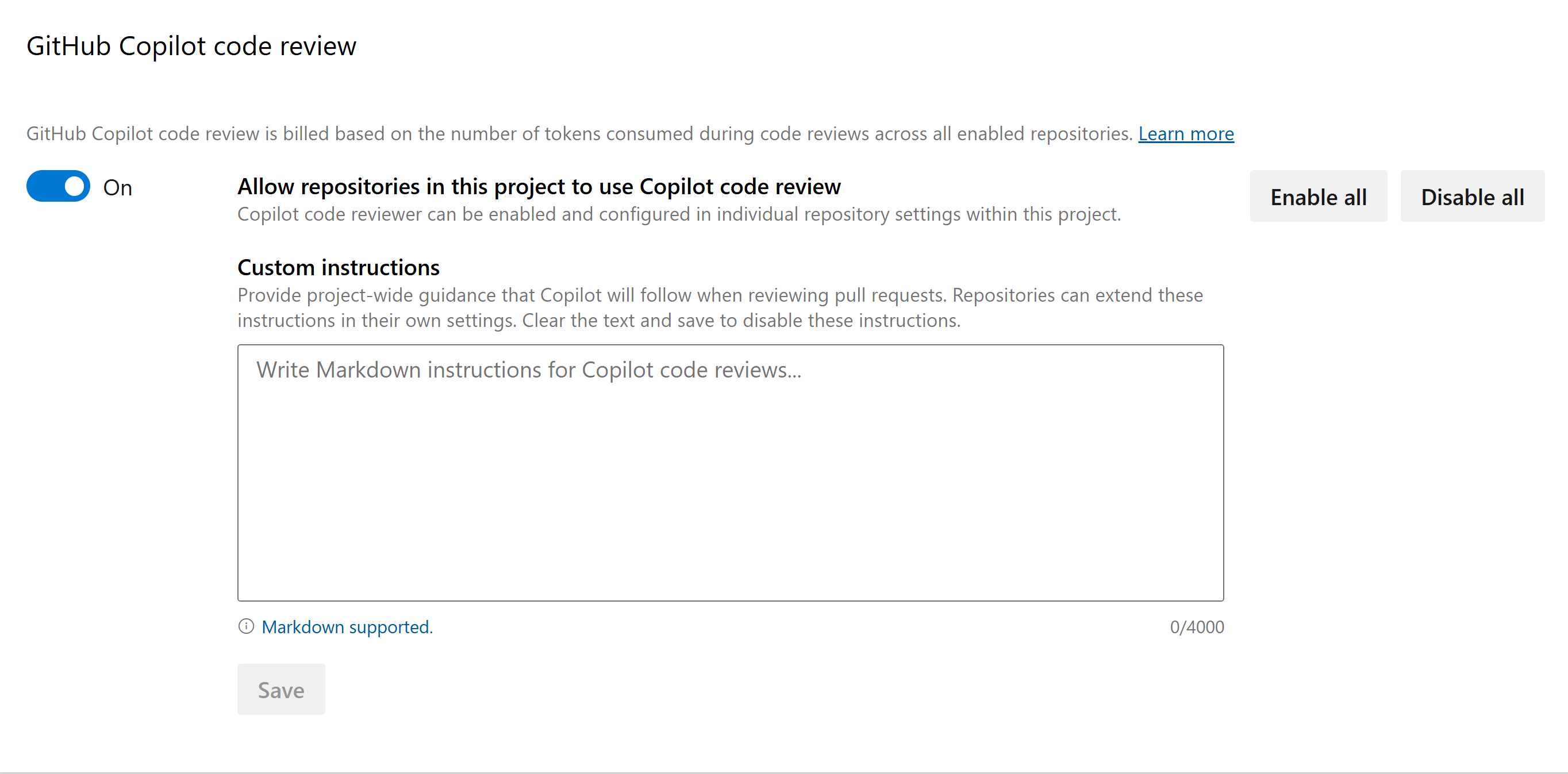
Project level
Add custom instructions at the project level to define shared review standards across all project repositories.
Project-level instructions influence Copilot code review for all repositories in that project, so use them for conventions that every team in the project should follow.
Order of precedence
When instructions overlap, Copilot applies them in this order of precedence:
- Repository-level instructions
- Project-level instructions
- Organization-level instructions
Repository instructions have the highest precedence, followed by project-level instructions, and then organization-level instructions.
If two instructions conflict, Copilot uses the instruction with the higher-precedence scope.
Note
The order of precedence guides Copilot's review behavior but isn't guaranteed. Because Copilot uses a large language model, it might occasionally interpret or apply conflicting instructions differently.
Get help
For troubleshooting custom instructions and answers to frequently asked questions about Copilot code review, see Troubleshoot Copilot code review.