Note
Access to this page requires authorization. You can try signing in or changing directories.
Access to this page requires authorization. You can try changing directories.
The langchain-azure-ai package is the Microsoft-maintained set of LangChain integrations for Azure. It includes AzureCosmosDBMongoVCoreVectorSearch, a VectorStore implementation that targets the MongoDB-compatible wire protocol exposed by Azure DocumentDB. Use it to embed documents, persist them and their vectors, build DiskANN, HNSW, or IVF indexes, and serve retrieval as a LangChain tool or chain step.
This how-to walks through wiring the integration to your cluster, building a vector index, adding documents, and running similarity and maximal-marginal-relevance (MMR) searches.
What is LangChain?
LangChain is an open-source framework for building applications backed by large language models (LLMs). It provides composable primitives — prompts, chains, retrievers, tools, and agents — for connecting LLMs to your own data and APIs. A common pattern is retrieval-augmented generation (RAG): embed your knowledge base, store the embeddings in a vector store, and at query time retrieve the most relevant chunks to ground the model's answer.
langchain-azure-ai is the official Azure distribution. The AzureCosmosDBMongoVCoreVectorSearch class wraps a MongoDB collection, performs embeddings via any LangChain Embeddings implementation, and runs vector kNN through the cosmosSearch aggregation stage that Azure DocumentDB supports.
LangChain Azure DocumentDB integration
Azure DocumentDB pairs well with LangChain for the following reasons:
- One store for documents and vectors. Native vector indexing lives alongside document data, enabling RAG and similarity search without introducing a separate vector store. Source documents, metadata, and embeddings stay in the same collection.
- MongoDB-compatible drivers and integrations. Azure DocumentDB exposes the MongoDB wire protocol, so
pymongoand the Microsoft-maintainedlangchain-azure-aipackage work against your cluster directly. MongoDB drivers and tools work without application-level rewrites, simplifying migration in common scenarios. - Three index types to match scale.
AzureCosmosDBMongoVCoreVectorSearch.create_index(...)supportsvector-ivf,vector-hnsw, andvector-diskann, with optional product quantization (DiskANN) and half-precision (IVF, HNSW) compression for large corpora. - Pre-filter inside vector search. Pass a Mongo filter expression to
pre_filterto narrow candidates insidecosmosSearchrather than post-filtering after kNN, which preserves top-k recall.
Get started: install dependencies
Install the LangChain Azure package, an embedding/model provider, and the MongoDB driver. Copy your Connection string value from the Azure portal for your DocumentDB cluster and store it as DOCUMENTDB_URI.
pip install langchain-azure-ai langchain-core langchain-openai pymongo
Note
The vector store integration in langchain-azure-ai is Python-only. If you're building a TypeScript app, use the mongodb driver and run vector queries with the same $search + cosmosSearch aggregation pipeline shown in Vector search in Azure DocumentDB.
Connect to Azure DocumentDB and create a vector store
Use the from_connection_string factory to get a vector store bound to a database.collection namespace and a LangChain embeddings model.
import os

from langchain_azure_ai.vectorstores.azure_cosmos_db import (
    AzureCosmosDBMongoVCoreVectorSearch,
)
from langchain_openai import OpenAIEmbeddings

embeddings = OpenAIEmbeddings(model="text-embedding-3-small")  # 1536 dimensions

vector_store = AzureCosmosDBMongoVCoreVectorSearch.from_connection_string(
    connection_string=os.environ["DOCUMENTDB_URI"],
    namespace="ragdb.knowledge_base",
    embedding=embeddings,
    index_name="kb_vector_index",
)
Key constructor parameters:
| Parameter | Default | Purpose |
|---|---|---|
namespace |
required | database.collection to back the store. |
embedding |
required | Any LangChain Embeddings implementation. |
index_name |
vectorSearchIndex |
Name of the vector index to create or reuse. |
text_key |
textContent |
Field that stores the raw text. |
embedding_key |
vectorContent |
Field that stores the vector. |
Create a vector index
Choose an index type to match your dataset size and accuracy needs. All three call the same create_index method — the kind argument selects the algorithm.
from langchain_azure_ai.vectorstores.azure_cosmos_db import (
    CosmosDBSimilarityType,
    CosmosDBVectorSearchType,
)

vector_store.create_index(
    kind=CosmosDBVectorSearchType.VECTOR_DISKANN,
    dimensions=1536,
    similarity=CosmosDBSimilarityType.COS,
    max_degree=32,
    l_build=50,
)
For pre-filter queries, also create a regular index on each filterable property:
vector_store.create_filter_index(property_to_filter="category", index_name="category_idx")
Add documents to the store
add_texts and add_documents embed the text on the client and bulk-insert the resulting documents into the collection.
from langchain_core.documents import Document

texts = [
    "DocumentDB supports DiskANN for high-recall vector search.",
    "HNSW is suitable for medium-scale embedding indexes.",
    "IVF is the lowest-cost option for prototypes and small datasets.",
]
metadatas = [
    {"category": "rag", "source": "docs"},
    {"category": "rag", "source": "docs"},
    {"category": "rag", "source": "docs"},
]

ids = vector_store.add_texts(texts=texts, metadatas=metadatas)
Run a similarity search
similarity_search returns the top-k most similar documents. similarity_search_with_score returns the same documents paired with their similarity score.
results = vector_store.similarity_search(
    query="Which vector index should I use for a million embeddings?",
    k=3,
    kind=CosmosDBVectorSearchType.VECTOR_DISKANN,
    pre_filter={"category": {"$eq": "rag"}},
)

for doc in results:
    print(doc.page_content, doc.metadata)
pre_filter runs inside the cosmosSearch stage, preserving top-k accuracy when narrowing the candidate set by metadata.
Diversify results with MMR
Maximal-marginal-relevance (MMR) re-ranks the top-fetch_k results to balance relevance against diversity. Use it to avoid near-duplicates dominating the result set.
diverse = vector_store.max_marginal_relevance_search(
    query="vector index trade-offs",
    k=4,
    fetch_k=20,
    lambda_mult=0.5,            # 0.0 = max diversity, 1.0 = max relevance
    kind=CosmosDBVectorSearchType.VECTOR_DISKANN,
)

for doc in diverse:
    print(doc.page_content)
Use the vector store as a retriever
Convert the store into a LangChain Retriever and plug it into any chain or agent:
from langchain_core.prompts import ChatPromptTemplate
from langchain_core.runnables import RunnablePassthrough
from langchain_openai import ChatOpenAI

retriever = vector_store.as_retriever(
    search_type="similarity",
    search_kwargs={
        "k": 4,
        "kind": CosmosDBVectorSearchType.VECTOR_DISKANN,
    },
)

prompt = ChatPromptTemplate.from_template(
    "Answer using only the context.\n\nContext:\n{context}\n\nQuestion: {question}"
)
llm = ChatOpenAI(model="gpt-4o-mini")

chain = (
    {"context": retriever, "question": RunnablePassthrough()}
    | prompt
    | llm
)

print(chain.invoke("Which vector index should I use for a million embeddings?").content)
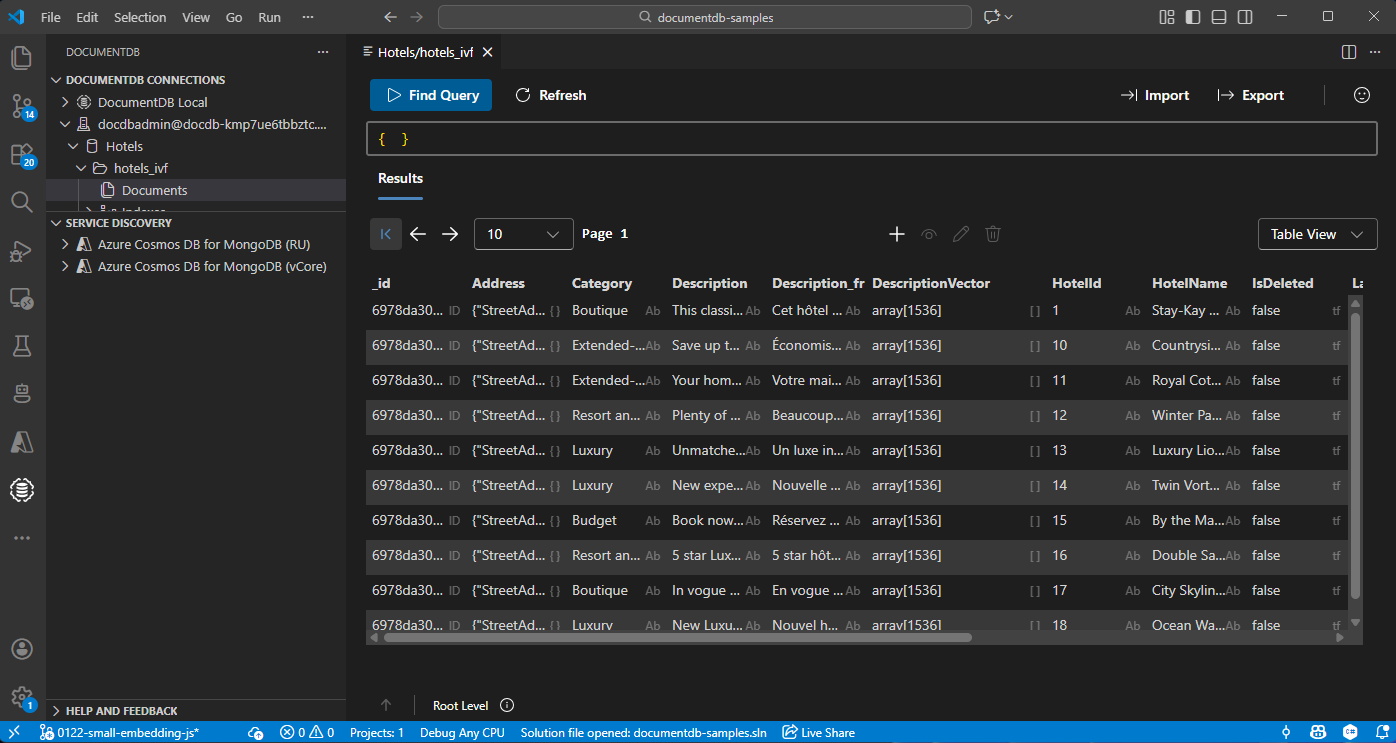
View and manage data in Visual Studio Code
You can browse persisted documents and vector indexes interactively without leaving your editor.
Install the Azure DocumentDB extension for Visual Studio Code.
Connect to your Azure DocumentDB cluster from the DocumentDB Connections view by using the same connection string you set as
DOCUMENTDB_URI.Expand your database to view collections, run find queries, and inspect vector and filter indexes that the vector store created.