Note
Access to this page requires authorization. You can try signing in or changing directories.
Access to this page requires authorization. You can try changing directories.
Important
On-demand sandboxes is currently in limited preview. Preview features aren't meant for production use and might have restricted functionality. For more information, see Supplemental Terms of Use for Microsoft Azure Previews.
On-demand sandboxes uses a two-part model:
- A sandbox worker profile in your orchestrator app that tells Durable Task Scheduler which activities to offload.
- A worker image that contains those activity implementations.
This article walks you through configuring both parts.
Prerequisites
- Read the overview and sign up for the limited preview.
- A Durable Task Scheduler in a supported preview region with On-demand sandboxes enabled by the Durable Task Scheduler team.
- An Azure Container Registry (ACR) to host your worker image.
- A user-assigned managed identity to use for image pull and sandbox worker authentication.
- .NET 8 SDK or later.
- Python 3.9 or later.
Install the preview packages
The on-demand sandbox APIs ship in two opt-in preview packages. Add both packages to your orchestrator app project, and add the worker package to your sandbox worker image project:
# Orchestrator app
dotnet add package Microsoft.DurableTask.Client.AzureManaged.Sandboxes --version 1.25.0-preview.2
dotnet add package Microsoft.DurableTask.Worker.AzureManaged.Sandboxes --version 1.25.0-preview.2

# Sandbox worker image project
dotnet add package Microsoft.DurableTask.Worker.AzureManaged.Sandboxes --version 1.25.0-preview.2
The on-demand sandbox APIs ship under the durabletask.azuremanaged.preview.sandboxes namespace. Install the Azure-managed Durable Task package:
pip install durabletask-azuremanaged==1.6.0
Configure managed identities for image pull
To start a sandbox, the scheduler uses a user-assigned managed identity attached to the scheduler to pull your worker image from your container registry. This identity needs the AcrPull role on the ACR that hosts your worker image.
Important
Only user-assigned managed identities are supported. System-assigned managed identities aren't supported at this time.
The worker profile uses two identity slots, which you can fill with the same identity or two separate identities:
- Image-pull identity: Durable Task Scheduler uses this identity to pull the worker image from your registry. This identity needs the
AcrPullrole on the registry. - Worker/scheduler identity: The sandbox worker uses this identity to connect back to the scheduler. Your activity code also runs as this identity when calling other Azure services (for example, Storage or Key Vault). Grant this identity whatever roles your activity code needs.
Using separate identities lets you scope image-pull permissions narrowly while granting your activity code only the downstream permissions it needs.
Grant the AcrPull role on your registry
Assign the AcrPull role to the image-pull managed identity, scoped to your registry:
az role assignment create \
  --assignee "<image-pull-identity-principal-id>" \
  --role "AcrPull" \
  --scope "/subscriptions/<subscription-id>/resourceGroups/<resource-group>/providers/Microsoft.ContainerRegistry/registries/<registry-name>"
Without this role assignment, the scheduler can't pull the worker image and the sandbox fails to start.
Attach the identity to the scheduler
The scheduler must have the user-assigned identity attached. Install the durabletask Azure CLI extension if you haven't already, then attach the identity:
az extension add --name durabletask

az durabletask scheduler identity assign \
  --resource-group "<resource-group>" \
  --name "<scheduler-name>" \
  --user-assigned "/subscriptions/<subscription-id>/resourceGroups/<resource-group>/providers/Microsoft.ManagedIdentity/userAssignedIdentities/<identity-name>"
To attach multiple identities (for example, separate image-pull and worker/scheduler identities), pass several space-separated resource IDs to --user-assigned. To verify what's attached, run:
az durabletask scheduler identity show \
  --resource-group "<resource-group>" \
  --name "<scheduler-name>"
Declare a sandbox worker profile
In your orchestrator app, declare a sandbox worker profile. The profile tells the scheduler which activities to offload, what container image to use, what managed identities to use for image pull and sandbox authentication, and what resources to allocate.
Define a profile class decorated with [SandboxWorkerProfile]:
using Microsoft.DurableTask.Client.AzureManaged;

[SandboxWorkerProfile("<worker-profile-id>")]
internal sealed class CodeSandboxWorkerProfile : ISandboxWorkerProfile
{
    public void Configure(SandboxWorkerProfileOptions options)
    {
        options.Image.ImageRef = Environment.GetEnvironmentVariable("DTS_SANDBOX_CONTAINER_IMAGE")
            ?? throw new InvalidOperationException("DTS_SANDBOX_CONTAINER_IMAGE is required.");
        options.Image.ManagedIdentityClientId = Environment.GetEnvironmentVariable("DTS_SANDBOX_IMAGE_PULL_UMI_CLIENT_ID")
            ?? throw new InvalidOperationException("DTS_SANDBOX_IMAGE_PULL_UMI_CLIENT_ID is required.");
        options.SchedulerManagedIdentityClientId = Environment.GetEnvironmentVariable("DTS_SANDBOX_SCHEDULER_UMI_CLIENT_ID")
            ?? throw new InvalidOperationException("DTS_SANDBOX_SCHEDULER_UMI_CLIENT_ID is required.");
        options.Cpu = "1000m";
        options.Memory = "2048Mi";
        options.MaxConcurrentActivities = 1;
        options.AddActivity(TaskNames.ExecuteCode, version: "");
    }
}
Then, in your main app, enable work-item filters, register the sandbox activities client, and declare the profiles with Durable Task Scheduler:
builder.Services.AddDurableTaskWorker(workerBuilder =>
{
    workerBuilder.AddTasks(tasks => tasks.AddAllGeneratedTasks());
    workerBuilder.UseWorkItemFilters();
    workerBuilder.UseDurableTaskScheduler(options =>
    {
        options.EndpointAddress = endpoint;
        options.TaskHubName = taskHub;
        options.Credential = credential;
    });
});

// Register the client that publishes declared profiles to Durable Task Scheduler.
builder.Services.AddDurableTaskSchedulerSandboxActivitiesClient();
Important
UseWorkItemFilters() is required. Without it, Durable Task Scheduler can dispatch a sandbox activity to your in-process worker, which doesn't implement it, and the orchestration gets stuck retrying.
Once the host is running, register the profiles with Durable Task Scheduler:
SandboxActivitiesClient sandboxActivitiesClient =
    host.Services.GetRequiredService<SandboxActivitiesClient>();
await sandboxActivitiesClient.EnableSandboxActivitiesAsync();
EnableSandboxActivitiesAsync() registers your sandbox worker profiles with Durable Task Scheduler so it routes their declared activities to managed compute. Without this call, those activities aren't offloaded.
The orchestrator call site doesn't change. Because ExecuteCode isn't registered in the main app's in-process activity list, the scheduler uses the profile to route the work to the sandbox image when the orchestrator calls it:
ExecuteCodeOutput execution = await context.CallActivityAsync<ExecuteCodeOutput>(
    TaskNames.ExecuteCode,
    new ExecuteCodeInput(pythonCode, input.CsvData));
Define a profile class decorated with @sandbox_worker_profile:
import os
from azure.identity import DefaultAzureCredential
from durabletask import task
from durabletask.azuremanaged.preview.sandboxes import (
    SandboxActivitiesClient,
    SandboxWorkerProfile,
    sandbox_worker_profile,
)
from durabletask.azuremanaged.worker import DurableTaskSchedulerWorker

REMOTE_HELLO = "remote_hello"

endpoint = os.environ["DTS_ENDPOINT"]
taskhub_name = os.environ["DTS_TASK_HUB"]
worker_profile_id = os.getenv("DTS_WORKER_PROFILE_ID", "default")
container_image = os.environ["DTS_SANDBOX_CONTAINER_IMAGE"]


@sandbox_worker_profile(worker_profile_id)
class RemoteWorkerProfile(SandboxWorkerProfile):
    def configure(self, options) -> None:
        options.image.image_ref = container_image
        options.image.managed_identity_client_id = os.environ[
            "DTS_SANDBOX_IMAGE_PULL_UMI_CLIENT_ID"]
        options.scheduler_managed_identity_client_id = os.environ[
            "DTS_SANDBOX_SCHEDULER_UMI_CLIENT_ID"]
        options.cpu = "1000m"
        options.memory = "2048Mi"
        options.max_concurrent_activities = 1
        options.add_activity(REMOTE_HELLO)
Then declare the profile with Durable Task Scheduler and start the worker. enable_sandbox_activities() registers the declared profiles with the scheduler so it routes those activities to the sandbox image. use_work_item_filters() prevents sandbox activities from being dispatched to the in-process worker:
credential = DefaultAzureCredential()

# Declare the sandbox worker profile with Durable Task Scheduler so it can route the activity to a sandbox.
sandbox_client = SandboxActivitiesClient(
    host_address=endpoint,
    secure_channel=True,
    taskhub=taskhub_name,
    token_credential=credential)
sandbox_client.enable_sandbox_activities()

with DurableTaskSchedulerWorker(
        host_address=endpoint,
        secure_channel=True,
        taskhub=taskhub_name,
        token_credential=credential) as worker:
    worker.add_orchestrator(hello_orchestrator)
    worker.use_work_item_filters()
    worker.start()
The orchestrator call site doesn't change:
def hello_orchestrator(ctx: task.OrchestrationContext, name: str):
    return (yield ctx.call_activity(REMOTE_HELLO, input=name))
Build and push the worker image
The worker image is a container you own. In most apps, this worker lives in a separate project from your orchestrator host so it can have its own entry point, dependencies, and container image. It registers the activity implementations it can run and opts in to managed execution.
In a separate project from your orchestrator, configure the worker with UseSandboxWorker():
builder.Services.AddDurableTaskWorker(workerBuilder =>
{
    workerBuilder.AddTasks(tasks =>
    {
        tasks.AddActivity<ExecuteCodeActivity>();
    });

    workerBuilder.UseSandboxWorker();
});
UseSandboxWorker() signals that this worker runs in scheduler-managed compute. The sandbox worker doesn't need to configure the scheduler endpoint, task hub, profile ID, or credentials—Durable Task Scheduler injects those runtime settings when it starts the container.
In a separate file from your orchestrator, configure the worker with SandboxWorker(). Durable Task Scheduler injects the required runtime settings as environment variables when it starts the container, so the sandbox worker doesn't need to configure them directly:
import os
import threading
from durabletask import task
from durabletask.azuremanaged.preview.sandboxes import SandboxWorker

REMOTE_HELLO = "remote_hello"


def _remote_hello(ctx: task.ActivityContext, name: str) -> str:
    sandbox_id = os.getenv("DTS_SANDBOX_ID", "unknown-sandbox")
    return f"Hello {name} from Python on-demand sandbox worker {sandbox_id}!"


# The registered activity name must match the name declared in the worker profile.
_remote_hello.__name__ = REMOTE_HELLO

with SandboxWorker() as worker:
    worker.add_activity(_remote_hello)
    worker.start()
    print("Python on-demand sandbox remote worker is running.")
    try:
        threading.Event().wait()
    except KeyboardInterrupt:
        pass
Tip
Keep the activity name constant (for example, REMOTE_HELLO) in a shared module so the declarer app and the remote worker stay in sync. When the worker connects, it reports its registered activity names, and Durable Task Scheduler validates they match the declaration before advertising worker capacity.
Package and push the image
Package the image by using a Dockerfile that installs the SDK and your activity's dependencies:
FROM mcr.microsoft.com/dotnet/aspnet:8.0 AS runtime
WORKDIR /app
COPY --from=build /app/publish .
ENTRYPOINT ["dotnet", "SandboxWorker.dll"]
# syntax=docker/dockerfile:1.7
FROM python:3.12-slim AS runtime
WORKDIR /app

RUN apt-get update \
    && apt-get install -y --no-install-recommends ca-certificates \
    && rm -rf /var/lib/apt/lists/*
ENV GRPC_DEFAULT_SSL_ROOTS_FILE_PATH=/etc/ssl/certs/ca-certificates.crt

# Install the Durable Task SDK and your activity dependencies.
RUN pip install --no-cache-dir durabletask-azuremanaged==1.6.0

COPY remote_worker.py /app/remote_worker.py
COPY activities.py /app/activities.py

ENTRYPOINT ["python", "/app/remote_worker.py"]
Build and push the image to your container registry:
docker build -f Dockerfile -t <container-image-reference> .
docker push <container-image-reference>
Set the image reference on the declarer profile by using the sandbox container image environment variable. The scheduler pulls the image by using the image-pull managed identity you configured on the profile.
View logs in the Durable Task Scheduler dashboard
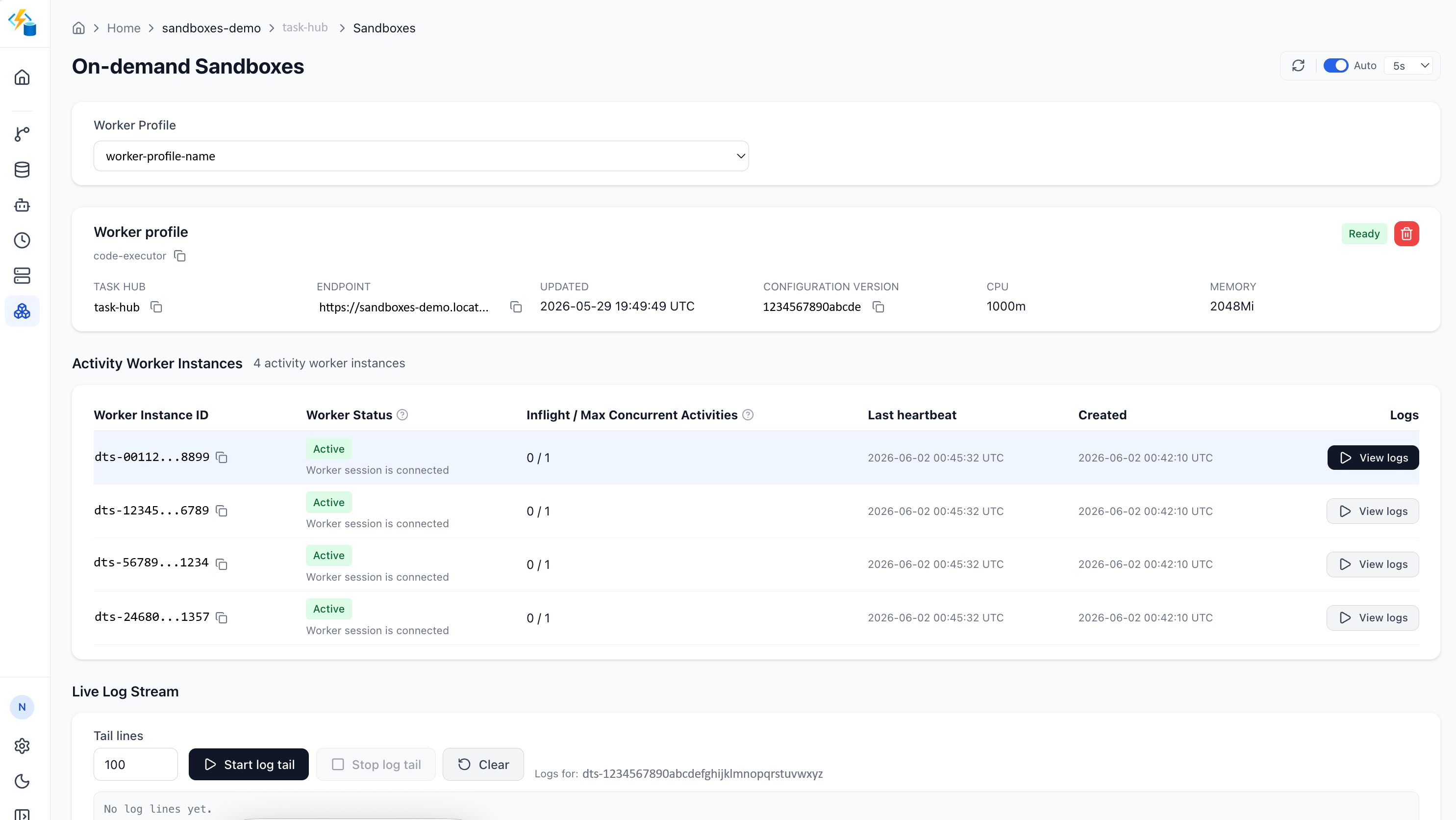
After your sandbox activities start running, you can view their execution logs directly in the Durable Task Scheduler dashboard. The dashboard shows real-time output from your managed workers, including stdout, stderr, and activity lifecycle events - without configuring external log sinks or building your own observability pipeline.
Worker profile configuration reference
The following table describes each SandboxWorkerProfileOptions setting:
| Option | Description | Accepted values | Default |
|---|---|---|---|
Image.ImageRef |
The container image that holds your activity implementations. | Full OCI image reference by tag (myregistry.azurecr.io/workers/hello:1.0) or digest. |
Required |
Image.ManagedIdentityClientId |
Client ID of the user-assigned managed identity Durable Task Scheduler uses to pull the worker image. Needs the AcrPull role on the registry. |
User-assigned managed identity client ID (GUID). Must be attached to the scheduler. | Required |
SchedulerManagedIdentityClientId |
Client ID of the user-assigned managed identity the sandbox worker uses to connect back to the scheduler and call other Azure services. | User-assigned managed identity client ID (GUID). Must be attached to the scheduler. Can be the same as the image-pull identity. | Required |
Cpu |
CPU quantity for each sandbox. | Positive CPU quantity in millicores (500m, 1000m) or whole/fractional cores (2, 0.5). |
1000m |
Memory |
Memory quantity for each sandbox. | Positive memory quantity such as 256Mi, 1Gi, or a bare number interpreted as MiB. |
2048Mi |
MaxConcurrentActivities |
How many activities a single sandbox worker instance processes concurrently. | Integer greater than 0. | 100 |
EnvironmentVariables |
Customer environment variables injected into the sandbox at runtime. | Map of string keys to string values. | Empty |
| Profile ID | Friendly profile identifier that groups image, resources, and activities for monitoring and reuse. Set via the [SandboxWorkerProfile] attribute. |
Non-empty string, unique across your declared profiles. | default |
AddActivity |
The activity names this profile offloads to the sandbox. At least one is required; an activity can belong to only one profile. | One or more activity names. | Required |
The following table describes each profile option:
| Option | Description | Accepted values | Default |
|---|---|---|---|
image.image_ref |
The container image that holds your activity implementations. | Full OCI image reference by tag (myregistry.azurecr.io/workers/hello:1.0) or digest. |
Required |
image.managed_identity_client_id |
Client ID of the user-assigned managed identity Durable Task Scheduler uses to pull the worker image. Needs the AcrPull role on the registry. |
User-assigned managed identity client ID (GUID). Must be attached to the scheduler. | Required |
scheduler_managed_identity_client_id |
Client ID of the user-assigned managed identity the sandbox worker uses to connect back to the scheduler and call other Azure services. | User-assigned managed identity client ID (GUID). Must be attached to the scheduler. Can be the same as the image-pull identity. | Required |
cpu |
CPU quantity for each sandbox. | Positive CPU quantity in millicores (500m, 1000m) or whole/fractional cores (2, 0.5). |
1000m |
memory |
Memory quantity for each sandbox. | Positive memory quantity such as 256Mi, 1Gi, or a bare number interpreted as MiB. |
2048Mi |
max_concurrent_activities |
How many activities a single sandbox worker instance processes concurrently. | Integer greater than 0. | 100 |
environment_variables |
Customer environment variables injected into the sandbox at runtime. | Dictionary of string keys to string values. | Empty |
| Profile ID | Friendly profile identifier that groups image, resources, and activities for monitoring and reuse. Set via the @sandbox_worker_profile decorator. |
Non-empty string, unique across your declared profiles. | default |
add_activity(...) |
The activity names this profile offloads to the sandbox. At least one is required; an activity can belong to only one profile. | One or more activity names. | Required |
Note
CPU and memory must be positive resource quantities. The platform might apply additional per-preview ceilings on the total CPU and memory a sandbox can request. Check your limited preview onboarding details for current limits.