Note
Access to this page requires authorization. You can try signing in or changing directories.
Access to this page requires authorization. You can try changing directories.
Important
On-demand sandboxes is currently in limited preview. Preview features aren't meant for production use and might have restricted functionality. For more information, see Supplemental Terms of Use for Microsoft Azure Previews.
On-demand sandboxes let you move individual workflow steps (activities) out of your orchestrator process and into managed, isolated compute - while your orchestrator stays exactly where it is. You tell Durable Task Scheduler which activities should run in isolation and provide a container image with the activity code. The scheduler handles provisioning, scaling, and teardown.
What is a sandbox?
A sandbox is an isolated, microVM-backed container that runs a single piece of your workflow with its own runtime, dependencies, and security boundary, separate from your orchestrator's process.
Most activities belong in-process: they're fast, simple, and co-located with your orchestrator. But some steps don't fit that model. They need a native binary, a different language runtime, per-invocation isolation, or bursty compute you don't want to keep warm. On-demand sandboxes handle those exceptions without dedicated infrastructure or custom scaling policies.
Benefits
On-demand sandboxes offer the following benefits:
| Benefit | Description |
|---|---|
| Activity-level granularity | Move individual steps to managed compute, not your whole app. |
| Per-invocation isolation | Each execution runs in a clean, microVM-backed sandbox. Ideal for untrusted code, customer plugins, or LLM-generated logic. |
| Cross-runtime flexibility | Run a Python inference step from a .NET orchestrator, with no compromise on either side. |
| Scale-to-zero | Pay for CPU and memory per second of execution, not for infrastructure that sits idle. |
| No orchestrator changes | Your orchestration code and hosting model don't change at all. |
When to use on-demand sandboxes
On-demand sandboxes are useful in scenarios such as:
- Native toolchains: Package
ffmpeg, LibreOffice, or Pandoc in a container without adding them to your main app. - CPU-heavy preprocessing: OCR, layout extraction, or image processing can scale independently of the rest of your workflow.
- Cross-runtime workflows: A .NET orchestrator dispatches a Python inference step without compromise.
- Sandboxed code execution: Run customer plugins or LLM-generated code with a clean boundary on every invocation.
- Bursty event-driven workloads: Steps that spike hard but rarely might not justify always-on infrastructure. Sub-second cold starts mean you get capacity when you need it without paying to keep it warm.
How it works
On-demand sandboxes use a two-part model:
- A sandbox worker profile in your orchestrator app that tells the scheduler which activities to offload, what container image to use, and what resources to allocate.
- A worker image that contains the activity implementations to run in isolation.
Your orchestrator still calls activities the same way it always has. The decision to run an activity in a sandbox lives entirely in the profile configuration - the orchestrator call site doesn't change.
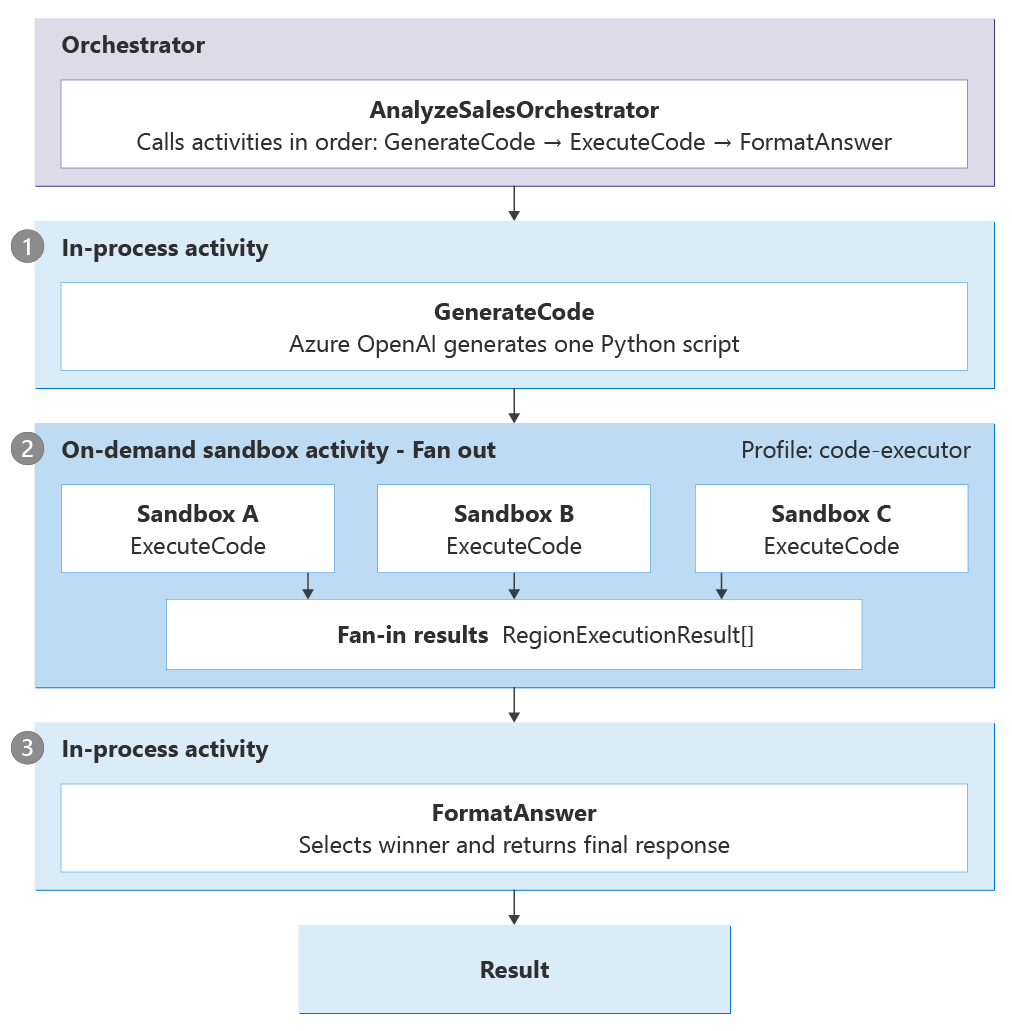
For example, let's say you have an orchestration responsible for scanning a dataset in an Excel file and determining answers to certain questions, such as, "What region had the most revenue in 2025?" The following diagram illustrates this orchestration flow and the order in which the in-process and sandboxed activities run.
- The
GenerateCodestep in the orchestration sends the question to the large language model, which returns Python code to run against the dataset. - That code is sent to the sandboxes to execute safely, not in the main process (
ExecuteCode). It fans out and executes in each region in the Excel file. - Finally, the
FormatAnsweractivity picks and formats the winning answer and returns it in the main process.
Supported SDKs and availability
On-demand sandboxes target the standalone Durable Task SDKs for apps running on Azure Container Apps, Azure Kubernetes Service, App Service, or anywhere else you self-host.
On-demand sandboxes currently support the following SDKs during limited preview:
| Language | Supported |
|---|---|
| C# (.NET) | ✅ |
| Python | ✅ |
| JavaScript | ❌ |
| PowerShell | ❌ |
| Java | ❌ |
Supported preview regions
You need a Durable Task Scheduler in one of the following supported preview regions:
- East US 2 (
eastus2) - West US 3 (
westus3) - North Europe (
northeurope) - Australia East (
australiaeast)
You can use an existing scheduler or create a new one in one of these regions.
Get preview access
To get access to the limited preview, email dts-team@microsoft.com with your scheduler name and the region it's in. The team enables On-demand sandboxes on your scheduler and helps you get your first sandbox activity running.