Note
Access to this page requires authorization. You can try signing in or changing directories.
Access to this page requires authorization. You can try changing directories.
Note
This document refers to the Microsoft Foundry (classic) agents.
🔍 View the new SharePoint tool documentation. Agents (classic) are now deprecated and will be retired on March 31, 2027. Use the new agents in the generally available Microsoft Foundry Agents Service. Follow the migration guide to update your workloads.
Note
This article describes the Microsoft SharePoint tool for Foundry Agent Service. For information on using and deploying SharePoint sites, see the SharePoint documentation.
Use this article to find step-by-step instructions and code samples for using the SharePoint tool in Agent Service.
Prerequisites
The
azure-ai-agentspackage version 1.2.0b1 or later. TheSharepointToolclass is only available in beta versions of the package. Install with:pip install --pre azure-ai-agentsYour Microsoft Foundry Project endpoint.
You can find your endpoint in the overview for your project in the Microsoft Foundry portal, under Libraries > Foundry.

Save this endpoint to an environment variable named
PROJECT_ENDPOINT.The name of your SharePoint connection name. Find it in the Foundry portal by selecting Management center from the left navigation menu. Then select Connected resources.
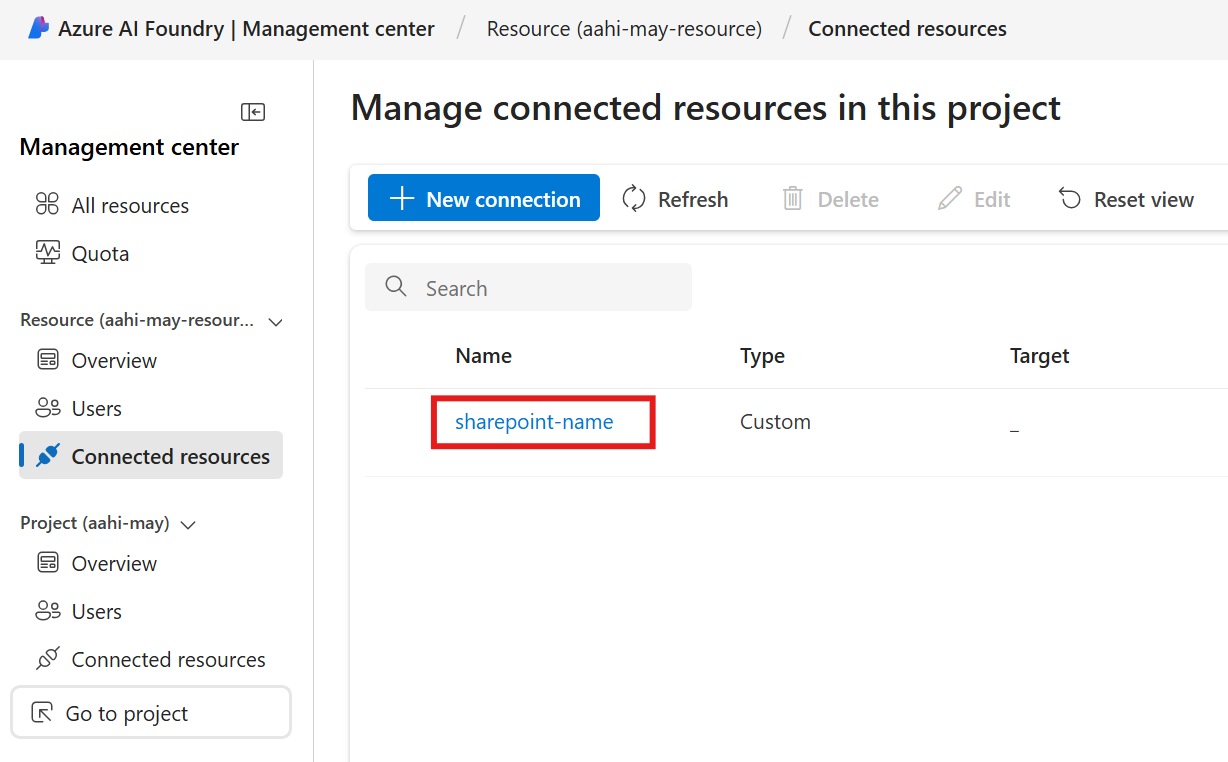
Save this endpoint to an environment variable named
SHAREPOINT_RESOURCE_NAME.The names of your model's deployment name. Find it in Models + Endpoints in the left navigation menu.

Save the name of your model deployment name as an environment variable named
MODEL_DEPLOYMENT_NAME.


Create a project client
Create a client object that contains the connection string for connecting to your AI project and other resources.
import os
from azure.ai.projects import AIProjectClient
from azure.identity import DefaultAzureCredential
from azure.ai.agents.models import SharepointTool

# Retrieve the endpoint and credentials
project_endpoint = os.environ["PROJECT_ENDPOINT"]  # Ensure the PROJECT_ENDPOINT environment variable is set

# Initialize the AIProjectClient
project_client = AIProjectClient(
    endpoint=os.environ["PROJECT_ENDPOINT"],
    credential=DefaultAzureCredential(),
)
Create an agent with the SharePoint tool enabled
To make the Microsoft Fabric tool available to your agent, use a connection to initialize the tool and attach it to the agent. You can find your connection in the connected resources section of your project in the Foundry portal.
conn_id = project_client.connections.get(name=os.environ["SHAREPOINT_RESOURCE_NAME"]).id

# Initialize Sharepoint tool with connection id
sharepoint = SharepointTool(connection_id=conn_id)

# Create an agent with the Fabric tool
# Create an Agent with the Fabric tool and process an Agent run
with project_client:
    agents_client = project_client.agents

    agent = agents_client.create_agent(
        model=os.environ["MODEL_DEPLOYMENT_NAME"],
        name="my-agent",
        instructions="You are a helpful agent",
        tools=sharepoint.definitions,
    )
    print(f"Created agent, ID: {agent.id}")
Create a thread
# Create thread for communication
thread = agents_client.threads.create()
print(f"Created thread, ID: {thread.id}")

# Create message to thread
message = agents_client.messages.create(
    thread_id=thread.id,
    role="user",
    content="Hello, summarize the key points of the <sharepoint_resource_document>",
)
print(f"Created message, ID: {message.id}")
Create a run and check the output
# Create and process agent run in thread with tools
run = agents_client.runs.create_and_process(thread_id=thread.id, agent_id=agent.id)
print(f"Run finished with status: {run.status}")

if run.status == "failed":
    print(f"Run failed: {run.last_error}")

# Uncomment the following lines to delete the agent when done
#agents_client.delete_agent(agent.id)
#print("Deleted agent")

# Fetch and log all messages
messages = agents_client.messages.list(thread_id=thread.id)
for msg in messages:
    if msg.text_messages:
        last_text = msg.text_messages[-1]
        print(f"{msg.role}: {last_text.text.value}")
Create an agent
Follow the REST API Quickstart to set the right values for the environment variables AGENT_TOKEN, AZURE_AI_FOUNDRY_PROJECT_ENDPOINT, and API_VERSION.
curl --request POST \
  --url $AZURE_AI_FOUNDRY_PROJECT_ENDPOINT/assistants?api-version=$API_VERSION \
  -H "Authorization: Bearer $AGENT_TOKEN" \
  -H "Content-Type: application/json" \
  -d '{
        "instructions": "You are a helpful agent.",
        "name": "my-agent",
        "model": "gpt-4o",
        "tools": [
          {
            "type": "sharepoint_grounding",
            "sharepoint_grounding": {
                "connections": [
                    {
                        "connection_id": "/subscriptions/<sub-id>/resourceGroups/<your-rg-name>/providers/Microsoft.CognitiveServices/accounts/<your-ai-services-name>/projects/<your-project-name>/connections/<your-sharepoint-connection-name>"
                    }
                ]
            }
          }
        ]
      }'
Create a thread
curl --request POST \
  --url $AZURE_AI_FOUNDRY_PROJECT_ENDPOINT/threads?api-version=$API_VERSION \
  -H "Authorization: Bearer $AGENT_TOKEN" \
  -H "Content-Type: application/json" \
  -d ''
Add a user question to the thread
curl --request POST \
  --url $AZURE_AI_FOUNDRY_PROJECT_ENDPOINT/threads/thread_abc123/messages?api-version=$API_VERSION \
  -H "Authorization: Bearer $AGENT_TOKEN" \
  -H "Content-Type: application/json" \
  -d '{
      "role": "user",
      "content": "What is the weather in Seattle?"
    }'
Run the thread
curl --request POST \
  --url $AZURE_AI_FOUNDRY_PROJECT_ENDPOINT/threads/thread_abc123/runs?api-version=$API_VERSION \
  -H "Authorization: Bearer $AGENT_TOKEN" \
  -H "Content-Type: application/json" \
  -d '{
    "assistant_id": "asst_abc123",
  }'
Retrieve the status of the run
curl --request GET \
  --url $AZURE_AI_FOUNDRY_PROJECT_ENDPOINT/threads/thread_abc123/runs/run_abc123?api-version=$API_VERSION \
  -H "Authorization: Bearer $AGENT_TOKEN"
Retrieve the agent response
curl --request GET \
  --url $AZURE_AI_FOUNDRY_PROJECT_ENDPOINT/threads/thread_abc123/messages?api-version=$API_VERSION \
  -H "Authorization: Bearer $AGENT_TOKEN"