Note
Access to this page requires authorization. You can try signing in or changing directories.
Access to this page requires authorization. You can try changing directories.
Important
Items marked (preview) in this article are currently in public preview. This preview is provided without a service-level agreement, and we don't recommend it for production workloads. Certain features might not be supported or might have constrained capabilities. For more information, see Supplemental Terms of Use for Microsoft Azure Previews.
A routine is a named automation rule that triggers an agent on a schedule or at a specific time. You define what fires the routine (the trigger) and what agent to invoke (the action). Foundry queues the invocation, runs the agent, and stores a run record you can inspect later.
This article shows you how to create, manage, and monitor routines by using the Foundry portal, the REST API, and the Python and JavaScript SDKs.
Note
Routines are in preview. Send the Foundry-Features: Routines=V1Preview header on every REST call. All routine operations are on the data plane under your project endpoint.
Supported trigger types
Routines support two time-based trigger types:
| Trigger type | Description |
|---|---|
schedule |
Recurring trigger defined by a cron expression. Minimum interval is five minutes. |
timer |
One-shot trigger that fires at a specific future date/time or after a duration. |
Supported action types
Each routine specifies exactly one action that runs when the routine fires. Two action types are supported:
| Action type | Description |
|---|---|
invoke_agent_responses_api |
Invokes the agent through the Responses API. Provide either the agent name or endpoint ID. |
invoke_agent_invocations_api |
Invokes the agent through the Invocations API. Requires the endpoint-scoped agent identifier. |
For required and optional fields of each action type, see Action fields.
Prerequisites
An active Microsoft Foundry project with at least one agent deployed.
Foundry User role or higher on the project scope.
Important
The Foundry RBAC roles were recently renamed. Foundry User, Foundry Owner, Foundry Account Owner, and Foundry Project Manager were previously named Azure AI User, Azure AI Owner, Azure AI Account Owner, and Azure AI Project Manager. You might still see the previous names in some places while the rename rolls out. The role IDs and core permissions are unchanged by the rename.
Note
Routines are available in a subset of regions in preview. Confirm that your Foundry project is provisioned in one of the supported regions before you create a routine:
- East US
- East US 2
- West US
- West US 2
- West Central US
- North Central US
- Sweden Central
- Japan East
Install the
azure-ai-projectsSDK, version 2.2.0 or later (preview):pip install "azure-ai-projects>=2.2.0"Version 2.2.0 introduces the duration shorthand (
"30m","2h") for timer triggers.Install
azure-identityfor authentication:pip install azure-identity
Install the
@azure/ai-projectsnpm package (preview):npm install @azure/ai-projects @azure/identity
Install the Azure Developer CLI (
azd1.23.13 or later).Install the routines extension (preview):
azd extension install azure.ai.routinesSign in and set your project endpoint:
azd auth login
export AZURE_AI_PROJECT_ENDPOINT="https://<account>.services.ai.azure.com/api/projects/<project>"
Create a routine
A routine definition specifies a trigger (when to fire) and an action (which agent to run and through which API). Exactly one trigger entry is supported in preview.
Schedule trigger
A schedule trigger fires repeatedly on a cron expression. The service enforces a minimum interval of five minutes.
In Microsoft Foundry, open your project.
In the left navigation, select Routines.
Select + New routine.
Enter a Name for the routine, for example
daily-summary.Select an Agent from the dropdown.
Enter a Prompt for the agent to run on each invocation.
Under Trigger, set Type to Recurring schedule, then choose a Frequency (Daily or Weekly) and a Time.
Select Create & start.
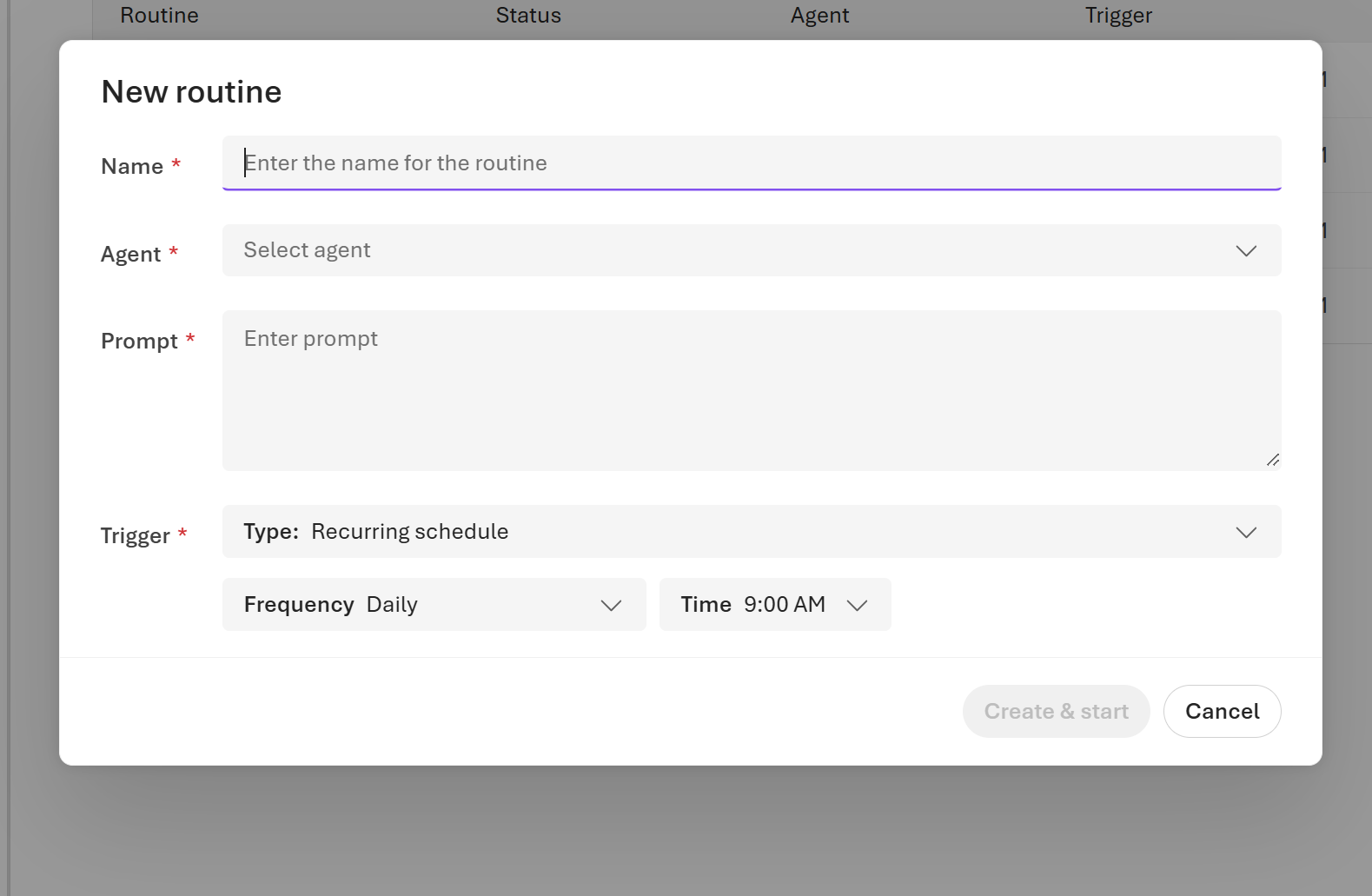
The portal interprets the Time in your browser's local time zone. To pin a routine to a specific time zone independently of the browser, create it through the REST API or an SDK and supply the time_zone field.
Note
If Routines isn't visible in the navigation, the feature isn't enabled for your region or subscription. Contact your account team to request access.
Replace the placeholder values, then run:
PROJECT_ENDPOINT=<your-project-endpoint>   # e.g. https://<account>.services.ai.azure.com/api/projects/<project>
AGENT_NAME=<your-agent-name>

TOKEN=$(az account get-access-token \
  --resource https://ai.azure.com \
  --query accessToken -o tsv)

# Using Responses API action
curl -sS -X PUT "$PROJECT_ENDPOINT/routines/daily-summary" \
  -H "Authorization: Bearer $TOKEN" \
  -H "Content-Type: application/json" \
  -H "Foundry-Features: Routines=V1Preview" \
  -d '{
    "description": "Runs a daily summary agent on weekday mornings.",
    "enabled": true,
    "triggers": {
      "weekday-morning": {
        "type": "schedule",
        "cron_expression": "0 7 * * 1-5",
        "time_zone": "UTC"
      }
    },
    "action": {
      "type": "invoke_agent_responses_api",
      "agent_name": "'"$AGENT_NAME"'"
    }
  }'
To use the Invocations API action instead, replace the action object with the following. agent_name is required; session_id is optional.
# Using Invocations API action
curl -sS -X PUT "$PROJECT_ENDPOINT/routines/daily-summary" \
  -H "Authorization: Bearer $TOKEN" \
  -H "Content-Type: application/json" \
  -H "Foundry-Features: Routines=V1Preview" \
  -d '{
    "description": "Runs a daily summary agent on weekday mornings.",
    "enabled": true,
    "triggers": {
      "weekday-morning": {
        "type": "schedule",
        "cron_expression": "0 7 * * 1-5",
        "time_zone": "UTC"
      }
    },
    "action": {
      "type": "invoke_agent_invocations_api",
      "agent_name": "'"$AGENT_NAME"'"
    }
  }'
A successful response returns HTTP 200 or 201 with the routine object, including created_at and updated_at timestamps.
import os
from azure.identity import DefaultAzureCredential
from azure.ai.projects import AIProjectClient

endpoint = os.environ["PROJECT_ENDPOINT"]
agent_name = os.environ["AGENT_NAME"]

client = AIProjectClient(endpoint=endpoint, credential=DefaultAzureCredential())

# Using Responses API action
routine = client.beta.routines.create_or_update(
    routine_name="daily-summary",
    description="Runs a daily summary agent on weekday mornings.",
    enabled=True,
    triggers={
        "weekday-morning": {
            "type": "schedule",
            "cron_expression": "0 7 * * 1-5",  # required
            "time_zone": "UTC",                 # required
        }
    },
    action={
        "type": "invoke_agent_responses_api",
        "agent_name": agent_name,  # required
        # "conversation_id": "...",  # optional
    },
)

print(f"Routine created: {routine.name}, enabled={routine.enabled}")

# To use the Invocations API action instead:
# action={
#     "type": "invoke_agent_invocations_api",
#     "agent_name": agent_name,  # required
#     # "session_id": "...",      # optional
# }
const { AIProjectClient } = require("@azure/ai-projects");
const { DefaultAzureCredential } = require("@azure/identity");

const endpoint = process.env.PROJECT_ENDPOINT;
const agentName = process.env.AGENT_NAME;

const client = new AIProjectClient(endpoint, new DefaultAzureCredential());

// Using Responses API action
const routine = await client.beta.routines.createOrUpdate("daily-summary", {
  description: "Runs a daily summary agent on weekday mornings.",
  enabled: true,
  triggers: {
    "weekday-morning": {
      type: "schedule",
      cron_expression: "0 7 * * 1-5",  // required
      time_zone: "UTC",                 // required
    },
  },
  action: {
    type: "invoke_agent_responses_api",
    agent_name: agentName,  // required
    // conversation_id: "...",  // optional
  },
});

console.log(`Routine created: ${routine.name}, enabled=${routine.enabled}`);

// To use the Invocations API action instead:
// action: {
//   type: "invoke_agent_invocations_api",
//   agent_name: agentName,  // required
//   // session_id: "...",    // optional
// }
Inline azd ai routine create --trigger schedule isn't supported in preview. Create the routine from a YAML manifest instead:
# routine.yaml
name: daily-summary
description: Runs a daily summary agent on weekday mornings.
enabled: true
triggers:
  weekday-morning:
    type: schedule
    cron: "0 7 * * 1-5"
    time_zone: UTC
action:
  type: invoke_agent_responses_api
  agent_name: <your-agent-name>
azd ai routine create --file routine.yaml
The minimum interval between fires is five minutes. Set time_zone to any IANA zone (for example America/Los_Angeles); omit it to interpret cron in UTC.
Note
The agent referenced by agent_name must have a configured agent identity. Prompt-only agents are rejected by the service when bound to a routine action.
Timer trigger
A timer trigger fires once at a specific future date and time, or after a duration from now.
Follow steps 1 through 6 in the previous procedure to open the New routine dialog and fill in Name, Agent, and Prompt. Use a name such as
once-on-release-day.Under Trigger, set Type to One-time schedule.
Under Run at, pick the date and time when the routine should fire.
Select Create & start.
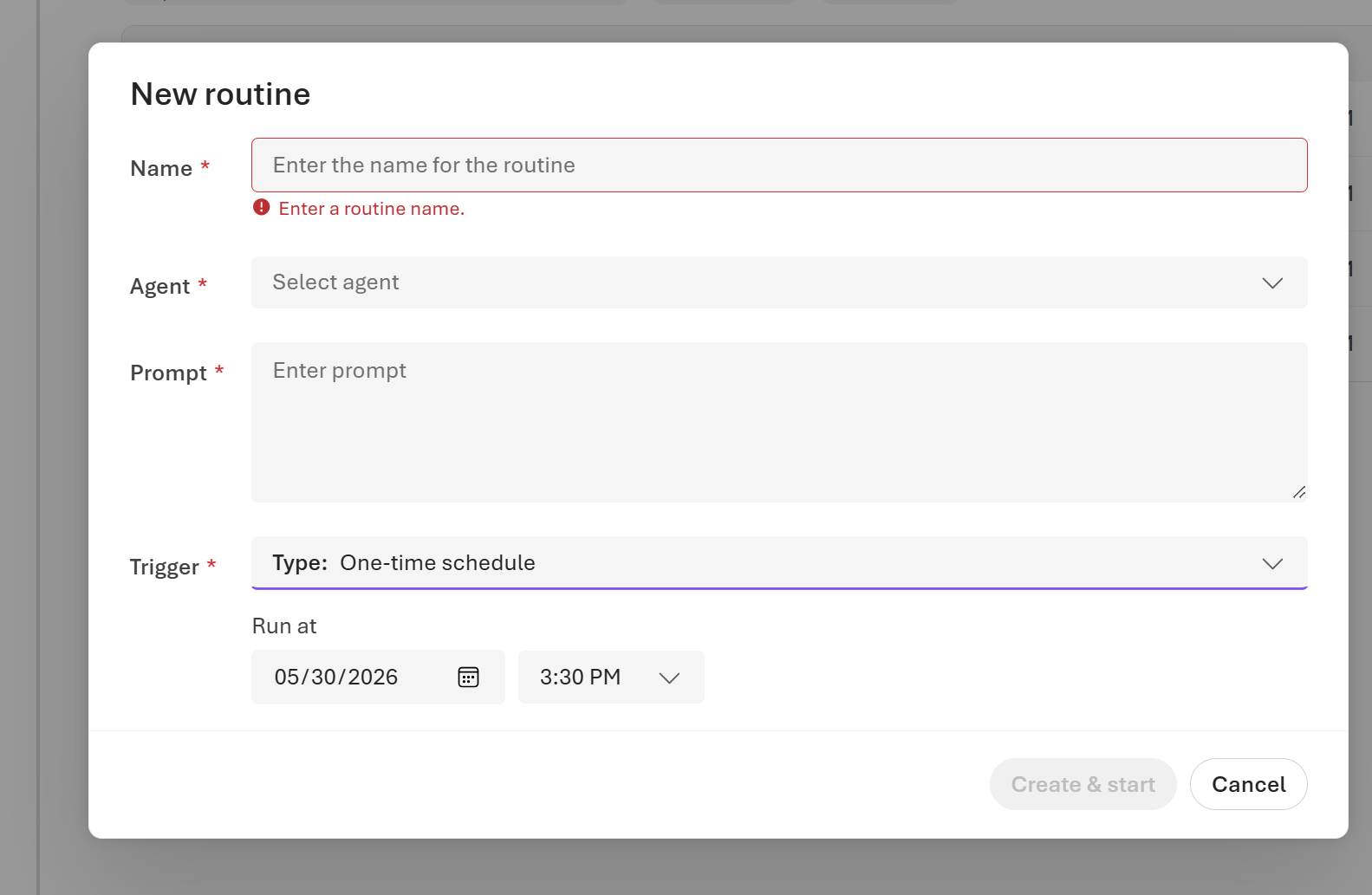
The Run at value is interpreted in your browser's local time zone. A one-time schedule fires exactly once, at the time you pick.
# Using Responses API action
curl -sS -X PUT "$PROJECT_ENDPOINT/routines/once-on-release-day" \
  -H "Authorization: Bearer $TOKEN" \
  -H "Content-Type: application/json" \
  -H "Foundry-Features: Routines=V1Preview" \
  -d '{
    "description": "Runs the agent once on release day.",
    "enabled": true,
    "triggers": {
      "release-day": {
        "type": "timer",
        "at": "2026-09-01T09:00:00Z"
      }
    },
    "action": {
      "type": "invoke_agent_responses_api",
      "agent_name": "'"$AGENT_NAME"'"
    }
  }'
The at field accepts:
- An ISO 8601 timestamp with an explicit UTC offset, for example
"2026-06-01T09:00:00Z". - A local timestamp paired with
time_zone, for example"at": "2026-09-01T09:00:00", "time_zone": "America/Los_Angeles". - A positive duration from the current time, for example
"30m"(30 minutes from now) or"2h"(two hours from now).
routine = client.beta.routines.create_or_update(
    routine_name="once-on-release-day",
    description="Runs the agent once on release day.",
    enabled=True,
    triggers={
        "release-day": {
            "type": "timer",
            "at": "2026-09-01T09:00:00Z",  # required
            # "time_zone": "UTC",           # optional; required when 'at' has no UTC offset
        }
    },
    action={
        "type": "invoke_agent_responses_api",
        "agent_name": agent_name,
    },
)
const routine = await client.beta.routines.createOrUpdate("once-on-release-day", {
  description: "Runs the agent once on release day.",
  enabled: true,
  triggers: {
    "release-day": {
      type: "timer",
      at: "2026-09-01T09:00:00Z",  // required
      // time_zone: "UTC",          // optional; required when 'at' has no UTC offset
    },
  },
  action: {
    type: "invoke_agent_responses_api",
    agent_name: agentName,
  },
});
Create a one-shot timer routine inline:
azd ai routine create once-on-release-day \
  --trigger timer \
  --at 2026-09-01T09:00:00Z \
  --action agent-response \
  --agent-name <your-agent-name>
Or create from a YAML manifest:
# routine.yaml
name: once-on-release-day
description: Runs the agent once on release day.
enabled: true
triggers:
  release-day:
    type: timer
    time_zone: UTC
    at: 2026-09-01T09:00:00Z
action:
  type: invoke_agent_responses_api
  agent_name: <your-agent-name>
azd ai routine create --file routine.yaml
Note
The agent referenced by agent_name must have a configured agent identity. Prompt-only agents are rejected by the service when bound to a routine action.
Action fields
Each routine specifies exactly one action. The two supported action types have different required and optional fields.
Responses API action (invoke_agent_responses_api)
Invokes the agent through the Responses API.
| Field | Type | Required | Description |
|---|---|---|---|
type |
string | Yes | Must be "invoke_agent_responses_api". |
agent_name |
string | Yes | The project-scoped agent name. Maximum 256 characters. |
conversation_id |
string | No | An existing conversation to continue during the dispatch. Maximum 256 characters. |
Invocations API action (invoke_agent_invocations_api)
Invokes the agent through the Invocations API.
| Field | Type | Required | Description |
|---|---|---|---|
type |
string | Yes | Must be "invoke_agent_invocations_api". |
agent_name |
string | Yes | The project-scoped agent name. Maximum 256 characters. |
session_id |
string | No | An existing hosted-agent session to continue during the dispatch. Maximum 256 characters. |
Enable and disable a routine
Routines start enabled if you set "enabled": true at creation. You can pause a routine without deleting it.
In Microsoft Foundry, open your project.
Select Routines in the left navigation.
Find the routine and select it.
Select Pause in the top right to pause the routine, or select Resume to re-enable a paused routine.
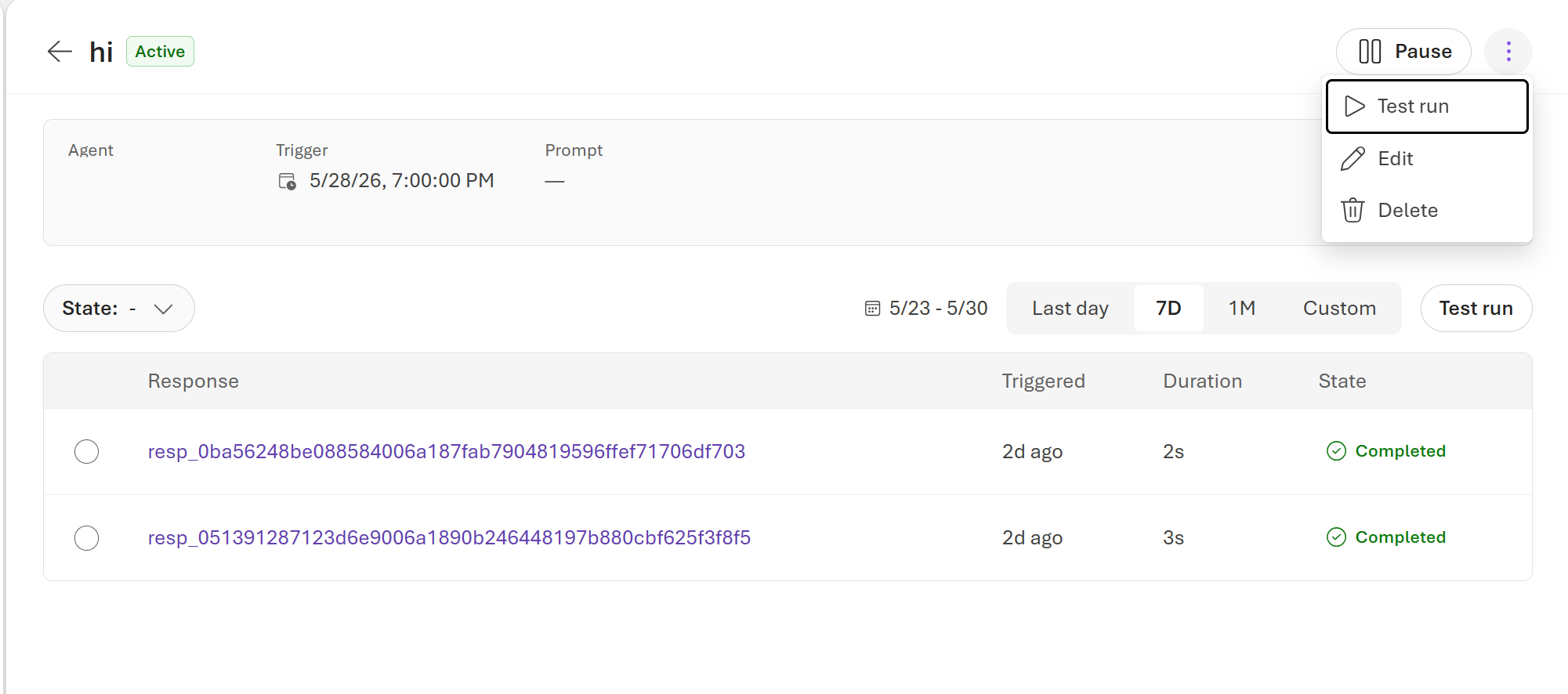
From the same page, you can also:
- Select Test run (either the button on the right or the entry in the overflow menu) to fire the routine immediately with its current prompt and agent, without waiting for the next scheduled trigger.
- Review past runs in the table below the routine details. Each row shows the response ID, when the run was triggered, its duration, and its state. Use the Last day, 7D, 1M, or Custom filters to scope the time range. Select a response ID to open the full run.
Disable a routine:
curl -sS -X POST "$PROJECT_ENDPOINT/routines/daily-summary:disable" \
  -H "Authorization: Bearer $TOKEN" \
  -H "Foundry-Features: Routines=V1Preview"
Enable a routine:
curl -sS -X POST "$PROJECT_ENDPOINT/routines/daily-summary:enable" \
  -H "Authorization: Bearer $TOKEN" \
  -H "Foundry-Features: Routines=V1Preview"
Both operations return the updated routine object.
# Disable
disabled_routine = client.beta.routines.disable("daily-summary")
print(f"Enabled: {disabled_routine.enabled}")   # False

# Enable
enabled_routine = client.beta.routines.enable("daily-summary")
print(f"Enabled: {enabled_routine.enabled}")    # True
// Disable
const disabled = await client.beta.routines.disable("daily-summary");
console.log(`Enabled: ${disabled.enabled}`);   // false

// Enable
const enabled = await client.beta.routines.enable("daily-summary");
console.log(`Enabled: ${enabled.enabled}`);    // true
# Disable
azd ai routine disable once-on-release-day

# Enable
azd ai routine enable once-on-release-day
Test a routine manually
Queue a one-off run without waiting for the trigger to fire. This lets you verify that the routine reaches your agent correctly.
- Open the routine in Microsoft Foundry.
- Select Test run (either the button on the right or the entry in the overflow menu next to Pause).
Foundry queues the run immediately with the routine's current agent and prompt. The new run appears in the past-runs table below the routine details and progresses from Queued to Completed or Failed.
Use the dispatch_async operation to queue the run. The dispatch payload type must match the routine's action type: use invoke_agent_responses_api for Responses API routines and invoke_agent_invocations_api for Invocations API routines.
| Payload field | Type | Required | Description |
|---|---|---|---|
type |
string | Yes | Must match the routine's action type: "invoke_agent_responses_api" or "invoke_agent_invocations_api". |
input |
string | No | Override input sent to the downstream target for testing. Maximum 32,768 characters. |
Responses API routine  with optional input override:
curl -sS -X POST "$PROJECT_ENDPOINT/routines/daily-summary:dispatch_async" \
  -H "Authorization: Bearer $TOKEN" \
  -H "Content-Type: application/json" \
  -H "Foundry-Features: Routines=V1Preview" \
  -d '{
    "payload": {
      "type": "invoke_agent_responses_api",
      "input": "Run the daily summary for testing."
    }
  }'
Invocations API routine  with optional input override:
curl -sS -X POST "$PROJECT_ENDPOINT/routines/my-invocations-routine:dispatch_async" \
  -H "Authorization: Bearer $TOKEN" \
  -H "Content-Type: application/json" \
  -H "Foundry-Features: Routines=V1Preview" \
  -d '{
    "payload": {
      "type": "invoke_agent_invocations_api",
      "input": "Run the agent for testing."
    }
  }'
Response:
{
  "dispatch_id": "disp-abc123",
  "action_correlation_id": "resp-xyz456",
  "task_id": "task-def789"
}
Use the dispatch_id to find the run in the run history.
Without an input override:
curl -sS -X POST "$PROJECT_ENDPOINT/routines/daily-summary:dispatch_async" \
  -H "Authorization: Bearer $TOKEN" \
  -H "Content-Type: application/json" \
  -H "Foundry-Features: Routines=V1Preview" \
  -d '{}'
# Responses API routine
result = client.beta.routines.dispatch(
    routine_name="daily-summary",
    payload={
        "type": "invoke_agent_responses_api",
        "input": "Run the daily summary for testing.",  # optional
    },
)
print(f"dispatch_id: {result.dispatch_id}")
print(f"task_id:     {result.task_id}")

# Invocations API routine
result2 = client.beta.routines.dispatch(
    routine_name="my-invocations-routine",
    payload={
        "type": "invoke_agent_invocations_api",
        "input": "Run the agent for testing.",  # optional
    },
)
// Responses API routine
const result = await client.beta.routines.dispatch("daily-summary", {
  payload: {
    type: "invoke_agent_responses_api",
    input: "Run the daily summary for testing.",  // optional
  },
});
console.log(`dispatch_id: ${result.dispatch_id}`);

// Invocations API routine
const result2 = await client.beta.routines.dispatch("my-invocations-routine", {
  payload: {
    type: "invoke_agent_invocations_api",
    input: "Run the agent for testing.",  // optional
  },
});
Queue a manual run for a Responses API routine:
azd ai routine dispatch once-on-release-day \
  --input "Run the routine for testing."
The command prints the dispatch_id and task_id. Use the dispatch_id to find the run in the run history.
View run history
Run history records every time a routine fired and the outcome of each attempt.
- Open the routine in Microsoft Foundry.
- Past runs are listed in the table on the routine detail page. Each row shows the response ID, when the run was triggered, its duration, and its state (for example Completed or Failed).
- Use the Last day, 7D, 1M, or Custom range controls above the table to filter the time window.
- Select a response ID to open the full run, including the response and any error details.
List all runs for a routine:
curl -sS "$PROJECT_ENDPOINT/routines/daily-summary/runs" \
  -H "Authorization: Bearer $TOKEN" \
  -H "Foundry-Features: Routines=V1Preview"
Example response:
{
  "value": [
    {
      "id": "run-abc123",
      "status": "FINISHED",
      "phase": "completed",
      "trigger_type": "schedule",
      "attempt_source": "schedule_delivery",
      "started_at": "2026-06-02T07:00:05Z",
      "ended_at": "2026-06-02T07:00:42Z",
      "dispatch_id": "disp-abc123",
      "response_id": "resp-xyz456"
    }
  ]
}
runs = client.beta.routines.list_runs("daily-summary")
for run in runs:
print(
f"{run.id} phase={run.phase} "
f"source={run.attempt_source} "
f"started={run.started_at} ended={run.ended_at}"
)
if run.phase == "failed":
print(f" error: {run.error_type}  {run.error_message}")
for await (const run of client.beta.routines.listRuns("daily-summary")) {
console.log(`${run.id} phase=${run.phase} source=${run.attempt_source}`);
if (run.phase === "failed") {
console.log(` error: ${run.error_type}  ${run.error_message}`);
}
}
Listing run history through azd ai routine isn't supported in preview. Use the Foundry portal, REST API, or an SDK to retrieve runs.
List and retrieve routines
All routines in your project are shown on the Routines page. Select any routine to see its configuration and run history.
List all routines in the project:
curl -sS "$PROJECT_ENDPOINT/routines" \
  -H "Authorization: Bearer $TOKEN" \
  -H "Foundry-Features: Routines=V1Preview"
Retrieve a specific routine:
curl -sS "$PROJECT_ENDPOINT/routines/daily-summary" \
  -H "Authorization: Bearer $TOKEN" \
  -H "Foundry-Features: Routines=V1Preview"
# List all routines
for r in client.beta.routines.list():
    print(f"{r.name}  enabled={r.enabled}  triggers={list(r.triggers.keys())}")

# Get a single routine
routine = client.beta.routines.get("daily-summary")
print(routine)
// List all routines
for await (const r of client.beta.routines.list()) {
  console.log(`${r.name}  enabled=${r.enabled}`);
}

// Get a single routine
const routine = await client.beta.routines.get("daily-summary");
console.log(routine);
Retrieve a single routine:
azd ai routine show once-on-release-day
Listing all routines through azd ai routine isn't supported in preview. Use the Foundry portal, REST API, or an SDK.
Update a routine
To change a routine's trigger or action, issue a new create-or-update request with the same name. The operation replaces the stored definition.
- Open the routine in Microsoft Foundry.
- Select Edit.
- Change the trigger or action settings.
- Select Save.
Reissue the PUT request with the updated body. Include all fields; omitted fields reset to defaults.
curl -sS -X PUT "$PROJECT_ENDPOINT/routines/daily-summary" \
  -H "Authorization: Bearer $TOKEN" \
  -H "Content-Type: application/json" \
  -H "Foundry-Features: Routines=V1Preview" \
  -d '{
    "description": "Updated: runs at 08:00 UTC on weekdays.",
    "enabled": true,
    "triggers": {
      "weekday-morning": {
        "type": "schedule",
        "cron_expression": "0 8 * * 1-5",
        "time_zone": "UTC"
      }
    },
    "action": {
      "type": "invoke_agent_responses_api",
      "agent_name": "'"$AGENT_NAME"'"
    }
  }'
updated = client.beta.routines.create_or_update(
    routine_name="daily-summary",
    description="Updated: runs at 08:00 UTC on weekdays.",
    enabled=True,
    triggers={
        "weekday-morning": {
            "type": "schedule",
            "cron_expression": "0 8 * * 1-5",
            "time_zone": "UTC",
        }
    },
    action={
        "type": "invoke_agent_responses_api",
        "agent_name": agent_name,
    },
)
print(f"Updated at: {updated.updated_at}")
const updated = await client.beta.routines.createOrUpdate("daily-summary", {
  description: "Updated: runs at 08:00 UTC on weekdays.",
  enabled: true,
  triggers: {
    "weekday-morning": {
      type: "schedule",
      cron_expression: "0 8 * * 1-5",
      time_zone: "UTC",
    },
  },
  action: {
    type: "invoke_agent_responses_api",
    agent_name: agentName,
  },
});
console.log(`Updated at: ${updated.updated_at}`);
Apply changes from a YAML manifest:
azd ai routine update once-on-release-day --file routine.yaml
The --description flag isn't supported for timer routines in preview; edit the manifest and reapply with --file instead.
Delete a routine
Deleting a routine removes it and stops all future trigger deliveries. Existing run records are preserved.
- Open the routine in Microsoft Foundry.
- Select Delete, then confirm.
curl -sS -X DELETE "$PROJECT_ENDPOINT/routines/daily-summary" \
  -H "Authorization: Bearer $TOKEN" \
  -H "Foundry-Features: Routines=V1Preview"
A successful response returns HTTP 204 No Content.
client.beta.routines.delete("daily-summary")
print("Routine deleted.")
await client.beta.routines.delete("daily-summary");
console.log("Routine deleted.");
azd ai routine delete once-on-release-day
Trigger fields
Schedule trigger fields
| Field | Type | Required | Description |
|---|---|---|---|
type |
string | Yes | Must be "schedule". |
cron_expression |
string | Yes | A 5-field cron expression. The service enforces a minimum interval of five minutes. |
time_zone |
string | Yes | An IANA or Windows time zone identifier, for example "UTC" or "America/Los_Angeles". |
Timer trigger fields
| Field | Type | Required | Description |
|---|---|---|---|
type |
string | Yes | Must be "timer". |
at |
string | Yes | A future timer expression. Accepts an ISO 8601 timestamp with an explicit UTC offset (for example, "2026-06-01T09:00:00Z"), a local timestamp paired with time_zone, or a positive duration from now (for example, "30m" or "2h"). |
time_zone |
string | No | An IANA or Windows time zone identifier. Required when at is a local timestamp without a UTC offset. |
Dispatch behavior and retry policy
When a trigger fires or you call :dispatch_async manually, Foundry acknowledges that the run was enqueued. The acknowledgment doesn't mean the downstream agent call has finished. Use the run state, telemetry, or the returned dispatch_id to confirm completion.
Downstream call outcomes
The delivery worker waits for the downstream invoke_agent_responses_api or invoke_agent_invocations_api HTTP call to finish before marking the run.
| Downstream HTTP result | Routine run behavior |
|---|---|
| 2xx | Run is marked completed and downstream dispatch identifiers are recorded. |
| 408, 429, or 5xx | Treated as retryable while attempts remain. |
| Other 4xx (for example, 400) | Treated as terminal and the run is marked failed. |
| Request timeout or transient service-invocation failure | Treated as retryable while attempts remain. |
If retries are exhausted, the run is marked failed with the last dispatch error.
A successful run means the downstream API accepted the dispatch request. It doesn't guarantee that asynchronous work started by the agent has completed.
Retry and timeout defaults
- The default delivery policy is 3 total attempts with exponential backoff starting at 1 second and capped at 5 seconds.
- The downstream HTTP request has a per-attempt timeout of 30 seconds. Queueing time, retry backoff, and worker concurrency limits aren't included in that per-request timeout.
Known issues and limitations
The preview has the following known issues and limitations:
- One trigger and one action per routine. Each routine supports exactly one entry in the
triggersmap and one action. To run multiple agents or multiple schedules, create separate routines. - Trigger types. Only
timer(one-shot) andschedule(cron-based recurring) triggers are supported. Event-based triggers aren't available in preview. - Action types. The only action is invoking one Foundry agent through the Responses API or Invocations API.
- Schedule minimum interval. A
scheduletrigger fires at most once every five minutes. Cron expressions that resolve to a shorter interval are rejected. - Regional availability. Routines are available only in the regions listed under Prerequisites. If Routines isn't visible in the Foundry portal navigation, the feature isn't enabled for your region or subscription.
- Use
:dispatch_asyncfor manual dispatch. Only thePOST .../routines/{routineName}:dispatch_asyncroute is part of the public contract. The legacy:dispatchroute isn't supported for customer use. - Acknowledgment isn't completion. A
:dispatch_asyncresponse acknowledges that the run was enqueued, not that the downstream agent call finished. Use the run state, telemetry, or the returneddispatch_idto observe final delivery. - Per-attempt timeout. The downstream HTTP request to the agent has a per-attempt timeout of 30 seconds. Queueing time, retry backoff, message-bus delivery time, and worker concurrency limits aren't included in that timeout. Requests that exceed the per-attempt timeout are retried per the retry and timeout defaults, and the routine run is marked failed if all attempts time out.
- Successful delivery doesn't guarantee end-to-end completion. A completed routine run means the downstream API returned success for the dispatch request. It doesn't guarantee that asynchronous work started by the agent has finished.