Note
Access to this page requires authorization. You can try signing in or changing directories.
Access to this page requires authorization. You can try changing directories.
A cost control is a policy in Microsoft Foundry that tracks the spending or token usage of the projects, model deployments, agents, or hosted agent sessions that you choose. When usage reaches thresholds that you set, a cost control sends an alert or blocks new requests. Cost controls count usage as requests run, so they can act before an overrun reaches your invoice.
Platform admins and FinOps practitioners use cost controls to set budgets across teams. Project leads and developers use them to cap their own spending and to check the limits that apply to their projects.
Important
Items marked preview in this article are currently in preview. This preview is provided without a service-level agreement, and Microsoft doesn't recommend it for production workloads. Certain features might not be supported or might have constrained capabilities. For more information, see Supplemental Terms of Use for Microsoft Azure Previews.
How cost controls work
Each cost control combines a budget, the usage that it applies to, a reset period, and threshold actions.
| Part | What it defines | Example |
|---|---|---|
| Budget | An amount of spending in US dollars, or a number of tokens. | A monthly limit of 10M tokens. |
| Applies to | The usage that counts toward the budget: all usage in the Foundry resource or project, or the part that you select with filters, such as one project or a few agents. | All agents in one project. |
| Budget sharing | Whether all matching usage shares one budget, or each project, agent, or session gets its own. | Each agent gets the full amount. |
| Reset period | How often counted usage starts over: daily, weekly, or monthly. | Monthly. |
| Dates | When the cost control starts and ends. You enter dates in your local time zone, and Foundry saves them in UTC. | Starts today and ends on June 30. |
| Threshold actions | What happens when usage reaches a threshold: send an alert, or block usage. | Send an alert at 80%, and block usage at 100%. |
When a request arrives, Foundry checks the cost controls that apply to it. If one of them has reached a Block usage threshold, the request is blocked. Otherwise, the request runs, and its usage counts toward each matching cost control.
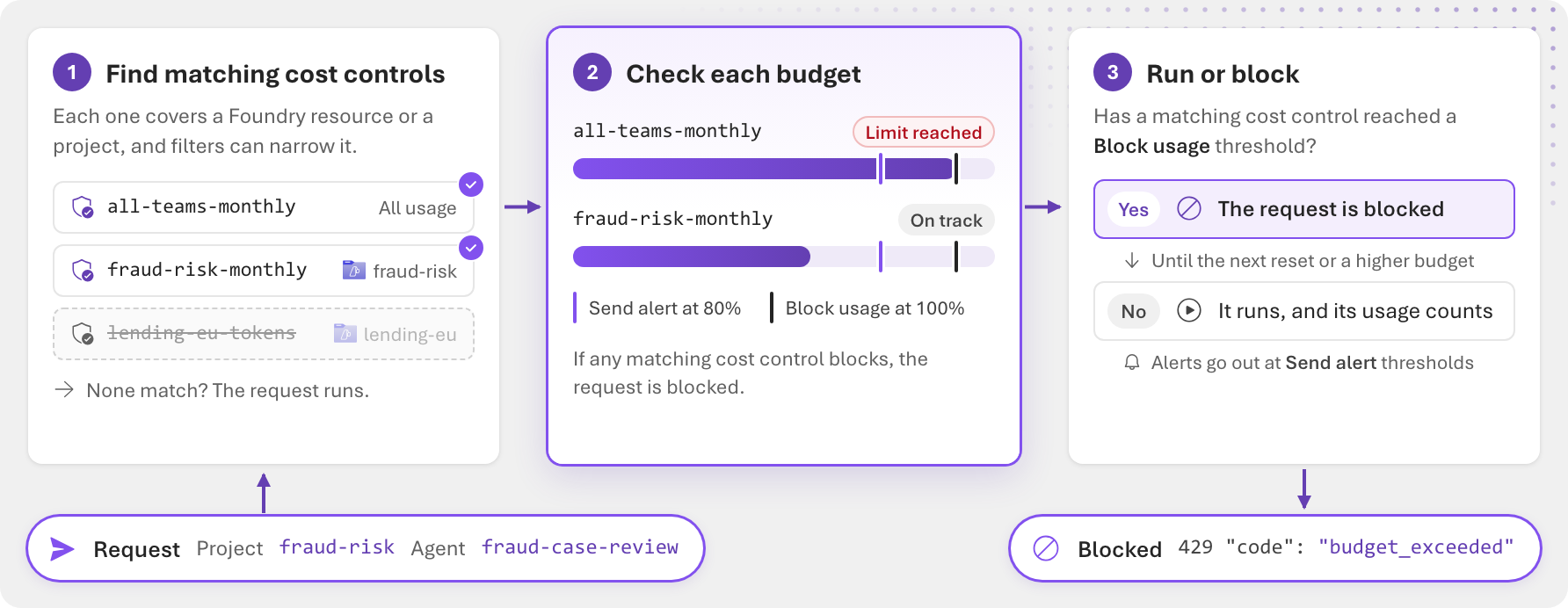
- Blocked requests return HTTP status code
429with the headerx-ms-budget-cause: budget_exceeded, and an error message that starts with "Budget exceeded for cost control". When an agent streams its response, the error arrives as an event in the stream instead. For details, see Respond when requests are blocked. - The request that crosses a threshold can still complete, so usage can end slightly above a threshold.
- Blocked requests succeed again after the next reset, after you raise the budget, or after you remove the cost control.
- Changes to a cost control take effect within 15 minutes.
A cost control without threshold actions tracks usage in Application Insights without affecting requests. Use this setup to watch spending before you enforce a limit.
Usage for the cost controls on a Foundry resource is recorded in one Application Insights resource, which you select under Usage data when you create a cost control. It's a shared setting for the Foundry resource, so changing it affects every cost control on the resource. Foundry Project Managers can see it, but only an admin of the Foundry resource can change it. Alerts and blocks don't depend on it. You need it to see how close each cost control is to its limit.
How cost controls price usage
Cost controls need to act in real time, hours before cost reaches Azure Cost Management. So Foundry keeps its own running total for each cost control:
- A Tokens budget counts the tokens of each matching request.
- A Spending budget prices those tokens with a snapshot of your negotiated prices, and with retail prices for models that don't have a negotiated price. Negotiated prices are the prices in your Azure agreement, such as an Enterprise Agreement or a Microsoft Customer Agreement. To see them, see View and download your organization's Azure pricing.
During public preview, this running total isn't reconciled with your bill. Your bill can apply pricing that the snapshot doesn't, such as tiered pricing, which usually lowers what you pay. So a cost control's total tends to be slightly higher than your billed cost, and the cost control reaches its thresholds a little early. The difference can grow over a long reset period, such as a month.
Use cost controls as guardrails that act as requests run, and use the cost pages and Azure Cost Management to track and reconcile what you spend.
Tip
To act before a hard limit, pair a Block usage threshold with an earlier Send alert threshold, for example an alert at 80% and a block at 100%.
Where you create cost controls
You create a cost control on a Foundry resource or on a project. The owner decides where you manage the cost control and which usage it can cover.
| Owner | Where in the Foundry portal | Can apply to | Typically used by |
|---|---|---|---|
| Foundry resource | Manage > Cost > Cost Control | All usage in the resource, or the projects, model deployments, agents, or sessions that you select with filters. | Platform admins and FinOps practitioners who set budgets across teams. |
| Project | Monitor > Cost Control in the project | Usage in that project. You can narrow it with filters, such as specific agents. The cost control stays in the project. | Project leads and developers who manage their own spending. |
A project's Cost Control tab also lists the Foundry resource's cost controls that apply to the project, read-only. On a project's Monitor > Cost tab, the Project budget card shows the spending budget for the whole project that's closest to its limit. That budget can be a project's cost control or a Foundry resource's cost control that filters to the project. Resource-wide budgets, budgets filtered to model deployments, and token budgets aren't used as the project budget, and the card counts budgets per agent or session separately.
The role that you need depends on the owner:
| Task | Foundry resource's cost controls | Project's cost controls |
|---|---|---|
| View | All Foundry roles, and Reader | All Foundry roles, and Reader |
| Create, edit, and delete | Foundry Account Owner, Foundry Owner, Owner, and Contributor | Foundry Account Owner, Foundry Owner, Foundry Project Manager, Owner, and Contributor |
Important
The Foundry RBAC roles were recently renamed. Foundry User, Foundry Owner, Foundry Account Owner, and Foundry Project Manager were previously named Azure AI User, Azure AI Owner, Azure AI Account Owner, and Azure AI Project Manager. You might still see the previous names in some places while the rename rolls out. The role IDs and core permissions are unchanged by the rename.
For the permissions behind these roles, see Permissions for cost data and cost controls.
What a cost control can apply to
A cost control covers all usage in its Foundry resource or project. To narrow it, add filters under What does it apply to?. When you add more than one filter, usage counts only if it matches all of them.
| Filter | What counts toward the budget |
|---|---|
| Project | Usage in the projects that you select. Available on a Foundry resource's cost controls. |
| Deployment | Requests to the model deployments that you select, including requests that agents make. |
| Agent | Requests that the agents you select make. On a Foundry resource's cost controls, first add a Project filter with one project. |
| Session | Usage in the hosted agent sessions that you list by ID, up to 20. |
Then choose how the budget is shared, under How should the budget be shared?:
| Option | How usage is counted |
|---|---|
| One budget for everything | All matching usage counts toward one total. |
| Budget per Agent, Session, or Project | Each agent, session, or project gets the full amount. Project is available on a Foundry resource's cost controls. A budget per session applies only to hosted agents, and stopping and resuming a session doesn't reset its usage. |
To cover agents in several projects, create one cost control per project, or filter by project instead.
Budget types
| Budget type | What it measures | What to know |
|---|---|---|
| Spending | The spending of matching requests, in US dollars. | Priced as requests run. For details, see How cost controls price usage. |
| Tokens | The tokens that matching requests consume. | Count All token types, or Only specific types: Input, Output, or both. Enter limits with K, M, B, or T shorthand, for example 10M for 10,000,000 tokens. |
After you create a cost control, you can't change its budget type or the token types that it counts. To measure something different, create a new cost control.
Threshold actions
Threshold actions define what happens as usage approaches the budget. You can add each action once.
| Action | What happens | Use it to |
|---|---|---|
| Send alert | A notification is sent through the Azure Event Grid topic that you select. Requests continue. | Warn owners early, for example at 80%. |
| Block usage | New requests that the cost control covers are blocked when usage reaches the threshold. | Stop spending at a hard limit. |
Set each threshold as a percentage of the budget, 50%, 75%, 80%, 90%, or 100%, or as an amount in the budget's unit, US dollars or tokens. Block usage starts at 100% of the budget, and you can lower it. A Send alert threshold must be at or below the Block usage threshold.
When you save a cost control with a Send alert action, Foundry creates a shared connection to the Event Grid topic on the Foundry resource. The topic must use the CloudEvents v1.0 input schema and allow key-based authentication. To notify people, subscribe to the topic, for example with an Azure Logic Apps workflow, Azure Functions, or a webhook. While usage is at or above the threshold, every request that counts toward the cost control sends another alert event, so remove duplicates in your automation. For the event format, see Receive alerts.
Cost control states
The cost control lists show each cost control's state in the State column. Most states come from usage in Application Insights. That usage is an estimate that can trail enforcement by a few minutes, so these states are tagged Estimated.
| State | Meaning |
|---|---|
| Scheduled | The start date is in the future. The cost control starts counting usage on that date. |
| On track | Usage is below the Near threshold point. |
| Near threshold | Usage reached the lowest Send alert threshold, or 80% of the budget if the cost control doesn't send alerts. |
| Limit reached | Usage reached the budget or the Block usage threshold. If the cost control blocks, new requests that it covers are blocked until the next reset. If it doesn't block, the state is tagged Over budget, and requests continue. |
| Expired | The end date has passed. The cost control no longer counts usage or runs its threshold actions. |
| Active | The cost control is in effect, but its usage can't be read, so usage shows Usage unknown. This state doesn't mean that requests are blocked. |
| Needs setup | The cost control doesn't cover any usage yet, so it doesn't track anything. |
If usage shows Permission required or Usage unavailable, you can't read the usage data, or Application Insights isn't set up. For fixes, see Troubleshoot cost controls.
When several cost controls apply
A request can count toward more than one cost control. For example, a resource-wide spending budget and a project's own token limit can both cover the same agent. Foundry evaluates each cost control separately and blocks the request if any of them is blocking. In practice, the most restrictive cost control decides whether a request runs.
What's supported in this preview
| Area | Support |
|---|---|
| Models | GPT models, such as gpt-5.4-mini. Other models aren't supported in this preview, including OpenAI o-series models and models from other providers, such as Claude and DeepSeek. |
| Agents | Prompt agents and hosted agents, including hosted agent sessions. |
| Deployment types | Provisioned throughput (PTU) deployments aren't counted. |
| Regions | All regions, for models that Foundry bills in that region. |
| What's counted | Model tokens, and the spending on them. Agent tool charges, such as web search, and hosted agent compute aren't counted. |
| Who's counted | Budgets per user or per Microsoft Entra group aren't available in this preview. To give teams separate budgets, use a budget per agent or per project, or give each team its own model deployment. |
Limitations
- During public preview, a cost control's spending is an estimate that isn't reconciled with your bill. To reconcile spending, use Azure Cost Management.
- To see the usage of each cost control, Application Insights must be set up for the Foundry resource, and you need read access to its data. Send alert and Block usage work without it.
- On a Foundry resource's cost control, an Agent filter covers agents in one project.
- Changes take up to 15 minutes to take effect, so requests might exceed a new or lowered limit during that time.
- If Foundry can't check a request against its cost controls in time, the request runs.
- You can't change a cost control's name or budget type after you create it. In the Foundry portal, its token types are locked too. Changing how the budget is shared, or the reset period, starts a new usage count.
- Every cost control has an end date. To keep one running, edit its end date before it passes.
- A project's cost controls count chat completions requests to the project but don't block them. The cost controls of a Foundry resource's default project also count requests to the resource's endpoint without blocking them. To block these requests, use a cost control on the Foundry resource.
- A project that has its own cost controls can't be deleted. Delete the project's cost controls first.
- With the REST API, create cost controls one at a time. Requests that create cost controls on the same Foundry resource at the same time can fail with
409. For details, see Create cost controls programmatically.
Compare cost controls with other ways to manage spending
Foundry offers several controls that work together. Each one limits something different.
| Control | What it limits | Can block requests | Granularity | Data used | Where you set it |
|---|---|---|---|---|---|
| Foundry cost controls (preview) | Spending or tokens in each reset period | Yes | Resource, project, model deployment, agent, or session | Usage as requests run, priced with a snapshot of your negotiated prices | Foundry portal or REST API. See Create and manage cost controls. |
| Azure Cost Management budgets | Cost in each period | No. Budgets send alerts, and action groups can start your own automation. | Subscription, resource group, resource, or billing scope | Cost, 8 to 24 hours after usage | Azure portal. See Create and manage budgets. |
| Quota | Deployment throughput, in tokens per minute or provisioned throughput units | Requests over the rate limit are throttled | Subscription, region, and model | Real time | Foundry portal. See Manage quotas. |
| AI gateway token limits | Tokens per minute, and a total token quota per period, for a project's model deployment | Yes. Requests over the TPM limit return 429, and requests over the quota return 403. |
Project and model deployment | Real time | Foundry portal. See Enforce token limits. |
| Azure Policy | Which models and deployment types people can deploy | Blocks deployments, not requests | Resource configuration | Not applicable | Azure portal. See Built-in policy for model deployment. |
Use these controls together. Quota protects capacity, cost controls cap spending across projects, agents, and models, Azure Cost Management budgets alert on cost across all your Azure services, and AI gateway token limits cap tokens for each project's model deployments.
Use cost controls with an AI gateway or Azure API Management
If your apps call Foundry through an AI gateway or Azure API Management, cost controls still apply. Foundry checks them after the gateway:
- A request must pass the gateway's limits and every cost control that covers it. A request that the gateway rejects never reaches Foundry, so it doesn't count toward a cost control.
- Cost controls count requests by the project, model deployment, agent, or session that Foundry sees. Settings that only the gateway knows about, such as the calling app or user, don't affect cost controls.
- To find which layer rejected a request, check the response. A cost control block has the
x-ms-budget-cause: budget_exceededheader. A gateway token limit returns429for tokens per minute or403for a token quota, without that header. When an agent streams its response, a cost control block arrives as an error event in the stream instead. For details, see Respond when requests are blocked.
Use the gateway for per-app or per-user token limits, and cost controls for spending budgets on Foundry projects, model deployments, and agents.
Related content
- To set your first budget, see Create and manage cost controls (preview).
- To see every cost capability in one place, see Cost and FinOps in Microsoft Foundry.
- To give people access to cost controls, see Permissions for cost data and cost controls.