Note
Access to this page requires authorization. You can try signing in or changing directories.
Access to this page requires authorization. You can try changing directories.
Use Microsoft Foundry Toolkit for Visual Studio Code to configure a prompt agent or develop a code-based hosted agent. Choose a creation route based on whether instructions and supported tools meet your needs, or you need custom runtime logic.
Prerequisites
- Install Microsoft Foundry Toolkit for Visual Studio Code.
- For agents that use Foundry resources, set up a Foundry project. Follow the guide for your chosen route for model, permission, and runtime requirements.
- For Copilot-assisted coding, access to GitHub Copilot in Visual Studio Code.
Choose an agent type
Foundry supports prompt agents and hosted agents. Both agent types can use tools and integrate into applications. Prompt agents aren't limited to prototypes.
| Compare | Prompt agent | Hosted agent |
|---|---|---|
| Define behavior | Configure a model, instructions, and supported tools. | Implement custom logic with a framework or your own code. |
| Use it for | Tasks that instructions and supported tools can handle, such as answering questions or summarizing documents. | Custom orchestration, dependencies, or runtime behavior, such as a multi-agent workflow. |
| What you maintain | The agent configuration and saved versions. | The agent code, dependencies, packaging, and deployment configuration. |
| Where to start | Agent Builder. | Hosted-agent samples or Copilot-assisted coding. |
Start with a prompt agent when its configuration options meet your needs. Choose a hosted agent when you need more control over execution. For details, see When to use hosted agents.
Open Create Agent
Open the creation page to choose how to build your agent.
In the Activity Bar, select Foundry Toolkit.
Under Developer Tools, expand Build, and select Create Agent.
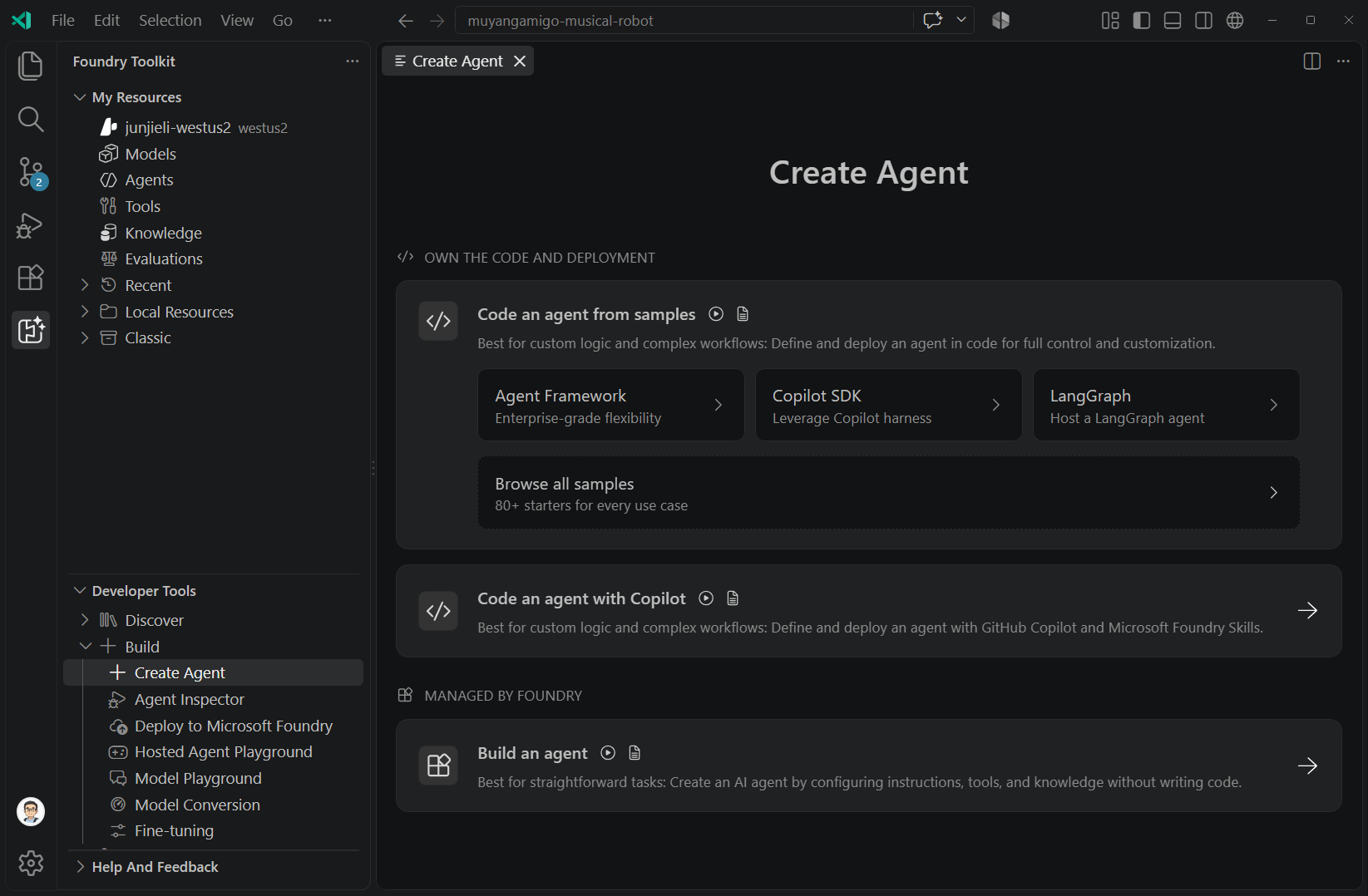
If Developer Tools uses Group by Resource, find Create Agent under Agent Dev Tools instead of Build.
Choose a creation route
Select the route that matches your agent type, and then follow its guide to configure, test, and save or deploy the agent.
| Route | Action in Create Agent | Next guide |
|---|---|---|
| Agent Builder | Select Build an agent to configure a prompt agent without a hosted-agent code project. | Create a prompt agent. |
| Hosted-agent samples | Under Code an agent from samples, select a framework or Browse all samples. Choose a sample for your scenario. | For code-based orchestration, create hosted agents. For other scenarios, follow the selected sample's generated README.md. |
| Copilot-assisted coding | Select Code an agent with Copilot to develop agent code with GitHub Copilot and Foundry skills. | Use the Microsoft Foundry Skill in coding agents. Review generated code and test it before deployment. |
Agent Builder also supports locally stored prompts. Their storage, tools, and evaluation options differ from Foundry prompt agents. See Work with local prompts.
Choose how to orchestrate or schedule work
For new code-based workflows, use Microsoft Agent Framework through the sample or Copilot route. To invoke an existing agent on a trigger or schedule, see Routines in Foundry Agent Service (preview).
Important
Declarative workflows in Microsoft Foundry are in preview and retire on December 1, 2026. This retirement doesn't affect code-based orchestration in hosted agents. To work with an existing declarative workflow, see Use and migrate declarative agent workflows.
Related content
Use these guides as you develop and integrate your agent: