Note
Access to this page requires authorization. You can try signing in or changing directories.
Access to this page requires authorization. You can try changing directories.
Important
Items marked (preview) in this article are currently in public preview. This preview is provided without a service-level agreement, and we don't recommend it for production workloads. Certain features might not be supported or might have constrained capabilities. For more information, see Supplemental Terms of Use for Microsoft Azure Previews.
Microsoft Foundry traces can capture sensitive information such as prompts, model responses, system instructions, and tool calls. This information can include personally identifiable information (PII) or protected health information (PHI). To restrict access to this content, Foundry stores it in a dedicated table that you can protect by using Azure role-based access control (RBAC).
This article summarizes the steps to route sensitive content to the dedicated table and restrict access to it, separately from the rest of your trace telemetry.
This article walks you through the following steps to protect sensitive content:
- Route sensitive content to the dedicated table by registering the
protectGenAISensitiveDatafeature flag. - Set the table as protected so it uses a deny-by-default model.
- Grant read access to authorized identities by using the Privileged Monitoring Data Reader role.
- Verify your configuration.
Prerequisites
- A Foundry project with at least one agent.
- If you haven't set up tracing yet, see Set up tracing in Microsoft Foundry.
- Access to the Application Insights resource connected to your project. For background, see Azure Monitor Application Insights.
- A Log Analytics Contributor role.
- A Owner role on the subscription, or a role that grants
Microsoft.Features/* actions, to register preview features.
Sensitive content in traces
The following OpenTelemetry generative AI attributes are considered sensitive content:
| Attribute | Description |
|---|---|
gen_ai.input.messages |
Prompt and input messages sent to the model. |
gen_ai.output.messages |
Model responses and output messages. |
gen_ai.system_instructions |
System instructions provided to the model. |
gen_ai.tool.definitions |
Definitions of tools available to the model. |
gen_ai.tool.call.arguments |
Arguments passed to a tool call. |
gen_ai.tool.call.result |
Result returned from a tool call. |
gen_ai.evaluation.explanation |
Explanation produced during model evaluation. |
For a list of all available fields, see AppGenAIContent.
Route sensitive content to the dedicated table
Two Azure preview feature flags control when generative AI content stops flowing to the existing telemetry tables. Register and unregister these flags on your subscription by using the standard preview feature process. For the portal, Azure CLI, and Azure PowerShell steps, see Set up preview features in Azure subscription.
To enable the dedicated table behavior before September 30, 2026, migration date, register the protectGenAISensitiveData feature flag. Early enablement routes sensitive content only to the AppGenAIContent table and improves your security posture ahead of the deadline when coupled with its configuration as a protected table.
az feature register --namespace Microsoft.Insights --name protectGenAISensitiveData
If you need more time to update custom queries and related assets after the migration date, register the optOutProtectGenAISensitiveData feature flag to temporarily maintain the current routing behavior.
az feature register --namespace Microsoft.Insights --name optOutProtectGenAISensitiveData
This opt-out is temporary and is discontinued on September 30, 2027. After that date, Application Insights routes generative AI content only to AppGenAIContent, regardless of the flag. To return to the dedicated table behavior sooner, unregister the flag.
az feature unregister --namespace Microsoft.Insights --name optOutProtectGenAISensitiveData
Set the table as protected
Set the AppGenAIContent table's protection level to Protected. This immediately prevents non-privileged standard read and custom roles from accessing the data. For the portal, Azure CLI, and REST API steps, see Set a table's protection level.
Note
If a custom role has one of two AzMon DataActions that allow access to the protected tables, customers that have these roles assigned get that access.
Grant read access to authorized identities
After the table is protected, only identities with the Privileged Monitoring Data Reader role can read the content. Assign that role to the users, groups, or managed identities that need access, and leave everyone else on standard read roles so they remain denied by default. For the steps, see Grant access to protected tables.
Note
If PIM is in place, you can use time-bound or JIT access.
Verify your configuration
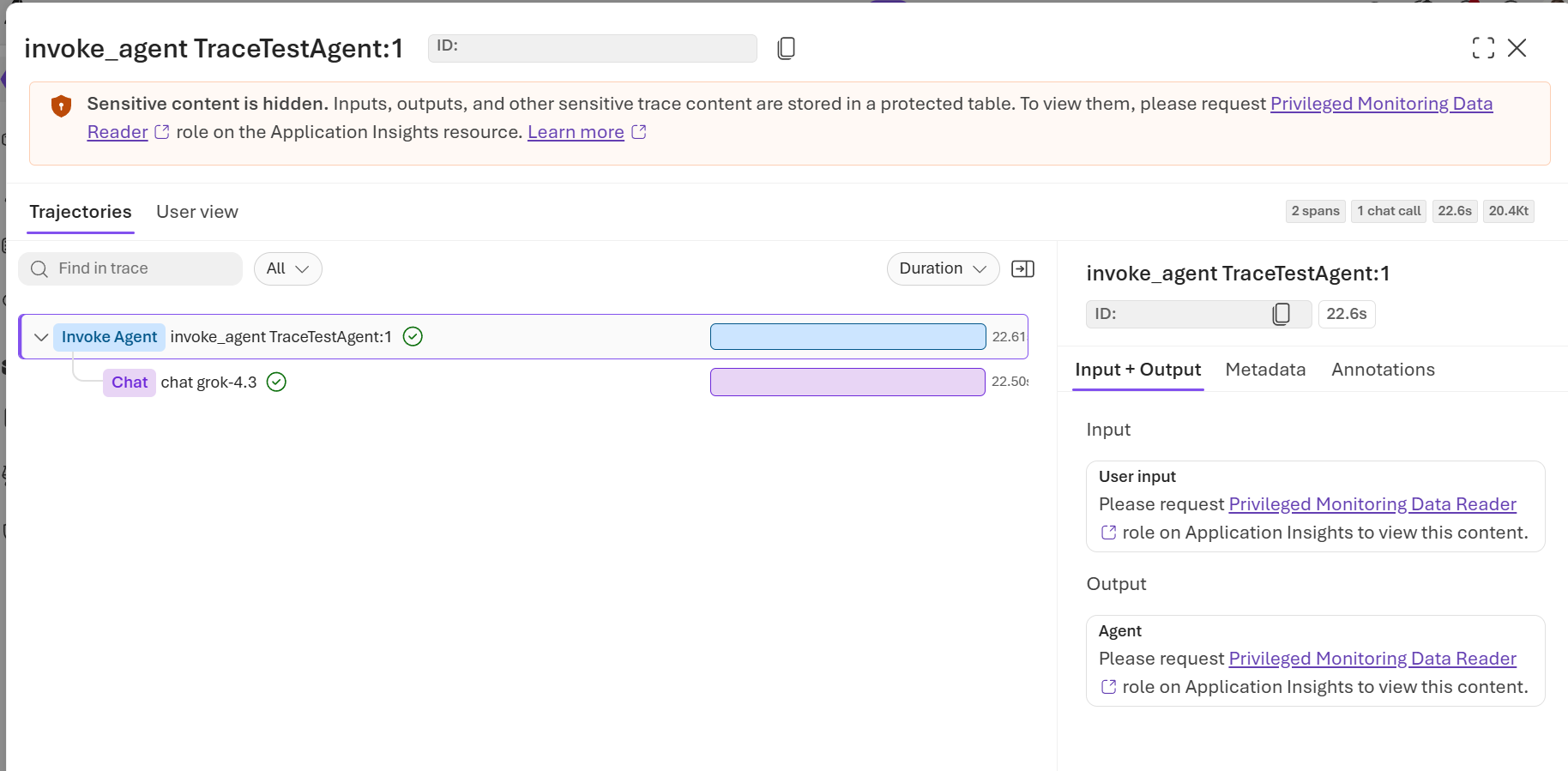
Confirm that a user with only the Log Analytics Reader role can't see the sensitive content within a trace, while the non-sensitive trace data remains visible to them, and that a user with the Privileged Monitoring Data Reader role can see the sensitive content.
Migration to the dedicated table
If you already have traces flowing through Foundry, review how the migration to the dedicated table affects your existing telemetry.
Before September 30, 2026, Application Insights routes these seven attributes to both the existing telemetry tables (AppDependencies, AppTraces, and AppEvents) and AppGenAIContent. Starting September 30, 2026, Application Insights stops routing the attribute values to the existing tables for newly ingested data. The attribute keys remain in the existing tables, but their values are replaced with a short pointer to AppGenAIContent. Read the values from AppGenAIContent instead.
This change only affects data ingested on or after September 30, 2026. Data ingested before that date remains in its existing tables and stays queryable as before. Built-in Application Insights and Azure AI Foundry experiences continue to work automatically. Update any custom queries, alert rules, dashboards, workbooks, or reports that read the affected attribute values from AppDependencies, AppTraces, or AppEvents.