Note
Access to this page requires authorization. You can try signing in or changing directories.
Access to this page requires authorization. You can try changing directories.
Azure HorizonDB AI Pipelines transform structured and unstructured data into an Apache AGE property graph. Relational rows and nested JSON flow directly to the graph sink. Unstructured documents first pass through chunking and AI extraction to produce ontology-aligned JSON graph fragments.
Both paths share one ontology and graph sink for mapping validation, incremental reads, identity-based upserts, relationship creation, and run tracking.
When to use this feature
AI Pipeline graph construction is a good fit when:
- You want to turn relational rows, nested JSON, or extracted document content into an Apache AGE knowledge graph.
- You can define stable identities and an approved ontology.
- You want repeatable, idempotent graph loading with incremental checkpoints.
- You want pipeline execution and graph data in the same database.
- Your workload supports append-oriented graph construction.
Before you begin, review the preview behavior for identity matching, incremental processing, and concurrent writers.
Core components
Knowledge graph construction combines five components.
| Component | Purpose |
|---|---|
ai.create_graph() |
Registers and validates the ontology, creates the backing Apache AGE graph, and prepares node labels for identity lookups. |
ai.table_source() |
Defines the source table and an optional incremental watermark column. |
ai.chunk_step() and ai.extract_step() |
Chunk unstructured text and extract ontology-aligned entities and relationships into JSON graph fragments. |
ai.graph_sink() |
Defines how source fields map to ontology nodes, properties, edges, and nested array elements. |
ai.create_pipeline() and ai.run() |
Register and execute the graph construction workflow. |
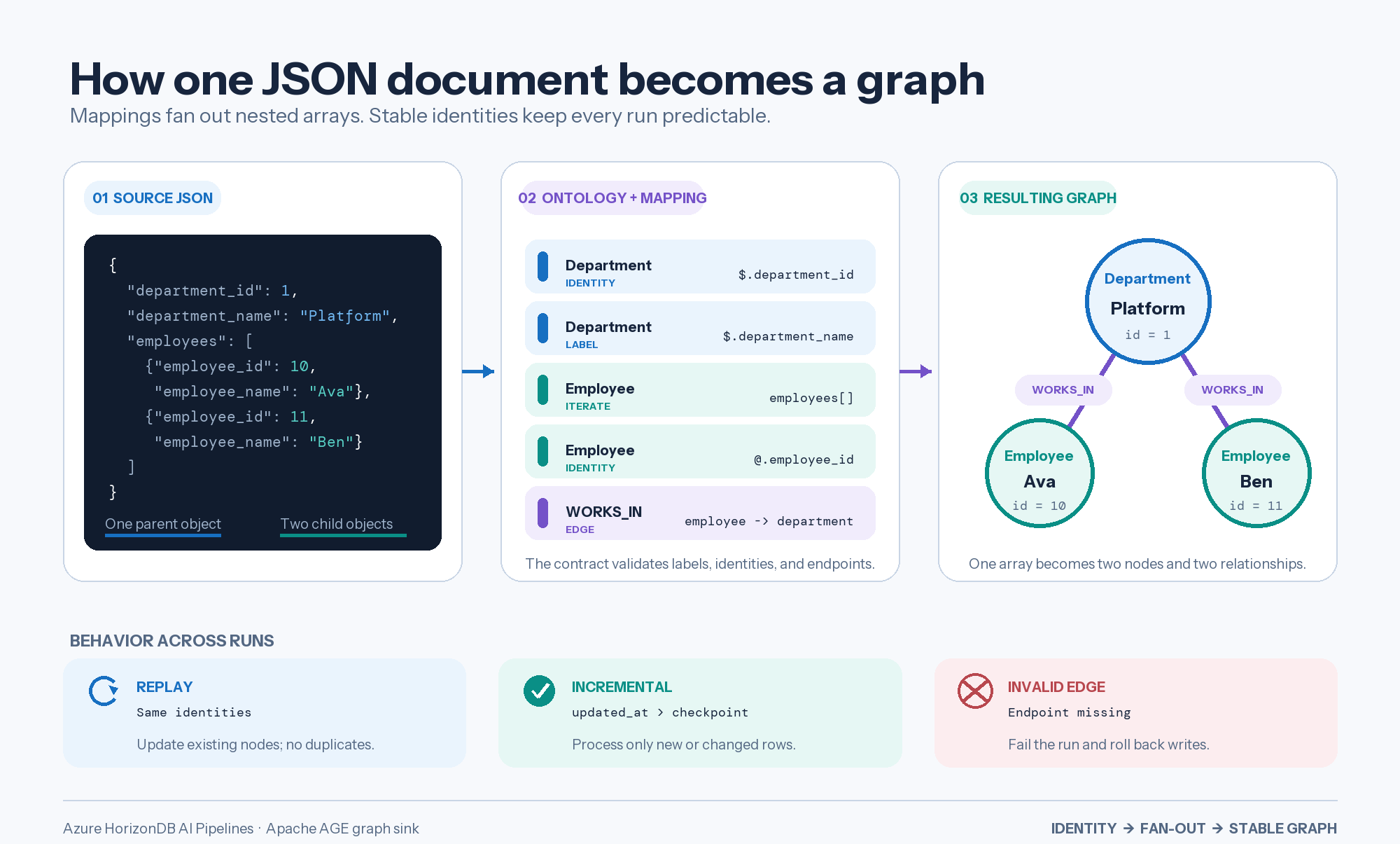
The following example shows how one nested JSON document fans out into graph nodes and relationships. The same identities keep replays stable, while the incremental watermark limits later runs to new or changed rows.
Define the ontology once
The ontology is the contract for the graph. It defines:
- Node labels.
- The identity property for each node label.
- Allowed node properties.
- Edge labels.
- The source and target node labels for each edge.
- Optional edge properties.
For example:
SELECT ai.create_graph(
    name => 'organization_graph',
    ontology => '{
      "nodes": [
        {
          "label": "Department",
          "identity": "id",
          "properties": ["id", "name"]
        },
        {
          "label": "Employee",
          "identity": "id",
          "properties": ["id", "name"]
        }
      ],
      "edges": [
        {
          "label": "WORKS_IN",
          "from": "Employee",
          "to": "Department"
        }
      ]
    }'::jsonb
);
Every node identity and every edge endpoint must be a scalar value. You can store arrays and objects as properties, but they can't identify a node or an edge endpoint.
Graph, label, and property names must match [A-Za-z_][A-Za-z0-9_]*.
Map relational data
When you don't specify source_column, the graph sink converts each source row to JSONB. Column names become paths in the row document.
For a table with employee_id, employee_name, and department_id, the following mapping creates an employee and a relationship to an existing department. First run a separate pipeline that loads Department nodes with identities matching department_id; otherwise, the missing department endpoint causes the run to fail and roll back.
{
  "nodes": [
    {
      "label": "Employee",
      "property": "id",
      "from": "employee_id"
    },
    {
      "label": "Employee",
      "property": "name",
      "from": "employee_name"
    }
  ],
  "edges": [
    {
      "edge_label": "WORKS_IN",
      "from_key": "employee_id",
      "to_key": "department_id"
    }
  ]
}
Use separate pipelines when different relational tables populate different parts of the same graph. All pipelines resolve identities against the ontology registered for that graph.
Map nested JSON documents
Specify a JSONB source_column when each source row contains a nested document. Use:
$to read from the source document.@to read from the current element inside aneachblock.- A bare property name as shorthand for a top-level
$path.
The following document contains one department and many employees:
{
  "dept_id": 1,
  "dept_name": "Platform",
  "employees": [
    {
      "id": 10,
      "name": "Ava"
    },
    {
      "id": 11,
      "name": "Ben"
    }
  ]
}
The mapping creates one department, two employees, and two WORKS_IN relationships:
{
  "nodes": [
    {
      "label": "Department",
      "property": "id",
      "from": "$.dept_id"
    },
    {
      "label": "Department",
      "property": "name",
      "from": "$.dept_name"
    }
  ],
  "each": [
    {
      "path": "employees",
      "nodes": [
        {
          "label": "Employee",
          "property": "id",
          "from": "@.id"
        },
        {
          "label": "Employee",
          "property": "name",
          "from": "@.name"
        }
      ],
      "edges": [
        {
          "edge_label": "WORKS_IN",
          "from_key": "@.id",
          "to_key": "$.dept_id"
        }
      ]
    }
  ]
}
The preview supports one level of each. It doesn't support nested each blocks, filters, expressions, or when predicates.
Extract a graph from unstructured data
Unstructured sources use two logical pipeline stages:
- Prepare graph fragments. Read documents, split long text into chunks, and use an AI extraction step to emit structured JSON that follows the approved ontology.
- Load the graph. Read the graph fragment table and use
ai.graph_sink()to map the extracted entities and relationships into Apache AGE.
For example, an incident report can produce a graph fragment with services and dependency relationships:
{
  "source_id": "incident-4012",
  "services": [
    {
      "id": "api-gateway",
      "name": "API gateway"
    },
    {
      "id": "auth-service",
      "name": "Auth service"
    }
  ],
  "relationships": [
    {
      "source": "api-gateway",
      "target": "auth-service",
      "type": "CAUSED_FAILURE_IN"
    }
  ]
}
Use separate arrays for different relationship types. The preview mapping language doesn't evaluate dynamic relationship types or conditional when expressions, so shape extraction output to match the static ontology and mappings.
Unstructured data requirements
Unstructured extraction requires:
azure_ai2.5.6 or later for theai.chunk_step()andai.extract_step()builders. For earlier versions, follow the database upgrade instructions.- A chat or generation model registered through AI Model Management or the model registry.
- An extraction schema or prompt that uses the approved ontology labels and properties.
- A JSONB staging table for graph fragments.
- Validation that rejects malformed, unsupported, or incomplete extraction output.
- A review strategy for low-confidence or business-critical relationships.
Treat extracted entities and relationships as model-generated assertions. Validate output and preserve source identifiers and evidence for traceability.
Use ai.extract_step(input => 'chunk_text', ...) inside the pipeline's steps array. The builder returns a JSONB descriptor; it doesn't call a model until the pipeline runs. The unsuffixed ai.extract(text => ..., data => ...) function performs synchronous inference and isn't a pipeline builder. Use ai.chunk_step() for chunking; the ai.deduplicate() builder keeps its name.
Understand identity and deduplication
The graph sink automatically upserts emissions with the same node label and exact identity. No deduplication step is required for exact matches, but Contoso and contoso remain different identities.
To normalize text identities, explicitly add the supported deduplication step before the graph sink. In this preview, it:
- Ignores uppercase and lowercase differences.
- Trims leading and trailing whitespace.
The step accepts the name of a top-level text column:
ai.deduplicate(input text)
Add it to the pipeline's steps array:
steps => ARRAY[
    ai.deduplicate(input => 'entity_name')
],
The step supports graph sinks only and rewrites the selected column before the graph mappings run.
For configuration guidance, see Understand deduplication behavior.
It doesn't provide broader entity resolution. Prefer numeric IDs, immutable business keys, or controlled catalog keys over display names. For unstructured data, use source-backed keys, an approved identity mapping, or the deduplication step. Don't ask the model to invent durable identifiers.
Understand write semantics
The graph sink writes in this order:
- Nodes: Group by label and identity, upsert one node per identity, and apply non-null mapped properties.
- Edges: Resolve endpoint identities, update existing relationship properties, and insert the relationship when the endpoint pair doesn't already have that edge label.
If an edge endpoint doesn't exist, the run fails and rolls back graph writes, run state, and checkpoint changes from that transaction.
Replaying unchanged input preserves graph counts but can still perform upsert work.
Process source changes incrementally
Pass an incremental_column to ai.table_source() to process new rows and updates that advance the watermark:
ai.table_source(
    table_name => 'department_documents',
    incremental_column => 'updated_at'
)
The graph sink stores the checkpoint and reads the next batch from that boundary. It can replay boundary rows to avoid skipping equal timestamps; identity-based writes keep graph counts stable.
Incremental processing is append-oriented:
- New and updated rows are processed when the watermark advances.
- The watermark must increase monotonically. Backdated or out-of-order values can fall below the saved checkpoint.
- Deleted rows and removed relationships don't retract existing graph state.
- Rows below the current watermark aren't revisited automatically after a mapping change.
Use a full reprocess, a new graph, or an application-managed reconciliation process when you need to rebuild historical graph state.
Choose a trigger
AI pipelines support manual execution and automatic execution when source rows are inserted or updated.
| Trigger | Use when | Considerations |
|---|---|---|
manual |
You want explicit control over graph refreshes. | Simplest option for testing, backfills, and controlled production runs. |
on_change |
You want inserts and updates to start a refresh. | Deletes don't trigger graph retraction. Changes that arrive during an active run aren't queued as a separate run. |
Use durable execution
When pg_durable is available, ai.run() can dispatch a graph sink pipeline with no transform steps to a background worker. The azure_ai.graph_sink_durable setting is on by default. The call returns an instance identifier. Inspect progress with ai.status(), ai.result(), or the df schema when available.
Set azure_ai.graph_sink_durable to off for the current session when the graph must be ready before the calling session continues:
SET azure_ai.graph_sink_durable = off;
Synchronous execution can increase client wait time and transaction duration.
Visualize the pipeline and graph
The PostgreSQL extension for Visual Studio Code provides:
- Pipelines and Workflows shows definitions and run state. Available graph sink details depend on the extension version.
- Apache AGE Graph Visualizer renders full vertex and edge objects as an interactive node-edge graph.
For graph rendering, return complete objects in separate output columns:
SELECT *
FROM ag_catalog.cypher(
    'organization_graph',
    $$
      MATCH (employee:Employee)-[relationship:WORKS_IN]->(department:Department)
      RETURN employee, relationship, department
    $$
) AS (
    employee ag_catalog.agtype,
    relationship ag_catalog.agtype,
    department ag_catalog.agtype
);
Set a disp_label property when you want the visualizer to show a readable node label instead of an internal identifier.
Permissions and concurrency
The pipeline caller needs:
- Read access to the source table.
- Permission to execute the pipeline functions.
- Write and update access to graph label tables used by the mapping.
- Access to pipeline metadata and durable execution surfaces required by the configured runtime.
- A role without the PostgreSQL
SUPERUSERattribute.ai.run()rejects superuser callers.
Serialize pipelines and other writers that target the same graph. The graph sink prevents concurrent runs of the same pipeline, but it doesn't provide a graph-wide lock across different pipelines or direct graph writers.
Limitations and known issues
The preview has these limits:
- Identities are exact unless the source provides a normalized key or a deduplication step runs before the sink. Deduplication covers case and surrounding whitespace only.
- Incremental processing doesn't retract deletes or shrinking edits.
- The
on_changetrigger doesn't queue every change that arrives during an active run. - Mappings support one level of JSON array iteration and field navigation without expressions or filters.
- Node identities and edge endpoints must be scalar. Missing or null identities skip the emission.
- A missing edge endpoint fails the run and rolls back the transaction.
- Conflicting property values from multiple rows or pipelines are order-dependent.
- Multiple pipelines that write to the same graph must run serially.
- The preview doesn't provide
ai.drop_graph()orai.list_graphs(). - Mapping changes don't backfill rows below the checkpoint, and backdated or out-of-order watermark values can be skipped.
- Graph relationship identity uses the edge label and endpoint pair. Edge properties don't create separate relationship occurrences.
- Shared canonical nodes can lose event-specific sequence context unless the ontology models occurrences explicitly.
- The graph sink doesn't interpret raw text. Unstructured sources need a chunking and extraction stage that produces graph-ready JSON.
- AI extraction can omit, misclassify, or invent entities and relationships. Validate output and retain evidence. Model calls also add latency, cost, quota, content-safety, privacy, and data residency considerations.