Look up an asset's calibration offset and add it to each reading. This example adds an offset of 2 to a value of 20, producing correctedValue: 22.
Prerequisites
Complete the shared example prerequisites, including the default profile and factory-mqtt endpoint. Use YAML for debugging and Azure CLI or Bicep for production management.
Use the existing built-in registry endpoint named default. For the environment variables, set AIO_INSTANCE_NAME and RESOURCE_GROUP to your existing instance and resource group names. For Bicep, also set CUSTOM_LOCATION_NAME to your existing custom location name.
Synchronize the state-store writer's clock with the broker. Confirm a successful
+OK response when populating the calibration record before publishing readings.
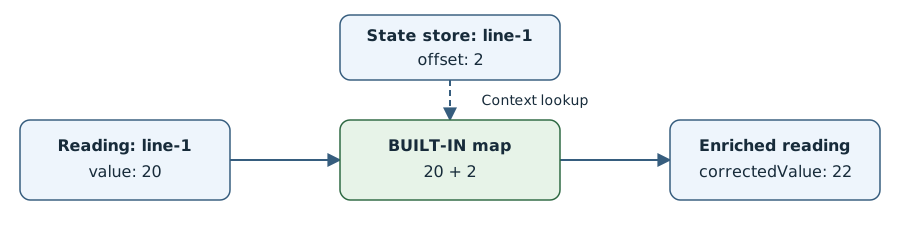
Use enrichment to read calibration records that an application maintains in the state store. The lookup uses the context available during processing, not necessarily the context valid when the reading was sampled. For that case, match context by timestamp.
Deploy the calibration graph:
In the operations experience, open your instance and select Data flow graph > Create data flow graph.
Name the graph add-calibration and select the default profile.
Add a source named source using endpoint factory-mqtt and topic factory/readings.
Add a map transform named calibrate, using azureiotoperations/graph-dataflow-map:1.0.0 from registry endpoint default.
In the map transform configuration, add a dataset with State store key factory-calibration as calibration, Match inputs $source.assetId and $context.assetId in that order, and Match expression $1 == $2.
Add these map rules:
| Inputs (in order) |
Output |
Expression |
* |
* |
Leave empty |
value, $context(calibration).offset |
correctedValue |
$1 + $2 |
Add a destination named destination using endpoint factory-mqtt and topic factory/calibrated.
Connect source → calibrate → destination, then select Save to deploy the enabled graph.
Save these complete graph properties as graph.json. The command uses the existing default profile.
{
  "mode": "Enabled",
  "nodes": [
    {
      "name": "source",
      "nodeType": "Source",
      "sourceSettings": {
        "endpointRef": "factory-mqtt",
        "dataSources": ["factory/readings"]
      }
    },
    {
      "name": "calibrate",
      "nodeType": "Graph",
      "graphSettings": {
        "registryEndpointRef": "default",
        "artifact": "azureiotoperations/graph-dataflow-map:1.0.0",
        "configuration": [
          {
            "key": "rules",
            "value": "{\n  \"datasets\": [\n    {\n      \"key\": \"factory-calibration as calibration\",\n      \"inputs\": [\"$source.assetId\", \"$context.assetId\"],\n      \"expression\": \"$1 == $2\"\n    }\n  ],\n  \"map\": [\n    {\"inputs\": [\"*\"], \"output\": \"*\"},\n    {\n      \"inputs\": [\"value\", \"$context(calibration).offset\"],\n      \"output\": \"correctedValue\",\n      \"expression\": \"$1 + $2\"\n    }\n  ]\n}\n"
          }
        ]
      }
    },
    {
      "name": "destination",
      "nodeType": "Destination",
      "destinationSettings": {
        "endpointRef": "factory-mqtt",
        "dataDestination": "factory/calibrated"
      }
    }
  ],
  "nodeConnections": [
    { "from": { "name": "source" }, "to": { "name": "calibrate" } },
    { "from": { "name": "calibrate" }, "to": { "name": "destination" } }
  ]
}
az iot ops dataflowgraph apply \
  --name add-calibration \
  --instance $AIO_INSTANCE_NAME \
  --resource-group $RESOURCE_GROUP \
  --config-file graph.json
Save this template as main.bicep. It references the existing instance, custom location, and default profile.
param aioInstanceName string
param customLocationName string

resource aioInstance 'Microsoft.IoTOperations/instances@2026-07-01' existing = {
  name: aioInstanceName
}

resource customLocation 'Microsoft.ExtendedLocation/customLocations@2021-08-31-preview' existing = {
  name: customLocationName
}

resource defaultDataflowProfile 'Microsoft.IoTOperations/instances/dataflowProfiles@2026-07-01' existing = {
  parent: aioInstance
  name: 'default'
}

resource dataflowGraph 'Microsoft.IoTOperations/instances/dataflowProfiles/dataflowGraphs@2026-07-01' = {
  parent: defaultDataflowProfile
  name: 'add-calibration'
  extendedLocation: {
    name: customLocation.id
    type: 'CustomLocation'
  }
  properties: {
    mode: 'Enabled'
    nodes: [
      {
        name: 'source'
        nodeType: 'Source'
        sourceSettings: {
          endpointRef: 'factory-mqtt'
          dataSources: [ 'factory/readings' ]
        }
      }
      {
        name: 'calibrate'
        nodeType: 'Graph'
        graphSettings: {
          registryEndpointRef: 'default'
          artifact: 'azureiotoperations/graph-dataflow-map:1.0.0'
          configuration: [
            {
              key: 'rules'
              value: '{\n  "datasets": [\n    {\n      "key": "factory-calibration as calibration",\n      "inputs": ["$source.assetId", "$context.assetId"],\n      "expression": "$1 == $2"\n    }\n  ],\n  "map": [\n    {"inputs": ["*"], "output": "*"},\n    {\n      "inputs": ["value", "$context(calibration).offset"],\n      "output": "correctedValue",\n      "expression": "$1 + $2"\n    }\n  ]\n}\n'
            }
          ]
        }
      }
      {
        name: 'destination'
        nodeType: 'Destination'
        destinationSettings: {
          endpointRef: 'factory-mqtt'
          dataDestination: 'factory/calibrated'
        }
      }
    ]
    nodeConnections: [
      {
        from: { name: 'source' }
        to: { name: 'calibrate' }
      }
      {
        from: { name: 'calibrate' }
        to: { name: 'destination' }
      }
    ]
  }
}
az deployment group create \
  --resource-group $RESOURCE_GROUP \
  --template-file main.bicep \
  --parameters aioInstanceName="$AIO_INSTANCE_NAME" customLocationName="$CUSTOM_LOCATION_NAME"
Important
The use of Kubernetes deployment manifests isn't supported in production environments and should only be used for debugging and testing.
Save the following manifest as add-calibration.yaml.
apiVersion: connectivity.iotoperations.azure.com/v1
kind: DataflowGraph
metadata:
  name: add-calibration
  namespace: azure-iot-operations
spec:
  profileRef: default
  mode: Enabled
  nodes:
    - name: source
      nodeType: Source
      sourceSettings:
        endpointRef: factory-mqtt
        dataSources: [factory/readings]
    - name: calibrate
      nodeType: Graph
      graphSettings:
        registryEndpointRef: default
        artifact: azureiotoperations/graph-dataflow-map:1.0.0
        configuration:
          - key: rules
            value: |
              {
                "datasets": [
                  {
                    "key": "factory-calibration as calibration",
                    "inputs": ["$source.assetId", "$context.assetId"],
                    "expression": "$1 == $2"
                  }
                ],
                "map": [
                  {"inputs": ["*"], "output": "*"},
                  {
                    "inputs": ["value", "$context(calibration).offset"],
                    "output": "correctedValue",
                    "expression": "$1 + $2"
                  }
                ]
              }
    - name: destination
      nodeType: Destination
      destinationSettings:
        endpointRef: factory-mqtt
        dataDestination: factory/calibrated
  nodeConnections:
    - from: { name: source }
      to: { name: calibrate }
    - from: { name: calibrate }
      to: { name: destination }
kubectl apply -f add-calibration.yaml
Before sending readings, write this synthetic NDJSON record under state-store key
factory-calibration. Use the state-store SET procedure in
Populate the state store key.
{"assetId":"line-1","offset":2}
Publish this reading to factory/readings:
{"assetId":"line-1","value":20}
Expect this payload on factory/calibrated. The map preserves the original fields and adds 20 + 2:
{"assetId":"line-1","value":20,"correctedValue":22}
This graph assumes a matching calibration record with a numeric offset. Before using it in production, define how to handle missing context and monitor lookup errors; the example doesn't include an invalid-context route.
Related content