Send accepted readings to factory/validated and rejected readings to factory/dead-letter. Preserve rejected payloads unchanged and add MQTT properties so a consumer can store them for inspection and controlled replay.
Use a branch to send rejected messages to a separate path for inspection or correction. A filter drops messages that match its expression. This pattern checks field-type and eligibility rules after JSON ingestion. Capture malformed JSON and parsing failures upstream with an explicit quarantine path.
Prerequisites
Complete the shared example prerequisites, including the existing default profile and factory-mqtt MQTT endpoint in the azure-iot-operations namespace. The built-in transforms use the existing default registry endpoint. These examples reference these shared resources without recreating them.
For Azure CLI and Bicep, follow the environment setup in Create a data flow graph. Set AIO_INSTANCE_NAME and RESOURCE_GROUP to your existing instance and resource group. For Bicep, also set CUSTOM_LOCATION_NAME to the instance's existing custom location name.
Set schema enrichment to None and supply the initial rules configuration shown in the graph for each branch and map. The checks below apply to this field-rule configuration.
Check types before values
This example uses built-in field rules. The first branch checks that assetId is a string and temperature is an int or float. Missing fields use expression-only defaults: "" for assetId and "missing" for temperature. The second branch accepts a nonempty asset ID and temperatures from 0 through 100, inclusive. Separate branches ensure value comparisons run only after the type check succeeds.
For schema-based validation, configure a registry, publish your schema, and follow Validate branch messages against a schema. The graph and checks below use field rules.
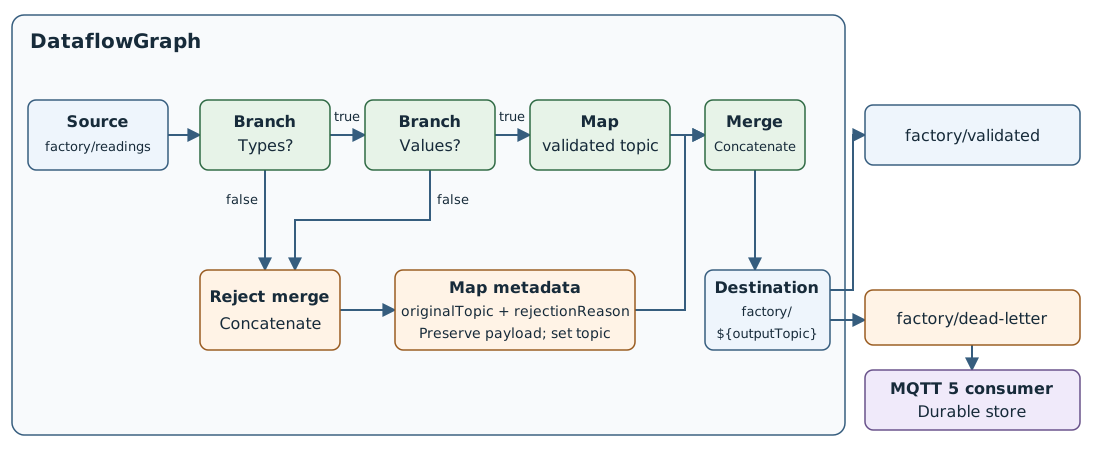
The graph checks types before values. Both rejection paths share a map that adds rejection metadata. Accepted and rejected messages then share one destination.
Both maps set $metadata.topic to a relative topic suffix. The destination expands factory/${outputTopic} to factory/validated or factory/dead-letter. Keep both output topics distinct from the source subscription to prevent cycling.
In the operations experience, open your instance and select Data flow graph > Create data flow graph.
Name the graph route-invalid-readings and select the existing default profile.
Add a source named source using factory-mqtt and topic factory/readings.
Add two Branch transforms named check-types and check-values, two Map transforms named accepted and rejected, and two Concatenate transforms named rejectedInputs and merge. Use branch 1.1.0, map 1.0.0, and concatenate 1.0.0 from the default registry endpoint.
Set schema enrichment to None for each branch and map. Leave Validate schema unchecked on both branches. Configure their initial field rules as follows:
| Branch |
Inputs, in order |
Expression |
check-types |
assetId ?? "", temperature ?? "missing" |
typeof($1) == "string" && (typeof($2) == "int" || typeof($2) == "float") |
check-values |
assetId ?? "", temperature ?? "missing" |
$1 != "" && $2 >= 0 && $2 <= 100 |
Configure the accepted map with these rules. Leave the expression empty for pass-through rules:
| Input |
Output |
Expression |
* |
* |
|
$metadata.topic |
$metadata.topic |
"validated" |
Configure the rejected map with these rules:
| Input |
Output |
Expression |
* |
* |
|
$metadata.topic |
$metadata.user_property.originalTopic |
|
$metadata.topic |
$metadata.user_property.rejectionReason |
"type-or-rule-rejected" |
$metadata.topic |
$metadata.topic |
"dead-letter" |
Leave both concatenate transforms without configuration or rules. Add a destination named destination using factory-mqtt and topic factory/${outputTopic}.
Connect the nodes as follows, dragging from the branches' true and false outputs:
| From |
To |
source |
check-types |
check-types.output.true |
check-values |
check-types.output.false |
rejectedInputs |
check-values.output.false |
rejectedInputs |
rejectedInputs |
rejected |
check-values.output.true |
accepted |
accepted |
merge |
rejected |
merge |
merge |
destination |
Select Save to deploy the graph.
Save these complete graph properties as graph.json. Each rules value is an escaped JSON string:
{
  "mode": "Enabled",
  "nodes": [
    {
      "name": "source",
      "nodeType": "Source",
      "sourceSettings": {
        "endpointRef": "factory-mqtt",
        "dataSources": ["factory/readings"]
      }
    },
    {
      "name": "check-types",
      "nodeType": "Graph",
      "graphSettings": {
        "registryEndpointRef": "default",
        "artifact": "azureiotoperations/graph-dataflow-branch:1.1.0",
        "configuration": [
          {
            "key": "rules",
            "value": "{\"branch\":{\"inputs\":[\"assetId ?? \\\"\\\"\",\"temperature ?? \\\"missing\\\"\"],\"expression\":\"typeof($1) == \\\"string\\\" && (typeof($2) == \\\"int\\\" || typeof($2) == \\\"float\\\")\"}}"
          }
        ]
      }
    },
    {
      "name": "check-values",
      "nodeType": "Graph",
      "graphSettings": {
        "registryEndpointRef": "default",
        "artifact": "azureiotoperations/graph-dataflow-branch:1.1.0",
        "configuration": [
          {
            "key": "rules",
            "value": "{\"branch\":{\"inputs\":[\"assetId ?? \\\"\\\"\",\"temperature ?? \\\"missing\\\"\"],\"expression\":\"$1 != \\\"\\\" && $2 >= 0 && $2 <= 100\"}}"
          }
        ]
      }
    },
    {
      "name": "rejectedInputs",
      "nodeType": "Graph",
      "graphSettings": {
        "registryEndpointRef": "default",
        "artifact": "azureiotoperations/graph-dataflow-concatenate:1.0.0"
      }
    },
    {
      "name": "accepted",
      "nodeType": "Graph",
      "graphSettings": {
        "registryEndpointRef": "default",
        "artifact": "azureiotoperations/graph-dataflow-map:1.0.0",
        "configuration": [
          {
            "key": "rules",
            "value": "{\"map\":[{\"inputs\":[\"*\"],\"output\":\"*\"},{\"inputs\":[\"$metadata.topic\"],\"output\":\"$metadata.topic\",\"expression\":\"\\\"validated\\\"\"}]}"
          }
        ]
      }
    },
    {
      "name": "rejected",
      "nodeType": "Graph",
      "graphSettings": {
        "registryEndpointRef": "default",
        "artifact": "azureiotoperations/graph-dataflow-map:1.0.0",
        "configuration": [
          {
            "key": "rules",
            "value": "{\"map\":[{\"inputs\":[\"*\"],\"output\":\"*\"},{\"inputs\":[\"$metadata.topic\"],\"output\":\"$metadata.user_property.originalTopic\"},{\"inputs\":[\"$metadata.topic\"],\"output\":\"$metadata.user_property.rejectionReason\",\"expression\":\"\\\"type-or-rule-rejected\\\"\"},{\"inputs\":[\"$metadata.topic\"],\"output\":\"$metadata.topic\",\"expression\":\"\\\"dead-letter\\\"\"}]}"
          }
        ]
      }
    },
    {
      "name": "merge",
      "nodeType": "Graph",
      "graphSettings": {
        "registryEndpointRef": "default",
        "artifact": "azureiotoperations/graph-dataflow-concatenate:1.0.0"
      }
    },
    {
      "name": "destination",
      "nodeType": "Destination",
      "destinationSettings": {
        "endpointRef": "factory-mqtt",
        "dataDestination": "factory/${outputTopic}"
      }
    }
  ],
  "nodeConnections": [
    {"from": {"name": "source"}, "to": {"name": "check-types"}},
    {"from": {"name": "check-types.output.true"}, "to": {"name": "check-values"}},
    {"from": {"name": "check-types.output.false"}, "to": {"name": "rejectedInputs"}},
    {"from": {"name": "check-values.output.false"}, "to": {"name": "rejectedInputs"}},
    {"from": {"name": "rejectedInputs"}, "to": {"name": "rejected"}},
    {"from": {"name": "check-values.output.true"}, "to": {"name": "accepted"}},
    {"from": {"name": "accepted"}, "to": {"name": "merge"}},
    {"from": {"name": "rejected"}, "to": {"name": "merge"}},
    {"from": {"name": "merge"}, "to": {"name": "destination"}}
  ]
}
Apply the graph through Azure Resource Manager. This approach avoids an azure-iot-ops extension validation issue with named outputs such as check-types.output.true.
INSTANCE_ID=$(az iot ops show --name "$AIO_INSTANCE_NAME" --resource-group "$RESOURCE_GROUP" --query id --output tsv)
EXTENDED_LOCATION=$(az iot ops show --name "$AIO_INSTANCE_NAME" --resource-group "$RESOURCE_GROUP" --query extendedLocation --output json)
GRAPH_ID="$INSTANCE_ID/dataflowProfiles/default/dataflowGraphs/route-invalid-readings"

az rest --method put \
  --url "$GRAPH_ID?api-version=2026-07-01" \
  --body "{\"extendedLocation\":$EXTENDED_LOCATION,\"properties\":$(cat graph.json)}"

az resource wait --created --ids "$GRAPH_ID" --api-version 2026-07-01
Save this complete template as main.bicep. The multiline rules strings preserve JSON escaping, and \${outputTopic} preserves the literal destination placeholder:
param aioInstanceName string
param customLocationName string

resource aioInstance 'Microsoft.IoTOperations/instances@2026-07-01' existing = {
  name: aioInstanceName
}

resource customLocation 'Microsoft.ExtendedLocation/customLocations@2021-08-31-preview' existing = {
  name: customLocationName
}

resource defaultDataflowProfile 'Microsoft.IoTOperations/instances/dataflowProfiles@2026-07-01' existing = {
  parent: aioInstance
  name: 'default'
}

resource dataflowGraph 'Microsoft.IoTOperations/instances/dataflowProfiles/dataflowGraphs@2026-07-01' = {
  parent: defaultDataflowProfile
  name: 'route-invalid-readings'
  extendedLocation: {
    name: customLocation.id
    type: 'CustomLocation'
  }
  properties: {
    mode: 'Enabled'
    nodes: [
      {
        name: 'source'
        nodeType: 'Source'
        sourceSettings: {
          endpointRef: 'factory-mqtt'
          dataSources: [
            'factory/readings'
          ]
        }
      }
      {
        name: 'check-types'
        nodeType: 'Graph'
        graphSettings: {
          registryEndpointRef: 'default'
          artifact: 'azureiotoperations/graph-dataflow-branch:1.1.0'
          configuration: [
            {
              key: 'rules'
              value: '''
{"branch":{"inputs":["assetId ?? \"\"","temperature ?? \"missing\""],"expression":"typeof($1) == \"string\" && (typeof($2) == \"int\" || typeof($2) == \"float\")"}}
'''
            }
          ]
        }
      }
      {
        name: 'check-values'
        nodeType: 'Graph'
        graphSettings: {
          registryEndpointRef: 'default'
          artifact: 'azureiotoperations/graph-dataflow-branch:1.1.0'
          configuration: [
            {
              key: 'rules'
              value: '''
{"branch":{"inputs":["assetId ?? \"\"","temperature ?? \"missing\""],"expression":"$1 != \"\" && $2 >= 0 && $2 <= 100"}}
'''
            }
          ]
        }
      }
      {
        name: 'rejectedInputs'
        nodeType: 'Graph'
        graphSettings: {
          registryEndpointRef: 'default'
          artifact: 'azureiotoperations/graph-dataflow-concatenate:1.0.0'
        }
      }
      {
        name: 'accepted'
        nodeType: 'Graph'
        graphSettings: {
          registryEndpointRef: 'default'
          artifact: 'azureiotoperations/graph-dataflow-map:1.0.0'
          configuration: [
            {
              key: 'rules'
              value: '''
{"map":[{"inputs":["*"],"output":"*"},{"inputs":["$metadata.topic"],"output":"$metadata.topic","expression":"\"validated\""}]}
'''
            }
          ]
        }
      }
      {
        name: 'rejected'
        nodeType: 'Graph'
        graphSettings: {
          registryEndpointRef: 'default'
          artifact: 'azureiotoperations/graph-dataflow-map:1.0.0'
          configuration: [
            {
              key: 'rules'
              value: '''
{"map":[{"inputs":["*"],"output":"*"},{"inputs":["$metadata.topic"],"output":"$metadata.user_property.originalTopic"},{"inputs":["$metadata.topic"],"output":"$metadata.user_property.rejectionReason","expression":"\"type-or-rule-rejected\""},{"inputs":["$metadata.topic"],"output":"$metadata.topic","expression":"\"dead-letter\""}]}
'''
            }
          ]
        }
      }
      {
        name: 'merge'
        nodeType: 'Graph'
        graphSettings: {
          registryEndpointRef: 'default'
          artifact: 'azureiotoperations/graph-dataflow-concatenate:1.0.0'
        }
      }
      {
        name: 'destination'
        nodeType: 'Destination'
        destinationSettings: {
          endpointRef: 'factory-mqtt'
          dataDestination: 'factory/\${outputTopic}'
        }
      }
    ]
    nodeConnections: [
      {
        from: { name: 'source' }
        to: { name: 'check-types' }
      }
      {
        from: { name: 'check-types.output.true' }
        to: { name: 'check-values' }
      }
      {
        from: { name: 'check-types.output.false' }
        to: { name: 'rejectedInputs' }
      }
      {
        from: { name: 'check-values.output.false' }
        to: { name: 'rejectedInputs' }
      }
      {
        from: { name: 'rejectedInputs' }
        to: { name: 'rejected' }
      }
      {
        from: { name: 'check-values.output.true' }
        to: { name: 'accepted' }
      }
      {
        from: { name: 'accepted' }
        to: { name: 'merge' }
      }
      {
        from: { name: 'rejected' }
        to: { name: 'merge' }
      }
      {
        from: { name: 'merge' }
        to: { name: 'destination' }
      }
    ]
  }
}
Deploy the template:
az deployment group create --resource-group $RESOURCE_GROUP --template-file main.bicep --parameters aioInstanceName="$AIO_INSTANCE_NAME" customLocationName="$CUSTOM_LOCATION_NAME"
Important
The use of Kubernetes deployment manifests isn't supported in production environments and should only be used for debugging and testing.
Save the full graph as route-invalid-readings.yaml:
apiVersion: connectivity.iotoperations.azure.com/v1
kind: DataflowGraph
metadata:
  name: route-invalid-readings
  namespace: azure-iot-operations
spec:
  profileRef: default
  mode: Enabled
  nodes:
    - name: source
      nodeType: Source
      sourceSettings:
        endpointRef: factory-mqtt
        dataSources: [factory/readings]
    - name: check-types
      nodeType: Graph
      graphSettings:
        registryEndpointRef: default
        artifact: azureiotoperations/graph-dataflow-branch:1.1.0
        configuration:
          - key: rules
            value: |
              {
                "branch": {
                  "inputs": ["assetId ?? \"\"", "temperature ?? \"missing\""],
                  "expression": "typeof($1) == \"string\" && (typeof($2) == \"int\" || typeof($2) == \"float\")"
                }
              }
    - name: check-values
      nodeType: Graph
      graphSettings:
        registryEndpointRef: default
        artifact: azureiotoperations/graph-dataflow-branch:1.1.0
        configuration:
          - key: rules
            value: |
              {
                "branch": {
                  "inputs": ["assetId ?? \"\"", "temperature ?? \"missing\""],
                  "expression": "$1 != \"\" && $2 >= 0 && $2 <= 100"
                }
              }
    - name: rejectedInputs
      nodeType: Graph
      graphSettings:
        registryEndpointRef: default
        artifact: azureiotoperations/graph-dataflow-concatenate:1.0.0
    - name: accepted
      nodeType: Graph
      graphSettings:
        registryEndpointRef: default
        artifact: azureiotoperations/graph-dataflow-map:1.0.0
        configuration:
          - key: rules
            value: |
              {
                "map": [
                  {"inputs":["*"],"output":"*"},
                  {"inputs":["$metadata.topic"],"output":"$metadata.topic","expression":"\"validated\""}
                ]
              }
    - name: rejected
      nodeType: Graph
      graphSettings:
        registryEndpointRef: default
        artifact: azureiotoperations/graph-dataflow-map:1.0.0
        configuration:
          - key: rules
            value: |
              {
                "map": [
                  {"inputs":["*"],"output":"*"},
                  {"inputs":["$metadata.topic"],"output":"$metadata.user_property.originalTopic"},
                  {"inputs":["$metadata.topic"],"output":"$metadata.user_property.rejectionReason","expression":"\"type-or-rule-rejected\""},
                  {"inputs":["$metadata.topic"],"output":"$metadata.topic","expression":"\"dead-letter\""}
                ]
              }
    - name: merge
      nodeType: Graph
      graphSettings:
        registryEndpointRef: default
        artifact: azureiotoperations/graph-dataflow-concatenate:1.0.0
    - name: destination
      nodeType: Destination
      destinationSettings:
        endpointRef: factory-mqtt
        dataDestination: 'factory/${outputTopic}'
  nodeConnections:
    - from: { name: source }
      to: { name: check-types }
    - from: { name: check-types.output.true }
      to: { name: check-values }
    - from: { name: check-types.output.false }
      to: { name: rejectedInputs }
    - from: { name: check-values.output.false }
      to: { name: rejectedInputs }
    - from: { name: rejectedInputs }
      to: { name: rejected }
    - from: { name: check-values.output.true }
      to: { name: accepted }
    - from: { name: accepted }
      to: { name: merge }
    - from: { name: rejected }
      to: { name: merge }
    - from: { name: merge }
      to: { name: destination }
Apply the graph for debugging:
kubectl apply -f route-invalid-readings.yaml
The rejection map passes the entire payload through unchanged, including {} and any supplied message ID. Keep * → * as the only payload rule and use metadata inputs and outputs for the other rules.
The MQTT 5 user property originalTopic captures the incoming factory/readings topic before the outgoing topic changes. The user property rejectionReason is a fixed application label summarizing type or eligibility failure. Both travel in MQTT metadata. If a producer supplied properties with the same names, the map appends its values; the consumer must use the last value for each name. Concatenate forwards each accepted or rejected message independently.
Check accepted and rejected outputs
With an authorized MQTT 5 client that exposes user properties, subscribe to factory/validated and factory/dead-letter, then publish these synthetic messages individually to factory/readings:
| Input |
Expected topic |
Expected payload |
{"assetId":"asset-01","messageId":"reading-001","temperature":20} |
factory/validated |
Original payload, unchanged |
{"assetId":"asset-01","messageId":"reading-002","temperature":"hot"} |
factory/dead-letter |
Original payload, unchanged |
{"messageId":"reading-003","temperature":20} |
factory/dead-letter |
Original payload, unchanged |
{"assetId":"asset-01","temperature":120} |
factory/dead-letter |
Original payload, unchanged |
{} |
factory/dead-letter |
{} |
{"assetId":42,"temperature":20} |
factory/dead-letter |
Original payload, unchanged |
null |
factory/dead-letter |
null |
[] |
factory/dead-letter |
[] |
false |
factory/dead-letter |
false |
Wrong types and missing temperatures fail the type check. A missing or empty asset ID and out-of-range temperatures fail eligibility. Confirm that rejected messages appear only on the rejection topic, with user properties originalTopic=factory/readings and rejectionReason=type-or-rule-rejected. QoS 1 can deliver duplicates.
Retain and reprocess dead letters
An MQTT 5 consumer subscribes to factory/dead-letter, durably stores the original payload and rejection properties, tracks processing status, and alerts operators when rejections accumulate. If storage requires an envelope, the consumer can create {"message":<original JSON>,"originalTopic":<last originalTopic property>,"rejectionReason":<last rejectionReason property>}, preserving empty objects too.
- Configure a stable MQTT client ID, a persistent session with suitable session expiry, and QoS 1 delivery. Size broker queues and message expiry for the expected outage duration. Broker queues are bounded; the consumer provides durable storage. Configure MQTT broker persistence separately for restart survival.
- Restrict publishing to the validated and rejection topics to the graph's authorized identity. Give the dead-letter consumer and operators only the access they need. Invalid payloads can contain sensitive data: protect stored payloads and metadata, define retention and deletion policies, and avoid copying raw payloads into logs.
- Correct and revalidate rejected messages before controlled replay through a separate
factory/replay topic and an explicitly configured replay graph. Keep replay separate from factory/readings to prevent cycling. Preserve the original message ID and implement idempotency or deduplication in the consumer; QoS 1 can deliver duplicates.
Related content