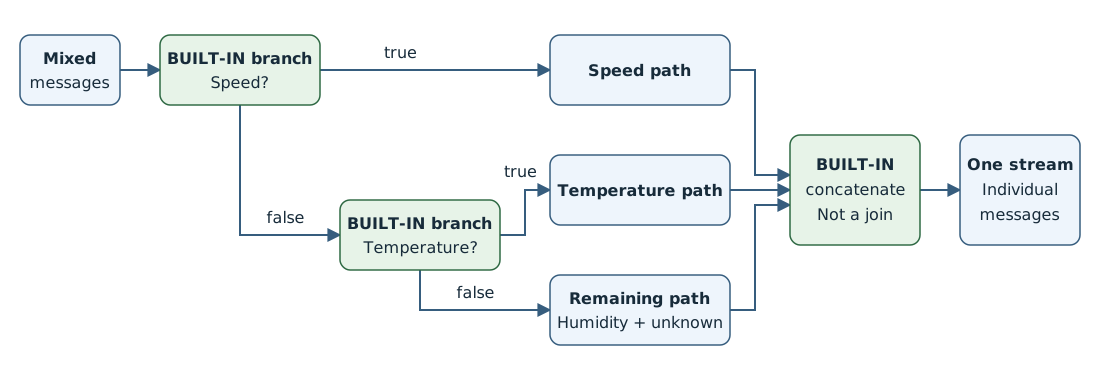
Save these complete graph properties as graph.json. The command uses the existing default profile.
{
  "mode": "Enabled",
  "nodes": [
    {
      "name": "source",
      "nodeType": "Source",
      "sourceSettings": {
        "endpointRef": "factory-mqtt",
        "dataSources": ["factory/mixed-readings"]
      }
    },
    {
      "name": "speed-check",
      "nodeType": "Graph",
      "graphSettings": {
        "registryEndpointRef": "default",
        "artifact": "azureiotoperations/graph-dataflow-branch:1.1.0",
        "configuration": [
          {
            "key": "rules",
            "value": "{\"branch\":{\"inputs\":[\"kind ?? \\\"unknown\\\"\"],\"expression\":\"$1 == \\\"speed\\\"\"}}"
          }
        ]
      }
    },
    {
      "name": "temperature-check",
      "nodeType": "Graph",
      "graphSettings": {
        "registryEndpointRef": "default",
        "artifact": "azureiotoperations/graph-dataflow-branch:1.1.0",
        "configuration": [
          {
            "key": "rules",
            "value": "{\"branch\":{\"inputs\":[\"kind ?? \\\"unknown\\\"\"],\"expression\":\"$1 == \\\"temperature\\\"\"}}"
          }
        ]
      }
    },
    {
      "name": "speed-path",
      "nodeType": "Graph",
      "graphSettings": {
        "registryEndpointRef": "default",
        "artifact": "azureiotoperations/graph-dataflow-map:1.0.0",
        "configuration": [
          {
            "key": "rules",
            "value": "{\"map\":[{\"inputs\":[\"*\"],\"output\":\"*\"},{\"inputs\":[\"kind ?? \\\"unknown\\\"\"],\"output\":\"route\",\"expression\":\"\\\"speed\\\"\"}]}"
          }
        ]
      }
    },
    {
      "name": "temperature-path",
      "nodeType": "Graph",
      "graphSettings": {
        "registryEndpointRef": "default",
        "artifact": "azureiotoperations/graph-dataflow-map:1.0.0",
        "configuration": [
          {
            "key": "rules",
            "value": "{\"map\":[{\"inputs\":[\"*\"],\"output\":\"*\"},{\"inputs\":[\"kind ?? \\\"unknown\\\"\"],\"output\":\"route\",\"expression\":\"\\\"temperature\\\"\"}]}"
          }
        ]
      }
    },
    {
      "name": "remaining-path",
      "nodeType": "Graph",
      "graphSettings": {
        "registryEndpointRef": "default",
        "artifact": "azureiotoperations/graph-dataflow-map:1.0.0",
        "configuration": [
          {
            "key": "rules",
            "value": "{\"map\":[{\"inputs\":[\"*\"],\"output\":\"*\"},{\"inputs\":[\"kind ?? \\\"unknown\\\"\"],\"output\":\"route\",\"expression\":\"\\\"remaining\\\"\"}]}"
          }
        ]
      }
    },
    {
      "name": "merge",
      "nodeType": "Graph",
      "graphSettings": {
        "registryEndpointRef": "default",
        "artifact": "azureiotoperations/graph-dataflow-concatenate:1.0.0"
      }
    },
    {
      "name": "destination",
      "nodeType": "Destination",
      "destinationSettings": {
        "endpointRef": "factory-mqtt",
        "dataDestination": "factory/routed-readings"
      }
    }
  ],
  "nodeConnections": [
    { "from": { "name": "source" }, "to": { "name": "speed-check" } },
    { "from": { "name": "speed-check.output.true" }, "to": { "name": "speed-path" } },
    { "from": { "name": "speed-check.output.false" }, "to": { "name": "temperature-check" } },
    { "from": { "name": "temperature-check.output.true" }, "to": { "name": "temperature-path" } },
    { "from": { "name": "temperature-check.output.false" }, "to": { "name": "remaining-path" } },
    { "from": { "name": "speed-path" }, "to": { "name": "merge" } },
    { "from": { "name": "temperature-path" }, "to": { "name": "merge" } },
    { "from": { "name": "remaining-path" }, "to": { "name": "merge" } },
    { "from": { "name": "merge" }, "to": { "name": "destination" } }
  ]
}
Apply the graph through Azure Resource Manager. This approach avoids an azure-iot-ops extension validation issue with named outputs such as speed-check.output.true.
INSTANCE_ID=$(az iot ops show --name "$AIO_INSTANCE_NAME" --resource-group "$RESOURCE_GROUP" --query id --output tsv)
EXTENDED_LOCATION=$(az iot ops show --name "$AIO_INSTANCE_NAME" --resource-group "$RESOURCE_GROUP" --query extendedLocation --output json)
GRAPH_ID="$INSTANCE_ID/dataflowProfiles/default/dataflowGraphs/route-message-kinds"

az rest --method put \
  --url "$GRAPH_ID?api-version=2026-07-01" \
  --body "{\"extendedLocation\":$EXTENDED_LOCATION,\"properties\":$(cat graph.json)}"

az resource wait --created --ids "$GRAPH_ID" --api-version 2026-07-01
Save this template as main.bicep. It references the existing instance, custom location, and default profile.
param aioInstanceName string
param customLocationName string

resource aioInstance 'Microsoft.IoTOperations/instances@2026-07-01' existing = {
  name: aioInstanceName
}

resource customLocation 'Microsoft.ExtendedLocation/customLocations@2021-08-31-preview' existing = {
  name: customLocationName
}

resource defaultDataflowProfile 'Microsoft.IoTOperations/instances/dataflowProfiles@2026-07-01' existing = {
  parent: aioInstance
  name: 'default'
}

resource dataflowGraph 'Microsoft.IoTOperations/instances/dataflowProfiles/dataflowGraphs@2026-07-01' = {
  parent: defaultDataflowProfile
  name: 'route-message-kinds'
  extendedLocation: {
    name: customLocation.id
    type: 'CustomLocation'
  }
  properties: {
    mode: 'Enabled'
    nodes: [
      {
        name: 'source'
        nodeType: 'Source'
        sourceSettings: {
          endpointRef: 'factory-mqtt'
          dataSources: [ 'factory/mixed-readings' ]
        }
      }
      {
        name: 'speed-check'
        nodeType: 'Graph'
        graphSettings: {
          registryEndpointRef: 'default'
          artifact: 'azureiotoperations/graph-dataflow-branch:1.1.0'
          configuration: [
            {
              key: 'rules'
              value: '{"branch":{"inputs":["kind ?? \\"unknown\\""],"expression":"$1 == \\"speed\\""}}'
            }
          ]
        }
      }
      {
        name: 'temperature-check'
        nodeType: 'Graph'
        graphSettings: {
          registryEndpointRef: 'default'
          artifact: 'azureiotoperations/graph-dataflow-branch:1.1.0'
          configuration: [
            {
              key: 'rules'
              value: '{"branch":{"inputs":["kind ?? \\"unknown\\""],"expression":"$1 == \\"temperature\\""}}'
            }
          ]
        }
      }
      {
        name: 'speed-path'
        nodeType: 'Graph'
        graphSettings: {
          registryEndpointRef: 'default'
          artifact: 'azureiotoperations/graph-dataflow-map:1.0.0'
          configuration: [
            {
              key: 'rules'
              value: '{"map":[{"inputs":["*"],"output":"*"},{"inputs":["kind ?? \\"unknown\\""],"output":"route","expression":"\\"speed\\""}]}'
            }
          ]
        }
      }
      {
        name: 'temperature-path'
        nodeType: 'Graph'
        graphSettings: {
          registryEndpointRef: 'default'
          artifact: 'azureiotoperations/graph-dataflow-map:1.0.0'
          configuration: [
            {
              key: 'rules'
              value: '{"map":[{"inputs":["*"],"output":"*"},{"inputs":["kind ?? \\"unknown\\""],"output":"route","expression":"\\"temperature\\""}]}'
            }
          ]
        }
      }
      {
        name: 'remaining-path'
        nodeType: 'Graph'
        graphSettings: {
          registryEndpointRef: 'default'
          artifact: 'azureiotoperations/graph-dataflow-map:1.0.0'
          configuration: [
            {
              key: 'rules'
              value: '{"map":[{"inputs":["*"],"output":"*"},{"inputs":["kind ?? \\"unknown\\""],"output":"route","expression":"\\"remaining\\""}]}'
            }
          ]
        }
      }
      {
        name: 'merge'
        nodeType: 'Graph'
        graphSettings: {
          registryEndpointRef: 'default'
          artifact: 'azureiotoperations/graph-dataflow-concatenate:1.0.0'
        }
      }
      {
        name: 'destination'
        nodeType: 'Destination'
        destinationSettings: {
          endpointRef: 'factory-mqtt'
          dataDestination: 'factory/routed-readings'
        }
      }
    ]
    nodeConnections: [
      {
        from: { name: 'source' }
        to: { name: 'speed-check' }
      }
      {
        from: { name: 'speed-check.output.true' }
        to: { name: 'speed-path' }
      }
      {
        from: { name: 'speed-check.output.false' }
        to: { name: 'temperature-check' }
      }
      {
        from: { name: 'temperature-check.output.true' }
        to: { name: 'temperature-path' }
      }
      {
        from: { name: 'temperature-check.output.false' }
        to: { name: 'remaining-path' }
      }
      {
        from: { name: 'speed-path' }
        to: { name: 'merge' }
      }
      {
        from: { name: 'temperature-path' }
        to: { name: 'merge' }
      }
      {
        from: { name: 'remaining-path' }
        to: { name: 'merge' }
      }
      {
        from: { name: 'merge' }
        to: { name: 'destination' }
      }
    ]
  }
}
az deployment group create \
  --resource-group $RESOURCE_GROUP \
  --template-file main.bicep \
  --parameters aioInstanceName="$AIO_INSTANCE_NAME" customLocationName="$CUSTOM_LOCATION_NAME"
Important
The use of Kubernetes deployment manifests isn't supported in production environments and should only be used for debugging and testing.
Save the following manifest as route-message-kinds.yaml.
apiVersion: connectivity.iotoperations.azure.com/v1
kind: DataflowGraph
metadata:
  name: route-message-kinds
  namespace: azure-iot-operations
spec:
  profileRef: default
  mode: Enabled
  nodes:
    - name: source
      nodeType: Source
      sourceSettings:
        endpointRef: factory-mqtt
        dataSources: [factory/mixed-readings]
    - name: speed-check
      nodeType: Graph
      graphSettings:
        registryEndpointRef: default
        artifact: azureiotoperations/graph-dataflow-branch:1.1.0
        configuration:
          - key: rules
            value: '{"branch":{"inputs":["kind ?? \"unknown\""],"expression":"$1 == \"speed\""}}'
    - name: temperature-check
      nodeType: Graph
      graphSettings:
        registryEndpointRef: default
        artifact: azureiotoperations/graph-dataflow-branch:1.1.0
        configuration:
          - key: rules
            value: '{"branch":{"inputs":["kind ?? \"unknown\""],"expression":"$1 == \"temperature\""}}'
    - name: speed-path
      nodeType: Graph
      graphSettings:
        registryEndpointRef: default
        artifact: azureiotoperations/graph-dataflow-map:1.0.0
        configuration:
          - key: rules
            value: '{"map":[{"inputs":["*"],"output":"*"},{"inputs":["kind ?? \"unknown\""],"output":"route","expression":"\"speed\""}]}'
    - name: temperature-path
      nodeType: Graph
      graphSettings:
        registryEndpointRef: default
        artifact: azureiotoperations/graph-dataflow-map:1.0.0
        configuration:
          - key: rules
            value: '{"map":[{"inputs":["*"],"output":"*"},{"inputs":["kind ?? \"unknown\""],"output":"route","expression":"\"temperature\""}]}'
    - name: remaining-path
      nodeType: Graph
      graphSettings:
        registryEndpointRef: default
        artifact: azureiotoperations/graph-dataflow-map:1.0.0
        configuration:
          - key: rules
            value: '{"map":[{"inputs":["*"],"output":"*"},{"inputs":["kind ?? \"unknown\""],"output":"route","expression":"\"remaining\""}]}'
    - name: merge
      nodeType: Graph
      graphSettings:
        registryEndpointRef: default
        artifact: azureiotoperations/graph-dataflow-concatenate:1.0.0
    - name: destination
      nodeType: Destination
      destinationSettings:
        endpointRef: factory-mqtt
        dataDestination: factory/routed-readings
  nodeConnections:
    - from: { name: source }
      to: { name: speed-check }
    - from: { name: speed-check.output.true }
      to: { name: speed-path }
    - from: { name: speed-check.output.false }
      to: { name: temperature-check }
    - from: { name: temperature-check.output.true }
      to: { name: temperature-path }
    - from: { name: temperature-check.output.false }
      to: { name: remaining-path }
    - from: { name: speed-path }
      to: { name: merge }
    - from: { name: temperature-path }
      to: { name: merge }
    - from: { name: remaining-path }
      to: { name: merge }
    - from: { name: merge }
      to: { name: destination }
kubectl apply -f route-message-kinds.yaml