Note
Access to this page requires authorization. You can try signing in or changing directories.
Access to this page requires authorization. You can try changing directories.
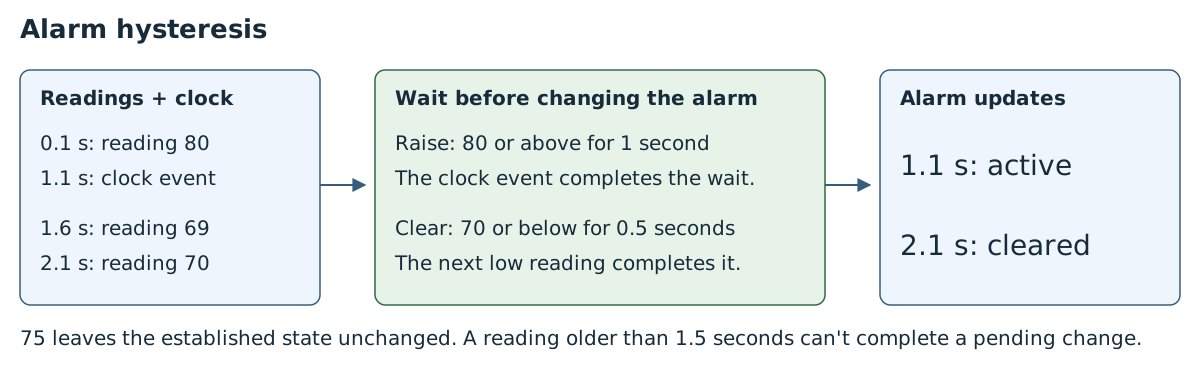
Raise an alarm at 80 or above, but clear it only at 70 or below. A reading of 75 leaves the alarm as it is. This gap between the thresholds is called hysteresis and prevents repeated on-off changes near a single threshold.
This example also waits 1 second before raising the alarm and 0.5 seconds before clearing it, so brief spikes don't change the alarm state. All examples are synthetic.
Prerequisites
Start with an existing Azure IoT Operations deployment and MQTT broker access. Follow Create a data flow graph to configure a data flow profile and MQTT endpoint.
Complete the Azure Samples deployment instructions for registry setup and single-instance deployment, then use the standalone sample setup. The examples use namespace azure-iot-operations. Configure the clock publisher to evaluate observation periods during sensor silence.
The default data flow profile must already exist with one instance. The examples reuse the existing factory-mqtt MQTT endpoint and factory-artifacts registry endpoint for ghcr.io; they don't create profiles or endpoints.
The Azure CLI installed on your development machine. Check Available Azure CLI extensions for the minimum required version to use the azure-iot-ops extension. Use
az --versionto check your version andaz upgradeto update if necessary. For more information, see Install the Azure CLI.The Azure IoT Operations extension for the Azure CLI. Use the following command to add the extension or update it to the latest version:
az extension add --upgrade --name azure-iot-ops
The Azure CLI examples in this article use environment variables so that you can set each value once and then copy and paste the commands as-is. If you're using the Azure IoT Operations Codespaces environment from the quickstart, these variables are already set for you and you can skip this step. Otherwise, set the following environment variables in your shell before you run the commands.
The following scripts set the most commonly used environment variables:
| Environment variable | Description |
|---|---|
SUBSCRIPTION_ID |
The ID of the subscription that contains your Azure IoT Operations instance. |
RESOURCE_GROUP |
The name of the resource group that contains your Azure IoT Operations instance. |
AIO_INSTANCE_NAME |
The name of your Azure IoT Operations instance. To list your instances, run az iot ops list -o table. |
CLUSTER_NAME |
The name of the Azure Arc-enabled Kubernetes cluster that hosts your instance. |
LOCATION |
The Azure region to use for new resources, for example eastus. |
SUBSCRIPTION_ID=<subscription-id>
RESOURCE_GROUP=<resource-group-name>
AIO_INSTANCE_NAME=<instance-name>
CLUSTER_NAME=<cluster-name>
LOCATION=<region>
You only need to set the variables that this article uses. This article might use additional environment variables for resource names that you choose. The article explains how to set them where they're introduced.
Deploy the complete graph
This sample uses a custom artifact from ghcr.io. The operations experience supports custom artifacts from Azure Container Registry (ACR), not GHCR. Use the Azure CLI or Bicep tab to deploy this example unchanged.
To use the operations experience, first copy the graph and its referenced WASM modules to ACR and configure a registry endpoint. Then follow Deploy custom WASM transforms for the supported UI workflow. The graph configuration in the Azure CLI tab shows the required topics and settings.
The source subscribes to factory/alarm-readings and factory/alarm-ticks; the destination is factory/alarms. Allow sensor publishers to publish readings, but allow only the authorized clock publisher to publish on factory/alarm-ticks.
The example starts in the normal state. It raises an alarm after observations at or above 80 persist for 1 second, and clears it after observations at or below 70 persist for 0.5 seconds. An observation older than 1.5 seconds can't complete a pending transition.
Check the behavior
A complete reading looks like this:
{"kind":"reading","assetId":"sensor-1","messageId":"r1","sequence":1,"value":80,"units":"C"}
Example timeline for a fresh deployment. Publish readings on factory/alarm-readings; the clock publisher sends events on factory/alarm-ticks:
| Elapsed time | Input | Result |
|---|---|---|
0 s |
r0, sequence 0, value 75 |
Start normal |
0.1 s |
r1, sequence 1, value 80, units C |
Start waiting to raise |
1.1 s |
Clock event | Emit active using observation r1 |
1.2 s |
r2, sequence 2, value 75 |
Keep active state |
1.3 s |
r3, sequence 3, value 70 |
Start waiting to clear |
1.5 s |
r4, sequence 4, value 71 |
Interrupt the wait |
1.6 s |
r5, sequence 5, value 69 |
Start a fresh wait to clear |
2.1 s |
r6, sequence 6, value 70 |
Emit cleared |
The clock event at 1.1 seconds produces:
{"kind":"alarm","assetId":"sensor-1","messageId":"r1","sequence":1,"value":80,"units":"C","state":"active","reason":"thresholdSustained","threshold":80,"emittedAtMs":1100,"receivedAtMs":100,"observationAgeMs":1000,"isFreshMeasurement":false}
Outputs preserve the latest observation's fields. The processor computes time fields automatically; the example shows milliseconds relative to the timeline's start, while live outputs use processing-clock epoch milliseconds. A reading-triggered transition has isFreshMeasurement: true and age 0; a clock-triggered transition refers to the earlier observation.
Advanced: timing and restart
The graph checks elapsed processing time when a reading or clock event arrives. A gap greater than 1.5 seconds cancels a pending transition but preserves the established alarm state. A fresh qualifying reading starts the wait again.
A reading that no longer meets the threshold interrupts the wait. Values between 70 and 80 preserve the established state. The time before an alarm update depends on clock-event frequency, delivery, and processing. The graph can't guarantee the sensor's value between readings. Use offline detection for availability.
Keep messageId unique for each asset, including across restarts, and keep sequence strictly increasing. Retry a message only with its original ID, sequence, and unchanged content.
A restart clears the alarm state, pending transitions, and retry tracking. Update consumers to account for the reset and collect fresh readings. The graph starts normal, without publishing a cleared event, and publishes its first state change when the raise condition is met.