Note
Access to this page requires authorization. You can try signing in or changing directories.
Access to this page requires authorization. You can try changing directories.
Authentication with Key Vault works in conjunction with Microsoft Entra ID, which is responsible for authenticating the identity of any given security principal.
A security principal is an object that represents a user, group, service, or application that's requesting access to Azure resources. Azure assigns a unique object ID to every security principal.
A user security principal identifies an individual who has a profile in Microsoft Entra ID.
A group security principal identifies a set of users created in Microsoft Entra ID. Any roles or permissions assigned to the group are granted to all of the users within the group.
A service principal is a type of security principal that identifies an application or service, which is to say, a piece of code rather than a user or group. A service principal's object ID acts like its username; the service principal's client secret acts like its password.
For applications, there are two ways to obtain a service principal:
Recommended: enable a system-assigned managed identity for the application.
With managed identity, Azure internally manages the application's service principal and automatically authenticates the application with other Azure services. Managed identity is available for applications deployed to a variety of services.
For more information, see the Managed identity overview. Also see Azure services that support managed identity, which links to articles that describe how to enable managed identity for specific services (such as App Service, Azure Functions, Virtual Machines, etc.).
If you cannot use managed identity, you instead register the application with your Microsoft Entra tenant, as described on Quickstart: Register an application with the Azure identity platform. Registration also creates a second application object that identifies the app across all tenants.
Key Vault authentication scenarios
When you create a key vault in an Azure subscription, it's automatically associated with the Microsoft Entra tenant of the subscription. All callers in both planes must register in this tenant and authenticate to access the key vault. Applications can access Key Vault in three ways:
Application-only: The application represents a service principal or managed identity. This identity is the most common scenario for applications that periodically need to access certificates, keys, or secrets from the key vault. For this scenario to work when using access policies (legacy), the
objectIdof the application must be specified in the access policy and theapplicationIdmust not be specified or must benull. When using Azure RBAC, assign appropriate roles to the application's managed identity or service principal.User-only: The user accesses the key vault from any application registered in the tenant. Examples of this type of access include Azure PowerShell and the Azure portal. For this scenario to work when using access policies (legacy), the
objectIdof the user must be specified in the access policy and theapplicationIdmust not be specified or must benull. When using Azure RBAC, assign appropriate roles to the user.Application-plus-user (sometimes referred as compound identity): The user is required to access the key vault from a specific application and the application must use the on-behalf-of authentication (OBO) flow to impersonate the user. For this scenario to work with access policies (legacy), both
applicationIdandobjectIdmust be specified in the access policy. TheapplicationIdidentifies the required application and theobjectIdidentifies the user. Currently, this option isn't available for data plane Azure RBAC.
In all types of access, the application authenticates with Microsoft Entra ID. The application uses any supported authentication method based on the application type. The application acquires a token for a resource in the plane to grant access. The resource is an endpoint in the management or data plane, based on the Azure environment. The application uses the token and sends a REST API request to Key Vault. To learn more, review the whole authentication flow.
The model of a single mechanism for authentication to both planes has several benefits:
- Organizations can control access centrally to all key vaults in their organization.
- If a user leaves, they instantly lose access to all key vaults in the organization.
- Organizations can customize authentication by using the options in Microsoft Entra ID, such as to enable multi-factor authentication for added security.
Configure the Key Vault firewall
By default, Key Vault allows access to resources through public IP addresses. For greater security, you can also restrict access to specific IP ranges, service endpoints, virtual networks, or private endpoints.
For more information, see Access Azure Key Vault behind a firewall.
The Key Vault request operation flow with authentication
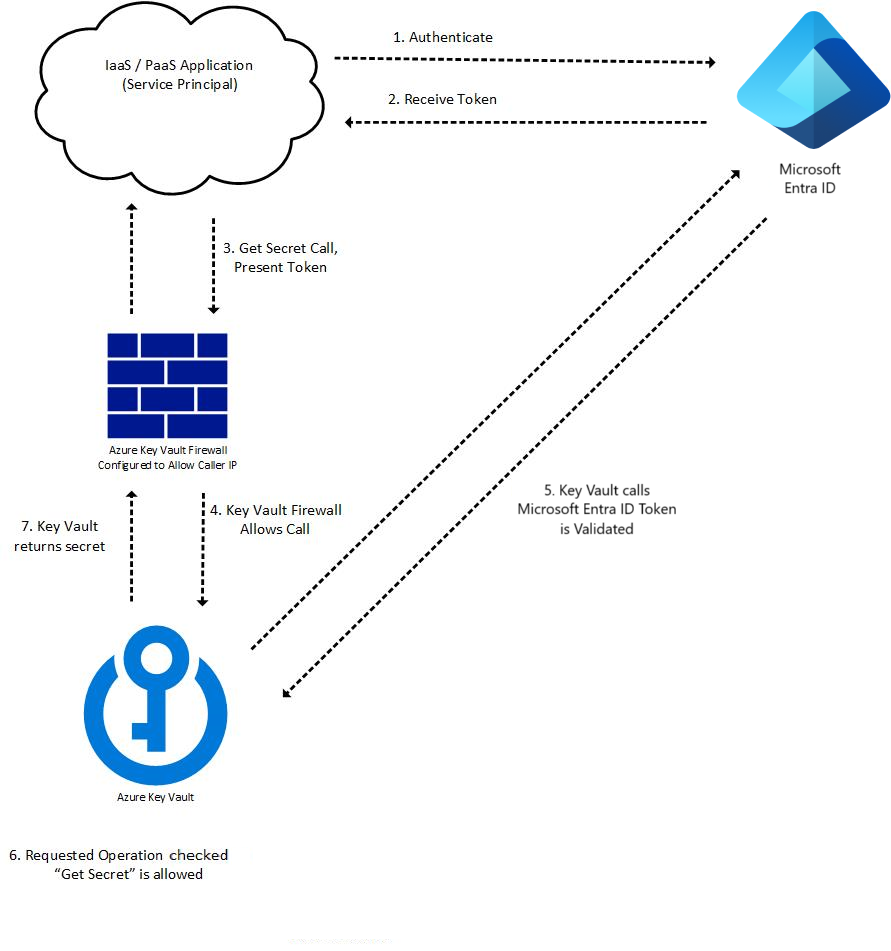
Key Vault authentication occurs as part of every request operation on Key Vault. Once token is retrieved, it can be reused for subsequent calls. Authentication flow example:
A token requests to authenticate with Microsoft Entra ID, for example:
- An Azure resource such as a virtual machine or App Service application with a managed identity contacts the REST endpoint to get an access token.
- A user logs into the Azure portal using a username and password.
If authentication with Microsoft Entra ID is successful, the security principal is granted an OAuth token.
A call to the Key Vault REST API through the Key Vault's endpoint (URI).
Key Vault Firewall checks the following criteria. If any criterion is met, the call is allowed. Otherwise the call is blocked and a forbidden response is returned.
- The firewall is disabled and the public endpoint of Key Vault is reachable from the public internet.
- The caller is a Key Vault Trusted Service, allowing it to bypass the firewall.
- The caller is listed in the firewall by IP address, virtual network, or service endpoint.
- The caller can reach Key Vault over a configured private link connection.
If the firewall allows the call, Key Vault calls Microsoft Entra ID to validate the security principal’s access token.
Key Vault checks if the security principal has the necessary permission for requested operation. If not, Key Vault returns a forbidden response.
Key Vault carries out the requested operation and returns the result.
The following diagram illustrates the process for an application calling a Key Vault "Get Secret" API:
Note
Key Vault SDK clients for secrets, certificates, and keys make an additional call to Key Vault without access token, which results in 401 response to retrieve tenant information. For more information see Authentication, requests and responses
Authentication to Key Vault in application code
Key Vault SDK is using Azure Identity client library, which allows seamless authentication to Key Vault across environments with same code
Azure Identity client libraries
| .NET | Python | Java | JavaScript |
|---|---|---|---|
| Azure Identity SDK .NET | Azure Identity SDK Python | Azure Identity SDK Java | Azure Identity SDK JavaScript |
More information about best practices and developer examples, see Authenticate to Key Vault in code