Note
Access to this page requires authorization. You can try signing in or changing directories.
Access to this page requires authorization. You can try changing directories.
Applies to: ✔️ Fleet Manager with hub cluster
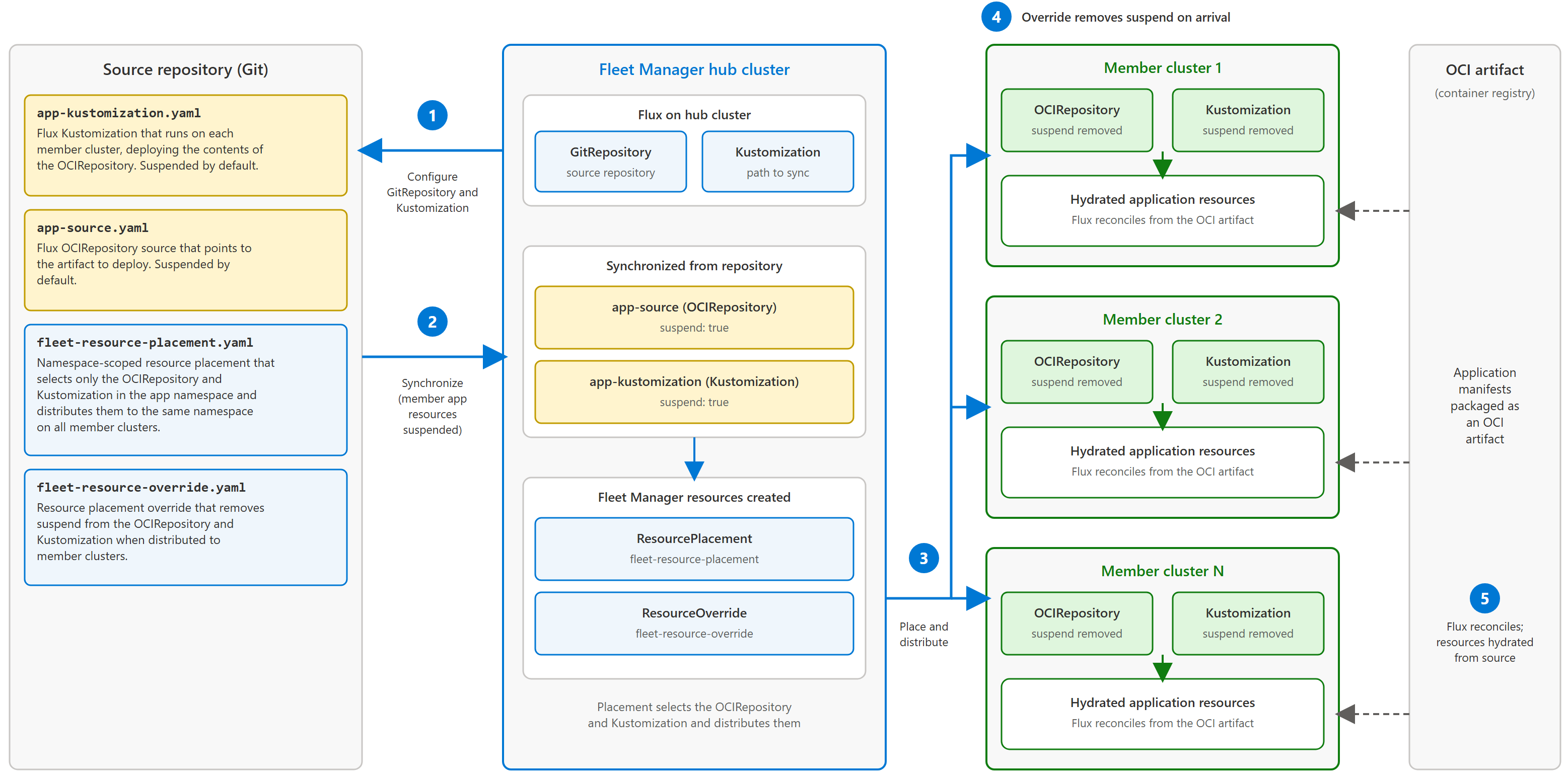
In this article, you deploy the AKS Store Demo from an OCI artifact across all member clusters in your fleet. You create the application namespace and Flux OCIRepository and Kustomization resources on the Fleet Manager hub cluster, then distribute them across member clusters by using Fleet Manager resource placement. You configure the OCIRepository and Kustomization as suspended on the Fleet Manager hub cluster, and only enable them once distributed to member clusters. This approach demonstrates how to use Fleet Manager resource placement overrides.
Important
Azure Kubernetes Fleet Manager preview features are available on a self-service, opt-in basis. Previews are provided "as is" and "as available," and they're excluded from the service-level agreements and limited warranty. Azure Kubernetes Fleet Manager previews are partially covered by customer support on a best-effort basis. As such, these features aren't meant for production use.
Before you begin
-
If you don't have an Azure account, create a free account before you begin.
You need a Fleet Manager with a hub cluster and member clusters. If you don't have one, see Create an Azure Kubernetes Fleet Manager resource and join member clusters by using the Azure CLI.
You need access to the Kubernetes API of the hub cluster. If you don't have access, see Access the Kubernetes API for an Azure Kubernetes Fleet Manager hub cluster.
Set environment variables for your subscription, Fleet Manager resource, and member cluster that should receive the older artifact tag.
export SUBSCRIPTION_ID=<subscription-id>
export GROUP=<resource-group-name>
export FLEET=<fleet-name>
You need Azure CLI installed to complete this article. To install or upgrade, see Install the Azure CLI.
Set the default Azure subscription by using the
az account setcommand:az account set --subscription ${SUBSCRIPTION_ID}
For the subscription where Fleet Manager is deployed, register the following Azure resource providers.
az provider register --namespace Microsoft.Kubernetes
az provider register --namespace Microsoft.ContainerService
az provider register --namespace Microsoft.KubernetesConfiguration
The user who installs and configures the extension must have both the Azure Kubernetes Fleet Manager Contributor and Kubernetes Extension Contributor roles.
You need the
k8s-extensionandfleetAzure CLI extensions. You can install them by running the following commands.az extension add --name k8s-extension az extension add --name fleetRun the
az extension updatecommand to update to the latest version of the extensions.az extension update --name k8s-extension az extension update --name fleetEnable the Flux extension on the Fleet Manager hub cluster.
az k8s-extension create \
    --name flux \
    --extension-type microsoft.flux \
    --cluster-name ${FLEET} \
    --resource-group ${GROUP} \
    --cluster-type fleets \
    --scope cluster
If you want to limit Flux to managing resources in a namespace other than the default
flux-system, provide the namespace by using the--release-namespaceparameter. To use the Flux extension in a multi-tenancy configuration update the--scopeargument tonamespace.Note
You can only install one instance of the Flux extension on a Fleet Manager.
Stage resources on Fleet Manager hub cluster
Start by creating the application namespace and staging its resources on the Fleet Manager hub cluster.
Get the kubeconfig file of the Fleet Manager hub cluster by using the
az fleet get-credentialscommand.az fleet get-credentials \ --resource-group ${GROUP} \ --name ${FLEET}Create the application namespace.
kubectl create namespace aks-store-demoUse Fleet Manager resource placement to distribute the staged namespace across member clusters. Save the following YAML as
crp-aks-store-demo.yaml:apiVersion: placement.kubernetes-fleet.io/v1 kind: ClusterResourcePlacement metadata: name: crp-aks-store-demo spec: resourceSelectors: - group: "" kind: Namespace version: v1 name: aks-store-demo selectionScope: NamespaceOnly policy: placementType: PickAll strategy: type: RollingUpdate rollingUpdate: maxUnavailable: 1 maxSurge: 25%Apply the resource placement on the Fleet Manager hub cluster.
kubectl apply -f crp-aks-store-demo.yamlAuthorize the
flux-applierservice account to manage resources in theaks-store-demonamespace. Save the following YAML asapply-service-account.yaml.apiVersion: v1 kind: ServiceAccount metadata: name: flux-applier namespace: aks-store-demo --- apiVersion: rbac.authorization.k8s.io/v1 kind: Role metadata: name: flux-applier namespace: aks-store-demo rules: - apiGroups: ["*"] resources: ["*"] verbs: ["*"] --- apiVersion: rbac.authorization.k8s.io/v1 kind: RoleBinding metadata: name: flux-applier namespace: aks-store-demo subjects: - kind: ServiceAccount name: flux-applier namespace: aks-store-demo roleRef: kind: Role name: flux-applier apiGroup: rbac.authorization.k8s.ioApply the authorization on the Fleet Manager hub cluster.
kubectl apply -f apply-service-account.yamlSo the Flux extension on member clusters can also manage resources in the distributed
aks-store-demonamespace, use a Fleet Manager resource placement to roll out the service account to member clusters. Save the following YAML asdistribute-service-account.yaml.apiVersion: placement.kubernetes-fleet.io/v1 kind: ResourcePlacement metadata: name: aks-store-demo-flux-roles-placement namespace: aks-store-demo spec: resourceSelectors: - group: "" version: v1 kind: ServiceAccount name: flux-applier - group: rbac.authorization.k8s.io version: v1 kind: Role name: flux-applier - group: rbac.authorization.k8s.io version: v1 kind: RoleBinding name: flux-applier policy: placementType: PickAll strategy: type: RollingUpdate rollingUpdate: maxUnavailable: 1 maxSurge: 25%Apply the placement on the Fleet Manager hub cluster.
kubectl apply -f distribute-service-account.yamlNext, attach the hub cluster to the Git source and use Kustomize to hydrate the resources onto the hub cluster. Save the following YAML as
bootstrap-fleet-gitops-oci.yaml.apiVersion: source.toolkit.fluxcd.io/v1 kind: GitRepository metadata: name: git-repo-fleet-config namespace: aks-store-demo spec: interval: 1m url: https://github.com/azure-samples/aks-store-demo ref: branch: main --- apiVersion: kustomize.toolkit.fluxcd.io/v1 kind: Kustomization metadata: name: kustonize-fleet-config namespace: aks-store-demo spec: interval: 1m path: ./fleet/aks-store-fleet-oci prune: true sourceRef: kind: GitRepository name: git-repo-fleet-configStage the resources on the Fleet Manager hub cluster.
kubectl apply -f bootstrap-fleet-gitops-oci.yamlNote
The Fleet Manager hub cluster doesn't run synchronized resources locally by design. The hub cluster is intended to only store resource definitions for distribution to member clusters.
Understanding the source repository
When Flux synchronizes the GitRepo source, it applies the manifests in the aks-store-fleet-oci folder and runs the Kustomization.
The file contents in the folder perform the following functions:
- app-kustomization.yaml - Flux Kustomization that runs on each member cluster, deploying the contents of the OCIRepository.
- app-source.yaml - Flux OCIRepository source that points to the artifact to deploy.
- fleet-resource-placement.yaml - A Fleet Manager namespace-scoped resource placement that selects just the OCIRepository and Kustomization resources in the application namespace and distributes them to the same namespace on all member clusters.
- fleet-resource-override.yaml - A Fleet Manager resource placement override that removes the
suspendfrom the OCIRepository and Kustomization resources when it distributes them to member clusters.
Note
Both app components are bundled with suspend set to true so that the Fleet Manager hub cluster doesn't reconcile the resources. The hub cluster can't schedule workloads, so there's no impact other than an unnecessary use of scheduler time on the hub.
Validating the deployment
Check the placement rollout:
kubectl get resourceplacement aks-store-demo-flux-placement -n aks-store-demoYour output should look similar to the following example:
NAME                             GEN   SCHEDULED   SCHEDULED-GEN   AVAILABLE   AVAILABLE-GEN   AGE
aks-store-demo-flux-placement    1     True        1               True        1               2m45s
On member clusters, view the services that Flux deployed from the OCI artifact.
kubectl get services --namespace aks-store-demoBrowse to the
store-frontorstore-adminservices to access the web experiences deployed and confirm the solution functions as expected.
Deleting the deployment
Delete the Kustomization on the Fleet Manager hub cluster. This action removes the resource placement and override, which in turn removes the application deployment on member clusters.
kubectl delete Kustomization kustomize-fleet-config -n aks-store-demo
Alternative use cases
To gradually roll out an OCI artifact update, change the tag in the OCIRepository and use a namespace-scoped ResourcePlacement with a staged update run. Configure stages to distribute the updated source to clusters in order, and validate each stage before proceeding. To roll back, restore the previous artifact tag and run another staged rollout. For details, see Control cluster order for resource placement and Understand resource placement.
Summary
In this article, you deployed the AKS Store Demo from an OCI artifact across Fleet Manager member clusters by using Flux OCIRepository and Kustomization resources. You staged the resources on the Fleet Manager hub cluster, used resource placement to distribute the namespace and OCI resources, applied an artifact tag override for one selected member cluster, and validated the deployed services.
This approach adds Fleet Manager placement, rollout control, and per-cluster overrides to Flux reconciliation, which helps you manage multicluster deployments without maintaining separate Flux configuration for each target cluster. As you add or remove clusters from your environment, you can expand, move, or remove your OCI-managed applications through Fleet Manager.
Next steps
To learn more about how to achieve additional control over resource distribution by using rollouts, see the following resources: