Note
Access to this page requires authorization. You can try signing in or changing directories.
Access to this page requires authorization. You can try changing directories.
Applies to: Azure Logic Apps (Standard)
Note
This preview feature is subject to the Supplemental Terms of Use for Microsoft Azure Previews.
If your organization uses an integration platform that the Azure Logic Apps Migration Agent extension in Visual Studio Code doesn't currently support, such as TIBCO BusinessWorks, IBM IIB/ACE, Dell Boomi, or Workato, you can extend the agent by creating and adding a custom parser for that platform. The extension uses a registry-based parser architecture that supports both built-in and external parsers, so you can add platform support without modifying the core migration pipeline.
This article shows how to create and add a custom parser that transforms your source integration platform's artifacts into the migration agent's common Intermediate Representation (IR) format. This JSON document describes artifacts in a platform-neutral way and lets the agent process your artifacts through all 5 migration stages.
Prerequisites
Before you start, make sure you have the following resources:
| Requirement | Description |
|---|---|
| Node.js 18 or later | Free, open-source, cross-platform JavaScript runtime environment |
| Visual Studio Code 1.85.0 or later | Local development experience |
| Visual Studio Code Extension API | API that lets you build extensions for Visual Studio Code |
| Azure Logic Apps Migration Agent extension | Required extension with migration agent for Visual Studio Code |
| Azure Logic Apps (Standard) extension | Required dependency for the Azure Logic Apps Migration Agent extension |
| Familiarity with TypeScript | A strongly typed programming language that builds on JavaScript |
| Source integration project | The source integration project and artifact files for the platform where you want support |
Parser architecture
To add platform support to the migration agent, use the following approaches:
| Approach | Recommended | Description |
|---|---|---|
| Built-in parser: Contribute to the extension's GitHub repository | Yes | Add a parser and skills directly to the project. Full integration with all five migration stages. This approach is recommended because built-in parsers ship with the extension, use the same CI/CD pipeline, and can access all internal APIs. |
| External parser extension | No | Create a separate Visual Studio Code extension that registers parsers through the plugin API. Covers only the Discovery stage. |
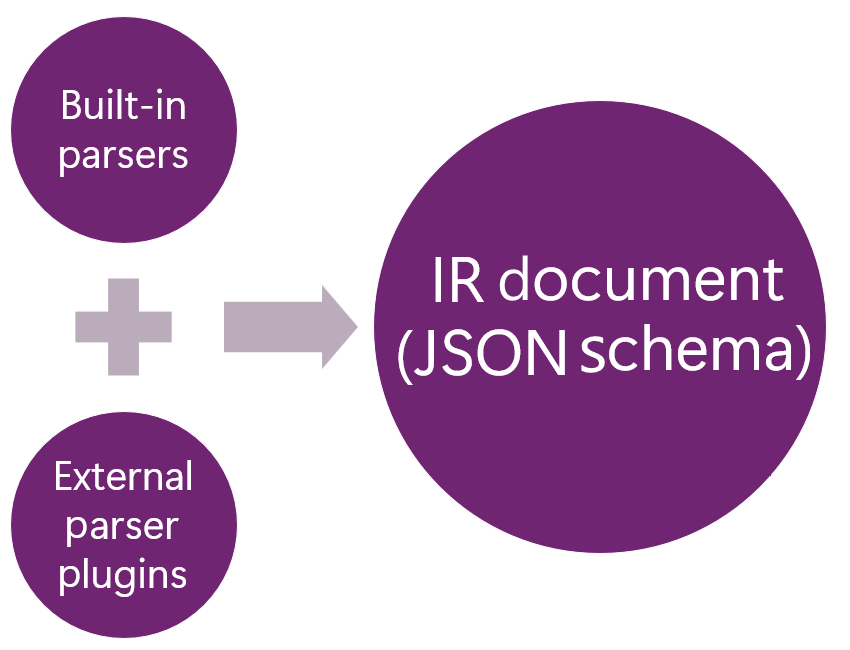
All parsers transform source platform artifacts into a common IR format as a JSON document. The migration agent uses the IR format in the planning, conversion, and validation stages. The parser registry supports both built-in and external parser plugins:
| Built-in parsers | External parser plugins |
|---|---|
BizTalk (.btproj, .odx) BizTalk ( .btm, .xsd) BizTalk ( .btp) MuleSoft (stub) |
Partner platform parsers Community parsers |
Step 1: Add a built-in parser
Under
src/parsers/<your-platform>/, create a new parser module.src/parsers/ ├── biztalk/ # Reference implementation │ ├── index.ts │ ├── types.ts │ ├── BizTalkProjectParser.ts │ ├── BizTalkOrchestrationParser.ts │ └── ... ├── <your-platform>/ # Your new parser │ ├── index.ts │ ├── types.ts │ └── <your-platform-parser-name>.tsMake sure each parser implements the
IParserinterface.import { IParser, ParserCapabilities, ParseResult, ParseOptions } from '../types'; import { IRDocument, createEmptyIRDocument } from '../../ir/types'; export class YourPlatformParser implements IParser { get capabilities(): ParserCapabilities { return { platform: '<your-platform>', fileExtensions: ['.<your-extension>'], fileTypes: ['flow'], supportsFolder: false, description: 'Parses <your-platform> integration flows.', }; } canParse(filePath: string): boolean { return filePath.endsWith('.<your-extension>'); } async parse( filePath: string, options?: ParseOptions ): Promise<ParseResult> { const ir = createEmptyIRDocument(); // Parse the source file and populate the IR document. // For the complete schema, see docs/IRSchema.md. return { ir, stats: { /* parsing statistics */ } }; } }Register your parser in
src/parsers/index.ts.import { <your-platform-parser-name> } from './<your-platform>'; export function initializeParsers(): void { // ... existing parsers ... defaultParserRegistry.register(new <your-platform-parser-name>()); }Tip
As a fully working reference, use the BizTalk parser implementation in
src/parsers/biztalk/.
Step 2: Add platform-specific skills
As Markdown files, skills provide AI instructions for each migration stage. They tell the GitHub Copilot agents how to analyze, plan, and convert artifacts for your specific platform.
To find these skills, look under resources/skills/ with platform-specific variants.
resources/skills/
├── detect-logical-groups/
│   ├── biztalk/SKILL.md
│   ├── mulesoft/SKILL.md
│   └── <your-platform>/SKILL.md
├── source-to-logic-apps-mapping/
│   ├── biztalk/SKILL.md
│   ├── mulesoft/SKILL.md
│   └── <your-platform>/SKILL.md
└── ... (13 skills total)
Each SKILL.md file uses YAML frontmatter followed by Markdown content, for example:
---
name: source-to-logic-apps-mapping
description: >-
   Component mapping for \<*your-platform*\> components to their equivalents in Azure Logic Apps (Standard).
---
Step 3: Map your platform to Azure Logic Apps (Standard) components
Review the following table to create the adapter mappings:
<your-platform> component Azure Logic Apps equivalent Native? Notes HTTP listener HTTP trigger Yes Built-in Database connector SQL Server connector Yes Built-in For each skill in the following table, create the required
<your-platform>/SKILL.mdskill variant:Tip
Copy the skills for a supported platform, such as
biztalk/SKILL.md, as a starting point and adapt the content for your platform.GitHub Copilot agent Skill Purpose @migration-analyserdetect-logical-groupsRules for grouping artifacts into logical flow groups @migration-analyseranalyse-source-designRules for analyzing source architecture and generating visualizations @migration-analyserdependency-and-decompilation-analysisRules for identifying missing dependencies All agents source-to-logic-apps-mappingComponent-by-component mapping from source to Azure Logic Apps @migration-plannerlogic-apps-planning-rulesRules for generating migration plans @migration-converterconversion-task-plan-rulesRules for creating conversion tasks @migration-converterscaffold-logic-apps-projectRules for scaffolding the Standard logic app project structure @migration-converterworkflow-json-generation-rulesRules for generating workflow.jsonfiles@migration-converterconnections-json-generation-rulesRules for generating the connections.jsonfile@migration-converterdotnet-local-functions-logic-appsRules for generating .NET local functions @migration-converterno-stubs-code-generationRules for ensuring that generated code is complete @migration-converterruntime-validation-and-testingRules for runtime validation and testing @migration-convertercloud-deployment-and-testingRules for cloud deployment and testing
Step 4: Register your platform
In the
src/types/platforms.tsfile, add your platform to the supported platforms list.export type SourcePlatform = 'biztalk' | 'mulesoft' | '<your-platform>'; export const SUPPORTED_PLATFORMS: PlatformInfo[] = [ // ... existing platforms ... { id: '<your-platform>', label: '<your-platform-name>', description: '<your-platform> version <version-number>', icon: '$(server)', filePatterns: ['.<your-extension>', '.<your-config>'], }, ];In the
src/stages/discovery/PlatformDetector.tsfile, add the detection logic.In the
src/stages/discovery/SourceFolderService.tsfile, add the file patterns.
Step 5 (optional): Add IR examples
To document how your platform's artifacts map to the IR schema, add a docs/IRExamples_YourPlatform.md file. The following examples exist and serve as templates:
| Example | Description |
|---|---|
docs/IRExamples_BizTalk.md |
BizTalk reference |
docs/IRExamples_MuleSoft.md |
MuleSoft reference |
docs/IRExamples_Boomi.md |
Dell Boomi example |
docs/IRExamples_IBMIIB.md |
IBM IIB/ACE example |
docs/IRExamples_TIBCO.md |
TIBCO BusinessWorks example |
docs/IRExamples_Workato.md |
Workato example |
Alternative: External parser extension
External parser extensions cover only the migration agent's Discovery stage where the agent parses your source files. Skills, platform detection, and AI-powered planning and conversion require that you directly contribute to the extension's GitHub repository.
However, if you prefer to not directly contribute to the repository, create a separate Visual Studio Code extension that registers parsers by using the parse plugin API:
import * as vscode from 'vscode';

export async function activate(context: vscode.ExtensionContext) {
    const assistant = vscode.extensions.getExtension('microsoft.logicapps-migration-assistant');

    if (assistant) {
        const api = await assistant.activate();
        api.registerParser(new MyPlatformParser(), {
            priority: 10,
        });
    }
}
Parser plugin API
| Method or property | Description |
|---|---|
version |
Extension version (read-only) |
registerParser(parser, options?) |
Register a parser with the registry. |
unregisterParser(id) |
Remove a registered parser. |
getParserRegistry() |
Directly access the parser registry. |
hasParser(id) |
Check whether a parser is registered. |
getExternalParsers() |
Get information about registered external parsers. |