Note
Access to this page requires authorization. You can try signing in or changing directories.
Access to this page requires authorization. You can try changing directories.
This article describes Premium SSD v2 (preview), a high-performance storage option for Azure Database for MySQL flexible server.
Premium SSD v2 (preview)
Premium SSD v2 offers higher performance than Premium file share and, as a general rule, a better price for performance. You can tune the capacity, throughput, and IOPS (input/output operations per second) of Premium SSD v2 independently, at any time. Because you can make these adjustments, your workloads stay cost-efficient as their performance needs change. For example, a transaction-intensive database might need a large amount of IOPS for a couple of exceptionally high-demand days. Or a gaming application might need higher throughput during peak hours only. For most general-purpose workloads, Premium SSD v2 provides the best price for performance. Premium SSD v2 also supports the latest General Purpose and Memory-Optimized v6 compute SKU families, so you can run larger and more demanding MySQL workloads.
Important
Premium SSD v2 for Azure Database for MySQL flexible server is currently in preview, supports only v6 compute SKUs, and is available in a subset of Azure regions that support MySQL flexible server.
Differences between Premium file share and Premium SSD v2
With Premium file share, the maximum IOPS your server can reach is determined by the compute size you select. Premium SSD v2 decouples performance from capacity: you can set a disk to any size you prefer and adjust IOPS and throughput separately, as your workload requires. You can change the disk size in steps of 1 GiB. Premium SSD v2 capacities range from 1 GiB to 64 TiB.
Premium SSD v2 offers flexible IOPS configurations. Azure Database for MySQL flexible server includes a baseline of 3,000 IOPS at no extra cost for all provisioned storage sizes. New servers are set to this 3,000 IOPS baseline by default, and it's also the minimum. You can increase IOPS up to 80,000 at any time, independently of disk size. IOPS that you provision above 3,000 incur extra charges. The IOPS your server can actually use is also limited by the IOPS limit of the selected compute size.
Premium SSD v2 also offers flexible throughput configurations. Azure Database for MySQL flexible server includes a baseline throughput of 125 MB/s at no extra cost for all provisioned storage sizes. New servers are set to this 125 MB/s baseline by default, and it's also the minimum. You can increase throughput up to 2,000 MB/s at any time, independently of disk size and IOPS. Throughput that you provision above 125 MB/s incurs extra charges.
The following table provides an overview of premium SSD v2 disk capacities and performance maximums to help you decide which one to use.
| SSD v2 disk size | Maximum available IOPS | Maximum available throughput (MB/s) |
|---|---|---|
| 1 GiB-64 TiBs | 3,000-80,000 (Increases by 500 IOPS per GiB) | 125-2000 (increases by 0.25 MB/s per set IOPS) |
Your virtual machine type also has IOPS limits. Although you can select any storage size independently from the server type, you might not be able to use all IOPS that the storage provides, especially when you choose a server with a few vCores.
To learn more, see Compute options in Azure Database for MySQL.
Important
The selected compute size determines the minimum and maximum IOPS.
Supported features
During preview, Premium SSD v2 for Azure Database for MySQL flexible server supports the following capabilities.
- Servers without high availability: Create and delete servers, scale compute and storage, configure backup settings, update server parameters, and use managed operations.
- High availability servers: Create and update the high availability configuration, select availability zones, and perform a forced failover.
- Networking: Use Private Link, configure firewall rules, and enable or disable public access.
- Security: Microsoft Entra ID authentication.
- Monitoring: Disk-level metrics for IOPS, throughput, usage against provisioned limits, queue depth, and backup storage only for non-HA servers.
- Backup and restore: List automated backups; configure retention and point-in-time restore (PITR).
Supported Regions
Australia East, Australia Southeast, Brazil South, Canada Central, Central India, Central US, Chile Central, East Asia, East US, East US 2, Germany West Central, India South Central, Israel Central, Italy North, Japan East, Japan West, Korea Central, Malaysia West, Mexico Central, Poland Central, South Africa North, Southeast Asia, Sweden Central, West Europe.
Create a server with Premium SSD v2 (preview)
You choose the storage type when you create the server. You can't change the storage type of an existing server.
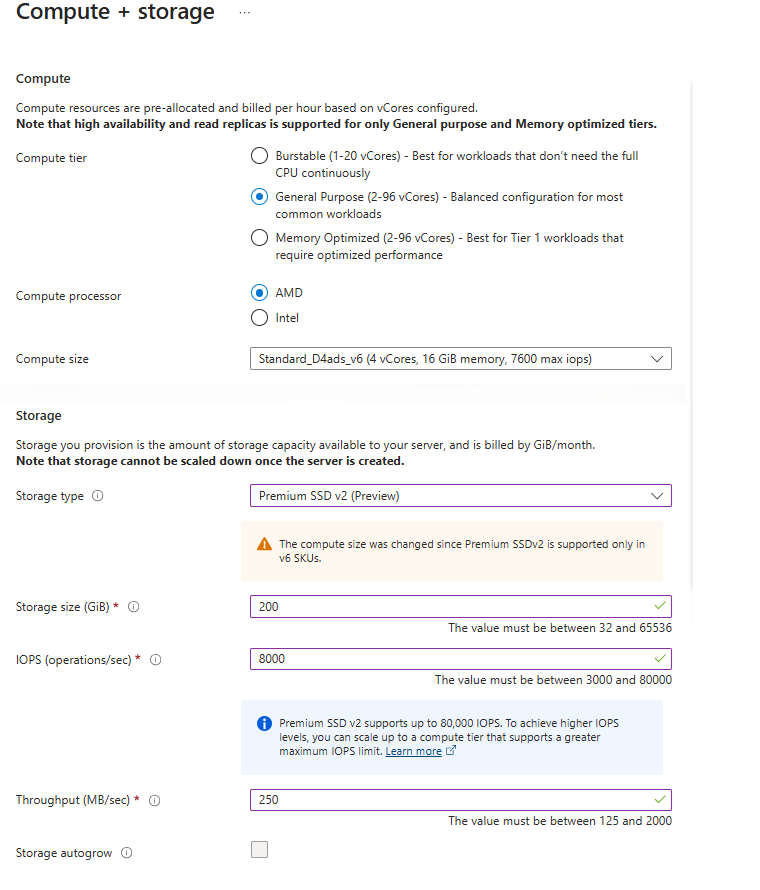
In the Azure portal, when you create a flexible server, from the Compute + storage section click Configure Server.
Go to the Storage section, select Storage type, and choose Premium SSD v2. Provide your desired disk size for Storage size (in GiB).
Select your IOPS as per your workload requirements. By default, 3000 IOPS are included free of cost for all premium SSD v2 disks.
Provide your Throughput details. By default, 125Mib/Sec throughput is included free of cost for all premium SSD v2 disks.
Click Save.
Limitations and considerations
- You can provision Premium SSD v2 by using only General Purpose and Memory Optimized compute tiers. Creating new Burstable compute tier with Premium SSD v2 isn't supported.
- Migration from Premium File Share to Premium SSD v2 isn't supported.
- Geo-redundant backups and storage auto-grow aren't supported.
- Read replicas aren't supported.
- Fabric Mirroring isn't supported.
- Customer-managed keys (CMK) aren't supported.
- Known issue: On servers with high availability enabled, some metrics can show inaccurate values in the Azure portal under load.