Note
Access to this page requires authorization. You can try signing in or changing directories.
Access to this page requires authorization. You can try changing directories.
Note
Access to operations center (preview) is part of Agents (preview) in Azure Copilot. To request access, see Manage access to Agents (preview) in Azure Copilot.
The Configuration menu of operations center helps you manage the configuration of your Azure VMs and Arc-enabled servers. It provides a streamlined onboarding experience to automatically enroll your machines for different Azure management and monitoring services. You can then use different pages in the menu to manage the configuration of your machines and updates to their client operating systems.
Manage the policies that define their configuration and track changes and operating system updates.
The Configuration menu uses the following Azure services:
Menu items
The Configuration menu includes the following menu items:
| Menu | Description |
|---|---|
| Configuration | Overview of resource policy compliance and update requirements. See Configuration overview for details. |
| Policy | Configure Azure Policy to enforce organizational standards and to assess compliance at-scale. The tabs across the top of this view correspond to menu items in the Policy menu. See Create and manage policies to enforce compliance for details. |
| Machine enrollment | Enable subscriptions for automatic Azure management service onboarding to your VMs and Arc-enabled servers. This page and functionality is unique to operations center. See Machine enrollment for details. |
| Update management | Use Azure Update Manager to manage and govern updates for all your machines. The tabs across the top of this view correspond to menu items in the Azure Update Manager menu. See About Azure Update Manager for details. |
| Machine configuration | Audit or configure operating system settings as code for VMs and Arc-enabled servers. See Understanding Azure Machine Configuration for details. |
| Machines changes + inventory | Use Change tracking and inventory to monitor changes and access detailed inventory logs for servers across your different virtual machines. The tabs across the top of this view correspond to menu items in the Change Tracking and Inventory Center menu. See Manage change tracking and inventory using Azure Monitoring Agent for details. |
| Recommendations | Azure Advisor recommendations related to configuration. See Azure Advisor portal basics for details. |
Configuration overview
The Configuration overview page provides a single-pane snapshot of policy compliance and update requirements across your Azure resources. Drill down on any of the tiles to open other pages in the Configuration menu for more details.
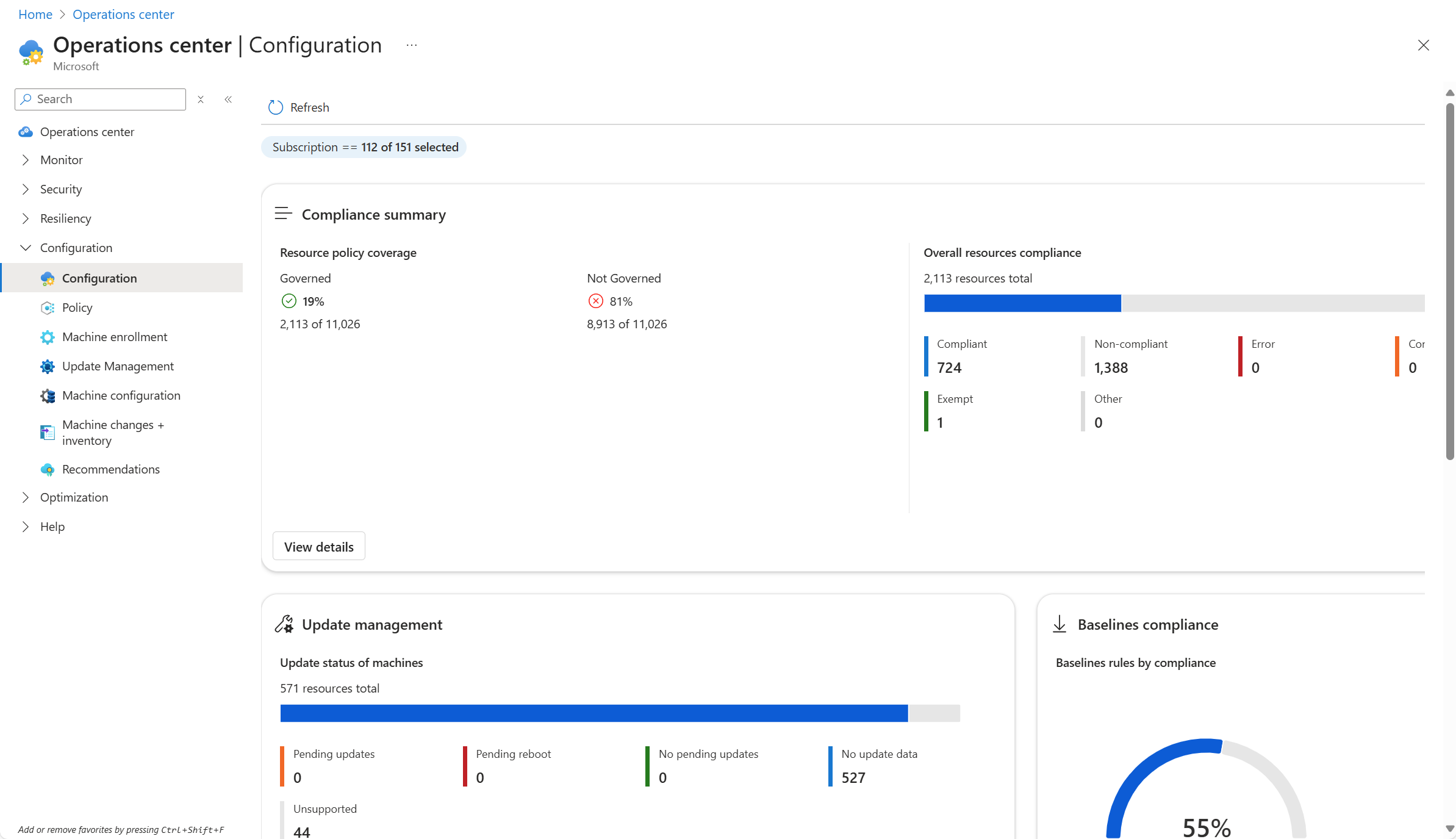
The Configuration overview page includes the following sections. Modify the scope of tiles by selecting the Subscription filter at the top of the page.
| Section | Description |
|---|---|
| Compliance summary | Summary of the policy compliance for all of your Azure resources. Click View details to open the Policy page for details on individual resources and to create remediations to improve compliance. |
| Update management | Summary of the update status for your virtual machines. Click View details to open the Update Management page. |
| Baselines compliance | Summary of the machines that that are compliant with baselines. Click View details to open the Machine configuration page. |
| Patch orchestration configuration of Azure virtual machines | Summary of the patching status for the machines inventoried in your subscription. This is similar to the tile in the Update Management page described at View update Manager status. |
| Machine assignments by compliance state | Summary of machines with policy assignments. Details are in the Assignments tab of the Machine configuration page. |
Machine configuration
The Machine configuration page provides several views to help you manage the policy definitions and assignments for your Azure VMs and Arc-enabled servers.
| Tab | Description |
|---|---|
| Overview | Shows assignments by compliance state |
| Definitions | Lists the policy definitions for guest configurations. This is the same as the Definitions tab in the Policy menu with a filter for Guest Configuration. |
| Baseline Rules (preview) | Lists Azure security baseline rules and the number of compliant machines. See Azure security baseline for Microsoft Defender for Cloud. |
| Assignments | Lists the policy assignments for guest configurations. This is the same as the Assignments tab in the Policy menu with a filter for Guest Configuration. |
| Windows recovery (preview) | Lists your Arc-enabled servers and their Windows recovery status. See Public Preview: Audit and Enable Windows Recovery Environment (WinRE) for Azure Arc-enabled Servers. |
Next steps
- Configure machine enrollment to automatically onboard your VMs and Arc-enabled servers to Azure management services.
- Learn more about operations center