Note
Access to this page requires authorization. You can try signing in or changing directories.
Access to this page requires authorization. You can try changing directories.
Azure Workload Center for Oracle brings workload management, configuration validation, health monitoring, and Azure Copilot guidance together for Oracle systems on Azure.
What is Azure Workload Center for Oracle?
Azure Workload Center for Oracle is an Azure experience for managing and operating Oracle workloads on Azure. It gives Azure an understanding of your Oracle system as a workload, so you don't have to manage each underlying Azure resource on its own.
When you enroll an existing Oracle system, Azure Workload Center for Oracle creates a Workload Virtual Instance (WVI). The WVI represents the Oracle system, its components, and the Azure resources on which it runs.
An Oracle system can run on Oracle AI Database@Azure or on Azure virtual machines (VMs). Oracle AI Database@Azure is a set of Oracle database services that Oracle runs in Azure datacenters.
Examples are Oracle Exadata Database Service on Dedicated Infrastructure and Oracle Autonomous AI Database. With Oracle on Azure VMs, you install and manage the Oracle database yourself on Azure VMs.
Important
Azure Workload Center for Oracle is currently in limited preview. To get access for your subscription, register your interest in the Azure Workload Center for Oracle preview. See the Supplemental Terms of Use for Microsoft Azure Previews for legal terms that apply to Azure features that are in beta, preview, or otherwise not yet released into general availability.
Benefits of Azure Workload Center for Oracle
With Azure Workload Center for Oracle, you can:
Simplify Oracle system management: Work from one view of your Oracle system, its components, and the Azure resources that support them.
Address configuration deviations early: Find deviations from Azure and Oracle on Azure recommended practices before they cause problems.
Detect and triage health issues faster: See when workload health changes and which components are affected, so you know where to investigate first.
Reduce investigation effort: Use the relationships between components, and their health signals, to understand the impact of an issue.
Move from findings to action: Ask the Azure Copilot "Run Oracle" Agent about configuration deviations and VM impact and get workload-aware guidance. You decide what to change and when.
What is a Workload Virtual Instance?
A Workload Virtual Instance (WVI) is a logical representation of an Oracle system running on Azure. The WVI is an Azure resource. It doesn't move or change the resources of the system.
A WVI groups the Azure resources of the system into workload components. Each component does one job in the system, such as running the database or the application tier.
For example, an Exadata system can have two components. The Database Services component contains the Exadata infrastructure, the VM cluster, and its databases. The Application Services component contains the application VMs.
The WVI records how each resource relates to the Oracle system and which role it plays. Azure Workload Center for Oracle uses this context to check the system and monitor its health as a whole.
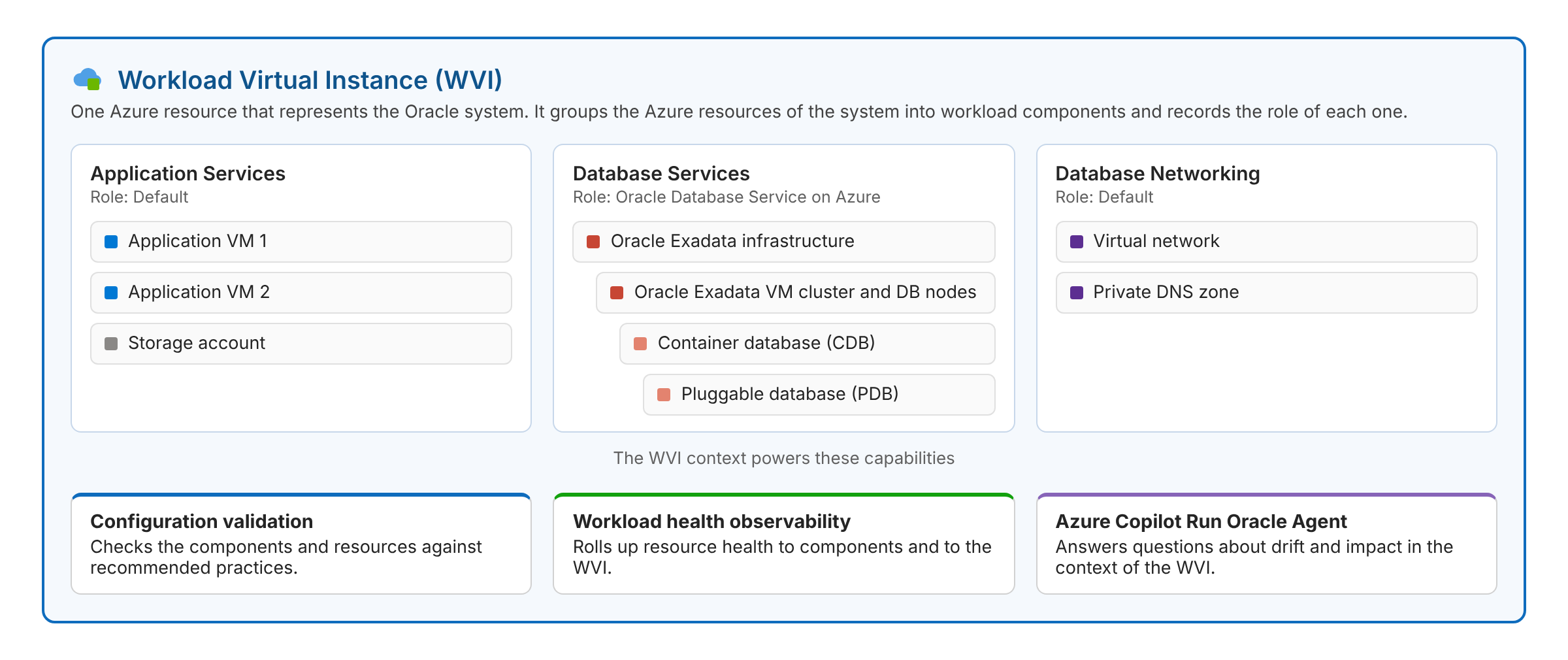
What does a Workload Virtual Instance enable?
Configuration validation
Configuration checks run automatically against your Oracle workload. You can see each deviation, its impact, and the steps to fix it.
Workload health observability
An Azure Monitor health model shows the health of your Oracle system, its components, and its resources. You can see where a degradation starts and which parts of the system it affects.
Workload-aware recommendations
Azure Advisor recommendations for the resources of the WVI show in the workload view. You can see which resources they affect without leaving the WVI.
Azure Copilot "Run Oracle" Agent
The agent uses the workload context to answer questions about configuration deviations. It also shows how Azure platform issues affect the VMs of your system.