Find answers to common questions about Azure Payment HSM v2.
General questions
In which regions is Azure Payment HSM v2 available?
During preview, Azure Payment HSM v2 is available in the West US and West Europe regions. For more information, see What is Azure Payment HSM v2?
Why does my audit log contain the entry **Daily self-tests passed**?
Daily self-tests passed is a normal audit log entry that the Utimaco Atalla Payment Module (APM) generates to satisfy PCI compliance requirements. The automated daily validation verifies HSM integrity, tamper protections, and cryptographic functions to confirm that the platform remains unchanged and compliant for payment processing workloads. For more information, see Configure audit logging for Azure Payment HSM v2.
How can I tell if mutual TLS is enabled?
The top-left corner of the SCA-W screen shows a connection icon and a green lock icon. Mutual TLS relies on the trusted certification authority (CA) certificates that you configure during onboarding. For more information, see Establish client trust.
How can I verify which Master File Keys are loaded?
A Master File Key (MFK) is a root key that protects and manages payment cryptographic keys within the HSM. In the SCA, connect to the HSM, select Utilities, and then select HSM Information. The HSM Information page displays the check digit for each loaded MFK type:
- The MFK field displays the check digit for a loaded 3DES MFK, such as
B196. - The AMK field displays the check digit for a loaded AES Master Key, the AES variant of the MFK, such as
B9BCAB7B63. - The page displays No keys loaded in the HSM if neither MFK type is present.
For more information, see Perform Azure Payment HSM v2 operations.
How can I tell if my Payment HSM has a security association?
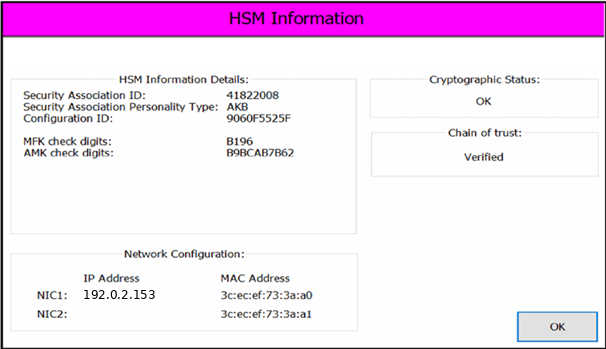
In the SCA, connect to the HSM, select Utilities, and then select HSM Information. The Security Association ID field displays the existing security association's ID number or None [factory] if no security association is present.
The following image shows a Security Association ID number of 41822008.
For more information, see Perform Azure Payment HSM v2 operations.
Customer onboarding
Is Azure Payment HSM v2 available at no charge during preview?
Yes. Azure Payment HSM v2 is available at no charge during preview and uses a gated onboarding model. To deploy or use the service, engage your Microsoft account manager or Microsoft Customer Support to have your Azure subscription registered and enabled. You must also register with Utimaco by using your corporate email address and business delivery address to establish an account for entitlement and support. If you don't have a Utimaco account, go to the Utimaco portal sign-in page and select Create Account.
After you register, Utimaco provides an onboarding welcome package that includes the Secure Configuration Assistant (SCA) application, C3 Key Loading Device (KLD), smart cards, and related materials. Verify that you received all package contents before you continue with onboarding activities. For more information, see Quickstart: Create a Payment HSM v2.
Support
How do I get support for Azure Payment HSM v2?
You must have a Utimaco account, an Azure Payment HSM v2 support entitlement, and an assigned Microsoft account manager. Microsoft provides support for gated onboarding, provisioning, configuration, and network access through Help + support in the Azure portal. Utimaco provides support for the Atalla Payment Module (APM), Secure Configuration Assistant (SCA) application, C3 Key Loading Device (KLD), and smart cards through the Utimaco support portal. For more information, see Quickstart: Create a Payment HSM v2.
Does Azure Payment HSM v2 have scheduled maintenance windows?
No, Azure Payment HSM v2 doesn't have scheduled maintenance windows. Microsoft might perform maintenance for necessary upgrades or to replace faulty hardware and notify you in advance of any anticipated impact. For more information, see What is Azure Payment HSM v2?
How are the HSMs used in Azure Payment HSM v2 protected?
Azure datacenters have extensive physical and procedural security controls. The HSMs are hosted in a restricted-access area of the datacenter with physical access controls and video surveillance. For more information, see Azure facilities, premises, and physical security.
Security and compliance
Do I share my Azure Payment HSM v2 resource with other Azure customers?
No. Azure Payment HSM v2 gives you exclusive administrative access to a single-tenant HSM. For more information, see What is Azure Payment HSM v2?
Can Microsoft or anyone at Microsoft access keys in my Azure Payment HSM v2 resource?
No. Microsoft doesn't have access to the keys stored in customer-allocated HSMs. For more information, see What is Azure Payment HSM v2?
Where does Azure Payment HSM v2 store customer data?
All key material and data remain within your HSM. Each Azure Payment HSM v2 cluster is dedicated to a single customer who has administrative control. Microsoft doesn't have access to customer data. For more information, see What is Azure Payment HSM v2?
Does Azure Payment HSM v2 support FIPS 140-3 Level 3?
Yes. Azure Payment HSM v2 uses HSM security infrastructure certified to FIPS 140-3 Level 3. For more information, see What is Azure Payment HSM v2?
Which PCI standards does Azure Payment HSM v2 support?
Azure Payment HSM v2 uses security infrastructure certified to PCI DSS, PCI 3DS, and PCI PIN standards. For more information, see What is Azure Payment HSM v2?