Note
Access to this page requires authorization. You can try signing in or changing directories.
Access to this page requires authorization. You can try changing directories.
Azure Database Migration Service (DMS) provides a managed experience for moving Oracle data to Azure Database for PostgreSQL. You configure and monitor the migration through the Azure portal without deploying migration infrastructure or installing migration software.
DMS handles data movement, not schema or application conversion. Before copying data, use the Oracle schema conversion tool in the PostgreSQL extension for Visual Studio Code to convert your Oracle schema and deploy the destination objects.
Key capabilities
- Managed migration: DMS provisions and manages the infrastructure used to copy data.
- Parallel data copying: Migration workers use multiple connections to read Oracle data and write it to the target.
- Schema-level selection: Choose the Oracle schemas you want to migrate and map them to destination schemas.
- Public and private connectivity: Configure supported network paths from DMS to the source and target.
- Migration monitoring: Track validation checks, migration status, and schema- and table-level copy metrics in the Azure portal.
Architecture
DMS sits between the Oracle source and the PostgreSQL target. Its migration workers connect to both databases to read and copy data.
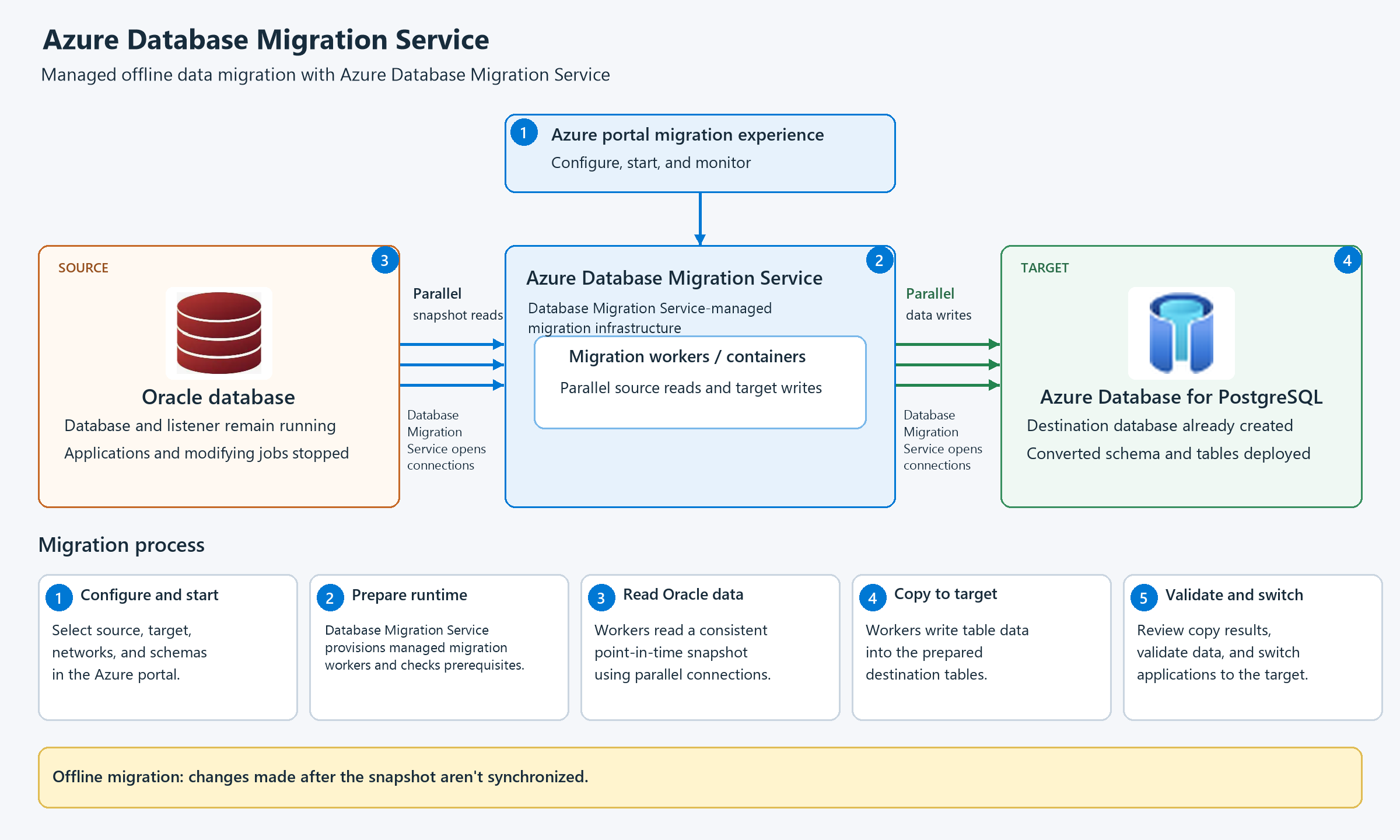
| Component | Role |
|---|---|
| Oracle source | Contains the table data you want to migrate. The database and listener remain running during migration. |
| Azure portal | Provides the experience for configuring, starting, and monitoring the migration. |
| Azure DMS | Provisions the migration runtime and runs workers that read source data and write it to the target. |
| Azure Database for PostgreSQL target | Contains the destination database and converted schema objects prepared before migration. |
How it works
- Configure the migration. Specify the source and target, configure connectivity, and choose the schemas and destination mappings.
- Prepare the runtime. DMS provisions the managed migration workers. Connection tests and prerequisite checks help identify issues before data copying.
- Read the source. Workers read Oracle table data from a consistent point-in-time snapshot using parallel connections.
- Copy the data. Workers write the data into the prepared destination tables. Monitor progress and inspect schema- and table-level results in the portal.
- Validate and switch. Independently validate the migrated data and application behavior before switching applications to the target.
Migration prerequisite and compatibility checks aren't a comparison of every source and target value. A successful copy should be followed by independent data validation.
Connectivity and security
DMS needs network access to both the Oracle source and the PostgreSQL target. It supports two connectivity options:
- Public connectivity: DMS connects through public database endpoints. Allow list the DMS outbound IP addresses shown in the Azure portal migration wizard in the applicable database and network firewalls.
- Private connectivity: DMS connects through private network paths. Depending on where your databases run, this option can involve virtual network peering, private endpoints, or VPN or ExpressRoute connectivity for Oracle sources outside Azure.
For either option, database hostnames must resolve correctly from the DMS network, and routing and firewall rules must allow access to the configured database ports.
Connection encryption is separate from network access. For Oracle, use TCPS, which uses TLS to encrypt the connection and is recommended. TCP is available when TCPS isn't configured, but it doesn't itself provide TLS encryption. Configure TLS for the PostgreSQL target as required by the service. Private connectivity doesn't replace transport encryption.
Plan an offline migration
Offline migration copies a point-in-time snapshot of your Oracle data. Changes made to the source after the snapshot aren't synchronized to the target.
Stop applications and scheduled jobs that modify the data you want to migrate before starting the copy, but keep the Oracle database and listener running. Applications remain unavailable until copying, validation, and the switch to the target are complete.
Rehearse the migration before scheduling production downtime. Use the rehearsal to plan a migration window that includes data copying, validation, application switching, and contingency time.
Where data migration fits
Data migration is a key part of moving an Oracle application to PostgreSQL: it brings your existing business data into the converted database. Coordinate it with schema conversion, application conversion, and validation so the target is ready before you switch applications.
The following activities work together to complete the migration:
| Activity | What you do |
|---|---|
| Schema conversion | Convert Oracle schema objects to PostgreSQL-compatible objects and deploy them before copying data. |
| Data migration | Use DMS to copy Oracle table data into the prepared destination tables. |
| Application conversion | Update and test Oracle-specific application code before switching applications. This work can proceed in parallel with migration preparation. |
| Validation and application switching | Verify the migrated data and application behavior, then direct applications to the target. |