Note
Access to this page requires authorization. You can try signing in or changing directories.
Access to this page requires authorization. You can try changing directories.
Azure Automation is a service that runs management tasks on your behalf. You define scripts, called runbooks, that you want to run, and Azure Automation provides the infrastructure to execute those scripts. This article focuses on process automation, which is the core capability of the service. Hybrid runbook workers, which run on customer-managed infrastructure, are outside the scope of this article.
When you use Azure, reliability is a shared responsibility. Microsoft provides a range of capabilities to support resiliency and recovery. You're responsible for understanding how those capabilities work within all of the services you use, and selecting the capabilities you need to meet your business objectives and uptime goals.
This article describes how to make Azure Automation resilient to various potential outages and problems, including transient faults, availability zone outages, region outages, and service maintenance. It also describes backup and restore options, and key information about the Azure Automation service-level agreement (SLA).
Production deployment recommendations for reliability
For production workloads that use process automation, follow these recommendations:
Handle transient faults that occur when your runbooks interact with Azure services and APIs by adding appropriate retry logic to your scripts.
Design your runbooks to be resilient to interruptions. Use checkpoints to maintain progress across job restarts, and if you need to store state, use external storage.
Reliability architecture overview
This section describes some of the important aspects of how the service works that are most relevant from a reliability perspective. The section introduces the logical architecture, which includes some of the resources and features that you deploy and use. It also discusses the physical architecture, which provides details on how the service works under the covers.
Logical architecture
When you deploy Azure Automation, you create an automation account, which is a logical container for resources that run your automation.
- Runbooks, which represent the work to be performed. Textual runbooks are scripts written in PowerShell or Python. Graphical runbooks are built using a graphical editor.
- Resources that runbooks share, including modules, connections, credentials, certificates, and variables.
- Resources that initiate runbook execution, including schedules and watchers.
For more information about these resources, see Runbook execution in Azure Automation.
This article covers the reliability and resiliency of these capabilities, which are part of process automation in Azure Automation.
Physical architecture
Runbooks execute on compute infrastructure. Two deployment models exist for process automation:
Cloud jobs (Microsoft-managed): By default, runbooks run on Microsoft-provided cloud infrastructure. Microsoft is responsible for the high availability and management of this infrastructure. When you submit a runbook job, Azure Automation allocates a cloud job from its pool of available compute resources, executes the runbook, and then returns the resource to the pool.
Cloud jobs might sometimes be interrupted while running. Design your runbooks on the assumption that a job might restart on different infrastructure and that any data written to temporary storage on the prior instance is no longer accessible.
Hybrid runbook workers: You can optionally configure your own compute infrastructure (virtual machines in Azure, other clouds, or on-premises) to run runbooks. When you use hybrid runbook workers, you're responsible for configuring them to meet your reliability requirements. Hybrid runbook workers are outside the scope of this article.
Resilience to transient faults
Transient faults are short, intermittent failures in components. They occur frequently in a distributed environment like the cloud, and they're a normal part of operations. Transient faults correct themselves after a short period of time. It's important that your applications can handle transient faults, usually by retrying affected requests.
All cloud-hosted applications should follow the Azure transient fault handling guidance when they communicate with any cloud-hosted APIs, databases, and other components. For more information, see Recommendations for handling transient faults.
You're responsible for writing runbooks that handle transient errors in the services and APIs they interact with. For textual runbooks, implement retry logic by using loops and error handling. For guidance and examples, see Handle transient errors in a time-dependent script. For graphical runbooks, configure retry behavior for activities in your workflow. For configuration details, see Retry activity in graphical runbooks.
Infrastructure maintenance or other platform events can interrupt runbook jobs. Design your runbooks to handle these interruptions:
Implement checkpoints. For PowerShell workflow runbooks, use checkpoints to save progress at key points in your workflow. If a job is interrupted and restarted, it can resume from the last checkpoint rather than starting over. For more information, see Use checkpoints in a workflow.
Understand job limits. Cloud jobs have fair-share limits on runtime duration. For details about job execution limits and how they're enforced, see Runbook execution.
Store persistent state externally. Jobs don't maintain state between runs. If a job is interrupted and restarts on another instance, anything written to temporary storage by the first run might be lost. If you need to persist data between job runs, store it in external storage, like Azure Blob Storage or a database.
Resilience to availability zone failures
Availability zones are physically separate groups of datacenters within an Azure region. When one zone fails, services can fail over to one of the remaining zones.
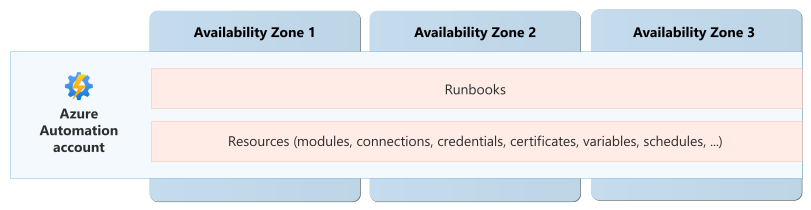
In supported regions, Automation accounts and cloud jobs are zone-redundant, which means the service spreads your resources across multiple availability zones. Microsoft automatically enables zone redundancy and doesn't require any configuration.
Requirements
Region support: When you deploy an automation account into one of the following regions, it's automatically zone-redundant:
| Americas | Europe | Middle East | Africa | Asia Pacific |
|---|---|---|---|---|
| Brazil South | France Central | Israel Central | South Africa North | Australia East |
| Canada Central | Germany West Central | Qatar Central | Central India | |
| Central US | Italy North | China North 3 | ||
| East US | North Europe | East Asia | ||
| East US 2 | Norway East | Japan East | ||
| South Central US | Poland Central | Korea Central | ||
| USGov Virginia | Sweden Central | Southeast Asia | ||
| West US 2 | UK South | |||
| West US 3 | West Europe |
For the current list of supported regions, see Availability zones support for Azure Automation.
Cost
There's no extra charge for zone redundancy. For process automation, billing is based on the length of time that your jobs and watchers run. For more information, see Azure Automation pricing.
Configure availability zone support
When you create an automation account in a supported region, it's automatically zone-redundant. You can't disable zone redundancy. For more information, see Availability zones support for Azure Automation.
Behavior when all zones are healthy
This section describes what to expect when your automation account is zone-redundant and all availability zones in the region are operational.
Cross-zone operation: Automation account management operations and cloud jobs automatically distribute across availability zones in the region. A request or job might be handled by any instance in any availability zone.
Cross-zone data replication: Automation account configuration, runbook scripts, and other resources that you deploy to your automation account are synchronously replicated across multiple availability zones.
Behavior during a zone failure
This section describes what to expect when your automation account is zone-redundant and there's an outage in one of the availability zones in the region.
- Detection and response: The Azure Automation platform is responsible for detecting a failure in an availability zone. You don't need to do anything to initiate a zone failover.
- Notification: Microsoft doesn't automatically notify you when a zone is down. However, you can use Azure Service Health to understand the overall health of the service, including any zone failures, and you can set up Service Health alerts to notify you of problems.
Active requests: Any job runs in progress in the unhealthy zone might be interrupted. Azure Automation automatically starts a new job run by using infrastructure in healthy zones. Design your runbooks to be resilient to transient faults and interruptions so that they can restart safely.
Expected data loss: Job runs don't persist state, so a zone failure isn't expected to cause data loss for in-progress jobs. If a job needs to store data that it can use to recover from interruption, like checkpoints, store that information in a persistent cloud storage service like Azure Storage or a database.
Automation account configuration and runbook data is replicated across zones and remains accessible even when a zone is unavailable.
Expected downtime: During a zone outage, your Automation account might experience a brief interruption while the service detects the failure and redistributes workload to healthy zones.
Redistribution: The service automatically rebalances capacity across the remaining healthy zones. New job runs, watchers, and schedules continue to run on infrastructure in healthy zones. Recovery doesn't depend on the failed zone returning to service.
Zone recovery
When a failed zone returns to service, Azure Automation automatically reintegrates it into the zone rotation. No action is required from you. The service monitors the zone's health and redistributes workload back across all zones as normal operations resume.
Test for zone failures
Azure Automation manages traffic routing, failover, and zone recovery for zone-redundant resources. You don't need to initiate anything, and you don't need to validate availability zone failure processes. Test your runbooks to confirm that they're resilient to interruptions.
Resilience to region-wide failures
Azure Automation is a single-region service. If the region becomes unavailable, your Automation account is also unavailable.
Custom multiregion solutions for resiliency
You can deploy separate Automation accounts into multiple regions and switch between them when needed. You're responsible for deploying the accounts to each region, configuring them appropriately, distributing requests among the accounts, and handling failover if a region is unavailable. For detailed information about approaches you can consider, see Disaster recovery for Azure Automation.
Backup and restore
Azure Automation doesn't provide built-in backup for your Automation account configuration or runbook content. Keep your own copies outside the service so that you can redeploy them if needed.
Use infrastructure as code (IaC) for automation account configuration. Define automation accounts and related resources in Bicep files, ARM templates, or Terraform. Store the templates in source control and use your deployment pipeline to recreate the environment in the same or another region. Include certificates, variables, schedules, and credential references in your artifacts and deployment processes. Store secrets in services such as Azure Key Vault rather than embedding values directly in runbook code.
Store runbook scripts in source control. Keep the source for PowerShell and Python runbooks in a source control system like Git. Use versioning, branching, and pull request review to protect script quality and enable rollback to known-good versions.
Back up state from the appropriate data store. Jobs don't retain state. If you need to keep detailed job logs or any other data that your runbooks generate, store it in another Azure storage or database service and back it up from there.
Resilience to accidental deletion
If you accidentally delete an Automation account, you might be able to restore it within a limited time window. For more information, see Restore a deleted Automation account.
Resilience to service maintenance
Microsoft regularly applies service updates and performs other maintenance. The Azure platform handles these activities automatically, ensuring that maintenance is seamless and transparent to you. No downtime is expected during maintenance events unless you've been advised through Azure Service Health planned maintenance.
Service-level agreement
The service-level agreement (SLA) for Azure services describes the expected availability of each service and the conditions that your solution must meet to achieve that availability expectation. For more information, see SLAs for online services.