Note
Access to this page requires authorization. You can try signing in or changing directories.
Access to this page requires authorization. You can try changing directories.
Infrastructure Resiliency Manager provides capabilities to assess, improve, and test resilience across your Azure resources and applications. This article explains which capabilities are available at no additional cost, how usage plans determine where charges are billed, and when a service group incurs charges.
For current rates, see Infrastructure Resiliency Manager pricing.
Free and paid capabilities
You can use the following capabilities at no additional Infrastructure Resiliency Manager cost without enrolling a service group in a usage plan:
- Assign resiliency goals to service groups that represent your applications.
- View resilience posture at scale across resources and service groups.
- Review resiliency recommendations.
Advanced capabilities, including Availability Zone Down Drills and Recovery Orchestration Plans, are paid capabilities. Before you set up drills or recovery plans, enroll the service group in a usage plan.
Important
A service group with only goals assigned is still billed if it's enrolled in a valid usage plan. Goals and recommendations don't require a usage plan, but assigned goals count as a resiliency artifact for billing when the service group is enrolled. To use only the free capabilities without these charges, remove the service group's usage plan enrollment.
How usage plans determine the billing subscription
A service group can contain resources across multiple subscriptions and isn't itself associated with a particular subscription. A usage plan lets you specify the Azure subscription to which the service group's Infrastructure Resiliency Manager usage is charged.
When you create a usage plan, you select its subscription, resource group, and name. Charges are billed to that subscription against the usage plan's Azure Resource Manager (ARM) resource ID.
You can enroll multiple service groups in the same usage plan. Each service group's usage is evaluated for billing, even when the groups share a plan.
When a service group is billed
A service group is billed at the published rates only when both of the following conditions are met:
- The service group is enrolled in a valid usage plan.
- The service group is onboarded to Infrastructure Resiliency Manager: it has at least one resiliency artifact, such as assigned goals, a recovery plan, or a drill.
Creating a service group alone doesn't meet the onboarding condition.
| Usage-plan enrollment | Resiliency artifacts on the service group | Infrastructure Resiliency Manager charges |
|---|---|---|
| Not enrolled | Goals assigned | No. Goals, posture, and recommendations are available at no additional cost without enrollment. |
| Enrolled in a valid usage plan | None | No. Enrollment alone doesn't meet both billing conditions. |
| Enrolled in a valid usage plan | Goals only | Yes. Assigned goals meet the artifact condition, even without drills or recovery plans. |
| Enrolled in a valid usage plan | A drill or recovery plan, with or without goals | Yes. The service group meets both billing conditions. |
Billing depends on the presence of resiliency artifacts, not on whether you execute a drill or recovery plan.
Hourly billing and proration
Billing is calculated hourly for the time during which both billing conditions are met. If the service group remains enrolled in a valid usage plan and has one or more resiliency artifacts throughout the month, it's charged at the applicable monthly rate on the pricing page.
If all resiliency artifacts are deleted during the month, the total charge is prorated based on the actual number of hours during which the service group met both conditions.
For example:
- Artifacts present for the full month: A service group is enrolled in a valid usage plan and has assigned goals and a recovery plan throughout the month. The service group is charged at the applicable published monthly rate, even if the recovery plan isn't executed.
- All artifacts deleted midmonth: A service group is enrolled in a valid usage plan and has resiliency artifacts from the start of the month. Midmonth, you delete all assigned goals, recovery plans, and drills. If no artifacts are added for the rest of the month, the charge is prorated for the actual hours before the last artifact was deleted.
- Goals remain after deleting advanced artifacts: You delete all drills and recovery plans but keep assigned goals. If the service group remains enrolled in a valid usage plan, it continues to incur charges because goals are still present.
To retain goals, posture, and recommendations without Infrastructure Resiliency Manager charges, remove the service group's usage-plan enrollment. If multiple service groups share the plan, remove only the relevant service group's enrollment rather than deleting the shared usage plan.
Enroll a service group in a usage plan
To enroll a service group in the Azure portal, follow these steps:
In the Azure portal, go to Resiliency > Service Groups under the Infrastructure Resiliency section.
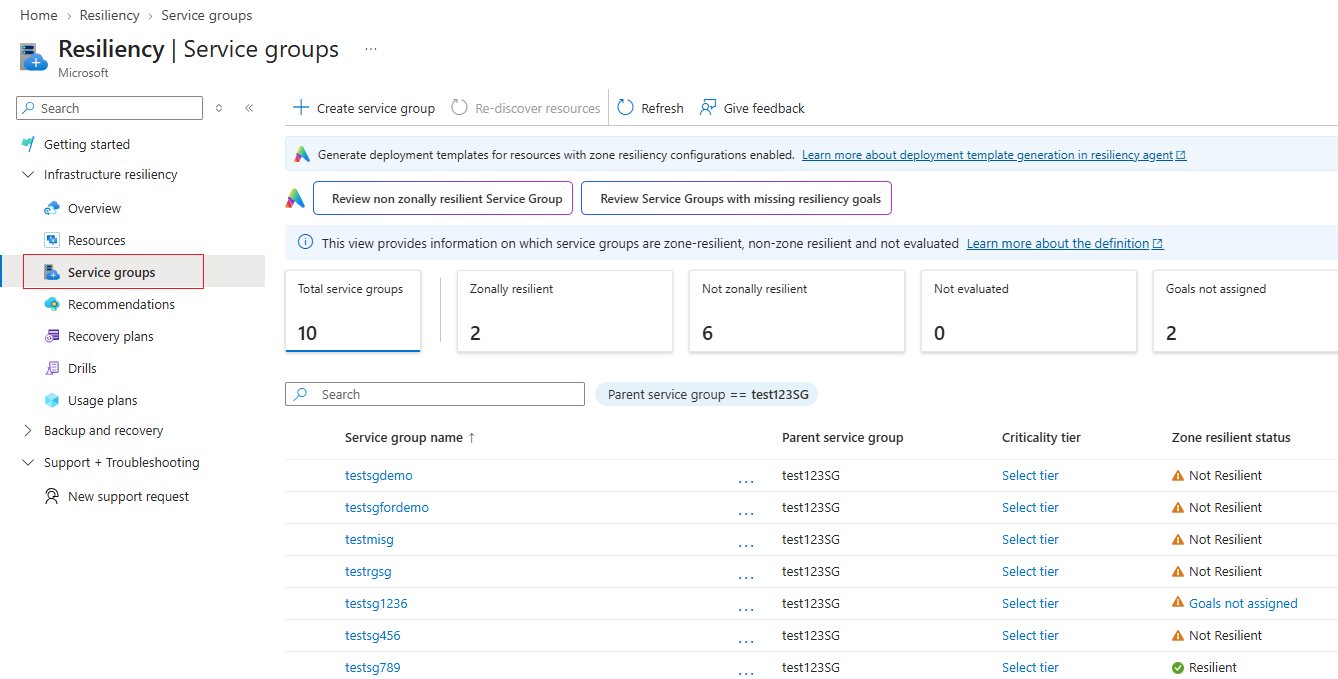
Search for and select your service group.
In the service group's menu, under Resiliency, select Usage Plans.
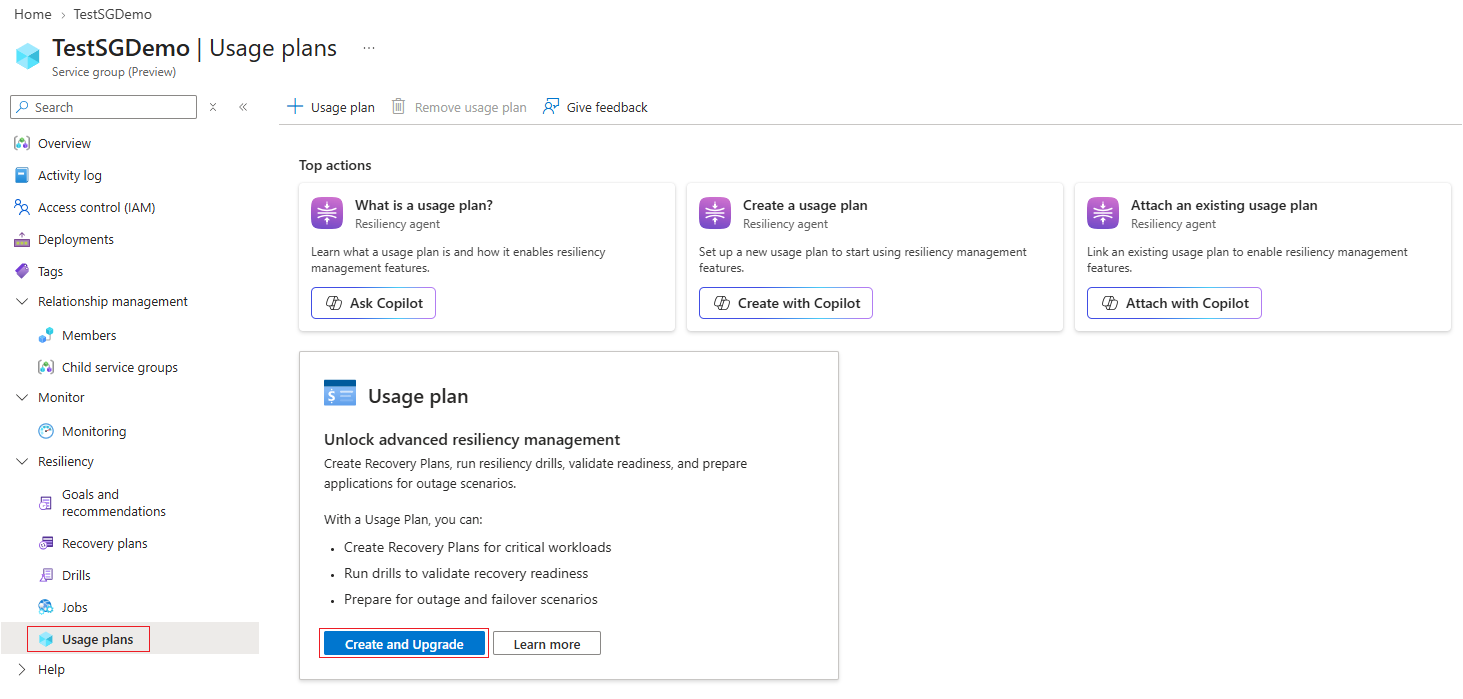
Select Create and Upgrade, and then choose whether to use a new usage plan or an existing usage plan:
- New usage plan: Select a subscription and resource group, and enter a name for the usage plan. The subscription you select is charged for the service group's usage against this usage plan's ARM resource ID.
- Existing usage plan: Select the usage plan to use for the service group. Usage is charged to the subscription associated with that plan.
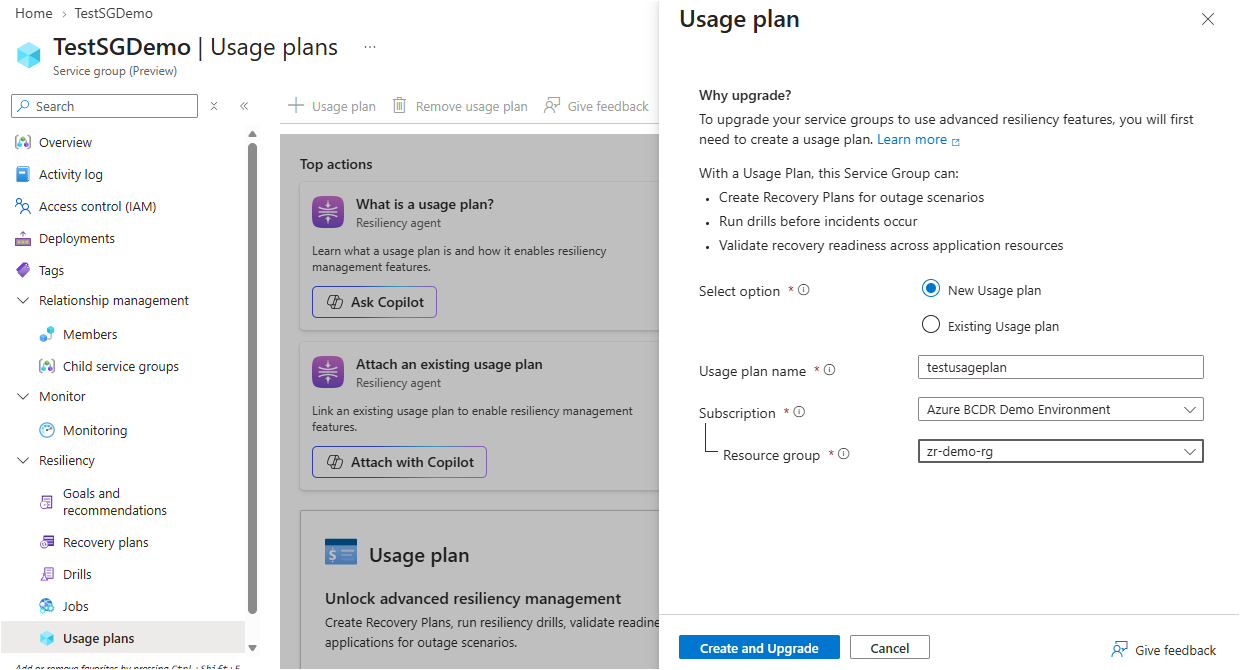
Confirm your selection. For a new plan, this step creates the usage plan and enrolls the service group. For an existing plan, this step enrolls the service group in the selected plan.
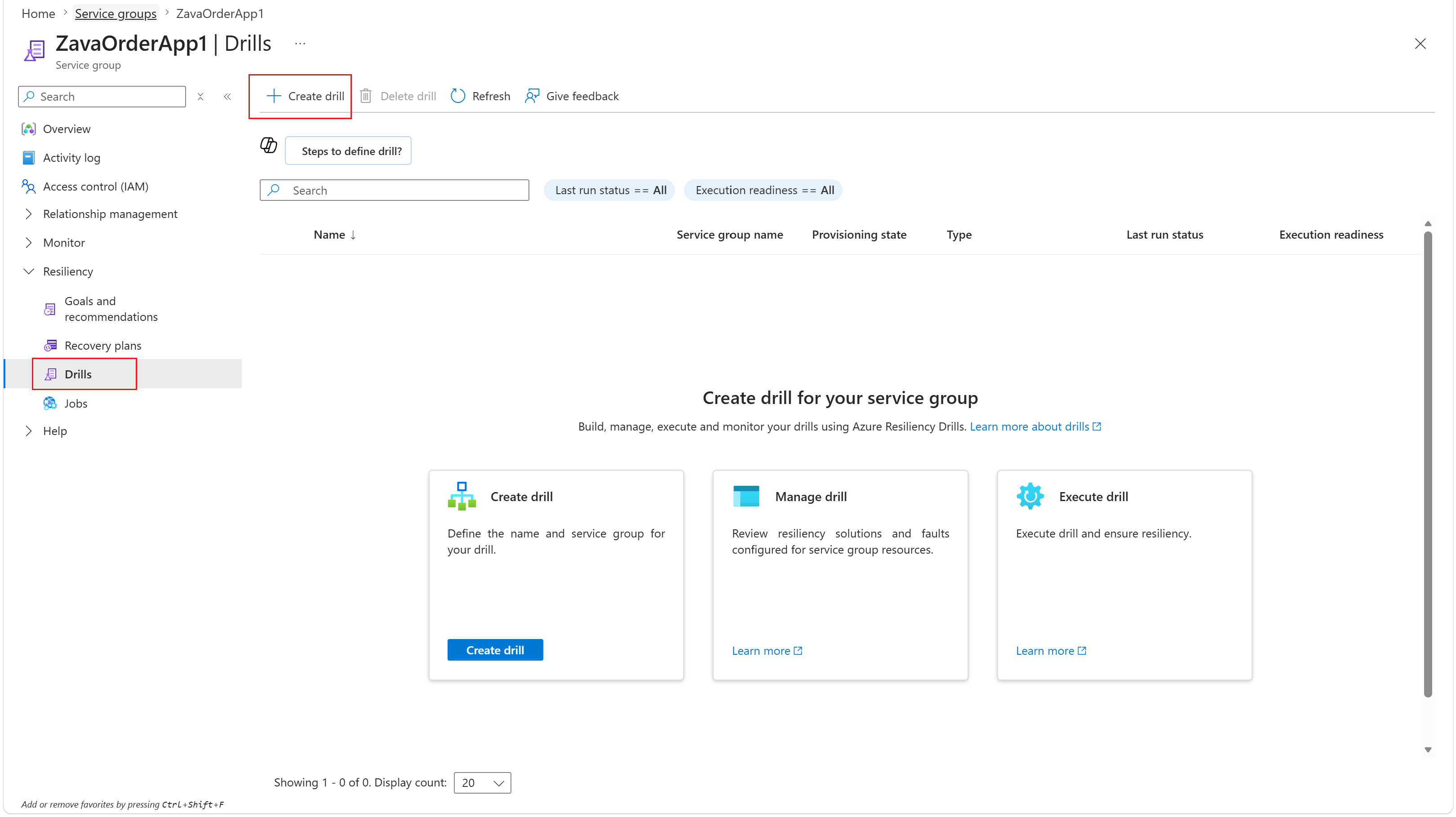
You can repeat these steps for other service groups and select the same existing usage plan.
After enrollment, you can define a zone down drill or create and configure a Recovery Orchestration Plan.
Important
If the service group already has assigned goals, enrolling it in a valid usage plan meets both billing conditions. You don't need to create or execute a drill or recovery plan for charges to begin.
Identify service group charges in Cost Management
In interfaces such as Azure Cost Management, Infrastructure Resiliency Manager usage is billed against the usage plan's resource ID, rather than the service group's ID.
When multiple service groups share a usage plan, use the tags field on the usage record to identify the service group associated with each line item. This method lets you attribute usage to individual applications while charging the same subscription through a shared usage plan.
Troubleshoot usage plan creation
If usage plan creation appears stuck, registration of the Microsoft.AzureResilienceManagement resource provider might not be complete in the subscription where you're creating the plan.
To complete registration and retry enrollment:
- In the Azure portal, go to Subscriptions and select the subscription where you want to create the usage plan.
- Under Settings, select Resource providers.
- Search for Microsoft.AzureResilienceManagement.
- If the provider isn't registered, select it and select Register. If registration is already in progress, wait for it to complete.
- Wait until the registration status shows Registered.
- Return to the service group's Resiliency > Usage Plans page and retry usage plan creation and enrollment.