Note
Access to this page requires authorization. You can try signing in or changing directories.
Access to this page requires authorization. You can try changing directories.
Important
Route maps for Azure Route Server is currently in preview. See the Supplemental Terms of Use for Microsoft Azure Previews for legal terms that apply to Azure features that are in beta, preview, or otherwise not yet released into general availability.
Route maps for Azure Route Server gives you control over route advertisements and routing behavior. By using route maps, you can manage the routing that enters and leaves Azure Route Server BGP peerings with network virtual appliances (NVAs), ExpressRoute gateway connections, and VPN gateway connections in the same virtual network.
You can configure route maps by using the Azure portal. For configuration steps, see How to configure route maps.
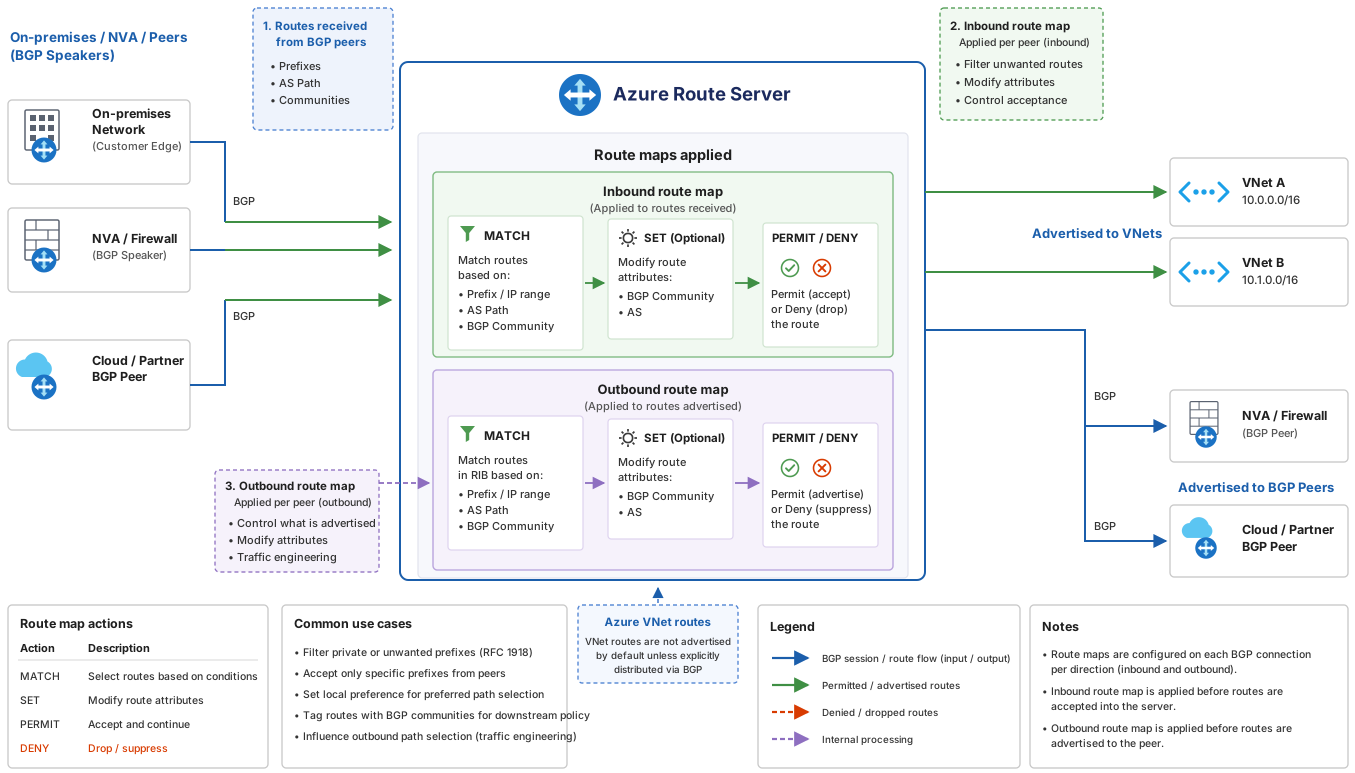
The following diagram shows how inbound and outbound route maps process routes as they enter and leave Azure Route Server. Each route map evaluates match conditions, applies optional attribute modifications, and then permits or denies the route before it's advertised to virtual networks or BGP peers.
Why use route maps?
Route maps provides the following key benefits:
- Route summarization: Summarize routes when your on-premises networks connect to your virtual network through ExpressRoute or VPN, and you're limited by the number of routes that can be advertised to or from Azure Route Server.
- Route control: Control routes entering and leaving your Azure Route Server deployment between on-premises networks, NVAs, and virtual networks.
- Path selection: Modify BGP attributes such as AS-PATH to make a route more or less preferable. When destination prefixes are reachable through multiple paths, you can use AS-PATH to control best path selection.
- Route tagging: Tag routes by using the BGP Community attribute to manage routes more easily.
Where you can apply route maps
Azure Route Server acts as a routing engine that manages route distribution between NVAs, virtual network gateways, and Azure's routing infrastructure. Route maps lets you perform route aggregation, route filtering, and BGP attribute modification (AS-PATH and Community) to manage routes and routing decisions.
You can configure route maps for the following resources:
- BGP peerings: A route map can be applied to BGP peerings between Azure Route Server and your network virtual appliances (NVAs).
- ExpressRoute gateway connection: The route server's connection to the ExpressRoute gateway in the same virtual network.
- VPN gateway connection: The route server's connection to the VPN gateway in the same virtual network.
You can apply a route map in the inbound or outbound direction on any of these connections:
- Inbound route map: Applied to routes received by Azure Route Server from a BGP peering, ExpressRoute gateway, or VPN gateway.
- Outbound route map: Applied to routes sent from Azure Route Server to a BGP peering, ExpressRoute gateway, or VPN gateway.
Important
You can apply only one route map per direction (inbound or outbound) on each connection. Outbound route maps modify route advertisements only and don't influence Azure Route Server's best-path selection, because path selection happens before outbound route maps are applied.
Route maps supports the following route manipulation capabilities:
- Route aggregation: Reduce the number of routes coming in or out of a connection by summarizing them. For example, 10.2.1.0/24, 10.2.2.0/24, and 10.2.3.0/24 can be summarized as 10.2.0.0/16.
- Route filtering: Exclude routes advertised or received from BGP peerings, ExpressRoute connections, and VPN connections.
- BGP attribute modification: Modify AS-PATH and BGP Communities. You can add or set ASNs (Autonomous System Numbers).
What are route-map rules?
A route map is an ordered sequence of one or more route-map rules that Azure Route Server applies to routes it receives or sends. Route-map rules consist of match conditions and actions.
When you configure a route-map rule, use the Next step setting to specify whether routes that match this rule continue to be processed by subsequent rules in the route map, or stop (terminate). After you configure route-map rules for the route map, you can apply the route map to BGP peerings and gateway connections.
Consider the following points:
- You can configure any number of route modifications in a route-map rule. It's possible to have a route map without any rules.
- If a route map rule has no actions, the routes remain unaltered.
- If a route map rule has multiple modifications, Azure applies all configured actions to the route. The order of the actions isn't relevant.
- If a route doesn't match all the match conditions in a rule, the route isn't considered a match for that rule. The route passes to the next rule in the route map, regardless of the Next step setting.
- To avoid unintended traffic flows, configure rules to match only the routes you intend.
Match conditions
Route maps lets you match routes by using route prefix, BGP community, and AS-Path. Match conditions are the conditions that a processed route must meet to be considered a match for the rule.
You can configure any number of match conditions in a route-map rule.
If you create a route map without a match condition, all routes from the applied connection are matched.
For example, a BGP peering has routes 10.2.1.0/24, 10.2.2.0/24, and 10.2.3.0/24 being advertised from an NVA to Azure Route Server. A route map without a match condition matches 10.2.1.0/24, 10.2.2.0/24, and 10.2.3.0/24.
If a route map has multiple match conditions, a route must meet all the match conditions to be considered a match for the rule. The order of the match conditions isn't relevant.
For example, a BGP peering has routes 10.2.1.0/24 with an AS-Path of 65535 and a BGP community of 65535:100 being advertised from an NVA to Azure Route Server. If you create a route-map rule with a match condition for prefix 10.2.1.0/24, and another match condition for AS-Path 65535, both conditions need to be met to be considered a match.
Azure Route Server supports multiple rules. If the first rule isn't matched, then the second rule is evaluated. Select Terminate in the Next step field to end the list of rules in the route map. When no rule is matched, the default is to allow, not to deny.
Actions
Match conditions select a set of routes. After the routes are selected, you can drop or modify them. You can configure the following actions:
- Drop: Drop all the matched routes (filter them out) from the route advertisement. For example, a BGP peering advertises routes 10.2.1.0/24, 10.2.2.0/24, and 10.2.3.0/24 from an NVA to Azure Route Server. You can configure a route map to drop 10.2.1.0/24 and 10.2.2.0/24, so only 10.2.3.0/24 is advertised.
- Modify: Modify routes by aggregating route prefixes or changing route BGP attributes. For example, a BGP peering has routes 10.2.1.0/24 with an AS-Path of 65535 and a BGP community of 65535:100. You can configure a route map to add the AS-Path of [64510, 64511].
Supported configurations for route-map rules
The following tables show the match conditions and actions that route maps supports.
Match conditions
| Property | Criterion | Value (example) | Interpretation |
|---|---|---|---|
| Route-prefix | Equals | 10.1.0.0/16, 10.2.0.0/16, 10.3.0.0/16 | Matches these routes only. Specific prefixes underneath these routes aren't matched. |
| Route-prefix | Contains | 10.1.0.0/16, 192.168.16.0/24 | Matches all specified routes and all prefixes underneath them. For example, 10.1.5.0/24 is underneath 10.1.0.0/16. |
| Community | Equals | 65001:100, 65001:200 | The route's Community property must have both communities. Order isn't relevant. |
| Community | Contains | 65001:100, 65001:200 | The route's Community property can have one or more of the specified communities. |
| AS-Path | Equals | 65001, 65002, 65003 | AS-PATH of the routes must have ASNs listed in the specified order. |
| AS-Path | Contains | 65001, 65002, 65003 | AS-PATH in the routes can contain one or more of the ASNs listed. Order isn't relevant. |
Route modifications
| Property | Action | Value | Interpretation |
|---|---|---|---|
| Route-prefix | Drop | 10.3.0.0/8, 10.4.0.0/8 | The routes specified in the rule are dropped. |
| Route-prefix | Replace | 10.0.0.0/8, 192.168.0.0/16 | Replace all the matched routes with the routes specified in the rule. |
| AS-Path | Add | 64580, 64581 | Prepend AS-PATH with the list of ASNs specified in the rule. These ASNs are applied in the same order for the matched routes. |
| AS-Path | Replace | 65004, 65005 | AS-PATH is set to this list in the same order for every matched route. See key considerations for reserved AS numbers. |
| AS-Path | Replace | (no value specified) | Remove all ASNs in the AS-PATH in the matched routes. |
| Community | Add | 64580:300, 64581:300 | Add all the listed communities to all the matched routes' Community attribute. |
| Community | Replace | 64580:300, 64581:300 | Replace Community attribute for all the matched routes with the list provided. |
| Community | Replace | (no value specified) | Remove Community attribute from all the matched routes. |
| Community | Remove | 65001:100, 65001:200 | Remove any of the listed communities that are present in the matched routes' Community attribute. |
Considerations and limitations
Before you use route maps, consider the following limitations:
- Route summarization strips the BGP Community and AS-PATH attributes from summarized routes. This limitation applies to both inbound and outbound routes.
Don't use private ASNs for AS prepending.
Don't use ASNs reserved by Azure for AS prepending:
- Public ASNs: 8074, 8075, 12076
- Private ASNs: 65515, 65517, 65518, 65519, 65520
Don't remove the Azure BGP communities:
- 65517:12001, 65517:12002, 65517:12003, 65517:12005, 65517:12006, 65518:65518, 65517:65517, 65517:12076, 65518:12076, 65515:10000, 65515:20000
Route maps only supports 2-byte ASN numbers.
- You can modify the default route only when the default route comes from on-premises or an NVA.
- You can modify a prefix either by using route maps or by using NAT, but you can't use both.
- You can't use route maps to modify or filter the virtual network address space that Azure Route Server advertises.
- Route maps only supports route summarization. Don't use route maps to create more specific routes.
- You can't apply route maps on the Microsoft Enterprise Edge (MSEE) for ExpressRoute connections.
- The first time you create a route map on an Azure Route Server, the route server undergoes an upgrade that takes approximately 30 minutes.
- Using route maps incurs extra charges. For more information, see Azure Route Server pricing.