Note
Access to this page requires authorization. You can try signing in or changing directories.
Access to this page requires authorization. You can try changing directories.
Hooks are custom checkpoints that intercept and control agent behavior at key moments. Use hooks to enforce quality gates on agent responses, audit and control tool usage, block dangerous operations by enforcing policies, and prevent early task completion by validating agent output.
The problem agent hooks solve
Your agent runs tasks autonomously by investigating incidents, running tools, and generating responses. But autonomy without oversight creates risk:
- Incomplete responses: The agent says "done" before addressing everything you asked for.
- Unaudited tool usage: You have no visibility into which tools the agent calls or what results it gets.
- No policy enforcement: Dangerous operations (destructive commands, unauthorized changes) proceed unchecked.
- Quality gaps: Responses miss critical information because there's no validation step.
You need a way to intercept agent behavior at key moments without slowing it down or removing its autonomy entirely.
How agent hooks work
Hooks are custom checkpoints you attach to specific agent events. When an event fires, your hook evaluates the situation and decides whether to allow or block the action.
Agent about to stop → Stop hook evaluates response → Allow or reject
Agent uses a tool   → PostToolUse hook checks result → Allow, block, or inject context
Two hook events are currently supported:
| Event | Triggers when | What you can do |
|---|---|---|
| Stop | Agent is about to return a final response | Validate completeness, reject and force the agent to continue |
| PostToolUse | A tool finishes executing successfully | Audit usage, block results, inject extra context |
Two levels of hooks
Hooks operate at two levels:
| Level | Where to configure | Scope |
|---|---|---|
| Agent level | Builder → Hooks in the portal | Applies to the entire agent including all threads and all custom agents |
| Custom agent level | Agent Canvas → Custom agent → Manage Hooks, or via the REST API v2 | Applies only when that specific custom agent runs |
Both levels can coexist. If an agent-level hook and a custom-agent-level hook both match the same event, both run. The agent-level hooks fire first.
Execution types
You can implement hooks by using either an LLM or a shell script:
| Type | How it works | Best for |
|---|---|---|
| Prompt | An LLM evaluates your prompt and returns a JSON decision | Nuanced validation ("Is this response complete?") |
| Command | A bash or Python script runs in a sandboxed environment | Deterministic checks, policy enforcement, auditing |
Prompt hooks are powerful for subjective evaluation, such as checking if a response addresses all user concerns or verifying that an investigation was thorough enough. They use the $ARGUMENTS placeholder to receive the full hook context. If $ARGUMENTS isn't present in the prompt, the context is appended automatically. When a conversation transcript is available, prompt hooks also receive ReadFile and GrepSearch tools, which let the LLM reason about the full conversation history.
Command hooks are better for deterministic checks, such as validating that a response contains required markers, blocking dangerous commands, or logging tool usage to an external system.
Agent behavior with and without hooks
The following table compares agent behavior with and without hooks.
| Without hooks | With hooks |
|---|---|
| Agent decides when it's "done" | You define what "done" means |
| Tool usage is invisible | Every tool call can be audited |
| Dangerous commands proceed silently | Policy enforcement blocks them automatically |
| Quality depends on prompt engineering alone | Automated quality gates catch gaps |
Hooks don't replace run mode safety controls. Instead, they complement them. Run modes control what the agent can do. Hooks control how well it does and what happens with the results.
Before and after adding agent hooks
| Scenario | Before | After |
|---|---|---|
| Response quality | Agent stops when it thinks it's done | Your Stop hook validates completeness before the response reaches users |
| Tool visibility | No audit trail of tool execution | PostToolUse hooks log and verify every tool call |
| Policy enforcement | Dangerous commands run unchecked | Scripts block rm -rf, sudo, and other risky patterns automatically |
| Quality assurance | Prompt engineering is your only lever | LLM-based hooks evaluate nuance; scripts enforce deterministic rules |
Configure agent hooks
Create hooks through the portal UI:
- Agent-level hooks: Go to Builder → Hooks → select Create hook.
- Custom-agent-level hooks: Go to Agent Canvas → select a custom agent → Manage Hooks.
For step-by-step instructions, see Create and manage hooks in the portal.
Tip
You can also configure hooks through REST API v2 by using PUT /api/v2/extendedAgent/agents/{agentName}. The YAML format in the following section shows the full configuration schema. To learn more, see the API tutorial.
The Agent Canvas YAML tab displays v1 format and doesn't show hooks. Use the Hooks page under Builder to view and manage hooks.
The following example shows a complete hook configuration:
api_version: azuresre.ai/v2
kind: ExtendedAgent
metadata:
  name: my_hooked_agent
spec:
  instructions: |
    You are a helpful assistant.
  handoffDescription: ""
  enableVanillaMode: true
  hooks:
    Stop:
      - type: prompt
        prompt: |
          Check if the response ends with "Task complete."
          $ARGUMENTS
          Respond with:
          - {"ok": true} if it does
          - {"ok": false, "reason": "End your response with 'Task complete.'"} if not
        timeout: 30

    PostToolUse:
      - type: command
        matcher: "Bash|ExecuteShellCommand"
        timeout: 30
        failMode: block
        script: |
          #!/usr/bin/env python3
          import sys, json, re

          context = json.load(sys.stdin)
          command = context.get('tool_input', {}).get('command', '')

          dangerous = [r'\brm\s+-rf\b', r'\bsudo\b', r'\bchmod\s+777\b']
          for pattern in dangerous:
              if re.search(pattern, command):
                  print(json.dumps({"decision": "block", "reason": f"Blocked: {pattern}"}))
                  sys.exit(0)

          print(json.dumps({"decision": "allow"}))
Hook response format
Hooks must output JSON. Two formats are supported:
Simple format (recommended for prompt hooks):
{"ok": true}
{"ok": false, "reason": "Please include more details."}
Expanded format (recommended for command hooks):
{"decision": "allow"}
{"decision": "block", "reason": "Dangerous command detected."}
{"decision": "allow", "hookSpecificOutput": {"additionalContext": "Tool audit logged."}}
Command hooks can also use exit codes instead of JSON output:
| Exit code | Behavior |
|---|---|
0 with no output |
Allow (no objection) |
0 with JSON |
Parse JSON for decision |
2 |
Always block. stderr becomes the reason |
| Other | Uses failMode setting (allow or block) |
Caution
For Stop hooks, a rejection without a reason is treated as approval, and the agent stops normally. Always provide a reason field when rejecting.
Note
You can define multiple hooks for the same event. For PostToolUse, each hook with a matching matcher pattern runs independently. If multiple hooks provide additionalContext, the last hook's context is injected into the conversation.
Configuration reference
The following table describes all available hook configuration options.
| Option | Type | Default | Description |
|---|---|---|---|
type |
string | prompt |
prompt or command |
prompt |
string | (none) | LLM prompt text (required for prompt hooks). Use $ARGUMENTS for context injection. |
command |
string | (none) | Inline shell command (for command hooks, mutually exclusive with script). |
script |
string | (none) | Multi-line script (for command hooks, mutually exclusive with command). |
matcher |
string | (none) | Regex pattern for tool names (required for PostToolUse hooks). * matches all tools. Patterns are anchored as ^(pattern)$ and matched case-sensitively. Empty or null matches nothing. |
timeout |
int | 30 |
Execution timeout in seconds (must be positive; values above 300 are flagged during CLI validation). |
failMode |
string | allow |
How to handle hook errors: allow or block. |
model |
string | ReasoningFast |
Model for prompt hooks (scenario name or deployment name). |
maxRejections |
int | 3 (agent default) |
Maximum rejections before forcing stop. Range: 1 to 25. Applies to prompt-type Stop hooks only. Command-type Stop hooks have no implicit limit. When multiple prompt hooks specify different values, the maximum is used. |
Hook context schema
Hooks receive structured JSON context about the current event. Prompt hooks receive context via the $ARGUMENTS placeholder in the prompt text. Command hooks receive context as JSON on stdin.
For both hook types, the execution_summary field contains a file path to the conversation transcript (not inline content). For prompt hooks, the LLM receives ReadFile and GrepSearch tools to access this file. For command hooks, the file is available at the specified path in the sandbox.
Common fields
All hooks receive the following fields:
{
  "hook_event_name": "Stop",
  "agent_name": "my_agent",
  "current_turn": 5,
  "max_turns": 50,
  "execution_summary": "/path/to/transcript.txt"
}
Stop hook fields
Stop hooks receive extra fields about the agent's final output.
{
  "final_output": "Here is my response...",
  "stop_hook_active": false,
  "stop_rejection_count": 0
}
PostToolUse hook fields
PostToolUse hooks receive extra fields about the tool execution.
{
  "tool_name": "ExecutePythonCode",
  "tool_input": { "code": "print(2+2)" },
  "tool_result": "4",
  "tool_succeeded": true
}
Model tiers
Prompt hooks use an AI model to evaluate agent behavior. You can select which model tier the hook uses, balancing evaluation quality against cost and latency.
| Tier | Best for | Trade-off |
|---|---|---|
| Reasoning | Complex policy enforcement, multistep validation, nuanced compliance checks | Highest quality, higher cost and latency |
| Fast Reasoning (default) | Most hooks, response validation, audit checks, safety enforcement | Good reasoning with low latency |
| General Purpose | Simple format checks, basic compliance validation | Balanced accuracy, cost, and speed |
| Fast | Lightweight checks, presence validation, format verification | Lowest cost, fastest response |
| Long Context | Hooks that process large outputs, full document analysis, extensive tool results | Handles larger input, higher cost |
Tip
Hooks default to Fast Reasoning because they run on every agent response or tool call, so low latency matters. Use Reasoning only for hooks that enforce complex policies where accuracy is critical.
Limits
The following limits apply to agent hooks.
| Limit | Value |
|---|---|
| Script size | 64 KB maximum |
| Timeout | 1 to 300 seconds |
| Max rejections (prompt Stop hooks) | 1 to 25 (default: 3) |
| Supported script shebangs | #!/bin/bash, #!/usr/bin/env python3 |
| Script execution environment | Sandboxed code interpreter |
Example: Audit all tool usage
The following PostToolUse hook logs every tool call and adds an audit context message:
hooks:
  PostToolUse:
    - type: command
      matcher: "*"
      timeout: 30
      failMode: allow
      script: |
        #!/usr/bin/env python3
        import sys, json

        context = json.load(sys.stdin)
        tool_name = context.get('tool_name', 'unknown')

        print(f"Tool used: {tool_name}", file=sys.stderr)

        output = {
            "decision": "allow",
            "hookSpecificOutput": {
                "additionalContext": f"[AUDIT] Tool '{tool_name}' was executed."
            }
        }
        print(json.dumps(output))
The additionalContext field is added as a user message into the conversation, giving the agent visibility into the audit trail.
Example: Require a completion marker
The following Stop hook rejects responses that don't end with "Task complete.":
hooks:
  Stop:
    - type: command
      timeout: 30
      failMode: allow
      script: |
        #!/bin/bash
        CONTEXT=$(cat)
        FINAL_OUTPUT=$(echo "$CONTEXT" | jq -r '.final_output // empty')

        if [[ "$FINAL_OUTPUT" == *"Task complete."* ]]; then
          exit 0
        else
          echo "Please end your response with 'Task complete.'" >&2
          exit 2
        fi
Best practices
When you configure agent hooks:
- Always provide a reason when rejecting. Treat rejections without reasons as approvals.
- Use appropriate timeouts: Long-running hooks slow down agent execution.
- Handle errors gracefully: Use
failMode: allowunless strict enforcement is required. - Be specific with matchers: Overly broad PostToolUse matchers can cause performance problems.
- Test hooks thoroughly: Hooks that always reject can cause loops (mitigated by
maxRejections). - Log to stderr: Use stderr for debugging output. The system parses stdout as the hook result.
Try agent hooks yourself
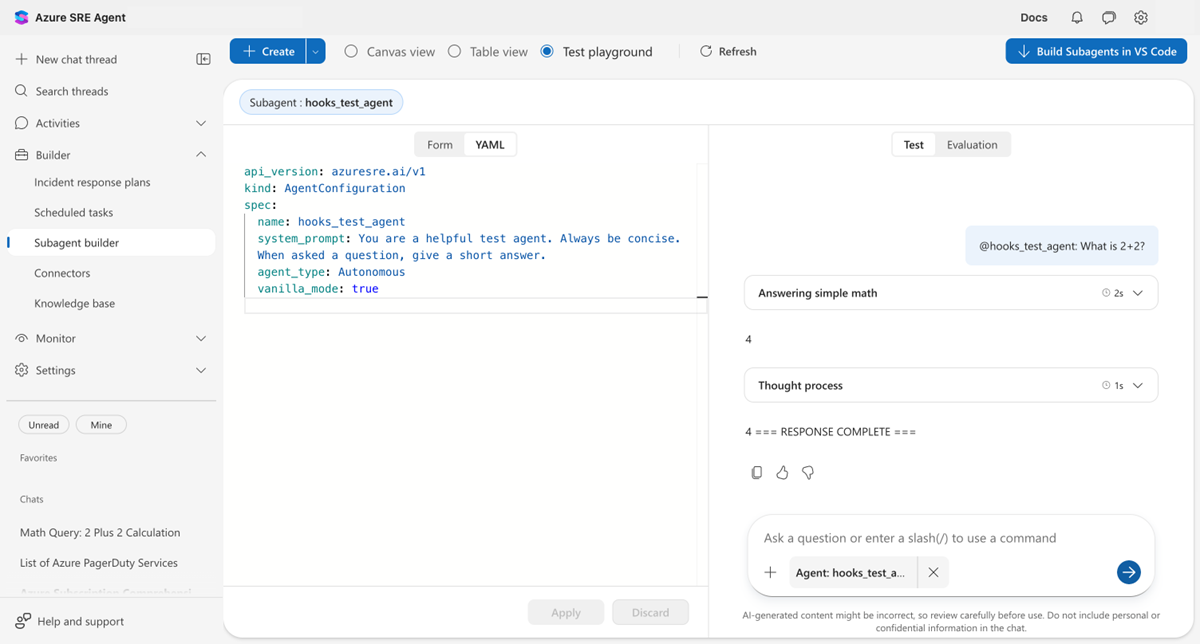
The following screenshot shows a Stop hook in action. The agent initially responds with just "4", but the hook rejects the response because the completion marker is missing. The agent then continues and adds the marker.
Get started
| Resource | What you learn |
|---|---|
| Create and manage hooks (portal) | Create hooks visually in the portal UI, no API calls needed. |
| Configure agent hooks (API) | Set up hooks by using REST API v2 and YAML. |
Related content
| Capability | How it relates |
|---|---|
| Run modes | Hooks complement run mode safety controls. Modes control what runs, hooks control how well it runs. |
| Python tools | Create custom tools that hooks can audit and validate. |